
Thames & Kosmos My Robotic Pet
4.1Editor score
Color-sensing coding robot
Screen-free unplugged coding
3 unique play modes
This guide compares the top coding toys for kids in 2026, covering screen-free options, robotics kits, and app-based tools to help parents choose the best STEM
Coding toys transform abstract programming concepts into tangible play experiences for young learners. These interactive tools teach sequencing, logic, and problem-solving without requiring heavy screen time. Parents look for durable designs that grow with their child's skills while keeping engagement high through physical manipulation and creative challenges.
We evaluated ten leading robotics and coding kits based on educational value, ease of use, and build quality. Our analysis considers age appropriateness, battery requirements, and the depth of programming concepts taught. Each product was reviewed against standards for STEM education, focusing on how well it introduces core computational thinking skills to beginners.
Every selection highlights unique features like screen-free modes, app integration, or modular expandability. Prices vary depending on included accessories and complexity levels, so check current listings before purchasing. This guide helps you find the right balance between fun and learning for your child's developmental stage and interests.
4.1Editor score
4.6Editor score

4.6Editor score
This side-by-side comparison highlights the key differences between our top ten selected coding toys. Each entry includes essential specifications like age range, coding method, and unique features to help you make an informed decision based on your child's needs.



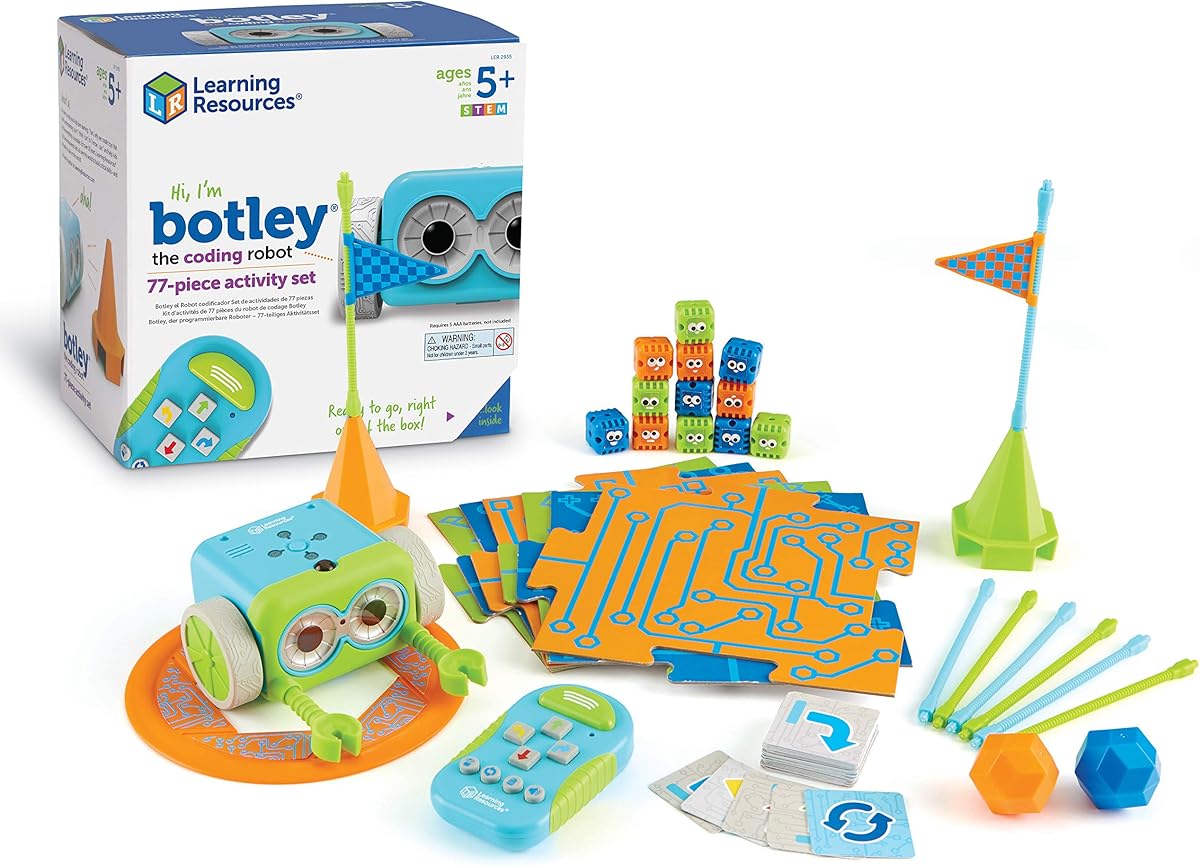
Botley stands out as a top choice for introducing young children to programming logic without screens. With a high rating from users, this set offers immediate play value right out of the box. The screen-free design ensures parents can encourage coding skills while limiting device time effectively.
We may earn a commission when you buy through this link, at no additional cost to you.
The included remote programmer allows kids to send commands easily, building confidence through cause-and-effect interactions. Botley can detect objects, follow black lines, and execute looping commands, which introduces advanced concepts like algorithms. The 77-piece set provides ample materials for building obstacle courses and testing different strategies.
While the need for batteries is a minor inconvenience, the durability and educational depth justify the cost. Parents report that children remain engaged for long periods, exploring hidden features and creating complex sequences. The lack of screen dependency is a significant benefit for families seeking balanced tech exposure.
This robot is ideal for ages five and up, offering a strong foundation for future STEM learning. Whether used at home or in classrooms, Botley promotes critical thinking and problem-solving through playful challenges. We highly recommend it for any child ready to start their coding journey.
Botley eliminates the need for tablets or phones by using a physical remote programmer. This approach helps kids understand code sequences through tactile interaction rather than digital interfaces.
Unlike simpler toys, Botley can detect objects and navigate around them. This capability teaches children about sensors and conditional logic in a way that is intuitive and fun.
We may earn a commission when you buy through this link, at no additional cost to you.
The Thames & Kosmos My Robotic Pet offers an affordable way to introduce coding concepts through a playful reptile design. Rated highly for its unique features, this kit combines building and coding for a comprehensive STEM experience. The color-sensing capability allows for creative interactions without needing a screen.
We may earn a commission when you buy through this link, at no additional cost to you.
Kids assemble the robotic chameleon, learning about engineering design as they go. Using physical action cards, they program movements and reactions, which teaches sequencing and logic. The three play modes—Coding, Wild, and Pet—provide variety and keep interest levels high during play sessions.
While the build process may require some adult assistance for younger children, it adds value by fostering teamwork. The included guide is thorough, explaining robotics components and how nature inspires engineering solutions. Some users note the learning curve, but the screen-free aspect remains a major selling point.
This kit is best suited for children eight and older who enjoy hands-on construction. It is an excellent choice for families looking for a budget-friendly option that still delivers educational value. The combination of assembly and programming makes it a standout in the affordable category.
Instead of typing code, children use colored cards to command the robot. This tactile method helps visualize programming logic without the distractions of a digital screen.
Building the chameleon introduces mechanical concepts like articulated joints and sensors. The detailed manual guides users through each step to ensure a successful build.
We may earn a commission when you buy through this link, at no additional cost to you.
Dash is a premium coding robot designed to engage children right out of the box without assembly. Its high rating reflects a user-friendly experience that balances fun with deep educational content. The ability to respond to voice commands adds a layer of interactivity that many other toys lack.
We may earn a commission when you buy through this link, at no additional cost to you.
Using compatible apps on iOS or Android, kids can learn sequencing, loops, and variables through visual block programming. Dash can sing, dance, and navigate obstacles, making the learning process dynamic and entertaining. The included connectors allow for further customization using standard building bricks.
Although it relies on an app for full functionality, the learning outcomes are robust. The robot is durable and designed for both home and classroom environments. Some parents prefer screen-free options, but the app integration here is intuitive and adds significant value to the coding curriculum.
Dash is perfect for children six and older who are ready for a more interactive experience. Its use in over forty thousand schools globally validates its educational merit. For those seeking a high-quality robot that grows with the child, Dash is a strong investment.
Dash can understand and react to voice commands, adding a new dimension to coding play. This feature helps children feel more connected to their robot friend.
Five different apps offer varied challenges and learning paths. This flexibility ensures that the toy remains engaging as the child's skills improve.
We may earn a commission when you buy through this link, at no additional cost to you.
Makeblock mBot serves as an excellent entry point for kids ready to move beyond basic coding. It bridges the gap between visual block coding and text-based programming, offering a smooth learning curve. The kit is designed to be built quickly, allowing more time for programming experiments.
We may earn a commission when you buy through this link, at no additional cost to you.
Children can program mBot using Scratch or transition to Arduino for more advanced projects. The robot includes features like line-following and obstacle avoidance, which introduce real-world robotics applications. With over a hundred compatible electronic modules, mBot can evolve alongside the child's growing skills.
While the robot requires batteries for operation, the value provided in terms of educational depth is significant. Users appreciate the open-source nature of the platform, which encourages creativity and modification. The metal construction ensures durability for active play and classroom use.
This kit is ideal for children aged eight to twelve who want to dive deeper into engineering. The balance of build and code makes it a comprehensive STEM tool. For families willing to invest in a long-term coding resource, mBot delivers exceptional value.
mBot supports both block-based and text-based coding languages. This dual capability allows children to progress without needing to switch hardware entirely.
The system is designed to accept add-on packs and external sensors. This modularity fosters experimentation and engineering design thinking.
We may earn a commission when you buy through this link, at no additional cost to you.
Sphero Mini packs advanced robotics features into a tiny ball size of a ping pong ball. It offers a fun and interactive way to learn coding through driving and games. The app connectivity allows for creative programming projects that can be shared easily with others.
We may earn a commission when you buy through this link, at no additional cost to you.
The robot can be controlled via a joystick, tilt, or slingshot mode on a mobile device. Kids can write code using drag-and-drop blocks or JavaScript, depending on their comfort level. The included cones and pins provide materials for setting up obstacle courses right out of the box.
While the playtime per charge is around one hour, the portability makes up for this limitation. It is a great choice for families with limited space or for children on the go. The ability to use it as a game controller adds an extra layer of engagement.
This toy is best for ages eight and up who enjoy interactive play with technology. The combination of coding and gaming appeals to a wide range of interests. For those looking for a compact and versatile robot, Sphero Mini is a top contender.
Sphero Mini can double as a controller for arcade-style games. This feature keeps children engaged while they learn how programming interacts with fun.
The small size makes it easy to carry anywhere. Children can take their coding robot to friends' houses or on family trips.
We may earn a commission when you buy through this link, at no additional cost to you.
This coding mouse is specifically designed to introduce programming concepts to very young children. It uses a simple button interface that teaches sequencing and logic without screens. The activity set includes maze grids and walls to create a variety of challenges for little learners.
We may earn a commission when you buy through this link, at no additional cost to you.
Colby the mouse navigates mazes based on commands entered by the child. This process reinforces directional understanding and problem-solving skills in a playful way. The set includes enough pieces to build a large board, allowing for group play and collaboration.
While it lacks the advanced features of more expensive robots, it is effective for its target age group. The durability of the mouse and accessories ensures it can withstand heavy use. Teachers often use this in centers to rotate activities and maintain engagement.
This robot is ideal for children four and older who are just beginning to understand cause and effect. It lays a strong foundation for more complex coding later on. For parents looking for an early learning tool, this set is highly recommended.
The simple button layout introduces the basic idea of programming commands. This helps young children understand how to give instructions to a machine.
Building the maze and moving the mouse provides physical feedback. This tactile experience is crucial for young learners to grasp abstract concepts.
We may earn a commission when you buy through this link, at no additional cost to you.
Mech-5 is a specialized kit that focuses on the mechanical side of robotics. It allows children to build a robot that can throw, lift, and kick. This action-oriented design keeps kids engaged while they learn about mechanical principles and coding basics.
We may earn a commission when you buy through this link, at no additional cost to you.
The building process is in-depth, requiring patience and attention to detail. It is not a pre-assembled toy, so it offers a true STEM experience through construction. Once built, the robot can be programmed to perform various physical tasks using coding buttons.
While the build time can be extensive, it adds significant value to the learning process. Children gain a better understanding of how machines work by putting them together. It is a great project for older children who enjoy a challenge.
This kit is best for ages ten and up who are ready for a complex project. It is an excellent gift for aspiring engineers who want to see their creations move. For those seeking a build-heavy experience, Mech-5 delivers a rewarding outcome.
Building Mech-5 teaches gears, levers, and structural integrity. This practical application of engineering concepts is highly educational.
The robot can perform physical tasks like kicking and lifting. These actions demonstrate the power of coding in real-world scenarios.
We may earn a commission when you buy through this link, at no additional cost to you.
Ozobot Evo introduces coding through a unique color-based system that appeals to younger students. It includes markers for drawing code on paper, which the robot reads to navigate. This screen-free method makes coding accessible without needing a tablet immediately.
We may earn a commission when you buy through this link, at no additional cost to you.
The robot also supports online coding via Blockly, allowing children to progress to digital programming. With five skill levels, Evo grows with the child from beginner to master. The kit includes over seven hundred free lessons covering various STEM subjects.
Durability is a key feature, with the robot built to withstand classroom use. The color markers are stored in a zip case to keep them organized. While the price is higher, the educational resources included justify the investment for schools or serious learners.
This kit is perfect for ages five to eleven who benefit from visual and tactile learning. It is highly recommended for teachers and parents seeking comprehensive educational materials. The blend of offline and online options provides excellent flexibility.
Evo reads colored lines to perform actions, teaching sequencing visually. This method bridges the gap between play and programming concepts.
The kit includes access to a vast library of lessons. This content supports long-term learning across multiple science and math topics.
We may earn a commission when you buy through this link, at no additional cost to you.
Botley 2.0 builds on the success of the original with enhanced features. It offers multi-step coding paths and 45-degree turns for more complex routes. The robot uses object-sensing to react to its environment, adding depth to play.
We may earn a commission when you buy through this link, at no additional cost to you.
New sounds and lights provide multisensory feedback, making the learning experience more engaging. The 78-piece set includes stackable obstacles for creating custom mazes. It is a robust kit that supports creative play and strategic thinking.
While it shares similarities with the original, the added capabilities make it worth the upgrade. Children can design longer routes and refine strategies to succeed. The remote programmer remains easy to use, supporting quick start-up times.
This version is ideal for children who enjoyed the original and want more challenge. It is suitable for ages five and up, offering a balance of simplicity and depth. For parents seeking a refined screen-free option, Botley 2.0 is a solid choice.
The robot supports more complex code paths than previous models. This allows children to learn about advanced logic structures early.
Lights and sounds provide immediate feedback on code execution. This helps children understand cause and effect in a clear way.
We may earn a commission when you buy through this link, at no additional cost to you.
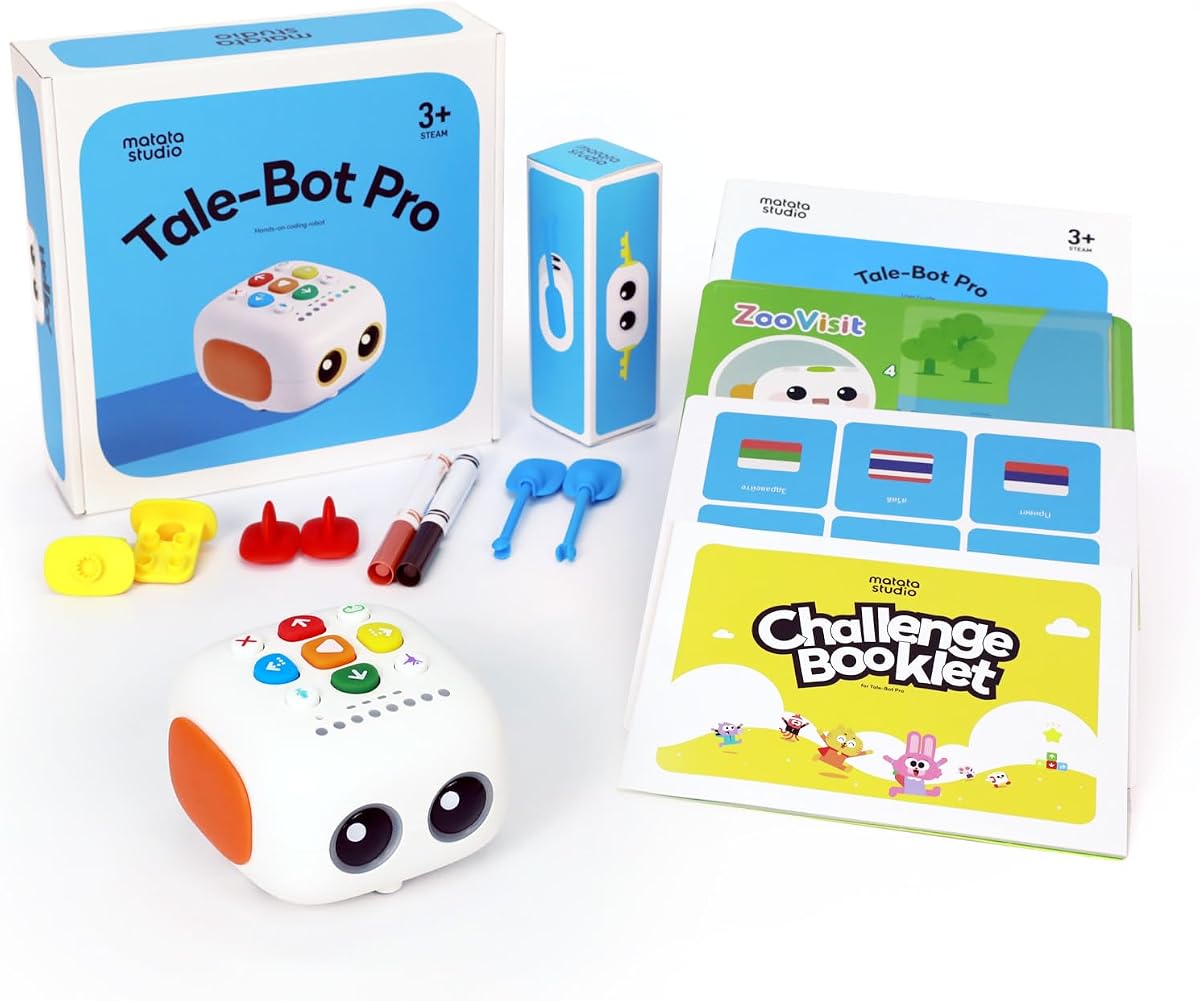
TaleBot Pro is designed specifically for toddlers and preschoolers to learn coding basics. It uses an interactive map and storytelling to teach commands and sequences. Voice recording features allow children to add their own voice to the play, fostering creativity.
We may earn a commission when you buy through this link, at no additional cost to you.
The robot supports multiple languages, making it accessible for diverse families. It is also compatible with Lego blocks, allowing for expanded building play. This combination of storytelling and coding helps children learn logic through narrative structures.
For very young children, the screen-free approach is highly effective. It focuses on language development alongside coding concepts, which is unique in the market. The interactive map provides a clear structure for learning without feeling like a lesson.
This robot is best for ages three to five who enjoy stories and imaginative play. It is an excellent tool for early learners who need gentle introduction to technology. Parents looking for a storytelling toy with coding benefits should consider TaleBot Pro.
TaleBot Pro lets kids record their own voice commands. This feature encourages language skills and creative engagement with the robot.
The robot teaches commands and loops in a simple way. This helps toddlers understand basic logic through playful interaction.
We may earn a commission when you buy through this link, at no additional cost to you.
Selecting the right coding toy depends on age, skill level, and the type of learning you prefer. This guide outlines key factors to consider when evaluating robotics kits for children.
Coding toys are designed for specific age groups ranging from preschoolers to teens. Younger children benefit from simple, screen-free toys that use physical buttons or cards. Older kids can handle complex kits that require building or app-based programming.
Always check the manufacturer's age recommendation to ensure the content matches your child's developmental stage.
Some parents prefer screen-free options to minimize device time. These toys use physical cards, remotes, or colored lines for programming. App-based robots offer deeper functionality but require a tablet or smartphone.
Decide whether your child needs a purely tactile experience or one that integrates digital tools.
Certain kits arrive fully assembled while others require children to build the robot from parts. Building kits teach engineering skills but take time to complete. Fully assembled robots are ready to use immediately out of the box.
Choose based on your child's patience for construction and your available time for setup.
Most robots run on batteries, so consider the frequency of charging or replacement. Some models use rechargeable batteries while others require standard AAA or AA cells. Check if the charger is included before purchasing.
Look for models with long battery life to avoid interruptions during play sessions.
High-quality coding toys often include lesson plans or activity cards. These resources help children progress through different skill levels systematically. Kits with comprehensive guides provide more value over time.
Prioritize toys that offer structured learning paths for long-term engagement.
Some robots are modular and accept add-on parts to expand capabilities. Compatibility with standard building blocks allows for creative customization. Look for kits that grow with your child's interests.
Check if add-on packs are available to extend the life of the toy.
Robots used by kids should be sturdy enough to withstand drops and heavy use. Metal parts often last longer than plastic in complex kits. Read reviews to gauge longevity and repairability.
Select models with solid construction to ensure they survive active play environments.
The interface should match your child's current understanding of coding. Visual block programming is easier for beginners than text-based coding. Look for intuitive interfaces that reduce frustration.
Ensure the programming method aligns with your child's cognitive abilities.
Start by reading the manual thoroughly to understand all features and components. Assemble the robot carefully if required to avoid damage to parts or motors. This ensures the toy functions as intended and prevents unnecessary wear.
Keep the robot away from water and extreme heat to protect internal electronics. Charge batteries fully before first use and store them properly when not in use. Proper maintenance extends the lifespan of the toy significantly.
Encourage children to experiment with different code combinations to learn effectively. Use activity cards or challenges provided by the manufacturer to guide progress. This hands-on approach reinforces concepts learned through play.
Not all coding toys are screen-free. Some require tablets or phones for programming, while others use physical buttons, cards, or colored lines. Parents looking to limit screen time should specifically check for screen-free models before purchasing.
Yes, many coding toys teach geometry, patterns, and spatial reasoning. These concepts are foundational to mathematics and help children understand angles, measurements, and logical sequences. The combination of logic and movement reinforces math concepts.
Some robots require Bluetooth connectivity to work with smartphones or tablets. Always check the compatibility requirements listed in the product description. Ensure your device meets the operating system criteria before buying an app-based robot.
Build time varies significantly depending on the complexity of the kit. Simple robots may take minutes while advanced mechanical kits can take hours. Check the product description for estimated build times to plan accordingly.
Yes, many of the featured robots are durable enough for classroom use. They often come with lesson plans designed for group activities. Teachers appreciate the modular nature that allows for collaboration among students.
Most robots include beginner levels and guided activities to help young children. Start with simple commands and gradually increase complexity as confidence grows. Patience and practice are key to overcoming initial challenges.
Choosing the right coding toy depends on your child's age, interests, and learning style. Botley offers excellent screen-free value while Dash provides premium app-based fun. For budget-conscious buyers, the My Robotic Pet kit is a strong option.
Prioritize toys that grow with your child through modular features or lesson progression. Durable construction ensures the toy survives active play and frequent use over time. Consider how much time you have for building and learning together.
Prices and availability can change frequently, so always check current listings before buying. We hope this guide helps you find the perfect coding toy to inspire future innovators. Happy building and coding!