
Lightning to HDMI Adapter for iPhone
4.4Editor score
Supports 1080P HD
Lightning charging port
No drivers needed
This guide compares the top HDMI Lightning adapter for iPhone to help you choose the right video sync tool for your device and big screen setup.
Finding the right HDMI Lightning adapter for iPhone can transform your viewing experience by connecting your device to any TV or projector seamlessly.
We compared ten leading adapters based on compatibility, video quality, ease of use, and user feedback to build this comprehensive expert guide.
Each pick highlights key features and real-world performance so you can decide quickly. Note that prices and availability change frequently on Amazon.
4.4Editor score

4.1Editor score

4.2Editor score
This table compares all ten HDMI Lightning adapters side by side so you can quickly identify the best fit for your iPhone model and needs.





This adapter offers strong performance at a competitive price with a 4.2 rating. It supports 1080P HD mirroring and includes a Lightning charging port for extended use.
We may earn a commission when you buy through this link, at no additional cost to you.
It works seamlessly with most apps like YouTube and local videos. The MFi certification ensures stable connectivity without needing extra drivers or settings adjustments.
Not all streaming apps work due to HDCP protection. You will still need to buy an HDMI cable separately for the full connection setup.
Ideal for budget conscious buyers who need reliable daily mirroring. It strikes a great balance between cost and essential features.
The built in Lightning port lets you charge your iPhone while mirroring so you never run out of battery during long sessions.
Supports nearly all Lightning devices from iPhone 5 to iPhone 14 and various iPad models ensuring broad usefulness across Apple gear.
We may earn a commission when you buy through this link, at no additional cost to you.
This adapter delivers solid performance with a 4.1 rating and a compact form factor. It mirrors your screen in 1080P HD and supports most common apps like YouTube.
We may earn a commission when you buy through this link, at no additional cost to you.
It features a Lightning charging port so you can keep your device powered during extended streaming or presentation sessions without interruption.
Apps with strict copyright protection like Netflix do not work on any Lightning adapter. Also ensure you have an HDMI cable ready before first use.
A great choice for travelers or casual users who value portability. It is reliable and straightforward for everyday mirroring needs.
Just plug it in and click Trust when prompted. No drivers or app installs are required so you can start streaming in seconds.
Its small size means you can toss it in a bag or pocket. Perfect for taking along to meetings or hotel stays when needed.
We may earn a commission when you buy through this link, at no additional cost to you.
This product stands out with a 4.3 rating and a fully integrated cable design. It offers seamless mirroring across a wide range of Apple devices and iOS versions.
We may earn a commission when you buy through this link, at no additional cost to you.
The MFi certification ensures stable performance without signal drops. It is straightforward to use and requires no external dongles or power supplies.
It lacks a charging port which might limit long sessions. The fixed cable length means less flexibility compared to separate adapter setups.
Best for users who prefer a single unit solution. It simplifies setup while delivering reliable HD output for presentations and media.
The cable is built into the adapter so there are no loose parts to lose. This keeps your setup tidy and reduces clutter.
With a high 4.3 rating users appreciate its reliability. It is a trusted choice for those who want consistent performance without fuss.
We may earn a commission when you buy through this link, at no additional cost to you.
This adapter includes a durable 6.6ft cable and carries a 4.3 rating. It delivers crystal clear HD video with minimal delay so your content appears in real time.
We may earn a commission when you buy through this link, at no additional cost to you.
The included cable saves you from buying one separately. It supports most apps like YouTube and local files and works across many iPhone and iPad models.
Netflix and similar services are blocked due to copyright rules. Also the lack of a charging port means you need a separate charger for long use.
Great for presenters who need reach. The long cable and lag free output make it ideal for classrooms or conference rooms.
The 6.6ft cable gives you more room to move. This helps avoid clutter and keeps your phone at a safe distance from the TV.
Users report smooth playback with no noticeable delays. This is vital for live demos or interactive sessions where timing matters.
We may earn a commission when you buy through this link, at no additional cost to you.
This official Apple adapter carries a 4.2 rating and guarantees native compatibility. It mirrors your screen in HD and outputs both video and audio to your TV or projector.
We may earn a commission when you buy through this link, at no additional cost to you.
Its quality assurance is a key advantage for enterprise users. The setup is straightforward and it supports all Lightning devices without driver issues.
It lacks extra ports like USB or charging. The price is higher than third party options but you get the assurance of Apple's own standards.
Choose this for mission critical presentations where reliability is paramount. It is the safest choice for professional environments.
Being an Apple product it is designed to work perfectly with iOS updates. You do not have to worry about compatibility problems later.
It sends both video and audio signals clearly. This means you get full multimedia playback without extra wiring for speakers.
We may earn a commission when you buy through this link, at no additional cost to you.
With a 4.4 rating this adapter stands out for its five year warranty. It supports 1080P HD mirroring and includes a Lightning port to keep your iPhone powered.
We may earn a commission when you buy through this link, at no additional cost to you.
The long warranty shows confidence in durability. It is easy to set up and works well with most apps for daily media and work tasks.
You must plug in a USB cable for power before use. Also streaming services like Netflix do not work on Lightning adapters due to copyright rules.
Perfect for users who want peace of mind. The warranty and charging port make it a strong all rounder for home or office.
A five year warranty is rare in this category. It protects your investment and shows the brand stands by its product quality.
The Lightning charging port keeps your iPhone charged during long sessions. This prevents shutdowns if you plan to stream for hours.
We may earn a commission when you buy through this link, at no additional cost to you.
This adapter has over two thousand verified ratings and a 4.3 score. It delivers zero lag mirroring and works instantly without apps or passwords.
We may earn a commission when you buy through this link, at no additional cost to you.
It is popular for travel and business because it is simple to use. The MFi certification ensures you get clear HD quality on compatible displays.
Streaming apps with strict copyright protection will not work. The max resolution is 1080P so do not expect 4K from Lightning ports.
Best for travelers who need a reliable HDMI adapter. It is straightforward and trusted by thousands for consistent daily performance.
Connect to hotel TVs in seconds without needing internet. This makes it ideal for watching downloaded content or giving presentations on the go.
Thousands of users trust this adapter for daily use. A 4.3 rating reflects consistent quality and customer satisfaction over time.
We may earn a commission when you buy through this link, at no additional cost to you.
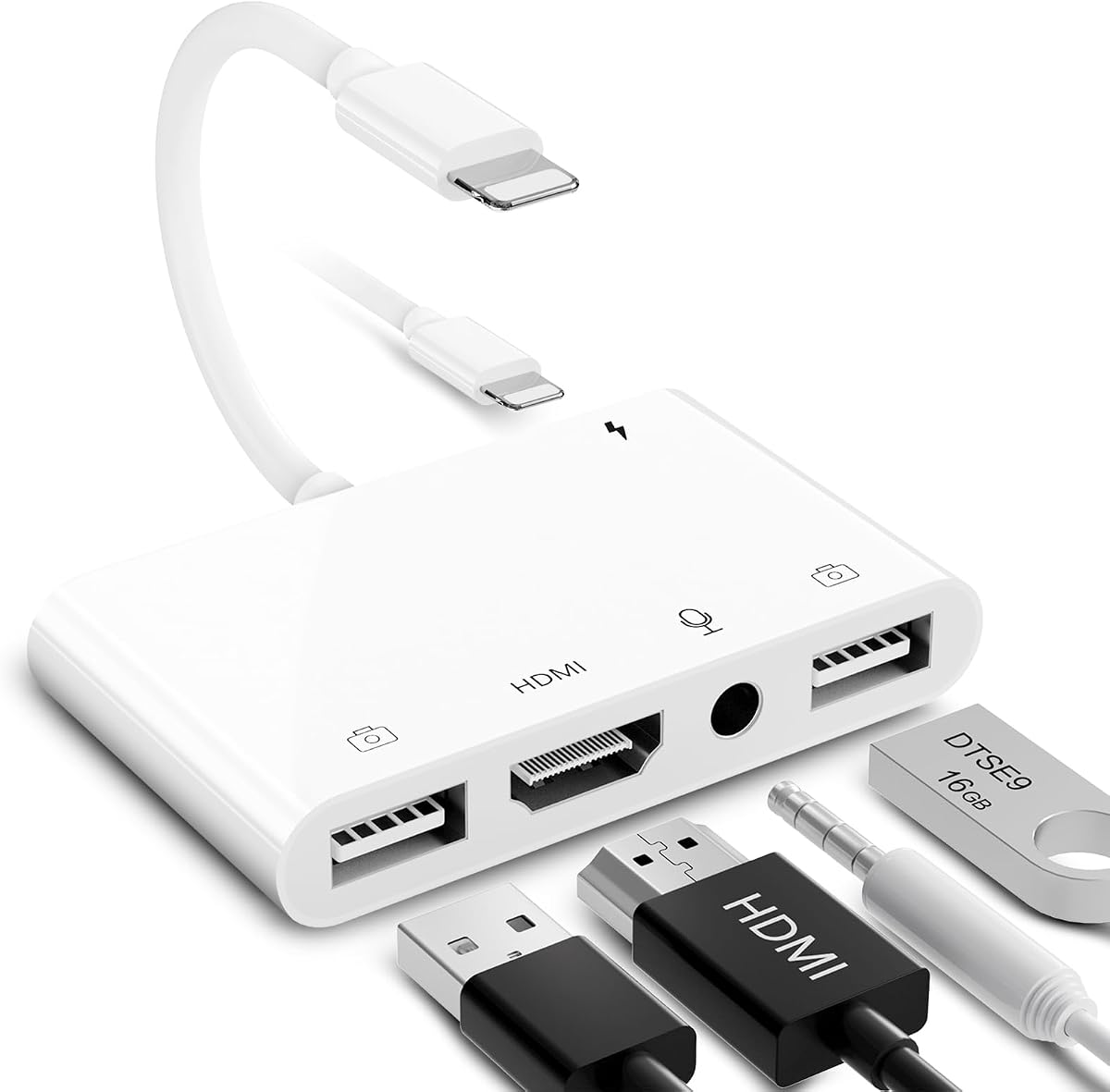
This five in one adapter includes dual USB ports and a 3.5mm mic jack. It lets you connect peripherals like keyboards and microphones while mirroring video.
We may earn a commission when you buy through this link, at no additional cost to you.
It supports file transfer and live streaming. This makes it a powerful tool for presentations or creative work that needs extra connectivity.
The unit is bulkier than basic adapters. You must plug in power for stable HDMI performance which adds a small step to setup.
Ideal for advanced users who need extra ports. It consolidates multiple functions into one device for richer interaction.
The 3.5mm mic jack lets you add an external mic. This is useful for live streaming or recording audio during presentations.
You can plug in a keyboard and a flash drive at once. This expands your iPhone capabilities without needing extra hubs.
We may earn a commission when you buy through this link, at no additional cost to you.
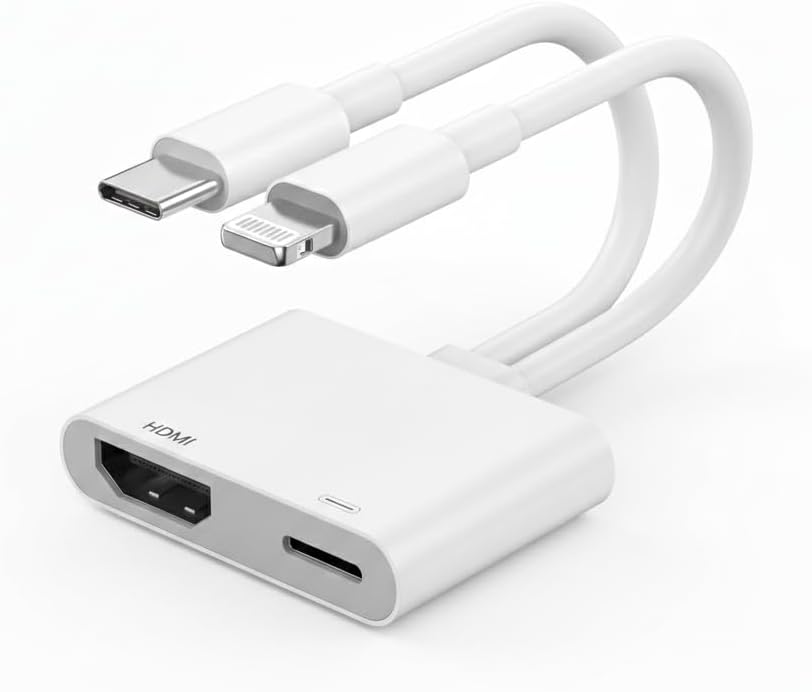
This hybrid adapter works with both USB-C and Lightning devices. It supports 4K on USB-C and offers a 100W charging port for fast power while streaming.
We may earn a commission when you buy through this link, at no additional cost to you.
It is ideal if you own both older Lightning iPhones and newer USB-C devices. The built in MFi chip ensures stable connections on iPhones.
Lightning mode still blocks some streaming apps. The device is best for mixed ecosystems or those planning to switch to USB-C soon.
Choose this if you want one adapter for multiple devices. It saves space and supports a wide range of hardware.
The USB-C side works with MacBooks and newer iPads. This makes it a versatile hub for Apple users across different hardware.
The 100W port keeps your laptop or phone charged quickly. This prevents interruptions during long meetings or streaming sessions.
We may earn a commission when you buy through this link, at no additional cost to you.
This older Apple adapter holds a strong 4.6 rating and delivers reliable HD mirroring. It mirrors your entire screen to HDMI displays without complex steps.
We may earn a commission when you buy through this link, at no additional cost to you.
It remains a trusted choice for businesses. Its simplicity ensures consistent performance and wide compatibility with all Lightning devices.
It has no charging or USB ports. The price is higher than third party options but you get Apple quality assurance.
Best for environments where stability matters. It is a proven device that works well for presentations and media playback.
It reflects exactly what you see on your device. This ensures your audience sees everything from buttons to popups without issue.
With a 4.6 rating this adapter has stood the test of time. It remains a favorite among users who value stability above all.
We may earn a commission when you buy through this link, at no additional cost to you.
Picking the right adapter depends on your device model and how you plan to use it.
MFi certification ensures the adapter meets Apple quality standards for performance and safety. Non certified units can fail after updates or cause connection issues.
Look for MFi branding to avoid compatibility problems and warranty issues.
Most adapters support 1080P HD mirroring which is enough for presentations and streaming. Do not expect true 4K unless using a USB-C adapter with USB-C.
Choose 1080P adapters for standard use and reserve 4K for USB-C devices.
An adapter with a Lightning charging port lets you charge your phone while mirroring. This is vital for long meetings or streaming sessions without power loss.
Prioritize models with charging ports if you plan to use the adapter for long periods.
Some units come with a built-in cable to reduce clutter and extra purchases. Others require you to buy HDMI cables separately which adds to the setup.
Check if the adapter includes the HDMI connector or needs a separate purchase.
Many streaming apps like Netflix do not work due to HDCP copyright protection. Only apps like YouTube and local files typically play through adapters.
Know that paid streaming apps will be blocked on all Lightning adapters.
Compact adapters are better for travel or carrying in a pocket. Bulky multi port units are useful but less convenient on the go.
Pick a slim design if you need to take the adapter frequently.
A longer warranty such as five years indicates confidence in product quality. It protects you from defects and gives peace of mind.
Check warranty terms to ensure reliable after-sales support.
Ensure the adapter supports your iPhone or iPad model and iOS version. Some older adapters may not work with the latest updates without firmware changes.
Confirm compatibility before buying to avoid returns or setup issues.
Start by connecting the adapter to your iPhone's Lightning port and plugging an HDMI cable from the adapter to your TV or projector. If the adapter has a charging port, plug a power cable into it to keep your device charged during use.
When you first connect, your iPhone may prompt you to trust the accessory. Tap Trust to allow the connection. Wait a few seconds for your screen to mirror automatically without needing extra apps.
To maintain your adapter, unplug it gently without tugging on the cable. Store it in a protective case to avoid damage and keep the Lightning port clean from dust.
No. These models use USB-C not Lightning. You need a USB-C to HDMI adapter for iPhone 15 and newer. The adapters listed here are for Lightning devices only.
Netflix and similar services use HDCP copyright protection which blocks content on most HDMI adapters. This is an Apple policy restriction not a product fault.
No. The adapters are plug and play. Just connect them to your phone and TV then tap Trust when prompted. No app or driver install is required.
Many adapters work without extra power but some models require a USB cable to stay stable. Check the product page for power requirements before buying.
Most support up to 1080P HD mirroring. If you need 4K you must use a USB-C adapter with a USB-C iPhone or iPad model.
Most adapters do not include an HDMI cable. You will need to buy a standard HDMI cable separately to connect to your TV or projector.
The adapters reviewed offer a range of options from budget friendly to premium. Models with charging ports and MFi certification stand out for daily use.
Prioritize adapters that match your device model and include the features you need like extra ports or longer warranties. Avoid expecting 4K or streaming app support.
Prices and stock change often so check current listings on Amazon before buying. Choose the adapter that fits your setup and budget.