
Brailliant BI 40X Braille Display
5.0Editor score
40-cell refreshable display
Bluetooth 5 technology
32GB internal storage
This guide compares the top Braille displays for blind users, covering refreshable models, slates, and accessories to help you choose the right tool for
Finding the right tactile tool is essential for independence. Modern devices offer versatile ways to read text, write notes, and navigate digital content. Whether you need a portable slate or a full-screen reader, there are options for every budget.
We analyzed ten highly rated products based on durability, connectivity, and ease of use. Our review covers refreshable displays, manual slates, and learning aids designed for students and professionals. Each entry highlights key features to help you make an informed decision.
Each pick below shows specific strengths like battery life, cell count, or portability. We also include care tips and FAQs to support your journey. Please note that availability and pricing can change over time, so verify details before purchasing.
5.0Editor score


3.4Editor score
This table compares the top ten Braille tools available today. It highlights key specifications like cell count, material, and connection types to help you find the perfect match for your needs.




The Brailliant BI 20X stands out as a top choice for users seeking a reliable refreshable display. It offers 20 cells for reading text with precision. This model supports cursor routing keys for efficient screen reader access.
We may earn a commission when you buy through this link, at no additional cost to you.
Its multi-device connectivity allows users to switch seamlessly between phones, tablets, and computers. The onboard KeySoft Lite apps add versatility for writing and calculations. Access to online libraries like Bookshare enhances its value.
While it is a powerful tool, the price point might be higher than manual slates. However, the features justify the cost for daily use. The 20-hour battery life ensures it lasts through long work sessions.
This device is ideal for professionals and students who need a dedicated reading tool. It balances portability with advanced features effectively. We recommend it for those needing a trusted companion.
Users can connect up to five Bluetooth devices and one USB device simultaneously. This flexibility makes switching between tasks easy without re-pairing.
Included apps like Editor and Calculator allow for standalone tasks. This reduces the need to rely solely on connected devices for basic functions.
We may earn a commission when you buy through this link, at no additional cost to you.
The Brailliant BI 40X offers a larger reading surface with 40 cells. This model is perfect for users who prefer a wider line of text. It supports cursor routing keys for precise navigation.
We may earn a commission when you buy through this link, at no additional cost to you.
Bluetooth 5 technology ensures faster and more stable wireless connections. The 32GB internal storage allows for more offline content and files. Onboard apps include Editor and Victor Reader for comprehensive use.
While it is a premium device, the enhanced storage and connectivity justify the investment. It is robust enough for daily tasks and long-term use. The battery life remains solid at up to 20 hours.
This device is best for professionals or students needing more screen real estate. It provides a premium experience with advanced features. We highly recommend it for those seeking top-tier performance.
Bluetooth 5 technology provides a more stable connection than older versions. This ensures smoother data transfer and less interruption during use.
With 32GB of internal storage, users can store more books and documents. This is ideal for those who access content offline frequently.
We may earn a commission when you buy through this link, at no additional cost to you.
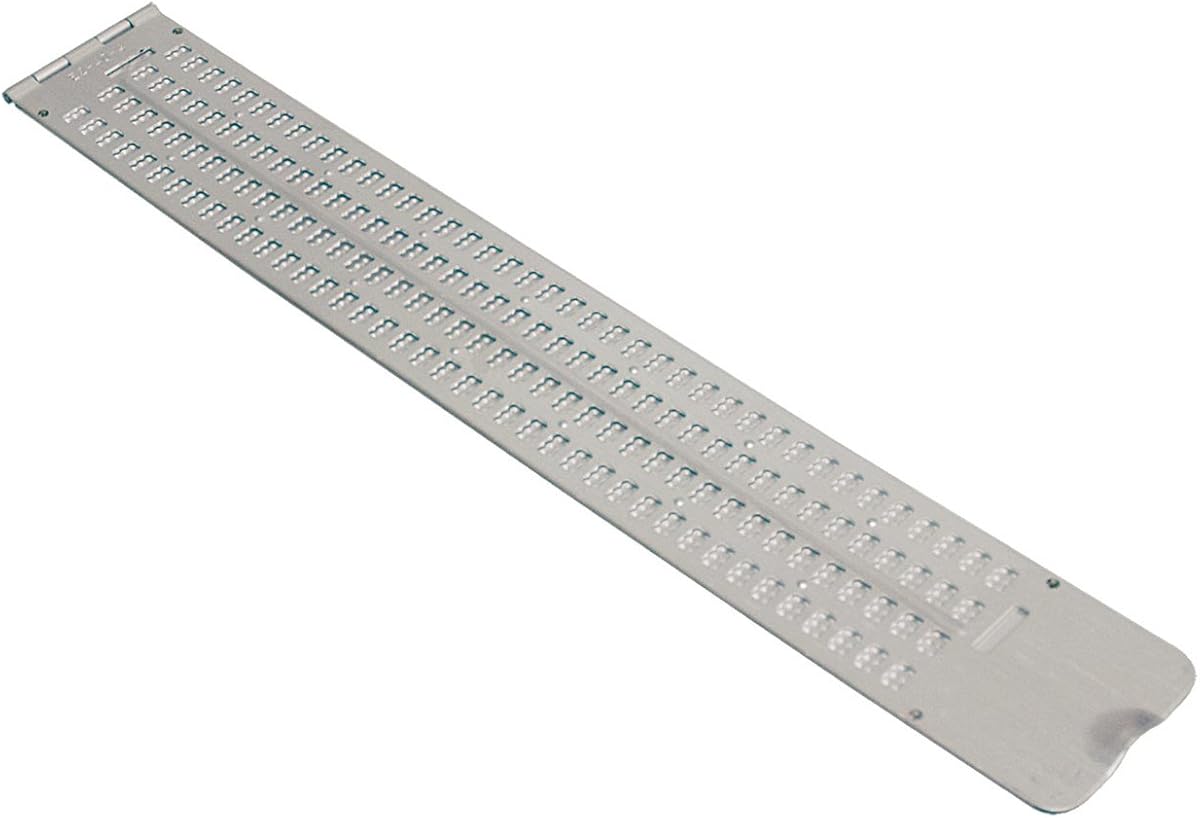
This Braille Slate is a great option for beginners or budget-conscious users. It features 13 lines with 36 cells each for writing notes. The hinged design makes it easy to open and close.
We may earn a commission when you buy through this link, at no additional cost to you.
Made of durable aluminum, it resists wear and tear. The thumb notch allows for quick access to the writing area. It includes a free stylus to get started immediately.
While it lacks electronic features, its simplicity is a strength. It requires no charging or software setup. This makes it a reliable tool for quick notes anywhere.
This slate is ideal for students or casual users needing a basic tool. It is lightweight and easy to carry in a bag. We recommend it for those starting their Braille journey.
The aluminum construction ensures the slate lasts through daily use. It is resistant to bending and damage compared to plastic models.
Having a stylus included means users can write right away. This saves time and cost compared to buying accessories separately.
We may earn a commission when you buy through this link, at no additional cost to you.
This business card slate is designed for quick notes and labels. It features a built-in guide to keep lines straight. The aluminum construction ensures it lasts for years of use.
We may earn a commission when you buy through this link, at no additional cost to you.
The compact size fits easily in a pocket or wallet. It comes with a Classic Stylus for writing. Users can emboss four lines with twelve cells each.
While small, it is perfect for short messages or signatures. It does not require power or batteries. This makes it an ideal tool for on-the-go labeling.
We recommend this for users needing a portable tool for short text. It is simple to use and highly durable. It is a great addition to any kit.
The guide ensures that writing remains straight and aligned. This is helpful for creating professional-looking business cards.
At about four inches by two and a half inches, it is very portable. It fits easily in a bag or pocket without bulk.
We may earn a commission when you buy through this link, at no additional cost to you.
This full-page slate allows writing on standard letter-size paper. It has 25 lines and 28 cells to fill a page. The design keeps the paper in place while writing.
We may earn a commission when you buy through this link, at no additional cost to you.
Made of thick plastic, it is quieter than metal slates. This is beneficial in quiet environments like libraries. It includes line numbers to help you resume writing easily.
While plastic is less durable than metal, it is practical for daily tasks. It is lightweight enough for a backpack. This model is great for students needing long notes.
We recommend this for anyone needing to write multiple pages easily. The quiet operation is a key advantage. It is a reliable tool for academic or professional use.
The slate fits standard North American paper sizes. This means no wasted space or need to shift the slate constantly.
Plastic construction minimizes noise during writing. This is respectful in shared or public spaces.
We may earn a commission when you buy through this link, at no additional cost to you.
This pocket slate is designed for on-the-go writing. It features 4 lines with 40 cells each for ample space. The lightweight aluminum makes it easy to carry.
We may earn a commission when you buy through this link, at no additional cost to you.
The pins up design allows for quick access to the writing area. It fits comfortably in a briefcase or backpack. This ensures you can take notes anywhere you go.
While it is compact, it maintains durability. It is built to withstand daily transport. The width is suitable for standard business card-sized notes.
We recommend this for professionals who need a portable solution. It is simple and effective. It is a solid choice for frequent travelers.
The aluminum construction keeps the weight down. This is essential for carrying in a pocket or small bag.
This design allows the pins to be ready for writing. It saves time when you need to jot down a quick note.
We may earn a commission when you buy through this link, at no additional cost to you.
The Hable One connects to your smartphone for private typing. It features 8 tactile buttons for navigation. The device works with iOS and Android systems seamlessly.
We may earn a commission when you buy through this link, at no additional cost to you.
No prior Braille knowledge is needed to start using it. It comes with free onboarding calls to help. The battery lasts over a month on a single charge.
While it relies on a phone for full functionality, it is compact. It allows typing with your phone in your pocket. This offers privacy that standard screens do not.
We recommend this for users wanting private access to digital content. It is an empowering tool for independence. It is a great companion for mobile users.
It connects easily to both iPhone and Android devices. This ensures most users can use it without compatibility issues.
You can type with your phone in your pocket. This offers a higher level of privacy than screen readers.
We may earn a commission when you buy through this link, at no additional cost to you.
This label maker is designed for organizing household items. It embosses Braille on standard vinyl tape. The spin dial makes selecting letters easy and intuitive.
We may earn a commission when you buy through this link, at no additional cost to you.
The device is lightweight and durable. It includes a roll of half-inch tape to get started. The dial has embossed Braille for easy use.
While it requires manual operation, it is reliable. It does not depend on batteries or software. This ensures it works anytime you need to label items.
We recommend this for users needing to organize their space. It is a practical tool for homes. It is a great gift for independent living.
The upper rim of the dial is embossed in Braille. This helps users feel the correct letter without looking.
Squeezing the trigger makes the Braille symbols. This tactile process ensures durability and reliability.
We may earn a commission when you buy through this link, at no additional cost to you.
These stickers add Braille to your existing keyboard. They are transparent so you can see original keys. This allows for a bilingual setup for sighted partners.
We may earn a commission when you buy through this link, at no additional cost to you.
The material is clear Lexan for durability. It uses a peel-and-stick method for application. The adhesive does not slip or ooze over time.
While they require careful application, they are effective. They provide a low-cost way to add Braille. This is great for shared workspaces.
We recommend this for users needing a bilingual workstation. It is an economical solution. It works well for those with existing hardware.
The transparent design allows sighted users to see the keys. This makes shared computers easier to use for everyone.
Lexan is a strong material that resists wear. It ensures the Braille remains legible for a long time.
We may earn a commission when you buy through this link, at no additional cost to you.
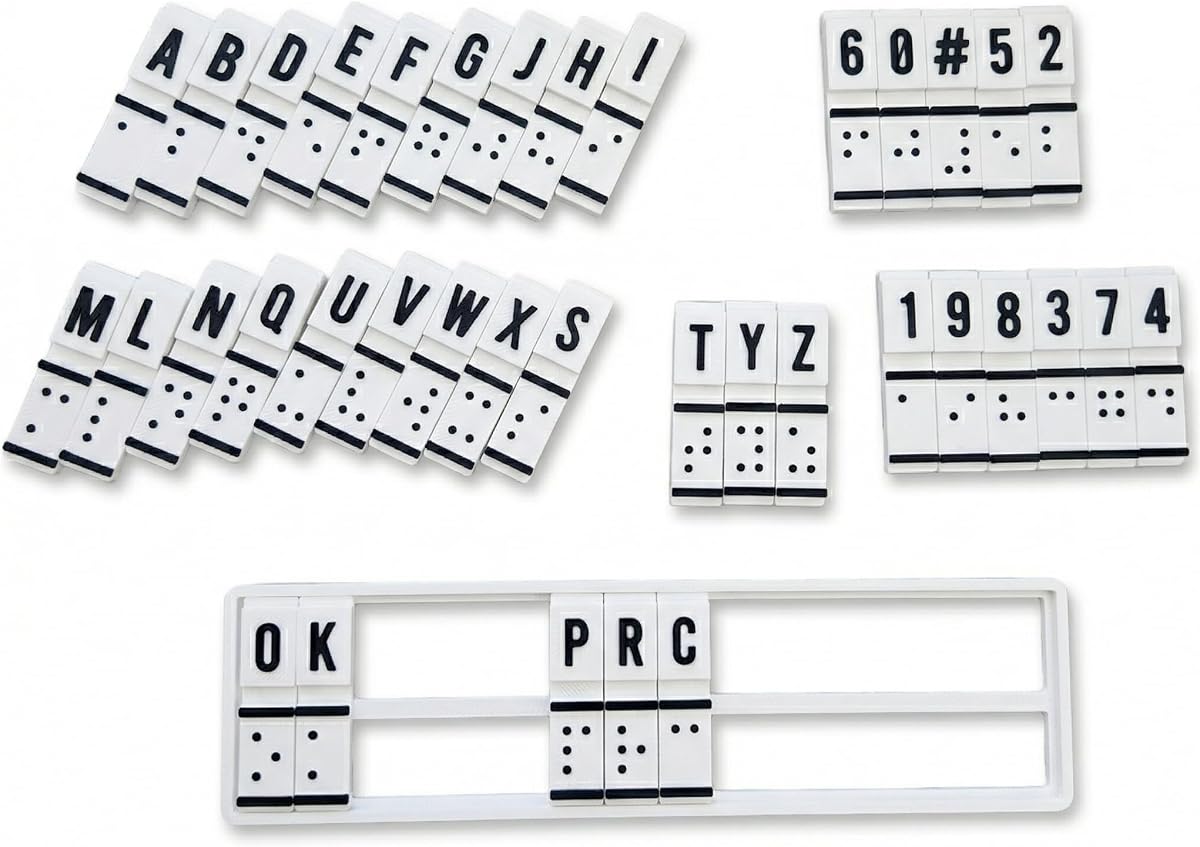
This device is designed for learning Braille basics. It combines education and translation in one unit. The raised cells help build tactile memory effectively.
We may earn a commission when you buy through this link, at no additional cost to you.
It allows users to feel and read Braille directly. This builds confidence in literacy skills. It is great for self-study or family practice.
While it has a unique design, it serves its purpose well. It is sturdy for repeated use in therapy. It is a supportive tool for new learners.
We recommend this for educators or parents helping beginners. It is a practical aid for literacy. It is a good starting point for skill building.
Raised cells allow direct tactile engagement. This helps learners feel patterns without needing a screen.
It works for home, school, or therapy sessions. It is a flexible tool for different learning environments.
We may earn a commission when you buy through this link, at no additional cost to you.
Selecting the right tool depends on your reading and writing needs. Consider connectivity, size, and budget carefully.
Refreshable displays connect to digital devices for dynamic text. Static slates are manual tools for notes. Choose based on whether you need digital access.
Displays range from 20 to 40 cells. More cells mean a wider reading line. Pick what fits your reading speed and budget.
Bluetooth and USB connections allow device pairing. Look for multi-device support if you switch between phone and computer. It adds significant flexibility.
Electronic displays need charging. Check battery hours to ensure it lasts your day. Slates need no power but require physical writing.
Consider size and weight for carrying. Pocket slates fit in bags easily. Larger displays are great for desks but less mobile.
Aluminum and sturdy plastic resist daily wear. Durable materials ensure longevity. Check reviews for build quality reports.
Ensure the tool works with your screen reader. Some have built-in apps. Others rely on external software. Verify OS support before buying.
Some devices require setup or apps. Others are ready to use immediately. Choose based on your comfort with technology.
For refreshable displays, connect via Bluetooth or USB first. Pair with your device to enable navigation keys. Ensure drivers or apps are installed correctly.
For slates, place paper in the hinge. Use the stylus to press down the metal pins. This embosses the Braille on the paper.
Clean electronic displays with a dry, soft cloth. Avoid liquids that could damage circuits. Store slates in a dry place to prevent rust.
A Braille slate is a manual tool for embossing paper with pins. A refreshable display shows digital text using moving pins that connect to devices.
Many modern displays connect via Bluetooth to both iOS and Android. Check specific product pages for supported operating systems before purchase.
Keep it clean and avoid exposing it to moisture. Regularly update software and charge it as needed to maintain performance.
Yes, they are great for note-taking and practicing Braille. They are durable and do not need batteries for school use.
Most premium models last around 20 hours on a single charge. This allows for full-day use without needing to find a power outlet.
Yes, most Braille keyboards work with built-in screen readers. They allow you to type privately without needing to read the screen.
Yes, there are interactive trainers and learning aids available. These help beginners practice dot patterns and reading skills easily.
Prices vary by features. Basic slates cost under $50. Electronic displays range from hundreds to thousands of dollars.
We reviewed ten top Braille tools ranging from electronic displays to manual slates. Our top picks include the Brailliant BI 20X, the 40X, and a budget-friendly slate.
Consider your reading habits and daily needs. If you use digital devices often, a refreshable display is key. For simple notes, a slate works well.
Always check current availability and prices before buying. Prices may change over time. We hope this guide helps you find the right tool for independence.