
Netgate 1100 pfSense+ Security Gateway
4.1Editor score
Pre-loaded pfSense+ software
Dual core ARM processor
Compact silent desktop form
This guide compares the top 10 hardware firewalls for businesses and homes. We analyze throughput, security features, and ease of use to find the best network
Hardware firewalls provide essential protection by filtering traffic before it reaches your internal devices. They act as a dedicated barrier against cyber threats ensuring your network remains secure from external attacks and unauthorized access attempts.
We evaluated ten top models based on throughput, security features, and ease of management. Our selection includes options for small businesses mid-sized enterprises and advanced users needing robust defense against modern digital threats.
Each pick highlights specific strengths like compact design high performance or advanced threat protection. Note that prices and availability change frequently so check current listings before making your final purchase decision.
4.1Editor score
4.2Editor score

4.7Editor score
The following table offers a side-by-side view of the key specifications for each hardware firewall. This comparison helps you quickly identify which model fits your network size and security needs.


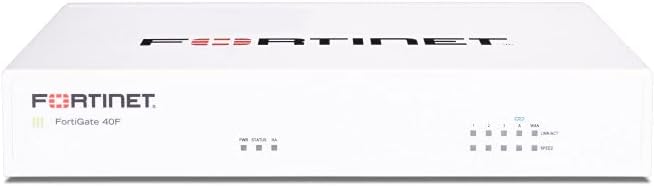
The FortiGate-40F Firewall Appliance is a robust solution for small to mid-sized businesses. It holds a solid 4.2 rating and delivers industry-leading performance with its purpose-built security processor technology.
We may earn a commission when you buy through this link, at no additional cost to you.
This device offers up to 1 Gbps IPS throughput and 600 Mbps threat protection throughput. It integrates with Fortinet’s AI-powered FortiGuard Labs to identify and mitigate known and unknown threats effectively across your network.
The fanless desktop form factor ensures quiet operation and minimizes space usage which is ideal for office environments. However full security services require a separate subscription which adds to the long-term cost.
If you need reliable security with high throughput for a branch office or small business this is a strong choice. Its user-friendly management console simplifies deployment and provides comprehensive network automation and visibility.
The purpose-built security processor ensures that SSL encrypted traffic is handled efficiently without slowing down your network speeds.
Features a user-friendly management console that provides comprehensive network automation and visibility for easier daily administration.
We may earn a commission when you buy through this link, at no additional cost to you.
The Netgate 1100 pfSense+ Security Gateway is a powerful budget-friendly option for secure edge networking. It arrives with a 4.1 rating and is pre-loaded with pfSense+ software to get you up and running fast.
We may earn a commission when you buy through this link, at no additional cost to you.
Its dual core ARM Cortex-A53 1.2 GHz processor delivers near gigabit routing of common traffic and over 650 Mbps of firewall throughput. The compact form factor and silent operation allow it to run unnoticed on a desktop.
Business readiness is ensured with pfSense+ software updates included for the product lifetime and a one-year hardware warranty. The three switched ports allow configuration of separate WAN LAN and OPT networks easily.
Ideal for small offices or home labs needing enterprise-grade features without the cost this gateway stands out. Free help with setup from the expert Technical Assistance Center is available 24/7/365 for added peace of mind.
Simply unbox it and start customizing for your secure edge networking needs with pre-loaded pfSense+ software included.
Low power draw and silent operation allow it to run unnoticed when placed on a desktop wall or rack.
We may earn a commission when you buy through this link, at no additional cost to you.
The Zyxel USGFLEX100H is a compact fanless hardware firewall designed for multi-layered security. With a 4.0 rating it supports up to 50 users and includes reputation filtering and visibility in its Entry Defense Pack.
We may earn a commission when you buy through this link, at no additional cost to you.
It delivers impressive throughput with 4000 Mbps SPI firewall 1500 Mbps IPS and 900 Mbps VPN capabilities. The 8 assignable ports allow for WAN load balancing active-backup failover and link aggregation for resilient connectivity.
Offline-capable setup and updates ensure the web interface remains fully accessible without internet after each update via FTP. Centralized configuration and policy sync are handled through the Nebula portal wizard for easy management.
This model is perfect for small businesses needing flexibility and robust offline capabilities. Support for various VPN protocols and managed APs extends its utility for modern hybrid work environments.
8 x 1G RJ-45 ports are assignable as WAN or LAN allowing WAN load balancing and active-backup failover.
Configure via Nebula portal wizard and update firmware offline via FTP on the local network.
We may earn a commission when you buy through this link, at no additional cost to you.
The SonicWall TZ280 Next-Gen Firewall Appliance offers up to 2.5 Gbps firewall inspection and 1 Gbps threat prevention. It carries a high 4.7 rating and is driven by SonicWall's patented Reassembly-Free Deep Packet Inspection engine.
We may earn a commission when you buy through this link, at no additional cost to you.
With 8x1GbE and 2x1G SFP connectivity it fits a desktop form factor while providing extensive options for distributed sites. Zero-touch deploy and manage on-box or via cloud Network Security Manager simplifies administration significantly.
Security services like intrusion prevention and application control are available with an active service subscription separately purchased. Built for small business and branch use it supports secure SD-WAN and Zero-Trust Network Access.
If you need high throughput and advanced inspection features this unit is a solid investment. Ensure you budget for the necessary subscription to unlock the full range of threat protection capabilities.
Driven by SonicWall's patented Reassembly-Free Deep Packet Inspection engine for fast and accurate threat detection.
8x1GbE + 2x1G SFP ports in a desktop form factor allow extensive connectivity for small offices.
We may earn a commission when you buy through this link, at no additional cost to you.
The Fortinet FortiGate-70G Firewall is a next-generation solution for small office and branch security. It holds a perfect 5.0 rating and features NGFW IPS and web filtering built in for robust protection.
We may earn a commission when you buy through this link, at no additional cost to you.
Secure SD-WAN improves cloud and SaaS performance while maintaining consistent security policies across your network. Deep visibility with SSL inspection and application control helps identify and govern encrypted traffic effectively.
Simple deployment and centralized management are handled via FortiGate Cloud or FortiManager for reduced IT overhead. Seamless integration with FortiSwitch and FortiAP ensures a unified and secure wired and wireless network setup.
This appliance is best for businesses needing high bandwidth and centralized control. Its strong rating indicates high reliability and performance for branch offices handling significant data traffic.
Secure SD-WAN improves cloud and SaaS performance while maintaining consistent security policy across branches.
Simple deployment and centralized management via FortiGate Cloud or FortiManager streamline operations.
We may earn a commission when you buy through this link, at no additional cost to you.
The Sophos XGS 128 is a next-generation firewall appliance engineered for high performance in business networks. It is designed for larger offices needing up to 19.1 Gbps firewall throughput and enterprise-grade reliability.
We may earn a commission when you buy through this link, at no additional cost to you.
It features 9 x 2.5 GE copper ports and 1 SFP fiber port providing extensive connectivity options. SD-WAN optimization provides resilient connectivity and intelligent traffic routing across multiple WAN connections for uninterrupted service.
VPN ready architecture supports secure site to site networking and encrypted remote employee access. Note that this is hardware only and requires a Sophos subscription to enable IPS and web security services.
For businesses needing significant throughput and enterprise-grade security this appliance is a strong choice. It ensures reliable operation and visibility in complex business networks.
Purpose built next generation firewall hardware engineered for high performance visibility and reliable operation in business networks.
SD-WAN optimization provides resilient connectivity and intelligent traffic routing across multiple WAN connections.
We may earn a commission when you buy through this link, at no additional cost to you.
The Zyxel USGFLEX700 is a business class firewall recommended for mid-size to large offices with internet speeds up to 900 Mbps. It holds a 5.0 rating and includes a 1-Year UTM security services bundle.
We may earn a commission when you buy through this link, at no additional cost to you.
It offers 5400 Mbps SPI Firewall throughput and 1600k sessions handling heavy traffic loads efficiently. The complete security bundle includes anti-malware ransomware blocking web filtering application control and IDP security services.
Unparalleled management is provided through Zyxel's award winning Nebula Cloud Management solution for easy network oversight. High throughput Gigabit ports allow flexible configuration and fast local network connectivity for 500 users.
This is an excellent choice for businesses needing robust security out of the box. The included security services save time and ensure protection against common digital threats immediately.
Includes 1 year anti-malware ransomware blocking web filtering application control and IDP security services.
Use Zyxel's award winning Nebula Cloud Management solution to easily manage monitor and configure network security.
We may earn a commission when you buy through this link, at no additional cost to you.
The SonicWall TZ680 Next-Gen Firewall Appliance provides up to 5 Gbps firewall inspection and 2.5 Gbps threat prevention. It is built for distributed and high-end SMB environments requiring robust performance.
We may earn a commission when you buy through this link, at no additional cost to you.
Its connectivity includes 8x1GbE + 2x5G SFP+ + 2x10G SFP in a desktop form factor supporting extensive network needs. Zero-touch deploy and manage on-box or via cloud Network Security Manager ensures easy administration.
SonicOS 8 delivers intrusion prevention gateway anti-malware application control and TLS/SSL decryption with an active service subscription. Secure SD-WAN and Zero-Trust Network Access keep distributed sites and remote workers protected effectively.
This model suits businesses needing high throughput and advanced cloud integration. Be prepared to purchase service subscriptions separately to activate full threat protection capabilities.
SonicOS 8 delivers intrusion prevention gateway anti-malware application control and TLS/SSL decryption features.
Cloud Secure Edge keeps distributed sites and remote workers protected through secure SD-WAN and Zero-Trust Access.
We may earn a commission when you buy through this link, at no additional cost to you.
The Fortinet FortiGate 60F Hardware is bundled with 36 Month Unified Threat Protection and FortiCare Premium. It is tailored for medium-sized businesses needing robust security without large enterprise infrastructure.
We may earn a commission when you buy through this link, at no additional cost to you.
Unified Threat Protection secures against advanced online threats with comprehensive web filtering and anti-botnet technologies. FortiCare Premium ensures high-quality support and service continuity for reliable operation.
Effective protection employs advanced filtering technologies to safeguard against sophisticated threats effectively. This all-in-one solution simplifies procurement by including both hardware and essential security services upfront.
Ideal for organizations wanting peace of mind with a long-term protection bundle. The included support helps maintain security posture without additional service planning.
Secures against advanced online threats with comprehensive web filtering and anti-botnet technologies included.
FortiCare Premium ensures high-quality support and service continuity for your hardware.
We may earn a commission when you buy through this link, at no additional cost to you.
The Cisco ASA5525-X Security Appliance is a renewed hardware unit offering 8 port gigabit Ethernet for reliable security. It holds a 4.3 rating and is suitable for businesses familiar with the Cisco ASA series.
We may earn a commission when you buy through this link, at no additional cost to you.
As a renewed product it provides an affordable entry point into Cisco firewall technology. While specifications vary based on the renewal condition it offers proven stability and enterprise features.
This unit is ideal for those looking to integrate into existing Cisco environments without major infrastructure changes. Check warranty details carefully for renewed hardware to ensure ongoing support availability.
A solid choice for network administrators preferring Cisco systems on a budget. Ensure you validate the renewed status before deployment for long-term reliability.
The Cisco ASA 5525-x firewall edition offers 8 port gigabit Ethernet for proven security.
Renewed hardware provides a cost-effective entry into Cisco firewall systems for existing admins.
We may earn a commission when you buy through this link, at no additional cost to you.
Selecting the right hardware firewall depends on your network size security needs and budget. Understanding key factors ensures you find a device that protects your data effectively.
Look for throughput numbers that match your internet speed and internal traffic. A firewall with low throughput will bottleneck your connection and cause slowdowns during peak usage.
Ensure the firewall can handle your current traffic and future growth without lagging.
Check for IPS anti-malware and web filtering capabilities. Many firewalls offer these as optional subscriptions so confirm which features are included with the hardware.
Prioritize models that include comprehensive threat protection out of the box.
Count the number and type of ports like Gigabit Ethernet or SFP. Ensure enough ports exist to connect your routers switches and servers directly.
More flexible ports allow better network segmentation and load balancing.
Evaluate the dashboard usability and support for cloud management. A user-friendly interface simplifies monitoring and policy changes.
Choose a system that matches your team's technical expertise.
If remote access is needed verify the number of supported users and tunnel types. Ensure the VPN throughput meets your requirements.
Secure VPN protocols like IPsec or SSL are essential for remote employees.
Consider warranty terms and technical support availability. A reputable vendor ensures firmware updates and timely help when issues arise.
Long-term support is vital for maintaining security over time.
Decide between desktop rack-mount or wall-mount designs. Ensure it fits your available space and cooling requirements.
Compact silent units are ideal for quiet office environments.
Choose a firewall that can handle future network expansions. Some models allow adding more users or throughput via licensing.
Plan for growth to avoid replacing the device too soon.
Connect the firewall between your modem and router to secure all incoming traffic. Configure basic network settings via the web interface to get started quickly.
Regularly update firmware through the provided portal or cloud management. Stay updated to patch vulnerabilities and maintain optimal performance.
Monitor logs and alerts to detect unusual activity. Adjust policies based on your specific security requirements for maximum protection.
Many require subscriptions for advanced features like IPS or web filtering. Check if basic firewalling is included or if security services are paid separately.
A router directs traffic while a firewall filters it based on rules. Hardware firewalls offer deeper inspection and stronger protection than basic routers.
Yes modern hardware firewalls support cloud management and integration. They can secure traffic destined for cloud platforms and SaaS apps.
Match the firewall throughput to your total internet bandwidth plus internal traffic. Always choose a model slightly higher than your current needs for growth.
Renewed units can be reliable if tested thoroughly. Check warranty terms and ensure firmware is updated to the latest version.
If the firewall lacks sufficient throughput it can bottleneck speeds. Choose a device rated for higher throughput than your internet connection to prevent delays.
DPI analyzes data packets for threats like malware or attacks. It offers better security than basic packet inspection.
We have reviewed ten top hardware firewalls suitable for various business and home needs. The FortiGate-40F leads for balanced performance while the Netgate 1100 offers budget-friendly entry.
Prioritize throughput and security features that match your specific environment. Don't overlook management ease and support options for long-term reliability.
Always verify current pricing and specifications before purchasing. These models provide robust protection to keep your network safe from evolving digital threats.