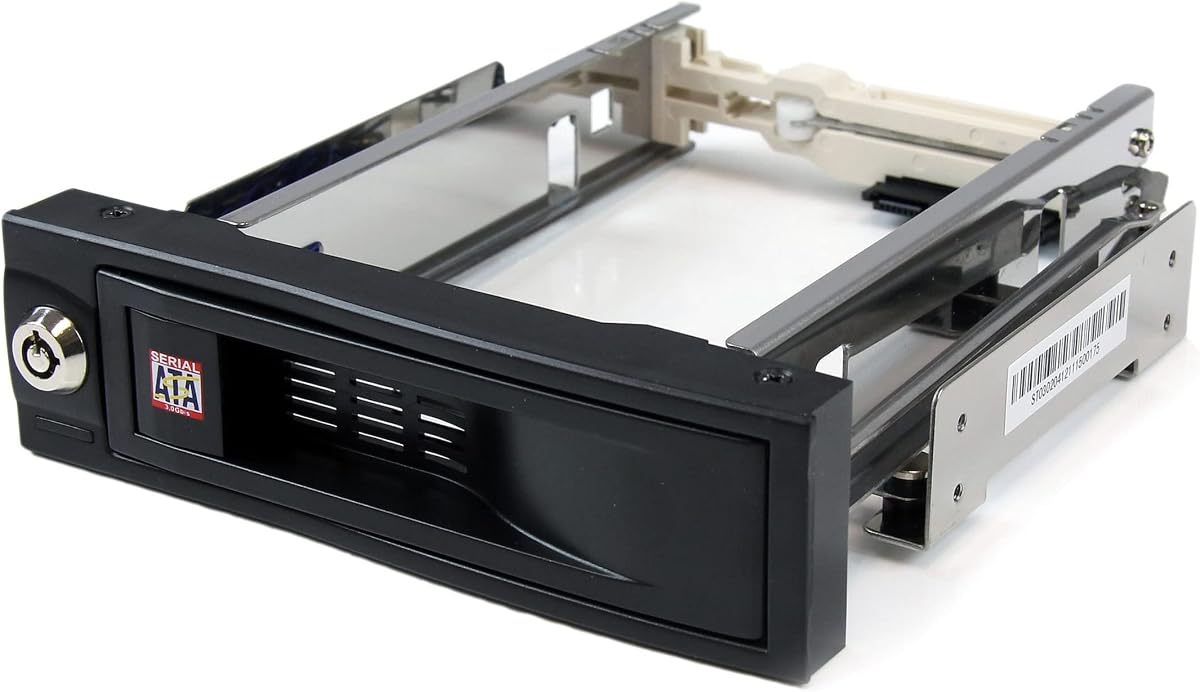
StarTech 3.5in Trayless
4.4Editor score
Holds one 3.5 inch drive
Trayless design for quick swaps
Internal rubber shock absorbers
Hot swappable drive bays allow users to replace storage devices without shutting down systems. This feature is essential for servers workstations and any environment where uptime matters most for professionals.
We evaluated ten products based on build quality thermal management compatibility with SATA and SAS drives and ease of installation. Our analysis focuses on real-world performance and reliability factors.
Each pick highlights specific strengths and trade-offs to help you match the right enclosure to your needs. Prices and availability change frequently so verify current listings before purchasing any item.
4.4Editor score

5.0Editor score

4.0Editor score
As an Amazon Associate we earn from qualifying purchases.
The following table provides a side-by-side comparison of all ten products evaluated in this guide. Use this overview to quickly identify key specifications and features that match your requirements.


This ICY DOCK enclosure leads the list with a perfect five-star rating for its robust build and intelligent features. It holds six 2.5 inch drives in a single 5.25 inch bay with tool-less mounting. The Active Power Technology ensures only installed drives receive power which saves energy and reduces heat generation across your system.
We may earn a commission when you buy through this link, at no additional cost to you.
The ExpressTray system allows for quick installation and removal without tools while maintaining stability through optional bottom screws. Three-speed fan control and dual 40mm fans keep temperatures low even under heavy loads. Individual LED indicators let you monitor each drive independently which is vital for server environments where uptime matters most.
The main trade-off is that it requires a full 5.25 inch bay which may not fit all chassis sizes. Also the price point is higher than single bay options but the value comes from reliability and energy efficiency. For users needing dense storage in a desktop case this unit offers professional features without enterprise complexity.
Choose this if you run workstations or small servers needing quick drive swaps and efficient cooling. Its compatibility with SATA and SAS drives plus support for multiple drive heights makes it versatile for mixed drive setups. This is the top recommendation for anyone prioritizing build quality and smart power management.
Only powers installed drives to reduce electricity consumption and lower overall system heat output significantly.
Tool-less mounting with optional screws balances speed and stability for reliable hot-swapping operations.
We may earn a commission when you buy through this link, at no additional cost to you.
The StarTech 3-Bay Backplane transforms two 5.25 inch bays into a hot-swappable interface for three 3.5 inch drives. It supports SATA and SAS drives making it ideal for enterprise system applications. The vented solid aluminum enclosure dissipates heat well while the built-in fan with speed control maintains optimal temperatures for long-term reliability.
We may earn a commission when you buy through this link, at no additional cost to you.
Individual ejection levers with a key-lock design add optional security for sensitive data environments. This unit is designed for IT professionals who need robust hardware backed by a two-year warranty and lifetime technical support. Power and status LEDs on each bay help monitor drive health easily without opening the chassis.
The key-lock mechanism adds security but requires keys which must be kept safe to avoid losing access. Fan noise can increase under load though the speed control helps manage this. These trade-offs are acceptable given the build quality and compatibility with various drive types for professional deployments.
Select this if you manage servers needing secure and scalable storage solutions. Its maximum compatibility and IT-focused features make it a strong candidate for office environments. Prioritize this model when security and reliability are more important than lowest cost.
Key-lock design provides optional protection against unauthorized drive removal in shared or public spaces.
Vented aluminum case and speed-controlled fan prevent overheating during extended operation periods.
We may earn a commission when you buy through this link, at no additional cost to you.
Rosewill Internal Hard Drive Enclosure turns three 5.25 inch CD-ROM slots into space for four 3.5 or 2.5 inch drives. It supports SATA I/II/III and SAS drives up to 6Gbps making it a flexible storage expansion tool. A single rear 120mm exhaust fan ensures effective cooling for all drives during heavy operations.
We may earn a commission when you buy through this link, at no additional cost to you.
The hot-swap feature allows drive replacement without shutting down the system which is crucial for continuous work. Made from durable steel and ABS materials it promises years of reliable use. Compatibility with specific Rosewill models like L4000U ensures seamless integration in supported setups.
SAS support is limited to 6Gbps which may be a constraint for newer high-speed SAS drives. Model compatibility is also restricted so verify before purchasing. These limitations are balanced by the space-saving design and affordable price for users with available optical drive bays.
Buy this if you want to maximize storage density in a PC with unused optical bays. It offers a cost-effective path to adding multiple drives without external enclosures. Ideal for home users needing extra local storage with hot-swap convenience.
Converts three optical drive slots into space for four hard drives improving internal storage density.
120mm rear fan provides consistent airflow to prevent thermal throttling during heavy file operations.
We may earn a commission when you buy through this link, at no additional cost to you.
The StarTech 3.5in Trayless Mobile Rack holds one 3.5 inch SATA drive in a front accessible 5.25 inch bay. Its trayless design allows quick installation without opening the chassis or using trays. Lockable drive bay adds security and internal rubber shock absorbers protect the drive during use.
We may earn a commission when you buy through this link, at no additional cost to you.
With a 50000+ insertion rating this unit ensures longevity from repeated drive swaps. The solid aluminum construction and shock absorbers maintain drive health even with frequent changes. This model is TAA compliant which suits government or public sector procurement needs for basic storage access.
It supports only one drive and SATA interfaces which limits scalability compared to multi-bay options. However the low price and simple design make it perfect for single drive replacement or testing. The high insertion rating confirms reliability for routine maintenance tasks.
Pick this for cost-effective single drive access where durability matters. It suits users needing a secure and accessible bay for a single backup or OS drive. Ideal for workstations or small offices needing reliable hot-swap without extra cost.
High insertion rating ensures the mechanism withstands frequent use without wear over time.
Internal shock absorbers reduce vibration and impact damage to connected storage devices.
We may earn a commission when you buy through this link, at no additional cost to you.
RackChoice Internal Hard Drive Enclosure converts three 5.25 inch bays into hot-swappable slots for five 2.5 or 3.5 inch drives. It supports SATA and SAS drives up to 6Gbps with an 80mm cooling fan inside the full metal body. Includes five SATA cables for immediate setup across all connected units.
We may earn a commission when you buy through this link, at no additional cost to you.
Support for RAID 0,1,5,6,10 is available with a RAID card which adds flexibility for data protection. The full metal body ensures excellent heat dissipation for dense storage configurations. Compatible with all rack types it adapts well to various chassis and server setups.
Requires two MOLEX connectors for power which may complicate cabling in some systems. The lower rating suggests potential quality control or assembly variances. However the high drive count per bay offers strong value for users needing massive local storage.
Choose this if you need maximum drive count in limited bay space. Ideal for home labs or media servers where density matters more than premium build. Verify power needs before purchase to ensure your PSU supports the MOLEX connections.
Five drives in three bays offers excellent storage capacity without external enclosures.
RAID modes available with additional card allow redundancy for mission-critical data.
We may earn a commission when you buy through this link, at no additional cost to you.
The TERRAMASTER D4-320 is an external hard drive enclosure using USB 3.2 Gen2 for speeds up to 10Gbps. It supports up to four 3.5 or 2.5 inch drives with a total capacity of 120TB. Plug-and-play compatibility eliminates drivers and works with Windows Mac and Linux systems.
We may earn a commission when you buy through this link, at no additional cost to you.
Tool-free Push-lock design secures drives automatically upon insertion. Intelligent temperature-controlled fans optimize heat dissipation while keeping noise low in standby mode. Hot-swappable convenience allows drive replacement without powering off the device for seamless data workflows.
Lack of RAID means data must be managed via software or host system. External power adapter means another cable to manage compared to internal options. These trade-offs are minor given the speed and portability for portable high-capacity storage.
Select this for high-speed external storage without NAS complexity. Ideal for creatives needing fast file access across platforms. Prioritize if you value portability and speed over internal integration features.
USB 3.2 Gen2 achieves up to 10Gbps for rapid large file transfers.
Sound-absorbing panels reduce noise to under 21 dB in standby for quiet use.
We may earn a commission when you buy through this link, at no additional cost to you.
CENMATE Aluminum 6 Bay supports 2.5/3.5 inch HDDs and SSDs with total capacity up to 20TB per drive. Uses USB 3.0 for up to 5Gbps transfer speeds. Aluminum-alloy build with two 2.7 inch fans maximizes data security through effective cooling. Tool-free installation simplifies setup significantly.
We may earn a commission when you buy through this link, at no additional cost to you.
Daisy chain expansion allows up to three devices to expand storage to 360TB total. Compatible with Windows Mac and Linux for plug-and-play use. USB A/C 3.0 cable included ensures broad connectivity options for various host systems.
Fan noise is around 40-50 decibels which may bother noise-sensitive users. Lack of RAID means data redundancy requires external solutions. However the price and bay count offer strong value for basic bulk storage needs.
Buy if you need cheap high-capacity external storage without NAS costs. Ideal for media archiving or backups in home environments. Prioritize for cost and bay count when noise is less critical.
Daisy chain support links multiple units for scalable storage growth without new ports.
Aluminum alloy housing improves heat dissipation and physical durability.
We may earn a commission when you buy through this link, at no additional cost to you.
This CENMATE model adds USB 3.2 Gen 2 for up to 10Gbps speeds while keeping six bays for 2.5/3.5 inch drives. Uses two 2.7 inch fans inside aluminum-alloy build for thermal security. Supports daisy chain expansion up to three devices for massive storage capacity.
We may earn a commission when you buy through this link, at no additional cost to you.
Tool-free trays and plug-and-play support ensure quick setup without drivers. Compatible with Windows 7 and above, Mac 9.1 and above, and Linux. USB Type-C interface supports Thunderbolt and various USB versions for versatile connectivity options.
Fan noise and higher price than 5Gbps models are trade-offs for speed. Lack of RAID means data protection must be managed elsewhere. For professional workflows needing speed and capacity this model balances performance and flexibility.
Choose for high-speed external storage in professional settings. Prioritize if transfer rates impact productivity. Ideal for creative pros needing fast access to large datasets across devices.
USB 3.2 Gen 2 achieves up to 10Gbps for rapid file movement.
Daisy chain support allows linking units to expand storage capacity easily.
We may earn a commission when you buy through this link, at no additional cost to you.
Silverstone FS304-V fits four 3.5 inch SAS or SATA drives in three 5.25 inch device bays. Supports SAS 12G and SATA 6Gbps for maximum performance. Built-in cooling fan ensures heat dissipation. Independent LED indicators monitor drive status independently.
We may earn a commission when you buy through this link, at no additional cost to you.
Compatible with 9.5mm slim optical drives saving space. Hot-swap functionality allows quick replacement without shutdown. Trayless design simplifies installation and removal for maintenance tasks. Solid build quality ensures reliability under continuous operation.
Requires three 5.25 inch bays which may limit compatibility in smaller cases. Cost is higher than basic SATA cages. These trade-offs are acceptable for users needing high-speed SAS support in desktop workstations.
Pick this for high-performance workstations needing SAS drives. Prioritize speed and density when budget allows. Ideal for professionals requiring fast data access and reliable hot-swap capabilities.
SAS 12Gbps support enables faster throughput than standard SATA interfaces.
Independent LEDs provide clear status tracking per drive without software.
We may earn a commission when you buy through this link, at no additional cost to you.
Kingwin Hard Drive Enclosure supports five 3.5 inch HDDs or SSDs in a 3 x 5.25 inch bay space. Uses aluminum trayless mobile rack design for tool-free installation and removal. Supports SATA I/II/III and SAS I/II/III up to 12 Gbps performance. Robust aluminum shell enhances heat dissipation.
We may earn a commission when you buy through this link, at no additional cost to you.
Designed for gaming rigs workstations and data servers. Efficient space utilization maximizes storage in limited chassis area. Integrated power control ensures drives are powered safely minimizing data loss risk. Wide compatibility with most PC cases.
No specific speed data may cause uncertainty for some users. Power management details vary by system. However the build and bay count make it reliable for bulk storage in compact setups.
Choose this for high-density internal storage in gaming or server PCs. Ideal for users needing simple hot-swap without external drives. Prioritize for space efficiency and broad drive support.
Aluminum construction improves heat dissipation and structural durability.
Tool-free installation reduces time and effort for drive swaps.
We may earn a commission when you buy through this link, at no additional cost to you.
Selecting the right hot swappable drive bay depends on your specific needs and system constraints. The following factors help you match an enclosure to your use case.
Ensure the enclosure supports your drive types (SATA or SAS) and physical sizes (2.5 or 3.5 inch). Mismatched interfaces can prevent the drives from functioning or limit performance.
Verify SATA version support (III/II/III) and whether SAS speeds meet your throughput needs.
Choose between internal and external options based on your chassis and access needs. Internal units fit 5.25 inch bays while external enclosures connect via USB.
Consider drive density to maximize storage in limited space without overcrowding the system.
Hot-swap allows replacing drives without shutting down which is vital for uptime. Check that the enclosure supports true hot-swap with proper connectors.
This feature ensures continuous operation during maintenance or drive replacements.
Active cooling via fans prevents overheating in multi-drive setups. Aluminum builds improve heat dissipation compared to plastic alternatives.
Choose enclosures with fans or fans for stable drive performance under load.
Lockable bays or key-lock designs add physical security for shared or public environments. This prevents unauthorized drive removal.
Security features are valuable when managing data in unattended locations.
Tool-less designs simplify mounting and removal for frequent access. Look for features like push-lock trays or ejection levers.
Quick installation reduces downtime and maintenance effort over time.
External enclosures vary by USB version (3.0, 3.1, 3.2) which impacts transfer speeds. Internal units rely on motherboard SATA or SAS controllers.
Match connectivity to your workload needs especially for large file transfers.
Internal enclosures use system power while external ones need adapters or MOLEX connections. Ensure your PSU can support additional connectors if needed.
Proper power management reduces risk of data loss or drive damage.
Install the enclosure following manufacturer guidelines ensuring proper cable connections to motherboard or power supply. Use tool-less mechanisms for quick access when needed.
Maintain cooling by keeping vents clear of dust and monitoring fan speeds. Clean filters regularly to prevent overheating during heavy use.
Backup critical data before any drive removal or replacement. Hot-swap is convenient but power fluctuations or errors can still risk data integrity.
No not all units support SAS. Some enclosures support both SATA and SAS interfaces while others only support SATA. Check the product specifications to ensure compatibility with your drives.
Many enclosures support both 2.5 and 3.5 inch drives. Some include adapters or trays for secure mounting of smaller drives. Verify the product supports your desired drive sizes.
Internal bays fit inside the PC case using 5.25 inch slots while external bays connect via USB. Internal units offer better integration and power external units provide portability and ease of access.
Most enclosures operate plug-and-play with standard SATA/SAS drivers. External USB units may require drivers on older systems but usually work without them on modern OS versions.
Not all units support RAID. Some enclosures support RAID with additional cards while others are basic storage devices. Check product specs if RAID functionality is required.
Use enclosures with built-in fans and adequate airflow. Keep vents clear and consider adding case fans. Active cooling prevents thermal throttling and extends drive lifespan.
This guide highlights ten top options ranging from budget internal bays to premium external enclosures. Each model offers unique advantages depending on speed requirements and system constraints.
Prioritize compatibility cooling and ease of installation when selecting a drive bay. Match the unit to your workload whether for backups media or server operations.
Always verify current prices and compatibility before purchase as listings change frequently. Choose a solution that fits both your budget and long-term storage needs.