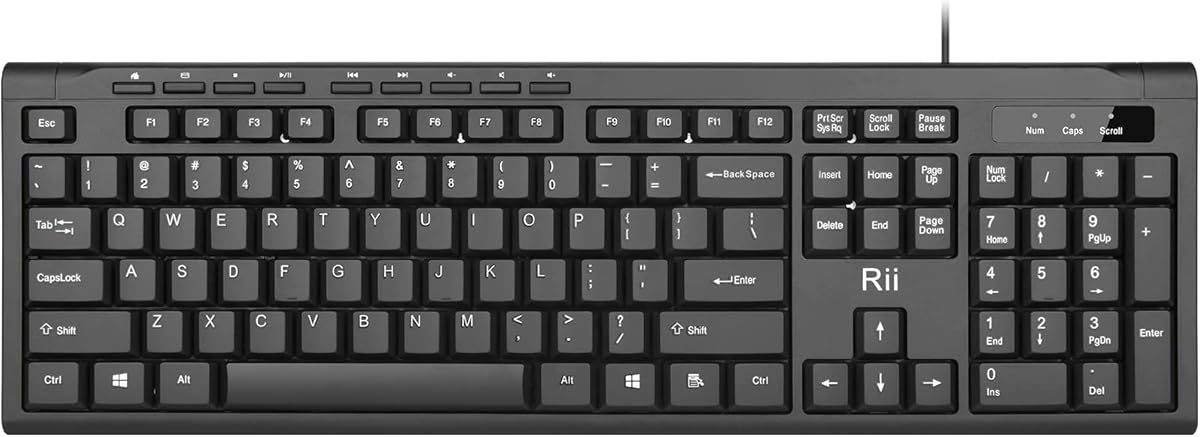
Rii RK907
4.5Editor score
Ultra-slim wired design
Quiet low-profile keys
Splash resistant build
This expert guide compares the top ten lightweight keyboards for portability and typing comfort, helping you choose the perfect slim device for work or travel
Finding a lightweight keyboard can transform your workspace by reducing clutter and making travel easier. Whether you work from home or on the go, a slim design saves space without sacrificing essential keys or functionality for daily tasks.
We compared ten highly rated models based on build quality, connectivity options, battery life, and typing comfort. Each product was selected for its ability to deliver reliable performance while maintaining a portable profile suitable for various environments and user preferences.
Every pick includes detailed specs, pros, and cons to help you decide quickly. Prices and availability can change frequently, so check the latest offers before purchasing to ensure you get the best value for your specific needs today.
4.5Editor score

4.4Editor score

4.3Editor score
Explore the side-by-side comparison of our top ten picks to find the ideal match for your workflow and budget.



The Logitech MX Keys Mini stands out as a top-tier option for those seeking premium quality in a compact form. With a 4.4 rating from users, it delivers exceptional typing comfort and smart features that adapt to your environment automatically.
We may earn a commission when you buy through this link, at no additional cost to you.
Its Perfect Stroke keys are shaped to match your fingertips, reducing strain during long sessions. The Smart Illumination feature detects hand proximity to light up keys only when needed, saving battery while ensuring visibility in any lighting condition.
While the price is higher than budget models, the durability and multi-device switching justify the investment. You can pair up to three devices and switch seamlessly, which is ideal for professionals managing multiple workflows without needing multiple peripherals.
This keyboard is best suited for professionals or creatives who value ergonomics and smart technology. If you prioritize typing comfort and smart lighting features, the MX Keys Mini is the definitive choice for a high-end lightweight experience.
The keys light up automatically when hands approach and adjust brightness based on ambient light, ensuring visibility while conserving power throughout the day.
Switch between three connected devices effortlessly via Bluetooth Low Energy, allowing you to type across computers or laptops in one fluid workflow.
We may earn a commission when you buy through this link, at no additional cost to you.
The Rii RK907 offers an exceptional value proposition for users needing a simple, reliable lightweight keyboard. Boasting a 4.5 rating, it provides a quiet, comfortable typing experience without the complexity of wireless pairing or high costs.
We may earn a commission when you buy through this link, at no additional cost to you.
Its low-profile keys ensure a quiet keystroke, making it perfect for shared offices or quiet environments. The splash-resistant design adds durability, protecting against accidental spills during daily use in various work settings.
While it lacks wireless capabilities and advanced media keys, the wired connection ensures zero latency and consistent performance. For basic tasks like typing documents or browsing, this keyboard delivers all the essential functionality at a fraction of the price.
Buyers seeking a no-fuss, economical solution will appreciate this model. If you need a compact keyboard that just works without extra setup, the Rii RK907 is the best budget pick for immediate productivity.
Low-profile keys provide a comfortable and quiet typing experience, reducing noise in shared spaces while maintaining a sleek, minimalist aesthetic.
Built with splash resistance, this keyboard withstands minor accidents like coffee spills, ensuring long-lasting reliability for daily office use.
We may earn a commission when you buy through this link, at no additional cost to you.
The ProtoArc XK01 redefines portability by offering a full-size typing experience in a foldable package. With a 4.3 rating, it is engineered for travelers who refuse to compromise on key layout while needing to save space in their bags.
We may earn a commission when you buy through this link, at no additional cost to you.
Its tri-fold design reduces the footprint significantly without removing the number pad or function keys. The internal aluminum hinges are tested for over 10,000 folds, ensuring the keyboard withstands frequent deployment and storage during business trips.
Although it adds some weight due to the full-size keys, the convenience of a desktop-like experience on the go is unmatched. The 3-device Bluetooth switching lets you manage phones, tablets, and laptops with a single press, enhancing workflow efficiency.
This model is perfect for road warriors and digital nomads needing comprehensive input. If you require a number pad and full layout in a travel-friendly form, the ProtoArc XK01 is the top premium choice for versatility.
The keyboard folds to 8.46 x 4.68 x 0.78 inches with internal aluminum hinges tested for 10,000+ folds, enabling quick setup anywhere.
105 keys including number pad and navigation keys deliver a desktop-style typing experience for travel, office, and remote work needs.
We may earn a commission when you buy through this link, at no additional cost to you.
The Logitech Pebble Keys 2 K380s is designed to defy boring desks with its stylish and functional form. Rated 4.3 by users, it offers a laptop-like typing experience that feels familiar yet lightweight enough for any environment.
We may earn a commission when you buy through this link, at no additional cost to you.
Its slim design incorporates recycled plastic, appealing to eco-conscious buyers. The Easy-Switch buttons allow instant connection to three devices, making it easy to switch between a laptop, tablet, or phone without re-pairing.
While it relies on AAA batteries, the auto-sleep mode extends usage significantly. The familiar key shape ensures comfort for long sessions, though customization requires the Logi Options Plus app for full control over shortcuts.
This keyboard is ideal for users wanting style and convenience. If you value a clean look and reliable wireless performance across devices, the Pebble Keys 2 K380s is a solid pick for daily work.
Switch between three wireless devices across Windows, macOS, iPadOS, and ChromeOS with one click of the Easy-Switch buttons.
Plastic parts include minimum 49% certified post-consumer recycled plastic, making a design choice you feel good about while reducing environmental impact.
We may earn a commission when you buy through this link, at no additional cost to you.
The Arteck 2.4G Wireless Keyboard combines a durable stainless steel body with an ultra-slim profile. With a 4.4 rating, it offers a solid typing experience that balances professional looks with practical usability for office tasks.
We may earn a commission when you buy through this link, at no additional cost to you.
Its full-size layout includes a number pad, making it ideal for data entry. The rechargeable lithium battery supports up to six months on a single charge, minimizing the need for frequent recharges during normal use.
While the lack of Bluetooth limits device switching, the 2.4G connection is stable and quick to set up via the nano receiver. The low-profile keys ensure quiet typing, which is beneficial in quiet work environments.
Buyers seeking a robust desktop replacement will find this appealing. If you prefer a wired-like stability with wireless freedom and need a number pad, the Arteck 2.4G Wireless is a great middle-ground choice.
Stainless steel material gives a heavy-duty feeling and durable look, ensuring the keyboard withstands daily wear and tear effectively.
Rechargeable lithium battery lasts up to six months with a single charge based on two hours of non-stop use per day.
We may earn a commission when you buy through this link, at no additional cost to you.
The TECKNET 2.4G Wireless Keyboard is designed for portability and media control. Rated 4.4 by users, it offers a mini compact layout that fits easily on small desks or travel bags while maintaining smooth typing performance.
We may earn a commission when you buy through this link, at no additional cost to you.
Its chocolate keycap design delivers a quiet tap with reduced finger fatigue. The dedicated media hotkeys allow quick access to volume and playback, making it a versatile choice for entertainment setups.
The 12-month battery life ensures minimal maintenance, though it requires AAA batteries. Note that the enter key layout differs from standard keyboards, which may require a short adjustment period for some users.
This keyboard is ideal for light typing and media use. If you need a compact device for streaming or light office work with long battery life, the TECKNET 2.4G is a practical solution.
Stylish chocolate keycap design delivers smooth quiet tapping and reduced key travel for a more comfortable typing experience.
Dedicated media keys provide quick access to volume and playback controls for seamless entertainment management.
We may earn a commission when you buy through this link, at no additional cost to you.
The ProtoArc XK04 offers an ultra-compact two-fold design tailored for mobile typing. With a 4.4 rating, it is lightweight enough to fit in a pocket while providing physical keys for more efficient input than on-screen keyboards.
We may earn a commission when you buy through this link, at no additional cost to you.
Its PU leather cover protects the keys during travel and adds a premium look. The optimized layout for phones and tablets allows you to type messages or notes comfortably even on airplane trays or café tables.
Bluetooth 5.1 ensures a stable 33ft range with support for three devices. The auto-sleep standby lasts up to 150 days, so the keyboard stays ready for action whenever your work moves to a new location.
This model is perfect for digital nomads or mobile users. If you need to type often on a phone or tablet and want a physical keyboard in a tiny package, the XK04 is the top pick for on-the-go.
Ultra-compact two-fold Bluetooth keyboard folds into a small form with premium PU leather cover, making it the lightweight travel companion.
Compact layout optimized for mobile devices provides physical typing capability for iPhone, iPad, and Android tablets with 10.76 x 4.07 inch unfolded size.
We may earn a commission when you buy through this link, at no additional cost to you.
The Arteck Stainless 2.4G is another excellent option from Arteck focusing on ultra-thin designs. Rated 4.4, it provides a heavy-duty feel thanks to its stainless steel construction while maintaining a light and slim footprint.
We may earn a commission when you buy through this link, at no additional cost to you.
Its 0.16-inch thickness makes it virtually flat on any desk, saving significant vertical space. The rechargeable lithium battery ensures you never have to deal with replacing disposable cells, offering a more sustainable user experience.
Full-size keys allow for complete functionality without sacrificing comfort. The low-profile keys offer quiet typing, perfect for home offices where noise is a concern during meetings or late-night work sessions.
Buyers who prioritize aesthetics and slim profiles will love this. If you want a professional-looking keyboard that is easy to store and recharge, the Arteck Stainless 2.4G is a reliable daily driver.
Compact size 11.1 X 5.3 X 0.16in and light weight 10.2oz provides full size keys for comfortable typing.
Stainless steel material gives heavy duty feeling, low-profile keys offer quiet and comfortable typing.
We may earn a commission when you buy through this link, at no additional cost to you.
The Logitech K400 Plus is a specialized keyboard designed for controlling entertainment centers. Rated 4.4, it integrates a touchpad and keyboard into one unit, removing the need for a separate mouse while managing your PC or TV.
We may earn a commission when you buy through this link, at no additional cost to you.
Its spill-resistant design ensures durability in living room settings where drinks might be nearby. The 33ft wireless range allows you to sit comfortably on a couch while browsing or typing without interruption.
While optimized for TV use, it works well for basic PC tasks too. The battery life extends up to 18 months, reducing maintenance. However, the touchpad is optimized for media navigation rather than precise PC gaming.
This keyboard is ideal for living room setups. If you want a simple way to navigate media and type from the couch, the K400 Plus is the best all-in-one remote replacement available.
Integrated, comfortable control of your PC-to-TV entertainment, eliminating the clutter of a separate keyboard and mouse.
The spill-resistant design and long-lasting keys keep you on-track despite any mishaps during media consumption.
We may earn a commission when you buy through this link, at no additional cost to you.
The GEODMAER 65% Gaming Keyboard provides a compact design for gamers needing space efficiency. Rated 4.3, it features a membrane feel that mimics mechanical switches, offering an excellent mechanical experience without the high price point.
We may earn a commission when you buy through this link, at no additional cost to you.
Its 65% layout saves desktop space while retaining arrow keys and media buttons. The Type-C cable ensures stable connection and low latency, crucial for responsive gaming. Backlit modes allow visibility in dark environments.
While it lacks true mechanical switches, the ergonomic keycaps protect wrists during long sessions. The 26-key anti-conflict system prevents input lag during complex key combos, making it a solid budget pick for light gaming.
This keyboard suits gamers or users on a tight budget. If you want a compact, backlit setup for gaming or typing without spending much, the GEODMAER 65% offers great value for entry-level needs.
26 keys no-conflict and FN+Win lockable win keys prevent accidental touches and input lag during gameplay.
New two-color injection molding key caps make characters transparent luminous for clear visibility in the dark.
We may earn a commission when you buy through this link, at no additional cost to you.
Selecting the right lightweight keyboard involves understanding several key factors that impact daily productivity and portability.
Decide between wired and wireless options. Wired keyboards ensure zero lag and consistent power, making them ideal for gaming. Wireless models offer greater freedom and cleaner desk setups, with Bluetooth being common for portable devices.
For most users, wireless is the go-to choice for mobility. Ensure the keyboard supports your devices' connection standards to avoid compatibility issues.
Key layout determines the physical size and usability of the keyboard. Full-size layouts include number pads for data entry, while compact layouts like 60% or 65% save space by removing them.
Choose a layout based on your primary tasks. Data entry needs a number pad, while typing and general use can benefit from the compact design of smaller layouts.
Materials impact durability and feel. Metal frames like stainless steel offer strength, while plastic keeps weight low. Some models include splash resistance for added protection in various environments.
Look for sturdy hinges if folding and high-quality keycaps to prevent wear. Build quality ensures the keyboard survives frequent travel or daily office use.
Battery life is critical for wireless keyboards. Some models use replaceable AAA batteries, while others are rechargeable via USB-C. A longer battery life reduces maintenance and ensures consistent use.
Rechargeable batteries are more eco-friendly. Check the manufacturer's claims for standby and usage time to match your usage patterns.
Ergonomic design affects long-term comfort. Keycap height, angle, and spacing should support natural hand positioning. Low-profile keys reduce finger travel, while some models offer wrist support.
Prioritize ergonomics if you type for hours. A comfortable design reduces fatigue and prevents strain over time.
Backlighting improves visibility in low light. Some keyboards feature smart sensors that turn on automatically when hands approach. Others offer adjustable modes and brightness levels for customization.
This feature is useful for night work or dim rooms. Ensure the backlighting can be turned off to save battery if not needed.
Many portable keyboards allow switching between multiple devices. Look for models with dedicated buttons to switch between up to three connections instantly.
This feature enhances workflow efficiency. It is essential for users managing multiple computers or phones.
Ensure the keyboard works with your operating system. Most modern keyboards support Windows, macOS, iOS, and Android. Some may require drivers for full functionality.
Check product details for OS requirements. Universal compatibility ensures the keyboard works right out of the box.
Start by pairing your keyboard securely with your device. For wireless models, turn on the power and hold the pairing button until it blinks. Then select the keyboard on your device's Bluetooth settings for a stable connection.
Keep your keyboard clean by using a soft brush to remove dust and crumbs from between the keys. Avoid eating or drinking directly above the keyboard to prevent spills and debris buildup that can damage internal components.
If your keyboard is rechargeable, charge it fully before first use. Store it in a dry, cool place when not in use to preserve battery life. Regular cleaning and proper storage ensure long-term reliability.
The lightest keyboards are typically ultra-slim models made from materials like aluminum or recycled plastic. Options like the Logitech MX Keys Mini or TECKNET Mini weigh under 10 ounces. For extreme portability, foldable models offer the best balance of weight and function.
Not necessarily. Many lightweight keyboards use scissor-switch or membrane mechanisms that offer comfortable typing experiences. Some high-end models provide mechanical-like feels while maintaining slim profiles. It depends on the specific brand and switch technology.
Most modern lightweight keyboards are compatible with both macOS and Windows. They often include dual-layout keys for easy switching. Always verify OS support before purchasing to ensure full functionality with your device.
Battery life varies by model and usage. Some rechargeable models offer up to 5 months, while others with replaceable batteries can last over 12 months. Smart backlighting and auto-sleep modes help extend battery life significantly.
Wireless is generally better for travel as it reduces cable clutter and allows easy device switching. However, wired options are cheaper and don't require charging. If you value convenience and battery freedom, wireless is the better choice.
Yes, compact keyboards work well for coding if you can adapt to missing number pads. Many developers prefer 60% layouts for efficiency. Some models have function layers to access missing keys, making them fully functional for development tasks.
Some do, but many prioritize slimness with membrane or scissor switches. Mechanical keyboards are often thicker due to switch height. However, low-profile mechanical options exist for those wanting mechanical feel in a compact frame.
Some models feature splash-resistant designs to handle minor spills. However, few are fully waterproof. Check product specs for resistance ratings. Even if resistant, avoid spills to protect internal electronics and extend the device's lifespan.
Our top picks like the Logitech MX Keys Mini and Rii RK907 cater to diverse needs from premium quality to budget-friendly options. Each model offers unique strengths to enhance productivity without adding bulk to your setup.
Prioritize factors like connectivity, battery life, and layout based on your daily workflow. Whether you need a full-size layout for data entry or a pocket-sized option for travel, there is a suitable choice available in this list.
Always check current prices and availability before purchasing to ensure you get the best value. With the right lightweight keyboard, you can maintain efficiency and comfort wherever your work takes you.