
Bambu Lab P2S Combo
4.7Editor score
AI failure detection
Multi-color 3D printing
Adaptive airflow system
Discover the top AI printers for home and office, featuring smart layouts, security, and cost-saving tech from leading brands like HP and Bambu Lab.
Modern printing has evolved beyond simple document output into intelligent hubs that manage workflows and enhance creativity. AI printers now optimize layouts, reduce waste, and ensure secure connections for seamless productivity in any environment.
We compared ten leading models based on speed, ink efficiency, connectivity, and unique artificial intelligence features. Each product offers distinct advantages for home offices, creative projects, or high-volume professional needs.
Every pick highlights standout capabilities like automatic content removal or multi-color 3D printing. Prices and availability may change, so verify current deals before making your final purchase decision today.
4.7Editor score

3.9Editor score

4.2Editor score
Explore the side-by-side comparison of the top ten AI printers available this month, highlighting key specs and unique features for every user need.



The HP OfficeJet Pro 8125 stands out as a top choice for home offices needing reliable, AI-enhanced printing. With a rating of 3.9, it delivers professional-quality color documents with intelligent features that save time.
We may earn a commission when you buy through this link, at no additional cost to you.
Its standout feature is HP AI, which optimizes print formatting by removing unwanted content from web pages and emails. This ensures precise layouts without wasted pages. Combined with dual-band Wi-Fi that resolves connection issues automatically, it keeps workflows smooth.
While it offers fast speeds up to 20 ppm black and includes a 3-month Instant Ink trial, users should note it only works with original HP chips. Firmware updates maintain this measure, which may limit third-party cartridge options.
This printer is ideal for small business owners or remote workers prioritizing security and smart layout tools. Choose it if you need a trusted brand with integrated AI to streamline daily document tasks efficiently.
HP AI automatically strips clutter from emails and web pages, ensuring your printed documents look polished and professional without manual editing.
HP Wolf Essential Security bolsters protection against cyber threats, keeping your network and sensitive data safe during every print job.
We may earn a commission when you buy through this link, at no additional cost to you.
The HP Smart Tank 5003 is designed for households with high printing demands, offering up to three years of ink included. Its 4.1 rating reflects reliability and low-cost operation for busy families.
We may earn a commission when you buy through this link, at no additional cost to you.
Key strengths include the mess-free refill system and up to 6000 pages right out of the box. This reduces ongoing costs significantly. AI capabilities ensure smart formatting, while borderless printing allows for creative projects like photos.
Despite being cartridge-free, it may have slower speeds compared to laser options. However, for home use where volume matters more than speed, the savings on ink make it a practical long-term investment.
Buy this if you print frequently and want to avoid constant cartridge purchases. Its durable design and generous ink supply make it perfect for students or families managing heavy print loads.
With up to three years of ink included, this printer eliminates the need for frequent cartridge replacements, saving you money and hassle over time.
The easy-access refill system lets you plug ink bottles directly into the tank, ensuring a spill-free process that even beginners can master easily.
We may earn a commission when you buy through this link, at no additional cost to you.
The HP Envy 6155 excels at producing vibrant home documents and photos, earning a 4.2 rating for its color accuracy. True-to-Screen P3 technology ensures prints match what you see on your device.
We may earn a commission when you buy through this link, at no additional cost to you.
HP AI optimizes print formatting to prevent awkward layouts, making it great for homework or school projects. The 2.4-inch touchscreen simplifies navigation, and dual-band Wi-Fi keeps connections stable during printing tasks.
While its 10 ppm black speed is slower, the borderless photo capability makes up for it in creative work. The sustainable design uses over 60% recycled plastic, appealing to eco-conscious buyers.
Choose this model if you prioritize image quality and ease of use for home tasks. It balances AI efficiency with vibrant output, perfect for occasional document and frequent photo printing needs.
P3 technology ensures your printed photos and documents retain the vibrant colors seen on your screen, delivering professional results every time.
Made with at least 60% recycled plastic, this printer reflects a commitment to sustainability without compromising on quality or performance features.
We may earn a commission when you buy through this link, at no additional cost to you.
The Bambu Lab P2S Combo leads the market with its impressive speed and AI-driven reliability, achieving a 4.7 rating. It combines a 3D printer with the AMS 2 Pro for seamless multi-color printing.
We may earn a commission when you buy through this link, at no additional cost to you.
AI failure detection and automatic calibration make professional-grade prints accessible to beginners. The Adaptive Airflow System maintains optimal temperatures for various materials, ensuring sharp layers and flawless corners every time.
Setup takes just 15 minutes, reducing downtime. While the price is higher, the precision and workflow efficiency justify the investment for serious creators or small manufacturing needs.
This is the ultimate pick for advanced users wanting speed and precision. If you need multi-color capability without manual swapping, its AI features ensure a smooth workflow from design to finished print.
AI failure detection monitors prints in real-time, alerting you to issues before they ruin your project and ensuring consistent quality every time.
This system balances cooling and heat retention automatically, keeping overhangs crisp or maintaining chamber temps for engineering-grade materials effortlessly.
We may earn a commission when you buy through this link, at no additional cost to you.
Designed for office environments, the HP OfficeJet Pro 9135 offers high-speed printing up to 25 ppm black and robust security. Its 4.0 rating confirms reliability for demanding business document needs.
We may earn a commission when you buy through this link, at no additional cost to you.
Single-pass duplex scanning speeds up workflow significantly. HP AI ensures precise layout formatting for emails and web pages, reducing waste. Dual input trays allow easy paper switching between document types.
While it includes Instant Ink trial, ongoing costs apply. However, Wolf Pro Security protects networks from threats. The large touchscreen makes navigation quick for shared office spaces.
Pick this if you need speed and security in a business setting. Its high volume capacity and AI tools make it a powerhouse for professional offices managing heavy daily print loads.
Wolf Pro Security bolsters your network against cyber threats, ensuring sensitive business documents remain protected during every print transaction.
Single-pass duplex scanning allows you to scan both sides of documents in one pass, saving time on bulk file digitization tasks.
We may earn a commission when you buy through this link, at no additional cost to you.
The HP Smart Tank 7603 offers exceptional value for home offices needing high volume and fax capabilities. With a 3.9 rating, it balances cost-saving features with reliable daily performance.
We may earn a commission when you buy through this link, at no additional cost to you.
Its magic touch control panel simplifies operation, while the auto document feeder handles bulk tasks. AI features ensure smart formatting, and the mess-free refill system keeps maintenance hassle-free over long periods.
Although print speeds are moderate, the included ink supply covers years of usage. This reduces overall ownership costs significantly compared to traditional cartridge printers.
Ideal for freelancers or home businesses needing fax and copy. Its long-term savings make it a smart investment for those managing mixed media tasks efficiently.
The magic touch control panel offers intuitive navigation, making it easy for users of all skill levels to manage complex print tasks quickly.
Up to 8000 color pages right out of the box ensures you can print for years without worrying about running out of ink supplies.
We may earn a commission when you buy through this link, at no additional cost to you.
The HP OfficeJet Pro 8139 stands out for its generous one-year Instant Ink trial, making it ideal for those testing subscription services. It achieves a 4.0 rating for reliable home office performance.
We may earn a commission when you buy through this link, at no additional cost to you.
With HP AI optimizing layouts, you save paper and time. Wolf Essential Security keeps your network safe. The 225-sheet tray ensures fewer refills, and fax capabilities add versatility for small businesses.
It maintains standard print speeds, which are sufficient for most home tasks. The long trial period allows users to assess the value of Instant Ink before committing to monthly fees.
Buy this if you want extended ink savings upfront. Its security and AI tools make it a practical choice for users needing reliable, secure printing with minimal waste.
Enjoy a full year of Instant Ink included, giving you ample time to experience cost-saving delivery without extra monthly expenses immediately.
HP Wolf Essential Security bolsters your network protection against cyber threats, ensuring your data remains safe with every print job.
We may earn a commission when you buy through this link, at no additional cost to you.
This variant of the HP Smart Tank 7603 offers similar high-volume capabilities with added fax functions. Its 4.0 rating confirms reliability for diverse home office printing tasks.
We may earn a commission when you buy through this link, at no additional cost to you.
The magic touch control panel enhances usability, while auto document feeding handles bulk scanning. AI ensures optimized layouts, and the refillable ink system delivers long-term savings without cartridge waste.
While physical size is larger, the versatility for mixed media like labels or documents justifies the space. Borderless printing supports creative projects alongside standard office work.
Choose this for balanced performance and convenience. It suits users needing fax capability and consistent ink supply without frequent maintenance interruptions.
Support for borderless prints and multiple document types makes this printer ideal for diverse projects from reports to personalized labels easily.
Refillable ink tanks with mess-free delivery ensure you never run out unexpectedly, keeping your office workflow uninterrupted and productive.
We may earn a commission when you buy through this link, at no additional cost to you.
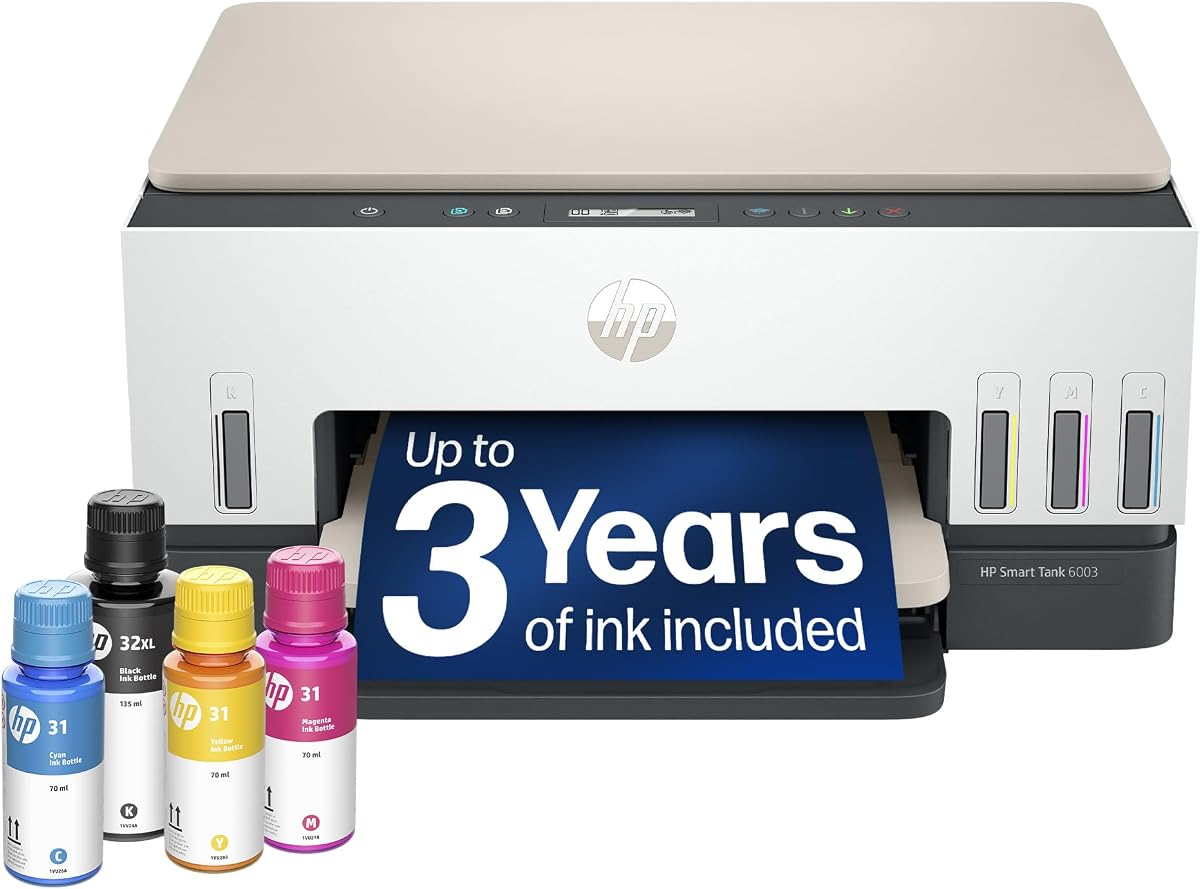
The HP Smart Tank 6003 is a compact option for home users seeking long ink life without large bulk. Its 3.8 rating reflects solid performance for general document and photo printing.
We may earn a commission when you buy through this link, at no additional cost to you.
Borderless printing enables creative photos and labels. The cartridge-free design reduces waste and costs. AI capabilities ensure smart formatting, while wireless printing keeps connectivity simple for mobile devices.
Paper capacity is modest, suited for light users. But the 3-year ink supply makes it a low-maintenance choice for those printing occasionally but consistently.
Ideal for small spaces needing reliable output. If you want simplicity and savings without sacrificing quality, this model delivers efficient performance for everyday tasks.
Its compact build fits easily on smaller desks, maintaining functionality without consuming too much workspace in crowded home offices.
With up to three years of ink included, this model minimizes replacement frequency, ensuring you stay productive without frequent supply runs.
We may earn a commission when you buy through this link, at no additional cost to you.
The Liene PixCut S1 combines printing and cutting for DIY enthusiasts, earning a 4.2 rating. It uses thermal dye-sublimation for vibrant, durable stickers with precise AI auto-cutting.
We may earn a commission when you buy through this link, at no additional cost to you.
AI image extraction automatically isolates subjects for perfect cuts. The app offers 50000 free images and templates, making creativity accessible without design experience. Stickers are waterproof and scratch-resistant.
While limited to sticker production, the precision and speed save hours of manual work. No subscriptions ensure pure creativity without hidden costs over time.
Buy this for crafting and personalized gifts. Its AI features and all-in-one design streamline the process from photo to finished sticker in minutes effortlessly.
Advanced AI technology identifies edges and subjects automatically, ensuring every sticker is cut perfectly without manual tracing or error.
Thermal dye-sublimation prints vibrant colors that resist fading, creating waterproof and scratch-resistant stickers suitable for long-term outdoor use.
We may earn a commission when you buy through this link, at no additional cost to you.
Selecting the right AI printer requires understanding specific features and needs to maximize efficiency and output quality.
AI printers optimize layouts, remove unwanted web content, or detect print failures automatically. Look for models with dedicated software that reduces manual editing and ensures professional results without user input.
Prioritize brands offering proven AI tools like HP AI or Bambu Studio to streamline your workflow effectively.
Assess how many pages you need monthly. Inkjet printers often offer slower speeds but vibrant color, while tank models support high volumes efficiently. Consider ppm rates for black and color to match your demands.
Choose higher speed models if you have urgent document needs or batch processing tasks in busy environments.
Ink cartridges can become costly over time. Ink tank systems or subscription services like Instant Ink deliver cost savings by including supplies upfront. Evaluate included trial periods and refill ease.
Opt for tank printers if you print frequently to avoid recurring cartridge purchases and save on long-term operation.
Wireless printing is standard, but dual-band Wi-Fi ensures stable connections. Security features like HP Wolf protect against cyber threats. Look for mobile app integration to print remotely.
Secure connectivity is crucial for office use to maintain data privacy and prevent unauthorized access to your printer.
Input trays vary widely; larger capacities reduce refill frequency. Consider features like duplex printing to save paper. Check auto document feeders for scanning efficiency.
High capacity trays suit offices managing large document volumes without constant user supervision or intervention.
Some printers focus on photo quality, stickers, or 3D models. Decide if you need borderless printing or cutting features. AI auto-cutting is essential for custom sticker creation.
Specialized models excel in their niche; choose based on whether you prioritize documents or creative projects primarily.
Reputable brands provide reliable warranties and firmware updates. Customer support availability matters for troubleshooting. Check community forums for common issues.
Stick with trusted manufacturers to ensure longevity and accessible help when technical issues arise unexpectedly.
Eco-friendly printers use recycled materials and reduce waste via duplex printing. AI optimization further saves paper. Check for ENERGY STAR ratings for efficiency.
Prioritize sustainable designs if you want to minimize your environmental footprint while maintaining high performance.
Set up your printer by installing the mobile app and connecting via dual-band Wi-Fi. Ensure you download the latest firmware for optimal AI feature performance.
Regularly clean print heads using built-in tools to maintain sharp text. For tank printers, keep ink bottles sealed to prevent clogs and ensure smooth refills.
Update drivers periodically to leverage new AI capabilities. Store paper in dry places to avoid jams and ensure consistent print quality over time.
AI-capable printers use software to optimize layouts, remove clutter, or detect failures automatically. They adjust settings dynamically for better results without manual input.
Yes, trial periods offer significant savings by delivering ink based on usage. However, check subscription costs after the trial to ensure it fits your budget long-term.
Yes, tank printers reduce costs significantly by using bulk ink instead of cartridges. You get thousands of pages per bottle, making them ideal for high-volume printing.
AI doesn't always increase mechanical speed but streamlines processing. It optimizes image data and formats documents quickly, reducing wait times before printing starts.
Yes, models with P3 tech or dye-sublimation excel at photos. AI ensures color accuracy and sharpness, matching your screen display for vibrant results.
Absolutely. Printers can be entry points for cyber threats. Models with HP Wolf Security protect your network and data from unauthorized access effectively.
Whether you need the precision of the Bambu Lab P2S or the value of the HP Smart Tank, AI features simplify workflows significantly.
Prioritize ink costs and speed based on your daily demands. Security and connectivity remain essential for modern home office environments.
Check current prices and deals before buying. Ensure you choose a model that balances performance, AI integration, and long-term value for your specific needs.