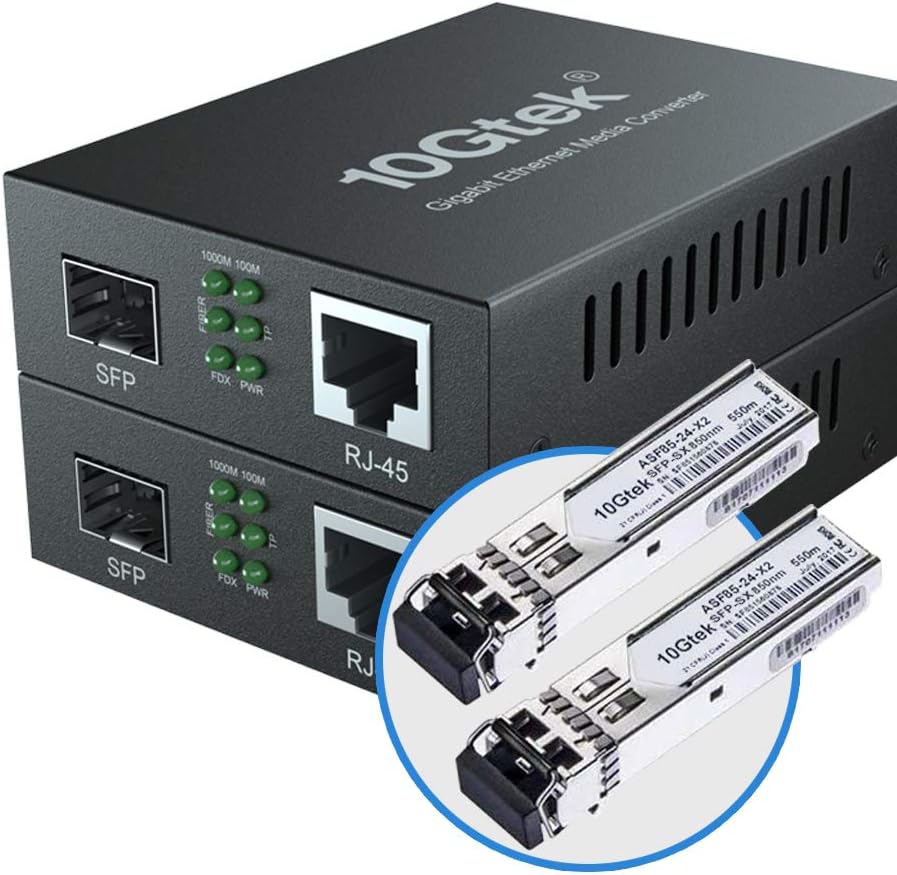
10Gtek Gigabit Ethernet Media Converter
4.7Editor score
Dual LC fiber port support
550-meter transmission range
UL certified power supply
This guide compares the top Ethernet Fiber Media Converter models for extending networks over fiber optics with reliable gigabit performance and compatibility.
Modern networks often require extending connectivity beyond the limits of copper cabling. Ethernet Fiber Media Converters bridge this gap by translating electrical signals to optical ones. These devices ensure stable high-speed data transmission across buildings and campuses while resisting electromagnetic interference effectively.
We evaluated ten leading converters based on fiber type support, speed capabilities, and ease of installation. Our analysis covers single-mode and multi-mode options ranging from basic gigabit units to advanced ten-gigabit solutions. Each product offers unique features suited for different enterprise and small business environments.
Every pick highlights key specifications and real-world performance traits. These selections help you find the right match for your existing infrastructure. Please note that availability and pricing may vary over time as supply chains evolve rapidly in this sector.
4.7Editor score

4.8Editor score

5.0Editor score
The following table provides a side-by-side overview of all ten reviewed models. It highlights core specifications like fiber type, distance limits, and port speeds to help you compare options quickly.


The 10Gtek Gigabit Ethernet Media Converter offers an excellent entry point for small businesses needing fiber connectivity. It features a solid 4.7 rating from users who appreciate its reliability and ease of use. The included SFP modules ensure you can connect right out of the box without additional purchases.
We may earn a commission when you buy through this link, at no additional cost to you.
This converter supports up to 550 meters of transmission which covers most office environments. Its auto-negotiation feature handles speed adjustments automatically ensuring smooth data flow between copper and fiber networks. The UL certification adds a layer of safety that is critical for unattended installations.
While it lacks advanced features like SFP slots for customization it gets the job done efficiently. The fixed 850-nm module means you must use compatible multimode fiber but this simplifies selection. It is a pragmatic choice for straightforward extension needs without extra complexity.
If you need a budget-friendly pair to connect two buildings this model is ideal. Its compact design fits easily on desks or walls making it versatile for various setups. We recommend it for users prioritizing cost and basic performance over advanced configuration options.
Buying in pairs saves money and ensures you have both ends ready for immediate deployment.
UL certification guarantees the power supply meets strict safety protocols reducing fire hazards.
We may earn a commission when you buy through this link, at no additional cost to you.
The Omada MC220L stands out for its hot-swappable FX port allowing you to change modules without downtime. With a 4.7 rating it is praised for maintaining stable connections in varied network environments. This flexibility makes it a strong contender for growing networks.
We may earn a commission when you buy through this link, at no additional cost to you.
Its versatility shines as it works with both single-mode and multi-mode SFP modules. You can adapt the device to different distance requirements simply by swapping the module. The auto-negotiation ensures compatibility with legacy devices maintaining smooth transitions to gigabit speeds.
One downside is that SFP modules are not always included adding to the initial cost. Users must ensure they buy compatible MSAs to avoid connection issues. Despite this the unit itself is robust and easy to integrate into existing racks.
For IT managers who need adaptable hardware the Omada converter is a smart pick. Its straightforward interface reduces configuration time significantly. We suggest this for offices planning to upgrade fiber distances over time without replacing the converter hardware.
Swap SFP modules quickly to adjust range without powering down the network link.
Works seamlessly with legacy 10/100 Mbps devices alongside modern gigabit equipment.
We may earn a commission when you buy through this link, at no additional cost to you.
This BiDi gigabit converter offers a complete kit with two transceivers making it ready for immediate use. A 4.5 rating reflects user satisfaction with its stability and comprehensive feature set. The inclusion of power supplies saves additional setup steps for small teams.
We may earn a commission when you buy through this link, at no additional cost to you.
It supports a wide power supply voltage which is beneficial for international deployments or unstable grids. The jumbo frame support enhances throughput for storage backups ensuring efficient large data transfers. LED indicators simplify troubleshooting by providing clear visual status for each port.
However, BiDi technology is specific and might not match existing non-BiDi fiber infrastructure. You need to ensure both ends use BiDi pairs which adds a layer of complexity. For pure speed optimization it is excellent but requires careful planning for the link.
If you need a turnkey solution for new installs this converter is highly practical. Its broad voltage tolerance ensures it runs reliably in various locations. We recommend it for users needing robust frame handling and global power compatibility.
Accepts 100V to 240V allowing use in most countries without voltage adapters.
Jumbo frames optimize network efficiency for large file transfers and backups.
We may earn a commission when you buy through this link, at no additional cost to you.
For future-proofing networks this 10G Ethernet Media Converter delivers impressive speed capabilities. It connects 10G fiber to copper ports that adapt from 100M up to 10G. This flexibility ensures compatibility during migration phases which is critical for modern data centers.
We may earn a commission when you buy through this link, at no additional cost to you.
The auto-sensing RJ45 port handles varying copper speeds automatically. You can link to older switches or new servers without changing settings. DIP switches provide control over features like flow control making it adaptable to specific traffic needs.
The requirement for 10G SFP+ modules means a higher upfront investment than gigabit units. These modules can be expensive depending on the brand and distance. However the long-term value justifies the cost for high-bandwidth applications like video streaming.
This converter is perfect for upgrading core segments of your network to 10G. Its warranty and support offer peace of mind for critical deployments. We recommend it for businesses ready to embrace multi-gigabit speeds without a full infrastructure overhaul.
Supports 2.5G 5G and 10G copper speeds ensuring smooth upgrade paths.
Flow control and DIP switches help manage bandwidth congestion effectively.
We may earn a commission when you buy through this link, at no additional cost to you.
With a 4.8 rating this SingleMode converter is a top choice for long-distance links. It supports up to 20km which is essential for campuses or remote sites. The pack of two ensures you get the full pair for both ends of the link.
We may earn a commission when you buy through this link, at no additional cost to you.
SC connectors are standard in many existing installations making it easy to integrate. The 1310-nm wavelength ensures low signal loss over these long distances. UL certification on the power supply provides confidence in safety for outdoor or industrial environments.
It lacks advanced features like SFP slots but delivers excellent basic performance. The design focuses on stability and speed which meets most standard requirements. For users needing reliable point-to-point links this unit offers great value for the money.
We suggest this model for warehouses or schools needing to extend networks between buildings. It bridges the gap between copper limits and fiber reach efficiently. It remains our top pick for budget-conscious users needing serious distance capabilities.
20km range supports large campuses and remote facilities with ease.
UL certification ensures safe operation in challenging environments.
We may earn a commission when you buy through this link, at no additional cost to you.
This model stands out with a 4.9 rating indicating high user satisfaction across reviews. It comes with 20KM modules pre-installed reducing the need for separate purchases. The U.S.-based support team offers reliable help during installation hours.
We may earn a commission when you buy through this link, at no additional cost to you.
The 1310nm wavelength is ideal for long-distance single-mode links ensuring low attenuation. Support for 9K-byte jumbo frames improves network efficiency for large data sets. Wide voltage input allows it to run on different power standards globally.
One limitation is the focus on gigabit speeds which might not suit high-bandwidth tasks. It is strictly a gigabit converter without multi-gigabit options. However for standard network extensions it is more than sufficient for most small businesses.
We recommend this for small offices needing straightforward fiber-to-copper links. The inclusion of modules and support makes it a complete solution. It offers a blend of performance and service that is hard to match in this price tier.
20KM modules included in the pair save time and additional costs.
U.S.-based support ensures quick answers during business hours.
We may earn a commission when you buy through this link, at no additional cost to you.
This converter features DIP switches for advanced configuration such as storm control and link fault pass-through. A 4.7 rating highlights its reliability and professional feature set. The included LC SFP module ensures you can connect immediately upon arrival.
We may earn a commission when you buy through this link, at no additional cost to you.
Link Fault Pass-through helps troubleshoot issues by dropping the copper link if fiber breaks. This ensures your switch knows the status rather than holding a dead port. The fanless design makes it suitable for noise-sensitive areas like classrooms.
Configuring the DIP switches requires a basic understanding of network protocols. It is more complex than pure plug-and-play units but offers needed control. Users can set specific speeds to match older legacy equipment in their network.
For tech-savvy users this unit provides essential diagnostic tools. We suggest it for environments where link stability and fault detection are priorities. It balances control and performance well for structured network deployments.
Link Fault Pass-through ensures switches see fiber breaks immediately.
Fanless design ensures quiet performance in office or classroom settings.
We may earn a commission when you buy through this link, at no additional cost to you.
The StarTech converter offers an open SFP slot and full TAA compliance for government projects. With a 4.7 rating it is trusted for field-tested reliability in mission-critical systems. Its design allows custom module selection to meet specific distance needs.
We may earn a commission when you buy through this link, at no additional cost to you.
Link Fault Pass-through ensures efficient troubleshooting by propagating fault statuses to connected switches. You can mount it in specific chassis for organized data centers adding to its professional appeal. It supports VLAN pass-through for complex network configurations.
While it costs more than standard units the compliance and support justify the price. You must buy compatible SFP modules separately which adds to the total. However the flexibility to choose any MSA-compliant module is highly valuable.
We recommend this for government or corporate environments requiring strict compliance. It offers longevity and professional features that cheaper models often lack. It is a solid choice for structured cabling projects needing enterprise-grade reliability.
TAA compliance allows use in federal contracts and government projects.
Chassis mounting options support clean and organized data center installs.
We may earn a commission when you buy through this link, at no additional cost to you.
This converter supports OM1 through OM5 fiber grades ensuring it works with most multimode plants. It includes a pre-installed SX module which is matched for optimal alignment and performance. The transparent VLAN passing ensures no tags are stripped during transmission.
We may earn a commission when you buy through this link, at no additional cost to you.
Four rear DIP switches allow fine-tuning of features like forced speeds and storm control. You can adapt it for legacy 100M gear or standard gigabit links easily. Dust caps protect the fiber ports when not in use extending lifespan.
While it lacks hot-swappable modules its fixed design simplifies setup for many users. You must ensure you use the right cable type given the fixed module. For standard office extensions this offers robust performance with little configuration effort.
We suggest this for businesses with mixed OM grades wanting guaranteed compatibility. It handles VLAN trunks effectively making it suitable for segmented networks. It is a practical choice for offices upgrading existing multimode cabling.
Works with OM1 to OM5 allowing use in older and newer builds.
QinQ and VLAN tags pass through unchanged for secure network segmentation.
We may earn a commission when you buy through this link, at no additional cost to you.
Achieving a perfect 5.0 rating this unit is ideal for mission-critical enterprise deployments. It supports remote monitor status and link-loss forwarding for superior troubleshooting. TAA compliance makes it suitable for federal procurement projects requiring strict adherence.
We may earn a commission when you buy through this link, at no additional cost to you.
The open SFP slot allows you to select any MSA-compliant gigabit transceiver. This modularity ensures you can choose the exact distance and fiber type needed. It supports full or half-duplex operation accommodating legacy hardware seamlessly.
The higher price reflects the advanced diagnostic tools and government compliance. You save time on troubleshooting thanks to remote status features. While you need to source modules separately the flexibility outweighs the initial effort.
For government or large enterprise environments this is the top tier option. It provides peace of mind through extensive monitoring and compliance features. We recommend it for projects where uptime and regulation compliance are non-negotiable.
Remote monitor status lets admins track link health without physical access.
TAA compliance ensures eligibility for government contracts and federal projects.
We may earn a commission when you buy through this link, at no additional cost to you.
Selecting the right Ethernet Fiber Media Converter involves evaluating fiber type, distance needs, and speed requirements. This guide breaks down key factors to help you match a device to your infrastructure.
You must choose between single-mode and multimode converters based on your existing cabling. Single-mode is better for longer distances while multimode suits short office spans. Always verify the connector type like LC or SC to match your patch cords.
Ensure your selected converter matches the fiber grade to avoid signal loss issues.
Distance limits vary significantly with models ranging from 550m to over 20km. Determine how far you need to extend your network before selecting a unit. Long distance links usually require single-mode fiber and specific transceivers.
Match the converter distance to your physical layout to ensure reliable signal strength.
Most units support 10/100/1000Mbps but some offer multi-gigabit options like 2.5G or 10G. If you need high bandwidth for servers consider a 10G converter to future-proof your setup. Standard offices often work well with gigabit speeds.
Check that both copper and fiber ports support the speeds you require.
Open SFP slots allow you to swap modules without replacing the whole device. This provides flexibility if you need to change distances or fiber types later. Units with pre-installed modules are simpler but less adaptable over time.
Open slots are better for networks expected to evolve or upgrade frequently.
Advanced units include features like Link Fault Pass-through and storm control via DIP switches. These tools help maintain uptime and troubleshoot issues quickly across the link. Basic models often lack these diagnostic capabilities.
Look for management features if you need remote monitoring and network resilience.
Verify the voltage range to ensure it matches your location standards like 110V or 240V. Some converters offer wall-mount ears while others are desktop only. Fanless models are essential for quiet environments like schools.
Choose a power and mounting style that fits your physical deployment space.
For government projects TAA compliance might be required to meet procurement rules. IEEE standards ensure interoperability with other network devices like switches and routers. Always check certification labels before finalizing a purchase.
Compliance ensures the device meets legal and technical requirements for your sector.
Manufacturers offer different warranty periods and technical support options. Lifetime support is a strong indicator of reliability for business critical hardware. Read reviews regarding customer service response times for added confidence.
Prioritize brands with strong support records to minimize downtime during issues.
Start by verifying you have the correct fiber patch cable matching your converters connectors. Connect one end to the fiber port and the other to the source device like a router. Secure the cables to avoid accidental disconnection which can disrupt service.
Plug the power adapter into the converter and then into an electrical outlet. Check the LED indicators to confirm the link lights are active. If the power light is on but the link is off inspect the fiber cable for bends or dust.
Keep the device in a well-ventilated area to prevent overheating. Clean the fiber ports regularly using dust caps when not in use to avoid debris buildup. Proper care ensures long lifespan and stable performance over years of use.
Single-mode converters use thin fiber for long distances often up to 20km or more. Multimode converters use thicker fiber for shorter distances typically under 550 meters. Choose single-mode for campus runs and multimode for office connections.
Yes you need fiber patch cables with connectors matching your unit like LC or SC. You also need standard Ethernet cables for the copper port to connect to your devices. Ensure the fiber grade matches the converter type.
Yes these converters are designed to extend networks between buildings over fiber. You need to run a fiber cable from one building to the other and install a converter at each end. Ensure you have a pair for a complete link.
Some advanced converters offer Link Fault Pass-through to drop the copper link too. This signals your switch that the connection is down so it stops sending data. Basic models might just show a red light without altering the copper port.
Units with open SFP slots usually support hot-swapping modules without power loss. Fixed module units cannot be swapped without powering down the device. Check the product details to confirm if your model supports hot-swapping.
Most single-mode units use 1310nm while multimode units use 850nm. This is standard for gigabit links and ensures proper signal transmission. Always match the wavelength to the fiber type you have installed.
No these converters do not provide Power over Ethernet on the fiber side. You will need a separate PoE switch on the copper side for cameras or APs. The converter only passes data signals not power.
Most converters are plug-and-play requiring no software installation. They auto-negotiate speeds and settings automatically. You simply plug in the cables and power to start the connection.
We highlighted ten top-rated models ranging from budget options to enterprise-grade units. The 10Gtek single-mode pair offers great value while the StarTech converters provide premium compliance.
Prioritize distance and fiber type compatibility when making your decision. Ensure the connector matches your existing cabling to avoid extra costs for adapters.
Prices and availability change frequently so check current listings before buying. These models provide a solid foundation for extending your network beyond copper limits.