
E1000 Heat Shrink Label Maker, Wire Label Maker Waterproof-Labels
4.4Editor score
2PK Heat Shrink Tapes
QWERTY keyboard typing
Reduced label waste design
Compare the top 10 label maker for network cables to find durable tools with heat shrink, thermal transfer, and compliance features for professional IT work.
Finding the right label maker for network cables is essential for organized data centers. You need durable tools that handle heat shrink and withstand harsh environments without failure or fading over time.
We compared ten real products based on print quality, tape compatibility, battery life, and compliance with industry standards like ANSI and TIA to help you make a smart choice.
Each pick highlights key strengths and ideal use cases for your specific setup. Remember that prices and stock levels change frequently, so check the current listings before purchasing your next tool.
4.4Editor score

4.6Editor score

4.4Editor score
This side-by-side comparison highlights the key specifications and features of every product in our list. Use this data to match the right tool with your specific labeling needs and budget.



The Makeid P31S stands out as the top choice for professionals needing reliable network cable labeling. It offers high resolution and meets critical industry standards for data centers and electrical work.
We may earn a commission when you buy through this link, at no additional cost to you.
Its 300 DPI print head ensures sharp text and barcodes that remain legible over time. The support for ANSI and TIA/EIA-606-A standards makes it ideal for compliance-heavy environments where accuracy is non-negotiable.
While the price is higher than entry-level models, the durability and battery life justify the investment. The rechargeable battery lasts up to 90 days on standby, reducing downtime during long projects.
This device is perfect for IT technicians and engineers who need consistent, professional results. If you require compliance and long-term durability, this model delivers superior performance.
The P31S meets ANSI and TIA/EIA-606-A standards ensuring your labeling is accepted in professional IT and electrical environments.
Print at 300 DPI to create sharp text and barcodes that stay clear even after years of exposure to harsh environments.
We may earn a commission when you buy through this link, at no additional cost to you.
The E1000 offers excellent value for users needing heat shrink labeling on a budget. It includes tapes and uses a familiar keyboard for quick text entry without a learning curve.
We may earn a commission when you buy through this link, at no additional cost to you.
Its ability to print 20 labels at once helps save on material waste, which is crucial when managing large bundles of network cables. The waterproof tapes withstand environmental factors effectively.
You won't find advanced connectivity options like PC software here. However, for standalone labeling tasks in offices or warehouses, this efficiency is a significant advantage over competitors.
This unit is a smart choice for small teams or budget-conscious installers. It balances cost and functionality well for basic network management tasks.
Included heat shrink tubes ensure secure fitting on wires and cables that withstand extreme temperatures up to 125 degrees.
Enter text on a QWERTY keyboard to speed up the process and reduce frustration during busy cable management sessions.
We may earn a commission when you buy through this link, at no additional cost to you.
The Epson LW-PX700 delivers premium features for demanding industrial applications. With a wide print head and lifetime warranty, it is built for heavy-duty professional environments.
We may earn a commission when you buy through this link, at no additional cost to you.
The print preview screen saves time by allowing you to see the final layout before printing. This reduces errors and material waste significantly over the course of a project.
While the price is steep, the lifetime warranty and cost-saving features like auto rewind offset the initial investment. It is a reliable choice for data centers that require constant accuracy.
Choose this device if you need top-tier reliability and support. It excels in environments where downtime and errors are costly.
The large clear preview screen shows exactly what your label will look like helping you avoid costly mistakes before printing.
Epson offers a full-service lifetime warranty ensuring you get a replacement if the unit fails in any location without extra fees.
We may earn a commission when you buy through this link, at no additional cost to you.
The Brother P-touch Pro simplifies electrical identification with dedicated one-touch keys. It is lightweight and portable making it easy to carry around a workspace.
We may earn a commission when you buy through this link, at no additional cost to you.
Its interface is user-friendly with clear menus and a preview function. The support for multiple tape widths allows for flexible labeling of different cable sizes.
You may need to purchase batteries separately depending on your setup. This can add to the initial cost but offers flexibility in power sources.
This label maker suits general office and workshop use. It is a practical tool for organizing mixed environments where cables are just one task.
Dedicated keys for cable wrap and flags streamline the labeling process reducing the time needed for each task.
Supports four different tape widths ranging from 3.5mm to 12mm allowing you to adapt to various labeling needs easily.
We may earn a commission when you buy through this link, at no additional cost to you.
The BRADY M210 is a professional handheld unit known for its reliability in tough environments. Its industrial build quality ensures it performs well on active worksites.
We may earn a commission when you buy through this link, at no additional cost to you.
It delivers consistent performance for network cable labeling without unnecessary complexity. The device is designed to withstand daily use in demanding settings.
While specific details on advanced features are less visible online, the build quality speaks volumes. It is a choice for professionals who value durability over gimmicks.
This device is ideal for field technicians needing robust tools. It offers a trusted solution for maintaining organized infrastructure.
Constructed with durable materials to handle the rigors of daily industrial use and demanding environments reliably.
BRADY is a trusted name in industrial labeling ensuring you get a device that works when you need it most.
We may earn a commission when you buy through this link, at no additional cost to you.
The Brady M211 Kit allows you to print labels using a mobile phone and app. This makes it highly portable and convenient for field work.
We may earn a commission when you buy through this link, at no additional cost to you.
It includes a hard case and belt clip ensuring the device stays protected and accessible. The unit is designed to survive drops and crushing forces.
You will need a smartphone to operate it which might limit use if connectivity is lost. The price is higher than standalone units reflecting its advanced capabilities.
This kit is best for mobile IT teams who already use phones for work. It bridges the gap between digital tools and physical labels.
Use the Express Labels Mobile App with your phone to create and print labels on the go without a keyboard.
Resistant to 250 pound crushes and 6-foot drops ensuring the printer survives harsh worksites safely.
We may earn a commission when you buy through this link, at no additional cost to you.
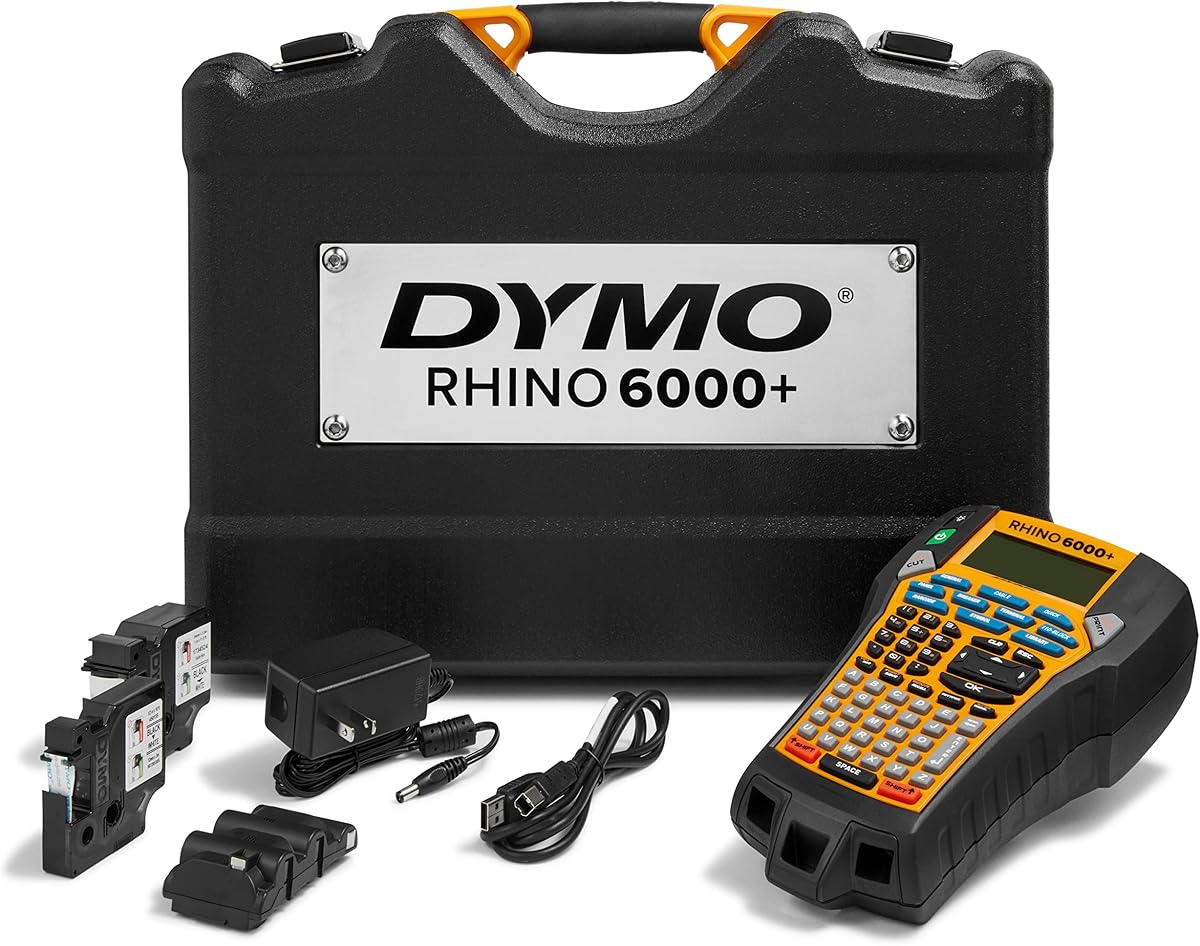
The DYMO Rhino 6000 is a high-end unit designed for complex label layouts. It connects to computers via software for advanced editing and batch printing.
We may earn a commission when you buy through this link, at no additional cost to you.
It includes a hard carry case and rechargeable battery for easy transport. The Hot Keys feature helps automate formatting for professional results quickly.
The interface is more complex than basic models so it may take time to learn. It is best suited for detailed projects like panel labeling.
Choose this device if you need advanced features and PC integration. It supports complex industrial tasks that simpler models cannot handle.
Connect to PC software to create complex label layouts and barcodes with greater control than standalone devices.
One-touch Hot Keys automatically size and space text simplifying the layout process for standard labels.
We may earn a commission when you buy through this link, at no additional cost to you.
The DYMO Rhino 5200 is a highly rated industrial unit known for its large display and high capacity. It offers five lines of text for detailed asset tags.
We may earn a commission when you buy through this link, at no additional cost to you.
It supports bar codes and features Hot Keys to automate formatting. The large backlit display makes it easy to read in dimly lit areas.
As an older model it may lack modern connectivity options like USB. However its proven reliability and high rating suggest it remains effective.
This device is ideal for warehouse or industrial tasks needing bulk info. It provides solid performance for labeling heavy equipment or racks.
Print up to five lines on a label allowing for comprehensive asset tags and detailed information on large items.
Print Code 39 and Code 128 bar codes on labels for improved tracking and asset management capabilities.
We may earn a commission when you buy through this link, at no additional cost to you.
This label maker offers a simple interface with a backlit screen for low-light areas. It includes waterproof tapes and multiple fonts for basic office needs.
We may earn a commission when you buy through this link, at no additional cost to you.
The three cable modes simplify common tasks like wrapping and flagging. It is easy to set up and use for home or office organization.
It lacks advanced features like PC software or high resolution. For complex network systems it may not be powerful enough to meet high standards.
This unit is good for simple labeling tasks in dry locations. It is a cost-effective solution for small-scale organization needs.
The LCD screen stays visible in low light situations making it easy to check text before printing.
Choose from 16 fonts and 100 frames to customize your labels for different environments and styles.
We may earn a commission when you buy through this link, at no additional cost to you.
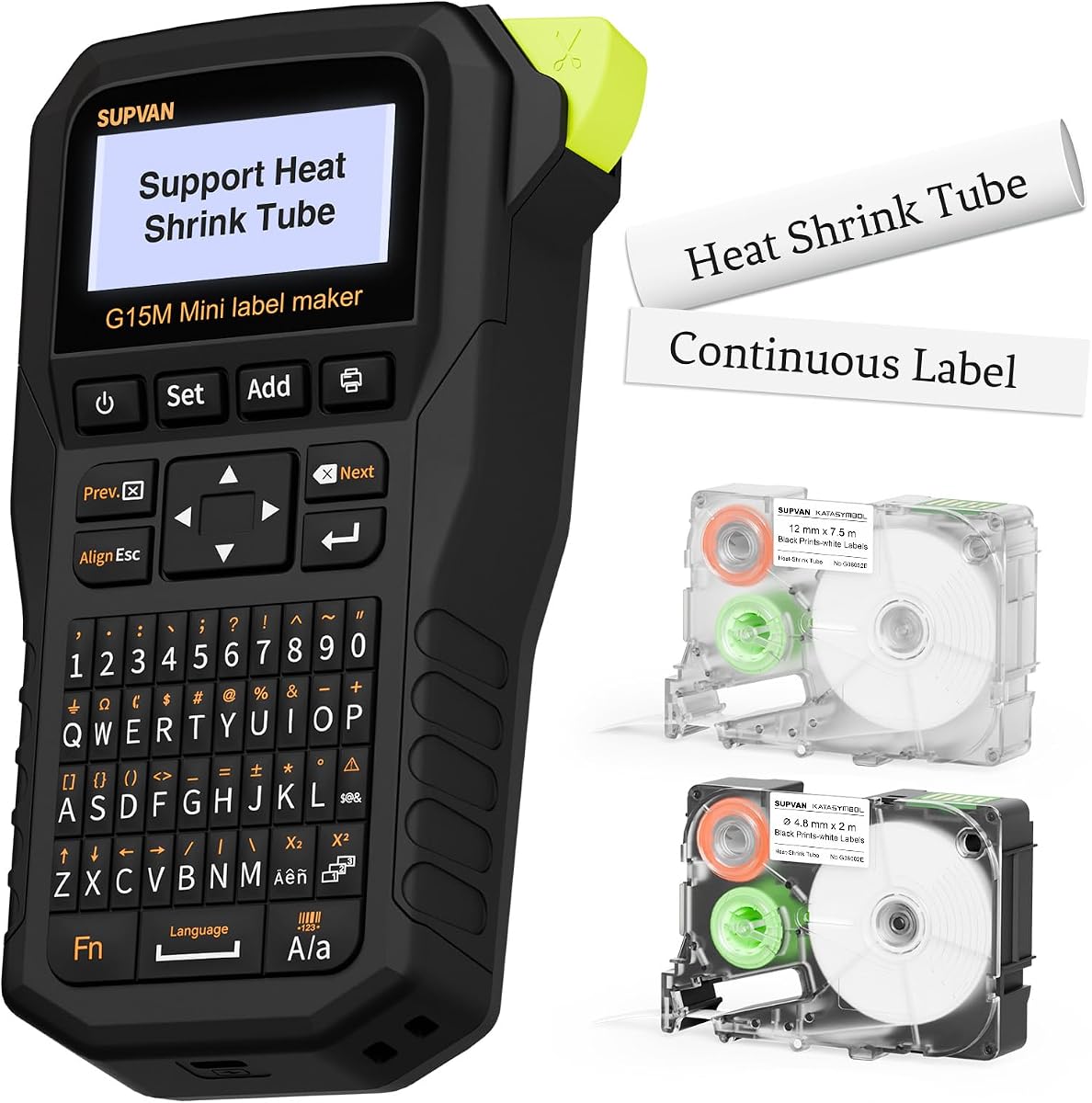
The SUPVAN G15M is a mini unit designed for portability. It supports heat shrink tubes and uses minimal margins to save material on every label.
We may earn a commission when you buy through this link, at no additional cost to you.
Its lightweight build and rechargeable battery make it easy to carry. The thermal transfer technology ensures labels last for ten years with high resistance.
The small size means limited features compared to larger industrial models. It is best for light tasks and tight spaces in offices or homes.
Choose this device if you need a compact and efficient tool. It offers good value for small labeling jobs.
Prints labels with just a 0.19 inch margin to save material and improve efficiency during long labeling sessions.
Features a built-in 1200 mAh rechargeable battery offering up to three months of use on a single charge.
We may earn a commission when you buy through this link, at no additional cost to you.
Choosing the right label maker requires balancing durability, print quality, and specific features for your network environment.
For network cables, clear text is critical for safety and maintenance. Look for devices with at least 200 DPI resolution to ensure barcodes and text remain legible over years of use. Thermal transfer technology often provides better durability than direct thermal for harsh environments.
Prioritize printers that offer sharp output with high DPI ratings to avoid unreadable labels.
Network cables vary in thickness so your label maker should support multiple widths such as 6mm and 12mm. Ensure the device can handle heat shrink tubes which are common in electrical work. Compatibility with self-laminating wraps is also essential for durability.
Verify that the printer supports the specific tape types required for your cables before purchasing.
In data centers and outdoor sites, labels face dust oil and moisture. Look for laminated or thermal transfer tapes that are oil-proof and UV resistant. A device built with sturdy materials will survive drops and vibration common on jobsites.
Choose models with industrial build quality to ensure labels last for ten years or more.
If you work in remote areas or large racks battery life is crucial. Rechargeable lithium-ion batteries offer convenience while models supporting AAA batteries provide easy replacement options. USB connectivity allows for continuous operation via power banks or laptops.
Select a device with power flexibility to avoid interruptions during long projects.
For professional IT work, compliance with ANSI and TIA/EIA standards is often required. These standards define color codes and labeling formats that prevent errors in complex systems. Check if the device includes templates for these standards.
Ensure the tool supports ANSI and TIA compliance to meet workplace safety requirements.
A clear LCD screen with preview functionality helps avoid printing errors. QWERTY keyboards speed up typing compared to multi-function buttons. Look for dedicated keys for common tasks like cable wraps to save time.
Opt for models with intuitive interfaces and preview screens to reduce waste.
Advanced models may offer Bluetooth or PC software integration for bulk data import. This is useful for large networks where labels are generated from a database. Consider if you need mobile app support for remote work.
Determine if computer connectivity is needed for your workflow to streamline labeling tasks.
Industrial tools often come with warranties ranging from one year to lifetime. A lifetime warranty offers peace of mind for expensive models. Check if technical support is available for software or hardware issues.
Look for devices with strong warranty coverage to protect your investment.
Insert the correct tape cartridge and align it properly within the device. Ensure the print head is clean by wiping it with a soft lint-free cloth if you notice blurry text.
Use the preview function before printing to check for spelling errors. This step saves material and ensures your labels are accurate before cutting.
Store your device in a cool dry place away from direct sunlight. Replace batteries or recharge regularly to prevent damage from leakage or low power.
The best label maker depends on your needs. The Makeid P31S is excellent for compliance and high resolution. The E1000 offers the best value for heat shrink needs. For premium features, the Epson LW-PX700 is highly recommended.
Heat shrink labels are more durable and resist water and abrasion. They are ideal for electrical and industrial environments. Tape labels are easier to apply for temporary or indoor tasks.
High-quality thermal transfer labels can last 10 years or more. Direct thermal labels fade faster in sunlight. Choose vinyl or heat shrink for long-term durability.
Most handheld makers work independently. However PC software is useful for bulk printing and complex layouts. Bluetooth models allow mobile apps to replace PC use.
For professional use, ANSI and TIA/EIA-606-A standards are common. They specify color and format for electrical and data systems. Check your local regulations.
Yes most devices support multiple widths like 6mm and 12mm. Ensure your model accepts the tape range you need. This allows flexibility for different cable sizes.
We explored ten top models ranging from budget-friendly to industrial-grade options. The Makeid P31S leads in compliance while the E1000 offers great value for heat shrink.
Prioritize durability and resolution for long-term performance. Ensure your device supports the tape types and standards required for your specific environment.
Check current availability and pricing before purchasing. These tools are essential for maintaining organized and safe network infrastructure.