
Yxk Zero1 2-Bay Desktop NAS
4.4Editor score
2.5GbE network speed
Docker support included
Private cloud access
This guide compares the top ten diskless NAS enclosure options for home and business use, highlighting features, performance, and value for secure storage
Choosing the right diskless NAS enclosure is essential for anyone seeking secure and scalable private storage without recurring cloud fees. These devices let you install your own drives to build a personalized network attached storage system that fits your specific needs and budget.
We evaluated ten leading diskless NAS enclosures based on performance, software features, connectivity options, and overall value. Our analysis considers hardware specs, supported operating systems, expansion capabilities, and user feedback to help you find the perfect fit for your data management workflow.
Each pick below shows key specifications, pros, cons, and detailed usage insights to guide your decision. Remember that prices and availability change frequently, so check current listings before purchasing to ensure you get the best deal for your specific storage requirements.
4.4Editor score

4.6Editor score

4.6Editor score
The following table provides a side-by-side comparison of all ten diskless NAS enclosure models reviewed in this guide. Use this overview to quickly identify key specifications, drive bay counts, and standout features for each product.




The Synology 2-Bay DiskStation DS223j stands out as the top pick for users seeking a reliable diskless NAS enclosure. With a 4.6-star rating, it offers a robust private cloud experience that ensures 100% data ownership and seamless multi-platform access from anywhere.
We may earn a commission when you buy through this link, at no additional cost to you.
Its standout quality lies in the comprehensive software ecosystem. The automated backup protection simplifies data safety for Macs, PCs, and mobile devices. Additionally, the built-in home security system allows you to record and monitor property 24/7 using multiple IP cameras with remote viewing capabilities.
While it lacks some advanced expandability options like RAM upgrades or native SSD caching, these trade-offs are acceptable for home and light office users. The hardware is backed by a 2-year warranty and Synology's expert customer support team, ensuring long-term reliability without complex maintenance.
This model is ideal for individuals or small teams who prioritize ease of use and security. If you want a plug-and-play diskless NAS enclosure that handles backups, media sharing, and surveillance without technical headaches, the DS223j is the recommended choice for most general storage needs.
Enjoy complete control over your files with end-to-end encryption and granular permission controls that keep your data safe from unauthorized access.
Set-and-forget backups ensure your important files are always protected across multiple destinations including cloud services and external drives without manual intervention.
We may earn a commission when you buy through this link, at no additional cost to you.
The Yxk Zero1 2-Bay Desktop NAS delivers exceptional value for those seeking an affordable diskless NAS enclosure without sacrificing core functionality. Rated at 4.4 stars, it is designed for beginners who crave simplicity in managing photos, videos, and files securely at home.
We may earn a commission when you buy through this link, at no additional cost to you.
Key strengths include blazing 2.5GbE speeds that transfer files in a flash and enable buffer-free 4K streaming. The device supports Docker for users ready to explore more advanced applications, all while maintaining a lightweight, whisper-quiet design that fits seamlessly into any room.
Trade-offs involve limited advanced enterprise features compared to premium rivals, but this is acceptable for personal home use. The one-time investment ensures lifelong storage freedom without recurring cloud subscription fees, putting you in complete control of your data growth.
This NAS is perfect for personal entertainment, photo backup, and worry-free data protection on a budget. If you need a compact diskless NAS enclosure that grows with your collection and offers remote access from any device, the Yxk Zero1 is a smart and economical choice.
Avoid recurring cloud subscription fees with a one-time purchase that puts you in full control of your data without monthly bills or storage limits imposed by others.
With 2.5GbE connectivity, your files transfer significantly faster than standard 1GbE networks, ensuring smooth 4K streaming and quick access to large media libraries.
We may earn a commission when you buy through this link, at no additional cost to you.
The UGREEN NAS DXP4800 GT is the premium choice for creators and tech enthusiasts needing powerful multitasking capabilities in a diskless NAS enclosure. With a 4.6-star rating, it handles backups, media processing, and Docker apps smoothly thanks to its AMD Ryzen Embedded R2514 processor.
We may earn a commission when you buy through this link, at no additional cost to you.
Its standout feature is the Dual 10GbE networking which delivers up to 2.5GB/s theoretical throughput for smoother large file transfers and efficient 4K/8K workflows. The UG Pro OS simplifies management while supporting virtual machines, SAN management, and a vast ecosystem of self-hosted applications.
While the price is higher and some apps like Plex require manual Docker setup, these are minor trade-offs for the hardware performance. The device supports up to 144TB total capacity, allowing you to store all your media, files, and security footage in one robust local platform.
Ideal for office teams or power users, this NAS offers local privacy with pro-grade security and flexible permissions. If you need a diskless NAS enclosure that combines speed, expandability, and advanced features for demanding workflows, the DXP4800 GT is the top-tier recommendation.
Dual 10GbE ports provide aggregate bandwidth up to 2.5GB/s theoretical throughput, enabling fast backups and seamless multi-user access for large file workflows.
Expand your NAS into a full media and service hub with support for Plex, Emby, Home Assistant, and virtual machines managed through the intuitive UGREEN NAS app.
We may earn a commission when you buy through this link, at no additional cost to you.
The TERRAMASTER D8 Hybrid 2 offers innovative storage flexibility for users needing massive capacity in a diskless NAS enclosure alternative. Rated 5.0 stars, it holds 4 SATA HDDs/SSDs and 4 M.2 NVMe SSDs simultaneously, supporting up to 152TB total storage in one compact unit.
We may earn a commission when you buy through this link, at no additional cost to you.
Its key strength is the hybrid design combining massive HDD capacity with high-speed SSD performance. The USB 3.2 Gen2 protocol delivers read speeds up to 1020 MB/s with single M.2 SSDs, making it ideal for video editing and efficient multitasking without waiting times.
Trade-offs include it being an external DAS rather than a full NAS with built-in OS, which requires third-party RAID software for management. However, the TPM power management technology optimizes efficiency and provides faster drive wake-up times for everyday workflows.
This enclosure is best for professionals who need flexible storage expansion and simpler file management. If you want a plug-and-play diskless enclosure that maximizes drive capacity and speed without complex setup, the D8 Hybrid 2 is a powerful tool for creative workflows.
Combine the massive capacity of HDDs with the high-speed performance of NVMe SSDs in one device for efficient storage management and faster data transfer.
TPM technology optimizes power efficiency and operational safety while offering one-touch switches between Power Save and Active modes for your workflow needs.
We may earn a commission when you buy through this link, at no additional cost to you.
The QNAP TR-004 serves as a robust external expansion option for users needing a diskless NAS enclosure alternative with hardware RAID. With a 4.2-star rating, it provides direct-attached storage via USB Type-C for Windows, macOS, and Linux systems effectively.
We may earn a commission when you buy through this link, at no additional cost to you.
Its main strength is the hardware RAID support for RAID 0, 1, 5, and JBOD, ensuring data safety without a full NAS OS. The lockable drive bays add physical security, making it suitable for expanding the capacity of existing QNAP NAS devices or serving as external storage backup.
Trade-offs include limitations where NAS applications cannot be installed and files may not be recognized if moved between certain devices. These are acceptable for users primarily needing extra storage volume rather than full network services, keeping the focus on simple, reliable external storage.
This unit is ideal for expanding existing QNAP systems or creating a secure external storage pool. If you need a diskless enclosure that offers hardware RAID and physical security for critical data, the TR-004 is a reliable and versatile choice for external needs.
Protect your data with hardware RAID support for RAID 0, 1, 5, and JBOD configurations without needing complex software setups or additional licenses.
Lockable drive bays prevent unauthorized access to your storage media, adding an extra layer of physical security for your valuable digital assets.
We may earn a commission when you buy through this link, at no additional cost to you.
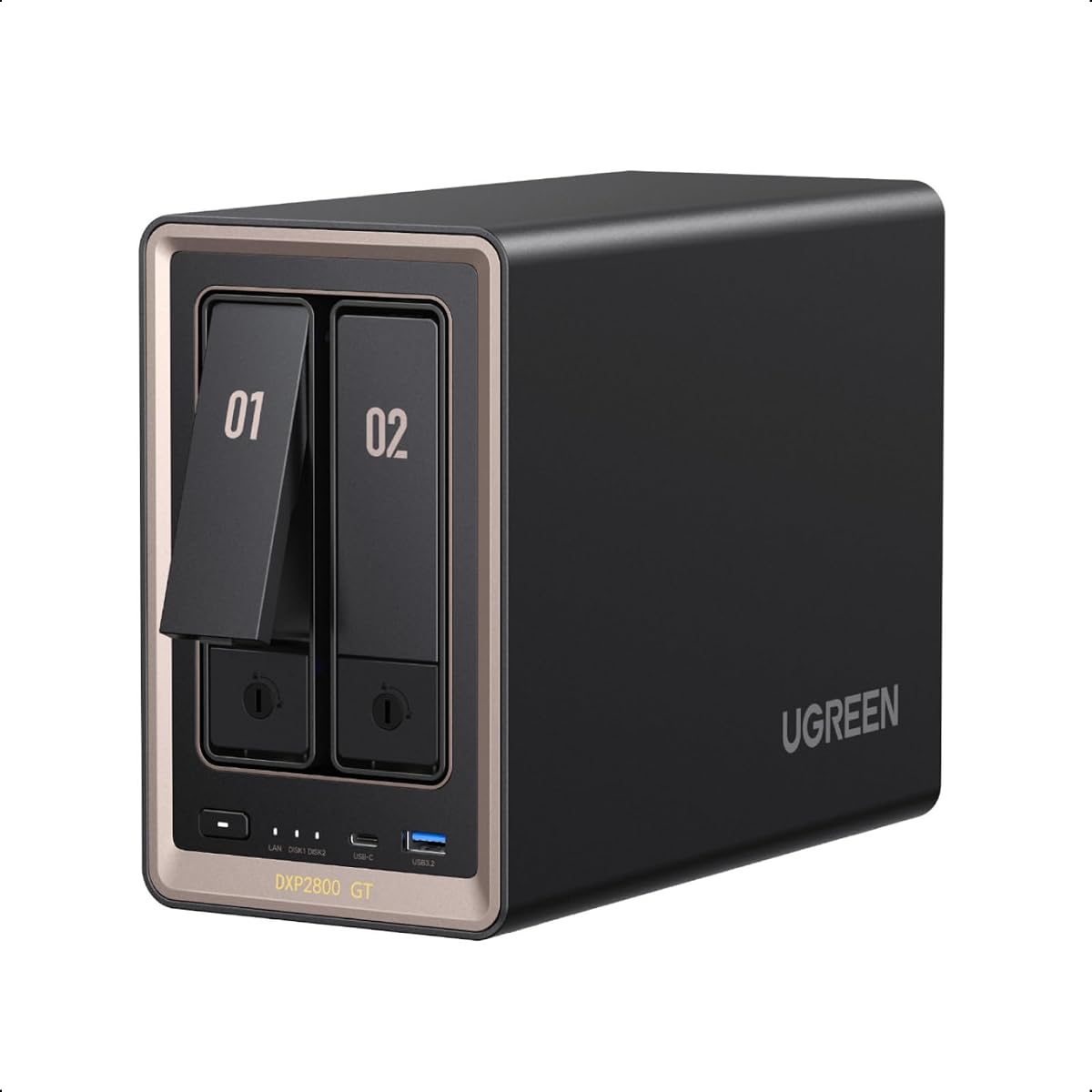
The UGREEN DXP2800 GT NAS is designed for freelancers and smart home enthusiasts needing speed in a diskless NAS enclosure. Rated 4.2 stars, it features AMD Ryzen Embedded processing and 10GbE networking to accelerate large workflows and multi-device access effortlessly.
We may earn a commission when you buy through this link, at no additional cost to you.
Key strengths include built-in surveillance center support for ONVIF/RTSP cameras and a local privacy focus with AES and TLS encryption. The UG Pro interface manages file organization, backup, and Docker apps easily, ensuring your important data stays safe from cloud subscription fees.
Trade-offs involve having fewer drive bays compared to larger models, limiting total capacity potential. However, with up to 80TB total capacity including SSD expansion, it remains sufficient for most personal and small creative projects without unnecessary complexity.
Ideal for creators building a fast home cloud, this unit balances performance and usability. If you need a diskless NAS enclosure that prioritizes local privacy and quick data access for heavy workflows, the DXP2800 GT is a strong recommendation for freelancers.
10GbE networking accelerates large photo libraries and media streaming, ensuring creators and freelancers spend less time waiting on file transfers.
Keep your data private by storing it locally with multi-layer encryption technologies that secure your documents and backups from unauthorized access.
We may earn a commission when you buy through this link, at no additional cost to you.
The Synology DS925+ is a robust diskless NAS enclosure tailored for small business environments needing reliable performance. With a 4.2-star rating, it supports up to 522/565 MB/s sequential throughput and offers dual 2.5GbE ports for fast network transfer speeds and increased redundancy.
We may earn a commission when you buy through this link, at no additional cost to you.
Its strengths include built-in file and photo management alongside virtualization and surveillance solutions. The 3-year limited hardware warranty and Synology's expert support team ensure businesses can rely on continuous operation and quick resolution for any technical challenges.
Trade-offs include higher pricing and limited RAM upgrade flexibility compared to some competitors. These are acceptable for users prioritizing stability and seamless integration into existing office workflows where consistent performance matters more than maximum expandability.
This model is ideal for small teams needing secure document storage and media handling. If you need a diskless NAS enclosure that balances reliability, speed, and professional support, the DS925+ is a trustworthy choice for growing business needs.
Backed by a 3-year limited hardware warranty and expert support, the DS925+ ensures your business data remains secure and available when you need it most.
Dual 2.5GbE ports provide fast network transfer speeds and increased redundancy, keeping your workflow smooth even if one connection fails.
We may earn a commission when you buy through this link, at no additional cost to you.
The Synology DS425+ is a premium diskless NAS enclosure designed as a private cloud media server for advanced users. With a 4.6-star rating, it supports concurrent access from 10+ users and offers granular access controls for secure file sharing across offices or teams.
We may earn a commission when you buy through this link, at no additional cost to you.
Its strengths include a professional surveillance system supporting up to 30 IP cameras and multi-layered data protection with RAID redundancy and snapshots. The centralized repository makes it easy to store company documents and media assets securely with audit logs for accountability.
Trade-offs involve higher costs and a learning curve for advanced features, which are acceptable for business-critical production environments. The 3-year warranty and dedicated technical account management ensure enterprise-level reliability without frequent disruptions or data loss risks.
Ideal for offices needing robust media streaming and document management, this unit delivers. security. If you need a diskless NAS enclosure that handles team productivity and media sharing efficiently, the DS425+ is the top choice for enterprise-grade needs.
Share large files and stream media across your office with high speeds and concurrent access from 10+ users keeping teams on the same page.
Monitor home or business with support for 30 IP cameras, motion detection, and secure remote access from a single centralized platform.
We may earn a commission when you buy through this link, at no additional cost to you.
The Synology DX515 is the best diskless expansion unit for existing Synology DiskStation owners needing more capacity. With a 4.6-star rating, it adds five additional 3.5-inch or 2.5-inch SATA HDD/SSD bays to your current setup seamlessly without complex configuration.
We may earn a commission when you buy through this link, at no additional cost to you.
Its strengths include plug-and-play compatibility and support for hot-swapping drives, allowing you to configure new storage in minutes using DSM's unified tools. The 3-year limited hardware warranty ensures your investment is protected alongside your main NAS unit with consistent support.
Trade-offs include it requiring a compatible Synology NAS to operate, so it is not a standalone solution. This is acceptable for users already invested in the DSM ecosystem who need simple, reliable storage expansion without changing their existing hardware.
Ideal for growing data needs, this unit lets you add storage as your collection grows. If you need a diskless NAS enclosure that expands your existing Synology system efficiently, the DX515 is the perfect companion for seamless capacity scaling.
Add five additional drive bays to your DiskStation with plug-and-play compatibility, letting you expand capacity without disrupting your workflow or settings.
Support for hot-swapping drives lets you replace or add storage without powering down your system, ensuring minimal downtime for your data access.
We may earn a commission when you buy through this link, at no additional cost to you.
The TrueNAS Mini X+ is a compact enterprise-grade diskless NAS enclosure offering advanced ZFS storage capabilities. With a 4.3-star rating, it features 32GB ECC RAM and an 8-Core CPU for reliable performance in small office or home applications needing robust data protection.
We may earn a commission when you buy through this link, at no additional cost to you.
Its key strength is the self-healing ZFS filesystem that protects data from corruption and ransomware attacks with snapshots. The dual 1/10GbE ports ensure high-speed networking, while Remote Management (IPMI) allows for off-site administrative control for seamless maintenance.
Trade-offs include a high price point and a complex OS learning curve that may challenge casual users. These are acceptable for SMBs prioritizing data integrity and long-term reliability, making the investment worth it for critical business operations.
Ideal for file sharing and multimedia processing, this unit scales well for development and virtualization. If you need a diskless NAS enclosure with professional-grade features and superior data protection, the TrueNAS Mini X+ is the top-tier choice for demanding environments.
Protected by the self-healing ZFS filesystem, your data remains safe from corruption and ransomware attacks with error protection and snapshot technologies.
Remote IPMI management allows administrators to monitor and maintain the server from anywhere, ensuring uptime even when you are off-site.
We may earn a commission when you buy through this link, at no additional cost to you.
Selecting the right diskless NAS enclosure involves balancing performance, capacity, and software needs. Consider these key factors to match a device to your specific storage and usage goals.
Drive bay configuration determines how many physical drives you can install and manage in your NAS. For most users, a 2-Bay setup offers a balance of capacity and redundancy, while 4-Bay or larger units provide scalable growth for heavy data needs.
Ensure the unit supports the drive sizes you plan to use and check hot-swap capabilities if you anticipate frequent maintenance or upgrades.
Network performance affects how fast you can transfer files and access data remotely. Look for models with at least 1GbE ports, but consider 2.5GbE or 10GbE options if you work with large media files or multiple users.
Higher speeds reduce latency during backups and streaming, making your workflow more efficient.
The software ecosystem defines the features available for managing, sharing, and protecting your data. Systems like Synology DSM or UG Pro offer user-friendly interfaces, automated backups, and app stores that extend functionality without coding.
Choose a platform that matches your comfort level and provides the tools you need like surveillance support or virtualization.
Expandability and RAM determine how much you can upgrade your NAS over time. Check if the unit allows memory upgrades to run more apps or virtual machines comfortably.
Units with upgrade options extend the lifespan of your investment as your data and performance needs grow.
Data protection features like RAID support, snapshots, and encryption keep your files safe from loss or theft. Hardware RAID adds physical redundancy while snapshots allow quick recovery from accidental deletions.
Prioritize units that offer these protections to ensure peace of mind for your valuable digital assets.
Physical design and noise levels matter if the NAS will sit in a living space or office. Look for compact, whisper-quiet designs with good thermal control to avoid distractions.
Efficient airflow systems maintain performance without excessive fan noise, ensuring comfort during daily use.
Warranty and support options ensure you have help when things go wrong. Most reputable brands offer 2 to 3-year warranties and accessible customer service channels.
Strong support networks save time and money by resolving hardware issues quickly and keeping your data accessible.
Budget and value help you avoid overpaying for features you won't use. Compare initial costs against long-term savings from avoiding cloud subscriptions or needing replacements sooner.
Investing in a slightly higher priced unit with better durability and features often pays off over years of reliable service.
Begin by installing compatible hard drives or SSDs into the drive bays securely before powering on the unit. Follow the manufacturer's guided setup wizard to connect to your network and configure basic settings like admin accounts and storage pools.
Regularly update the NAS operating system to ensure security patches and new features are available. Use built-in tools to schedule automatic backups of your important files to cloud services or external drives for added redundancy.
Keep the device in a well-ventilated area to maintain optimal temperatures and extend hardware life. Monitor system health alerts and drive status periodically to catch any potential issues before they affect your data availability.
A diskless NAS enclosure is a network storage device sold without pre-installed hard drives. You purchase and install your own drives to customize capacity and performance, giving you full control over your storage hardware and avoiding unnecessary initial costs.
Not all drives are designed for NAS use. It is recommended to use NAS-rated drives like WD Red or Seagate IronWolf which are built for 24/7 operation and vibration resistance. Always check the manufacturer's compatibility list before purchasing drives.
Most modern NAS enclosures offer user-friendly setup wizards that guide beginners through installation and configuration. While some advanced features may require technical knowledge, basic file sharing and backup functions are easy to manage without extensive training.
You can access NAS files remotely using the manufacturer's dedicated mobile app or web portal after configuring remote access settings. Many systems offer secure tunneling methods that let you connect from anywhere without exposing your network to public vulnerabilities.
RAID is not strictly necessary but highly recommended for data protection. It provides redundancy so if one drive fails, your data remains safe. For critical files, RAID 1 or RAID 5 setups offer a good balance of safety and usable storage space.
NAS-rated drives typically last five years or more under normal conditions. Lifespan depends on usage intensity and environmental factors like temperature and ventilation. Monitoring drive health with SMART tools helps predict failures before they occur.
Yes, many NAS enclosures support storage expansion by adding more drives or connecting expansion units. Check if your model supports hot-swapping drive online growth without powering down or using expansion boxes for additional bays.
Yes, modern diskless NAS enclosures include built-in security features like encryption, firewall protection, and secure remote access protocols. Proper configuration and regular system updates ensure your data remains protected from unauthorized access and cyber threats.
We reviewed ten top diskless NAS enclosure models ranging from budget-friendly options to high-end enterprise solutions. The Synology DS223j offers the best all-around value for most users while the UGREEN DXP4800 GT excels for power users needing speed and expandability.
Prioritize your specific needs like network speed, drive capacity, and software features when making your final decision. A unit that matches your current workflow and future growth plans will deliver the most satisfaction and return on your investment.
Remember that prices and availability fluctuate so always check current listings before buying. With the right choice, you can build a secure and efficient storage system that serves you well for years without reliance on expensive cloud services.