
Brother DCP-L2640DW
4.1Editor score
Compact monochrome design
Fast wireless printing speeds
Mobile app connectivity support
This guide compares the top copier machine for business options to help you find the right multifunction device for your office needs.
Finding the right copier machine for business is essential for maintaining productivity and professional document quality. Modern offices require reliable devices that handle printing, scanning, and copying efficiently without constant downtime or maintenance issues.
We evaluated ten top-rated models based on speed, connectivity, security features, and overall value. Our analysis covers compact units for small teams and robust systems designed for high-volume daily operations across various business environments.
Each pick highlights specific strengths like cost efficiency or advanced scanning capabilities. Keep in mind that pricing and availability fluctuate frequently so verify current deals before making your final purchase decision for your workspace.
4.1Editor score

4.5Editor score
4.4Editor score
The following table provides a quick side-by-side overview of the ten best business copiers available this month helping you compare key specifications at a glance.


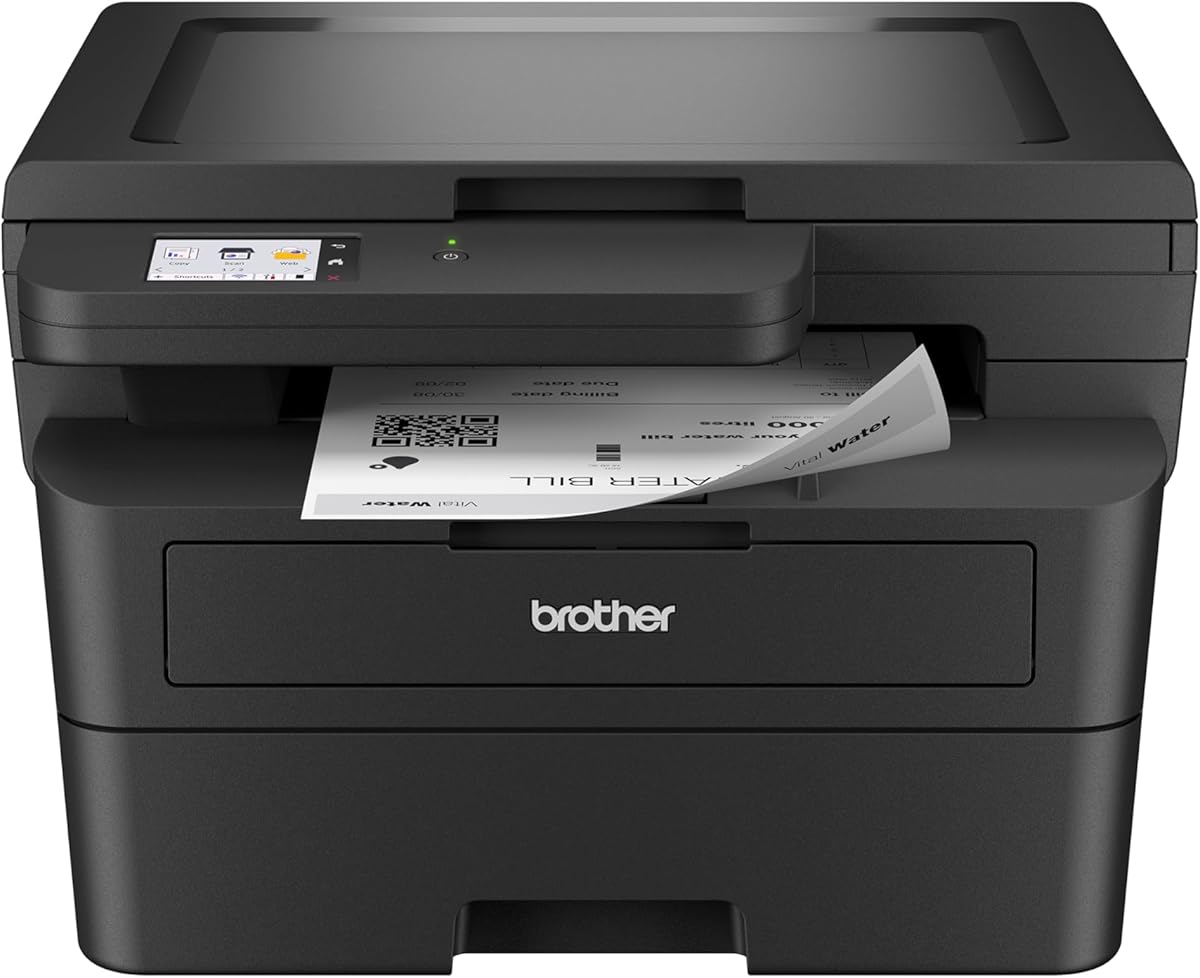
The Brother DCP-L2640DW stands out as an excellent entry-level copier machine for business environments needing reliable monochrome printing. It holds a solid rating from users who appreciate its speed and compact design for smaller workspaces.
We may earn a commission when you buy through this link, at no additional cost to you.
Its standout qualities include impressive print speeds of up to thirty-six pages per minute and efficient scanning capabilities. The built-in dual-band wireless ensures stable connections while the Brother Mobile Connect app simplifies remote management and supply tracking.
Honest trade-offs involve the lack of color printing and fax functions which might limit larger organizations requiring more comprehensive document handling. However these limitations are acceptable for teams prioritizing core print and scan efficiency over additional features.
Business owners seeking a cost-effective solution for daily document needs should strongly consider this model. It delivers professional quality black and white prints while maintaining low operational costs through genuine toner compatibility and optional subscription services.
The fifty-page auto document feeder allows for quick multi-page scanning saving valuable time during busy workdays.
Using Brother Genuine Toner ensures consistent quality while the refresh subscription service can significantly reduce long-term supply expenses.
We may earn a commission when you buy through this link, at no additional cost to you.
The Brother MFC-L5915DW earns our Editor's Choice award for its exceptional speed and robust build quality suited for demanding office environments. Users praise its ability to handle high-volume tasks without compromising on document clarity or consistency.
We may earn a commission when you buy through this link, at no additional cost to you.
Key strengths include a blazing fifty pages per minute print speed and a seventy-page auto document feeder that supports single-pass two-sided scanning. The gigabit Ethernet ensures reliable network performance while high-yield toner options help minimize recurring supply costs.
While the initial investment is higher than budget models the productivity gains justify the cost for active teams. The larger footprint requires dedicated space but this trade-off is necessary for the enhanced paper handling and network capabilities it provides.
Medium to large businesses needing rapid document processing will find this copier machine for business ideal. Its reliable performance ensures workflows remain uninterrupted even during peak usage times throughout the workday.
The high-speed scanning and printing capabilities significantly reduce wait times allowing staff to focus on core tasks.
Ultra high-yield toner cartridges extend replacement intervals helping organizations control long-term operational expenses effectively.
We may earn a commission when you buy through this link, at no additional cost to you.
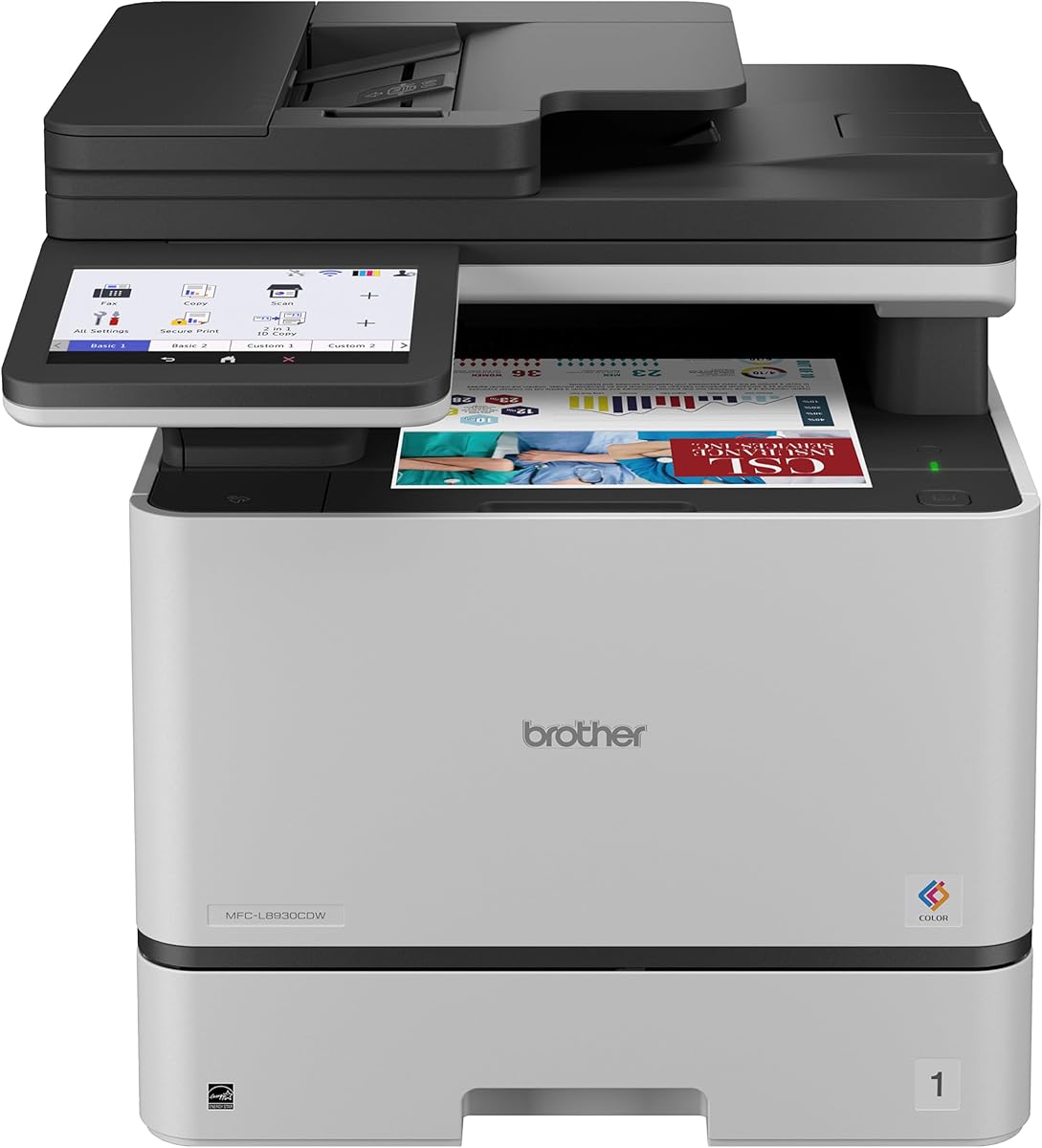
The Brother MFC-L8930CDW represents the premium tier of copier machines for business offering professional color output and enterprise-grade security features. Its modern design and intuitive touchscreen make it a favorite among organizations needing versatile document handling capabilities.
We may earn a commission when you buy through this link, at no additional cost to you.
This model excels with sharp color prints and fast two-sided scanning up to one hundred four pages per minute. Triple Layer Security protects sensitive data during transit while the seven-inch color touchscreen simplifies navigation and allows for up to sixty-four customized shortcuts.
Potential trade-offs include higher operational costs for color toner and a potentially complex initial setup compared to simpler models. However these are acceptable for businesses requiring secure and high-quality color printing for client-facing documents.
Enterprises prioritizing security and professional presentation should choose this device. Its advanced features ensure that sensitive information remains protected while delivering vibrant and clear color prints for marketing and reporting needs.
Integrated NFC card readers and advanced encryption keep your network and printed documents secure from unauthorized access.
The customizable touchscreen shortcuts streamline frequent tasks reducing the time spent navigating menus for common operations.
We may earn a commission when you buy through this link, at no additional cost to you.
The Brother MFC-L3720CDW offers a balanced mix of color printing and fax capabilities at an accessible price point. It appeals to small teams needing all-in-one functionality without investing in enterprise-level hardware or complex configurations.
We may earn a commission when you buy through this link, at no additional cost to you.
Key strengths include a three point five inch color touchscreen with customizable shortcuts and direct access to popular cloud services like Google Drive and Dropbox. The fifty-sheet auto document feeder and dual-band wireless ensure versatile connectivity and efficient workflow integration.
Slower print speeds compared to monochrome models may feel limiting for high-volume black and white tasks. This trade-off is acceptable if color printing is a regular requirement for your team alongside basic scanning and faxing needs.
Small businesses needing reliable color output and fax support will find this unit suitable. Its intuitive interface and smart integration features help maintain productivity even when staff members have limited technical expertise.
Direct access to cloud services allows seamless document management and sharing across your digital workspace environment.
Remote access capabilities via the companion app enable monitoring and managing print jobs from anywhere at any time.
We may earn a commission when you buy through this link, at no additional cost to you.
The HP LaserJet Pro MFP 3101sdw is a top choice for small teams needing dependable professional quality black and white documents. It consistently receives high praise for its reliability and ease of use in everyday office environments.
We may earn a commission when you buy through this link, at no additional cost to you.
Its standout qualities include impressive print speeds of up to thirty-five pages per minute and a dependable intelligent Wi-Fi connection that actively searches for the best network signal. The award-winning reliability ensures the device is always ready for high business demands.
Users note that the printer is designed to work only with cartridges containing HP chips which limits third-party toner options. While this may increase costs for some the consistent quality and reliability often outweigh this limitation for small businesses.
Small teams prioritizing consistent performance and professional output should consider this model. It provides a straightforward and effective solution for daily printing scanning and copying needs without requiring complex technical oversight.
The proven track record ensures the printer remains operational even during peak usage times without frequent interruptions.
Sharp text and clear graphics make every document look polished and ready for client or internal distribution.
We may earn a commission when you buy through this link, at no additional cost to you.
The Canon Color imageCLASS MF753Cdw II provides a comprehensive 4-in-1 printing scanning copying and faxing solution for modern offices. It is designed to handle color duplex printing efficiently making it a versatile addition to any business workspace.
We may earn a commission when you buy through this link, at no additional cost to you.
Key strengths include wireless connectivity that allows multiple users to share the device easily and duplex printing capabilities that reduce paper waste. Canon's reputation for quality ensures that the output remains consistent across various document types and sizes.
Detailed specifications like exact print speeds are not fully provided in the available data which might make comparisons slightly challenging. However the robust feature set suggests it performs well for general office tasks requiring both color and monochrome output.
Organizations needing a full suite of document tools in one device will find this unit practical. It balances functionality with ease of use making it suitable for teams requiring flexible and efficient document handling capabilities.
Combining print scan copy and fax into one unit saves space and simplifies device management for smaller offices.
Automatic duplex printing helps reduce paper consumption supporting sustainability goals while lowering operational material costs.
We may earn a commission when you buy through this link, at no additional cost to you.
The HP LaserJet Pro MFP 3101fdw is tailored for offices requiring secure and fast black and white document processing. It includes HP Wolf Pro Security which allows customizable settings to protect both the device and sensitive business information.
We may earn a commission when you buy through this link, at no additional cost to you.
Key strengths include rapid print speeds of up to thirty-five pages per minute and versatile connectivity options including Bluetooth and Ethernet. The intelligent Wi-Fi ensures stable network performance while the auto document feeder speeds up scanning tasks for busy teams.
The focus on security may require initial setup time to configure settings to match organizational policies. However this investment is worthwhile for businesses handling confidential data that must remain protected from unauthorized access or network threats.
Small teams needing reliable security and fax capabilities will find this copier machine for business ideal. It offers a solid balance of speed protection and ease of use for daily operational requirements.
Customizable security settings ensure your information stays safe during printing scanning and network transmission processes.
Support for Bluetooth and Ethernet provides flexible connection choices ensuring compatibility with diverse office setups.
We may earn a commission when you buy through this link, at no additional cost to you.
The Canon imageCLASS MF462dw II delivers fast and efficient monochrome printing suitable for offices focused on high-volume text documents. Its five-inch color touchscreen provides intuitive access to features and simplifies daily operations for users.
We may earn a commission when you buy through this link, at no additional cost to you.
Key strengths include a print speed of up to thirty-seven pages per minute and an expandable paper capacity that supports growing needs. The high-capacity toner reduces replacement frequency while the duplex ADF saves time during scanning and copying tasks.
The device lacks color printing capabilities which might limit teams needing vibrant marketing materials or color-coded documents. However for businesses focused on reports and contracts the speed and efficiency of this model make it a strong candidate.
Small offices prioritizing speed and ease of use should consider this copier machine for business. Its expandable features ensure it can adapt as your printing demands grow over time.
The large color touchscreen makes navigating settings and printing jobs simple for users of all technical skill levels.
Optional paper cassettes allow you to increase paper capacity to match rising office workload requirements effectively.
We may earn a commission when you buy through this link, at no additional cost to you.
The HP LaserJet Pro MFP 4101fdw offers blazing fast print speeds of up to forty-two pages per minute making it one of the fastest options available for business use. It maintains HP's reputation for reliability while adding robust security features.
We may earn a commission when you buy through this link, at no additional cost to you.
Key strengths include HP Wolf Pro Security with customizable settings and versatile connectivity options like Ethernet and Bluetooth. The device works seamlessly with various platforms including Windows Mac and Android ensuring broad compatibility across different office systems.
While it is a higher cost model the speed and security features provide significant value for time-sensitive business environments. The limitation to black and white output is acceptable for teams prioritizing efficiency and document security over color printing.
Large teams or busy offices needing rapid document processing should consider this copier machine for business. Its performance ensures that printing tasks are completed quickly keeping workflows moving smoothly throughout the day.
The high print speed minimizes wait times allowing teams to complete large document tasks rapidly and efficiently.
Integrated security solutions keep your business information safe from potential digital threats during print processes.
We may earn a commission when you buy through this link, at no additional cost to you.
The Brother HL-L2480DW is engineered for efficiency and compact workspaces making it perfect for small offices or home setups. It combines laser printing scanning and copying in a small footprint while supporting voice commands via Alexa.
We may earn a commission when you buy through this link, at no additional cost to you.
Key strengths include fast print speeds of up to thirty-six pages per minute and intuitive cloud integration allowing easy access to apps like Google Drive and Dropbox. The mobile connect app ensures you can manage the device from anywhere at any time.
The compact size means a smaller paper tray which may require frequent refills during high-volume usage periods. This trade-off is acceptable for smaller teams with limited space who prioritize convenience and speed over large paper capacity.
Small businesses seeking a space-saving solution with smart features will find this copier machine for business ideal. Its compact design and modern connectivity options make it a flexible tool for evolving work environments.
Voice assistant integration allows for hands-free printing commands simplifying tasks for busy professionals.
Direct cloud app access streamlines document retrieval and storage enhancing overall workflow efficiency.
We may earn a commission when you buy through this link, at no additional cost to you.
Selecting the right business copier requires evaluating several key factors to ensure the device meets your specific operational needs and budget constraints effectively.
Print speed measured in pages per minute directly impacts how quickly your team can complete documents. For high-volume offices consider models offering at least forty pages per minute to avoid bottlenecks during peak hours.
Choose a machine that matches your average daily print volume to ensure consistent performance without overheating or mechanical stress over time.
Modern businesses need versatile connectivity including dual-band wireless gigabit Ethernet and Bluetooth to support multiple devices and users simultaneously. Ensure the copier supports mobile printing protocols like AirPrint or Mopria for ease of use.
Look for cloud integration capabilities that allow seamless printing from popular services to enhance remote work flexibility and efficiency.
Protecting sensitive business data requires advanced security features such as encryption user authentication and secure print release. Devices with integrated security suites help prevent unauthorized access and data breaches.
Verify that the model supports regular firmware updates to maintain protection against emerging digital threats and vulnerabilities.
Evaluate the cost per page including toner cartridge prices and yield capacities before making a purchase. High-yield cartridges may have a higher upfront cost but often save money over the long term.
Check if the copier supports subscription services or generic toner options to further reduce ongoing supply expenses for your budget.
Consider the available floor space in your office and choose a model with a footprint that fits comfortably. Compact designs are ideal for smaller workspaces while larger units may offer better paper handling and paper capacity.
Ensure the device has adequate paper trays and an auto document feeder to minimize manual refilling and scanning interruptions.
Decide whether you need just printing and copying or additional features like faxing color printing and advanced scanning options. Multifunction devices consolidate tasks into one unit reducing clutter and simplifying maintenance.
Ensure the scanner supports two-sided and high-resolution scanning if you frequently handle large or detailed documents for archival.
Review the manufacturer warranty and available service plans to understand how issues will be handled if problems arise. Extended warranties can provide peace of mind for heavy-use environments where downtime is costly.
Check customer support availability and the reputation of the brand for responsive service and easy access to technical assistance.
A clear intuitive touchscreen with customizable shortcuts helps staff complete tasks quickly without extensive training. Look for models with simple menus and helpful guidance for common print and scan operations.
Prioritize ease of use to reduce the learning curve for new employees and minimize errors during daily operations.
Start by placing the device on a flat stable surface away from direct sunlight and dust sources to maintain internal component longevity and print quality.
Always use recommended toner cartridges and paper types to avoid jams and ensure consistent output quality across all documents and jobs.
Regularly clean the scanner glass and rollers to prevent smudges and streaks and run diagnostic tools periodically to catch minor issues early.
Businesses should prioritize print speed for productivity connectivity options for flexibility security features for data protection and cost per page for long-term budgeting. Choosing a model that balances these elements ensures efficient operations and minimal downtime.
Wireless connectivity allows multiple users to print from laptops and mobile devices without being tethered to a single computer. This flexibility enhances workflow efficiency and supports modern remote or hybrid work environments.
Replacement frequency depends on your monthly print volume and the cartridge yield. High-yield toners can last for thousands of pages so monitor usage levels and order replacements before running out to avoid workflow interruptions.
Color copiers are worth it if your business requires branded marketing materials or color-coded documents regularly. For offices needing only text documents monochrome models provide better value with lower ongoing costs.
Essential security features include user authentication secure print release and data encryption to protect sensitive information. Look for models with built-in protection suites and regular firmware update support to keep devices safe.
While some brands allow third-party toners others may restrict them with chip detection. Always check manufacturer policies before purchasing alternatives to ensure compatibility and avoid voiding warranties or causing errors.
Duplex printing automatically prints on both sides of the paper reducing paper usage by half and saving costs. This feature streamlines tasks and reduces the manual effort required to re-feed paper for two-sided documents.
A printer mainly receives data from computers to produce hard copies while a copier machine scans physical documents directly. Most modern business copiers are multifunction devices that combine both printing and scanning capabilities.
We recommend the HP LaserJet Pro MFP 3101sdw for small teams needing reliability and the Brother MFC-L8930CDW for enterprises requiring security and color output.
Prioritize speed and connectivity for high-volume workflows or security and toner costs for sensitive or budget-conscious environments to ensure the best long-term value.
Always check current prices and availability before purchasing since deals change frequently and stock levels vary by retailer and region.