
JOYO Guitar Audio Interface
4.2Editor score
Zero latency direct monitoring
Pocket sized portable design
Plug and play connectivity
This guide compares the top audio interfaces for guitar including features like latency, connectivity, and sound quality to help you choose the right recording
Finding the right audio interface for guitar is crucial for capturing high-quality recordings whether you are a beginner or a professional musician. These devices convert your instrument analog signals into digital data that your computer can process for recording and mixing.
We have evaluated ten top-rated audio interfaces based on sound quality, connectivity options, ease of use, and value. Our comparison covers portable solutions for mobile recording as well as robust desktop units designed for home studios.
Each selection highlights specific strengths such as low latency monitoring, high-resolution conversion, and included software bundles. Please note that prices and availability may change so check the latest offers before making your purchase decision.
4.2Editor score
4.6Editor score

4.5Editor score
The following table provides a side by side overview of key specifications for each interface to help you quickly identify the model that best fits your recording needs and budget constraints.



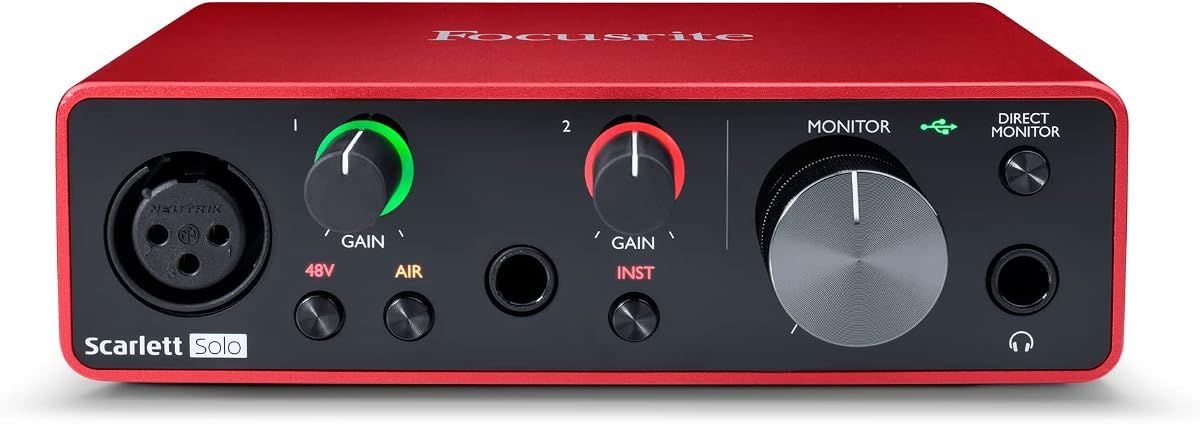
The Focusrite Scarlett Solo 3rd Gen stands out as the top choice for guitarists seeking studio quality sound at an accessible price point. With a high rating and years of industry trust it delivers pristine recordings for both vocals and instruments.
We may earn a commission when you buy through this link, at no additional cost to you.
Its high performance mic preamps offer plenty of headroom for high gain guitar signals without unwanted noise. The switchable Air mode adds extra clarity to acoustic instruments making it versatile for different recording scenarios.
While it is limited to two inputs which may not suit large band recordings the included software like Pro Tools Intro provides a robust starting point. The Gain Halo feature ensures you never clip your audio recording clean takes every time.
This interface is ideal for solo artists and home studio enthusiasts who value reliability and sound quality. It provides all the tools needed to start recording professionally right away with excellent build quality.
The Scarlett 3rd Gen preamps are designed to capture detailed audio with low noise ensuring your guitar tone remains true to source.
Included plugins and DAWs allow you to produce complete tracks immediately without needing additional purchases or downloads.
We may earn a commission when you buy through this link, at no additional cost to you.
The JOYO MOMIX CAB is a tiny powerhouse designed for mobile recording on the go. It allows guitarists to record directly to their smartphones without needing a laptop or complex drivers making it perfect for quick sessions.
We may earn a commission when you buy through this link, at no additional cost to you.
Direct monitoring ensures you hear your guitar instantly with zero latency which is essential for practicing with backing tracks or live streaming. The signal indicator lights help you adjust levels to avoid distortion during use.
While it cannot process real-time software effects it excels at capturing dry tracks for later editing. The included cables ensure wide compatibility with iPhone and select Android devices for seamless connection.
This is the ideal choice for beginners or travelers who need a reliable way to capture ideas. Its small size and low cost make it an essential tool for any guitarist on a budget.
Attach the interface to your pocket or strap to record inspiration anywhere without carrying heavy equipment to your phone.
Connect and start recording immediately as no software installation or external power is required for operation.
We may earn a commission when you buy through this link, at no additional cost to you.
The Fender Quantum HD 2 represents the pinnacle of home recording technology with professional grade specs designed for serious musicians. Its high-fidelity converters capture every nuance of your guitar tone for pristine playback and mixing.
We may earn a commission when you buy through this link, at no additional cost to you.
Built-in Max-HD preamps provide crystal clear gain while the Auto Gain feature simplifies setup for fast sessions. The included Fender Studio Pro software offers a complete suite of tools for recording mixing and mastering.
Although it comes with a higher price tag the expandability via ADAT and the quality of the included gear justify the investment. Dual re-amp outputs allow for advanced tone shaping with external pedals and amplifiers.
This interface is best suited for prosumers and studio owners who demand the best quality. It offers future proof features that will serve growing studios and advanced production needs effectively.
With 32-bit/192 kHz converters you achieve studio grade clarity that rivals high-end professional recording facilities.
Seamlessly integrates with Fender amplifiers and effects to provide an authentic tone experience from input to output.
We may earn a commission when you buy through this link, at no additional cost to you.
The M-AUDIO M-Track Duo is a versatile interface for recording guitar and vocals simultaneously with two combo inputs. Its Crystal preamps ensure optimal sound quality for both dynamic and condenser microphones.
We may earn a commission when you buy through this link, at no additional cost to you.
The USB/Direct switch allows for zero latency monitoring which is critical for live performance and comfortable recording sessions. It is compatible with Mac and PC providing flexible connectivity for various studio setups.
While the audio resolution is limited to 48kHz it is sufficient for most music and podcast production needs. The included MPC Beats software adds value for those interested in beat making and production tasks.
This interface is a solid mid-range option for creators needing more than one input without breaking the bank. It balances affordability with performance features that support diverse recording scenarios.
Record a guitar and a microphone at the same time with independent gain controls and high impedance inputs.
The USB power and direct monitoring ensure reliable operation during critical recording tasks without audio dropouts.
We may earn a commission when you buy through this link, at no additional cost to you.
The IK Multimedia iRig USB is engineered for musicians who need a reliable connection between their guitar and modern digital devices. It supports Mac PC and iPad making it a versatile choice for diverse recording environments.
We may earn a commission when you buy through this link, at no additional cost to you.
The dedicated Amp out jack allows you to connect to external amplifiers while still recording the dry signal. This dual capability ensures you can practice silently or record your actual amp tone without extra gear.
Despite its small form factor it maintains robust build quality suitable for road use. The included software tools help jumpstart your creative journey by providing essential production plugins and recording capabilities.
This interface is perfect for those who want a simple yet effective solution for digital recording. It bridges the gap between analog instruments and modern workflows with ease.
Works with a wide range of devices including the latest iPhones and iPads ensuring you can record anywhere.
Use the direct monitoring for silent practice without needing to turn on your main amplifier in the room.
We may earn a commission when you buy through this link, at no additional cost to you.
The MAONO PS22 Lite is designed specifically for content creators and streamers who need to manage multiple audio sources. Its loopback function allows you to mix computer audio with your guitar for live broadcasts effortlessly.
We may earn a commission when you buy through this link, at no additional cost to you.
With high resolution recording at 24-bit/192kHz it captures detailed audio that stands out in streams or podcasts. The direct monitoring switch ensures you can hear your performance in real time without delay.
The intuitive design makes it easy to switch between recording and broadcasting modes with simple button presses. It supports ASIO drivers for low latency performance which is critical during live online sessions.
This is a top choice for influencers who want to engage audiences with high quality audio. It simplifies the technical side of streaming so you can focus on your content.
Capture game audio and voice simultaneously with loopback technology to create immersive live content.
Compatible with various DAWs and streaming software to fit into your existing creative workflow.
We may earn a commission when you buy through this link, at no additional cost to you.
The PIYONE USB C Interface offers professional quality sound at a competitive price point. It features high performance converters that ensure clear and low noise recordings for music production.
We may earn a commission when you buy through this link, at no additional cost to you.
The illuminated gain knobs help you see levels in dimly lit studios while adding a modern aesthetic to your setup. The class compliant design means you can plug it in without installing extra drivers.
It supports both XLR and TRS inputs giving you the flexibility to connect microphones or instruments directly. Direct monitoring ensures that what you hear matches what is being recorded in real time.
This interface is great for budget conscious musicians who do not want to compromise on sound quality. It delivers reliable performance for both recording and playback needs.
The fixed LED light rings on gain knobs improve visibility and enhance the look of your desk.
Connect directly to your laptop without external power supplies or complex software installation steps.
We may earn a commission when you buy through this link, at no additional cost to you.
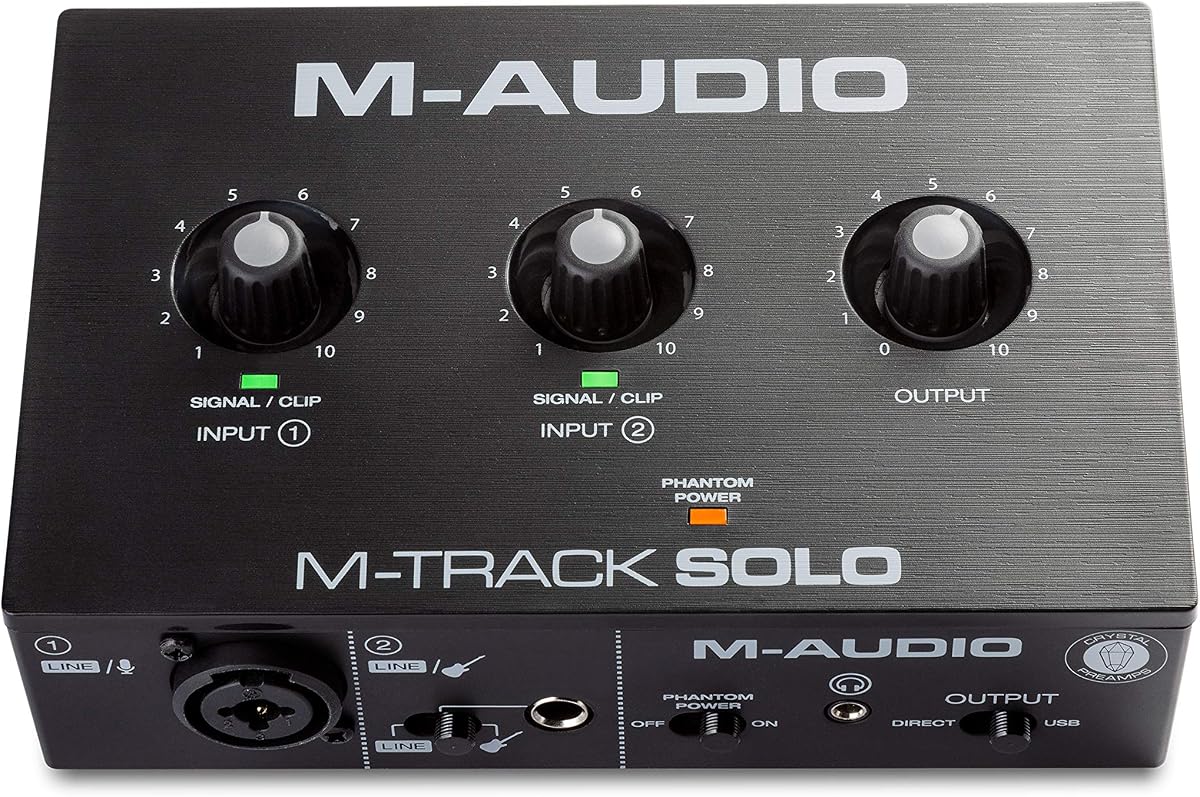
The M-AUDIO M-Track Solo is an excellent entry point for those starting their recording journey. It focuses on essential features like high quality preamps and reliable connectivity for simple tasks.
We may earn a commission when you buy through this link, at no additional cost to you.
Its transparent Crystal preamp guarantees optimal sound from microphones and instruments alike. The USB/Direct switch helps avoid latency during monitoring so you can stay in sync while recording.
While it has only one combo input it is sufficient for solo artists recording guitar or vocals one at a time. The included MPC Beats software provides a pathway to music production beyond simple recording.
This interface is ideal for beginners who need a dependable device without overwhelming features. It gets the job done efficiently and supports growth into more complex setups.
Focus on creating music without getting bogged down by complex settings or menu navigation.
Get access to production tools immediately to start creating beats and arranging songs right away.
We may earn a commission when you buy through this link, at no additional cost to you.
The Arturia MiniFuse 1 is unique in its class for including dedicated MIDI inputs and outputs alongside audio. This makes it perfect for producers who use external synthesizers and drum machines with their computer.
We may earn a commission when you buy through this link, at no additional cost to you.
It features a USB hub port that allows you to connect additional peripherals to your computer easily. The loopback function lets you record system audio for content creation without extra cables.
With a robust five year warranty this interface is built to last and provides peace of mind for users. The included software suite includes premium plugins to help you craft professional sounding tracks.
This is the go-to choice for MIDI enthusiasts who want reliable audio conversion too. It simplifies your connection setup by integrating MIDI and audio into one compact unit.
Connect your keyboards and controllers directly to the interface without needing a separate MIDI to USB converter.
Benefit from an industry leading warranty that ensures long term reliability and support for your hardware.
We may earn a commission when you buy through this link, at no additional cost to you.
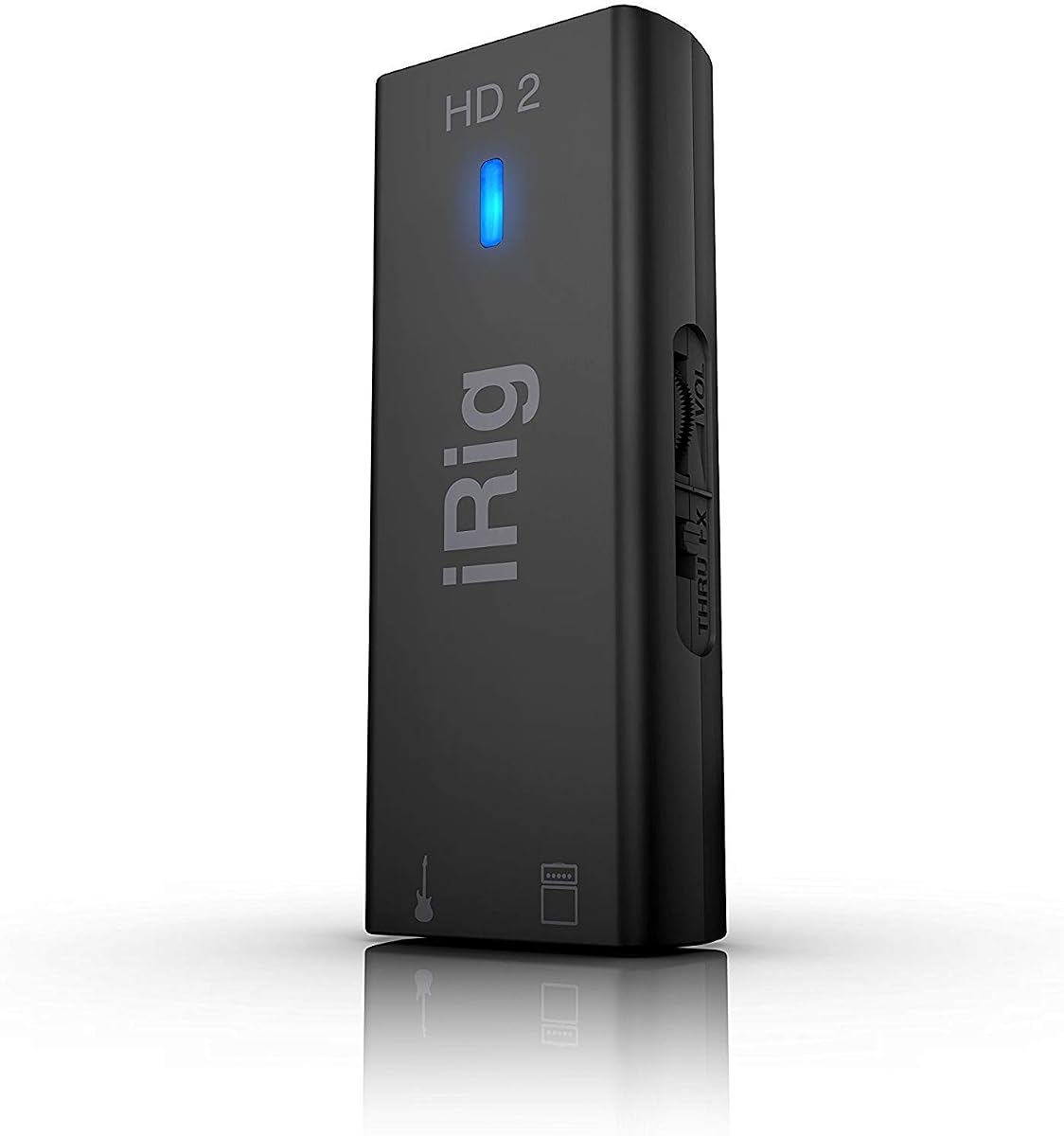
The IK Multimedia iRig HD 2 is known for its high-definition audio capture making it a favorite among mobile musicians. It offers a 96kHz sampling rate which is higher than many competitors in its class.
We may earn a commission when you buy through this link, at no additional cost to you.
Its Amp out jack lets you plug directly into your existing pedalboard or amplifier while recording a clean signal. This hybrid approach preserves the sound of your gear for authentic tone capture.
The lightweight construction allows it to fit in a pocket or gig bag easily. Although it uses Lightning cables it remains a top choice for iOS users who value high resolution recording on the go.
This interface is perfect for iPhone users who need high fidelity without carrying a large interface. It bridges the gap between mobile convenience and professional sound quality effectively.
Record at 96kHz to capture the full frequency range and detail of your performance.
Use the pass-through to connect to your pedals while recording a clean version simultaneously.
We may earn a commission when you buy through this link, at no additional cost to you.
Selecting the right interface involves evaluating several technical factors that impact your sound quality and workflow efficiency.
Determine how many instruments and microphones you need to record simultaneously. Solo guitarists might only need one input while bands or podca will need multiple inputs.
For most guitarists, a single instrument input is sufficient, but having an XLR mic input is useful for adding vocals or narration later.
Low latency is critical for playing guitar comfortably. Look for interfaces with direct monitoring features that let you hear your guitar in real time without computer delay.
Always choose a model with a direct monitoring switch to ensure you can perform naturally regardless of computer speed or driver quality.
Higher sample rates like 96kHz or 192kHz capture more audio detail, which is beneficial for high fidelity production. However, standard 44.1kHz is adequate for most casual uses.
If you plan to mix professionally, aim for at least 24-bit depth to ensure high dynamic range and flexible editing capabilities.
Modern interfaces use USB-C for faster data transfer and power. Older USB-A models work fine but may require adapters for newer laptops.
Check if your computer has the right ports. If you use a Mac with Thunderbolt, ensure the interface supports that standard for best performance.
Many interfaces come with DAWs and plugins. These can save you money and provide tools to start producing tracks immediately without extra purchases.
Verify that the software is compatible with your operating system. Some older plugins may not work on the latest macOS or Windows versions.
If you plan to travel, choose a compact interface with durable materials. A rugged design prevents damage during transport and ensures reliability on the road.
Desktop models offer more connectivity but are bulkier. Consider where the interface will live most of the time before deciding on size.
If you use condenser microphones for vocals or acoustic guitar, ensure the interface provides 48V phantom power. This is essential for powering certain types of mics.
Even if you only play electric guitar now, having phantom power gives you future flexibility to record acoustic sessions or vocals.
A longer warranty period indicates confidence in build quality. Brands like Arturia offer five year warranties which is rare and valuable for peace of mind.
Check if the company has accessible customer support for troubleshooting technical issues quickly to keep your studio running smoothly.
Start by connecting the interface to your computer using the included high-quality cable. Ensure you select the correct sample rate in your DAW settings to match the interface capabilities.
Always use direct monitoring when recording to hear yourself instantly. Adjust the gain knobs carefully to avoid clipping while ensuring the signal is strong enough.
Store the interface in a cool, dry place to prevent moisture damage. Regularly check cables for fraying and update drivers to maintain stable performance.
An audio interface provides high quality analog to digital conversion that is far better than what computers have built in. While you can plug into a mic jack, the sound will be noisy and lower fidelity.
Yes, many interfaces support mobile recording via USB-C or Lightning connections. Ensure you have the correct OTG adapter for Android or a compatible cable for iOS to make it work.
Direct monitoring allows you to hear your input signal directly from the interface without passing through the computer. This eliminates latency and helps you play along with backing tracks.
Most modern interfaces are class compliant and work without drivers. However, some may require specific drivers for lowest latency, especially on Windows systems where ASIO is needed.
For most guitarists, 48kHz is sufficient. 96kHz captures more detail but uses more storage. Choose based on your needs, but ensure your computer can handle the extra processing load.
Most include software that can emulate amps, but some mobile interfaces like JOYO only pass through dry signal. Check the package details to see if amp software is included.
The Focusrite Scarlett Solo 3rd Gen remains the best all-around choice for quality and ease of use. For budget-conscious users, the JOYO MOMIX CAB offers surprising utility at a low price.
Prioritize direct monitoring and connectivity that matches your computer. A reliable interface ensures you spend time playing music rather than fighting with technical issues or latency.
Always verify current prices and availability before purchasing as models and deals change frequently. Investing in the right tool now will support your creative growth for years to come.