
FLASHFORGE Creator 5 Pro
4.0Editor score
4-Toolhead Industrial System
65°C Active Heated Chamber
CoreXY 600mm/s Speed
This guide compares the best 3D printers for figurines and models, evaluating speed, precision, multi-color capabilities, and ease of use for creators.
Finding the right 3D printer for figurines and models requires balancing speed, detail, and material versatility. Whether you are a hobbyist or a professional, the best machines deliver consistent quality without excessive calibration hassle.
We have evaluated ten top-rated printers based on real-world performance data, build quality, and user feedback. Our analysis focuses on resolution, print speed, multi-color support, and reliability to help you choose the perfect machine.
Each pick highlights key strengths and trade-offs so you can match a printer to your specific needs. Prices and availability change frequently, so verify current details before purchasing to ensure you get the best value.
4.0Editor score

4.7Editor score

4.4Editor score
The following comparison highlights key specifications across all ten selected printers to help you quickly identify which machine aligns with your printing goals and technical requirements.





The Bambu Lab A1 stands out as a premier choice for those seeking precision and speed in equal measure. With a high rating from users, it delivers an unparalleled printing experience suitable for both beginners and seasoned professionals.
We may earn a commission when you buy through this link, at no additional cost to you.
Its high-speed precision is driven by an impressive acceleration of 10,000 mm/s², ensuring that even intricate figurines are printed rapidly without sacrificing detail. The active flow rate compensation algorithm actively adjusts the flow to extrude with accuracy, resulting in flawless prints every time.
While the A1 excels in automation, users should note that multi-color printing requires the AMS lite accessory separately. Additionally, its compact build volume may limit larger projects, but for standard model sizes, it offers robust performance.
Ideal for hobbyists and professionals who value efficiency, the A1 combines user-friendly interfaces with quiet motor noise canceling. It is a strong recommendation for anyone wanting to minimize setup time and maximize print success.
The A1's acceleration and active flow compensation ensure that fine details on figurines remain sharp even at high speeds.
Automatic calibration for Z-offset and bed leveling removes the technical barriers often associated with FDM printing.
We may earn a commission when you buy through this link, at no additional cost to you.
The Bambu Lab P2S Combo is engineered for users who demand professional-grade capabilities right out of the box. Its robust design and advanced AMS 2 Pro integration make it a top contender for complex projects.
We may earn a commission when you buy through this link, at no additional cost to you.
Printing speeds reach up to 600 mm/s while maintaining exceptional accuracy thanks to the PMSM Servo Extruder. The AMS 2 Pro enables seamless multi-color and multi-material printing with built-in filament drying, ensuring every spool is ready for flawless results.
While the cost is higher than entry-level options, the productivity gains from AI failure detection and adaptive airflow justify the investment. Users must manage the complexity of multi-material workflows, but the system handles it well.
This printer is perfect for creators needing versatility and speed. Whether you are printing functional parts or detailed models, the P2S Combo delivers reliability and workflow efficiency.
The adaptive airflow balances cooling and heat retention for crisp overhangs or high-temperature materials.
From design on MakerWorld to finished print, the P2S supports a smooth, unified workflow with minimal interruption.
We may earn a commission when you buy through this link, at no additional cost to you.
The FLASHFORGE Creator 5 Pro represents industrial strength for the home studio. It offers unique capabilities like independent toolheads and an active heated chamber that support a wide range of advanced materials.
We may earn a commission when you buy through this link, at no additional cost to you.
Its FlashSwap changer switches nozzles in just seven seconds without flushing, drastically reducing operational costs and waste. The CoreXY structure ensures rapid speeds up to 600mm/s without sacrificing accuracy, eliminating ghosting and vibrations.
Safety is prioritized with dual HEPA 13 filtration, trapping ultrafine particles. However, the price and complexity may not suit casual users. It is best reserved for those requiring engineering-grade prints.
For professionals needing robust design versatility, the Creator 5 Pro is unmatched. It combines safety, speed, and material flexibility in a fully enclosed frame.
The 65°C heated chamber prevents warping in tough filaments like ABS, PC, and PA for ultimate versatility.
Monitor progress with a built-in HD camera and auto-generated time-lapse videos via Flash Studio.
We may earn a commission when you buy through this link, at no additional cost to you.
The P1S brings enclosed reliability to the mid-range market, delivering speeds and automation that rival higher-end models. It is an excellent choice for creators who need a balance of performance and ease of use.
We may earn a commission when you buy through this link, at no additional cost to you.
With speeds up to 500mm/s and 20000 mm/s² acceleration, the P1S ensures lightning-fast print times. The fully enclosed body improves performance for advanced filaments, while automatic bed leveling makes setup a breeze.
Multi-color printing requires connecting the AMS, which adds cost but expands capabilities. While not recommended for carbon fiber composites, it handles most standard and engineering filaments well.
If you value consistency and speed without spending a premium, the P1S is a top contender. It simplifies the workflow while maintaining professional-grade output quality.
Lightning-fast printing allows you to focus on creating rather than waiting, without compromising quality.
Set up in 15 minutes and start printing immediately thanks to a user-friendly, hassle-free design.
We may earn a commission when you buy through this link, at no additional cost to you.
The FLASHFORGE AD5X delivers impressive value by offering multi-color capabilities and high-speed printing at an affordable price. It is an ideal entry point for those looking to experiment with vibrant designs.
We may earn a commission when you buy through this link, at no additional cost to you.
Advanced IFS technology allows up to four colors simultaneously, creating vibrant models with ease. The 600mm/s speed and 300°C nozzle ensure versatility across a wide range of filaments without compromising precision.
Fully automatic leveling simplifies the process for beginners, though the system may produce some waste during color swaps. Despite this, the cost-performance ratio remains highly competitive.
For hobbyists seeking multi-color features on a budget, the AD5X is a smart choice. It balances functionality and affordability to encourage creativity.
Multi-color printing with IFS enables the creation of artistic projects and intricate designs effortlessly.
The high-temperature nozzle supports PLA, ABS, PETG, and more for varied project requirements.
We may earn a commission when you buy through this link, at no additional cost to you.
The Snapmaker U1 offers a revolutionary approach to multi-material printing with its 4-toolhead system. It excels in handling complex projects that require switching between different types of materials seamlessly.
We may earn a commission when you buy through this link, at no additional cost to you.
The SnapSwap system reduces tool changes from minutes to seconds, minimizing waste and improving productivity. Its ability to combine rigid, flexible, and water-soluble materials in one print sets it apart from standard FDM machines.
While the price and complexity are high, the reliability of over 1,000,000 validated swaps ensures confidence. The Orca software simplifies the process for both beginners and professionals.
If you need to print functional prototypes or articulated models with mixed properties, the U1 is unmatched. It delivers professional-level capabilities with a focus on efficiency and control.
Printing with U1 means less waste and lower costs due to its direct tool change mechanism.
Validated through millions of swaps, the locking mechanism ensures durability and consistent performance.
We may earn a commission when you buy through this link, at no additional cost to you.
The Creality SPARKX i7 is a tech-forward machine that uses AI to simplify the modeling process. It is designed for creators who want to generate models quickly without extensive design skills.
We may earn a commission when you buy through this link, at no additional cost to you.
CubeMe AI lets you upload a portrait to generate a unique 3D model in seconds, perfect for personalized gifts. The printer arrives fully pre-assembled, allowing you to start printing in just five minutes.
Multicolor printing with 50% less waste makes it efficient for custom upgrades. The AI camera detects failures and alerts you, ensuring high success rates even for novice users.
For those interested in personalized models and ease of use, the i7 offers unique value. It balances AI innovation with standard high-performance features.
AI power unleashes your creativity instantly by turning simple images into detailed 3D figurines.
The AI camera watches over every print, detecting failures like spaghetti or tangles in real time.
We may earn a commission when you buy through this link, at no additional cost to you.
The Adventurer 5M Pro emphasizes automation and speed with its 1-click auto printing system. It is built for users who want fast results without manual troubleshooting.
We may earn a commission when you buy through this link, at no additional cost to you.
Vibration compensation algorithms eliminate ghosting, ensuring smooth surface finishes even at 600mm/s. The tool-free quick-release nozzle system allows for easy maintenance and multiple size options.
Safety is addressed with dual filtration and a fully enclosed chamber, making it suitable for indoor use. While it supports high-temperature materials, setup may require learning the Flash Studio software.
For those prioritizing speed and safety, the 5M Pro is a reliable choice. It balances engineering capabilities with user-friendly features.
Vibration compensation eliminates ghosting for smooth prints regardless of speed.
The enclosed chamber and dual filtration ensure a clean and safe environment for home or office.
We may earn a commission when you buy through this link, at no additional cost to you.
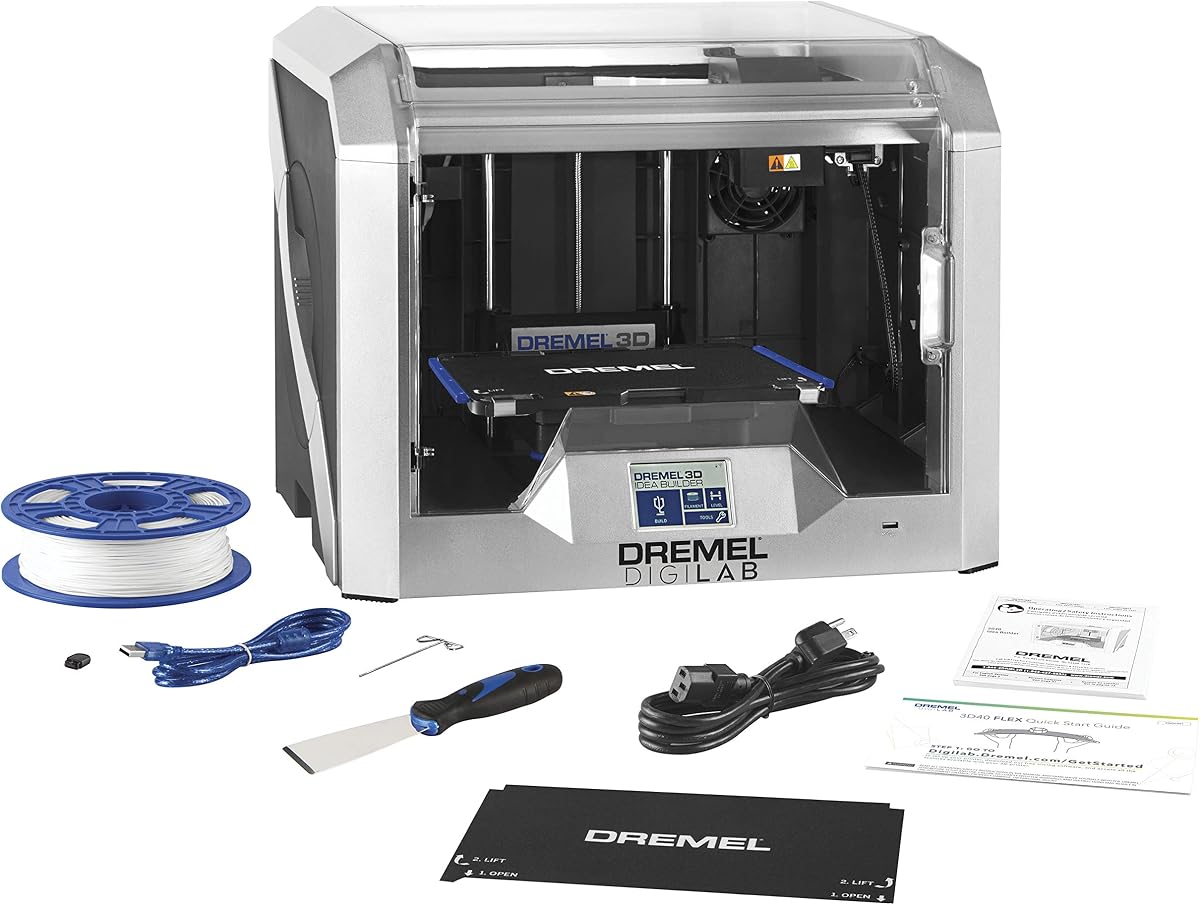
The Dremel 3D40-FLX is built for reliability and ease of use. It is a trusted choice for beginners who want a machine that works consistently with minimal fuss.
We may earn a commission when you buy through this link, at no additional cost to you.
Its flexible build plate makes removing printed models a snap, and the automated 9-point leveling ensures a perfect first layer. The direct drive extruder is clog resistant and delivers smooth prints.
With high resolution and reliable customer support, it offers peace of mind for long-term users. While not the fastest, its consistency makes it ideal for educational or hobbyist environments.
If you value stability and support over raw speed, this printer is a solid investment. It simplifies the process for anyone from novice to professional.
The clog-resistant extruder and detection features ensure smooth prints and resume capabilities.
Dremel's lifetime support and warranty provide confidence and long-term service for your machine.
We may earn a commission when you buy through this link, at no additional cost to you.
The A1 Combo delivers a complete package combining the base printer with the AMS Lite system. It is a popular choice for those seeking speed and precision with multi-color capability.
We may earn a commission when you buy through this link, at no additional cost to you.
Active flow compensation uses high-frequency sensors to measure pressure and ensure accurate extrusion. Fully automatic calibration handles all necessary checks for every print job, reducing user effort.
While the open frame design limits some engineering filament options, it is perfect for common materials. The quick change nozzle and motor noise cancellation add to the user experience.
For enthusiasts wanting a ready-to-use multi-color solution, the Combo offers excellent value. It combines cutting-edge features with a user-friendly open-frame design.
High-resolution sensors measure nozzle pressure to compensate and extrude accurately every time.
Quick change nozzle and noise cancellation make the printing process smoother and quieter.
We may earn a commission when you buy through this link, at no additional cost to you.
Choosing the right printer requires understanding several technical factors that directly impact print quality and usability.
Ensure the printer's dimensions match your largest intended models. A build volume that is too small may require splitting figures, while one that is too large wastes space and energy for smaller projects.
For most figurines, a 220mm build volume is sufficient, but larger statues may need 300mm or more.
Lower layer heights yield finer details but take longer to print. For high-quality models, look for machines capable of 0.05mm or 0.1mm layers to capture intricate details.
Higher resolution is critical for facial features and textures on detailed models.
If color diversity is essential, consider models with multi-filament systems or independent toolheads. These allow for vibrant prints without manual swapping.
Automatic systems like AMS or FlashSwap reduce waste and save time during color transitions.
High-speed printers improve workflow efficiency. Look for machines with high acceleration rates that maintain precision during rapid movements.
Balancing speed with quality ensures faster turnaround without sacrificing detail.
Some printers are limited to PLA, while others support ABS or ASA. Ensure the nozzle and bed temperatures support your preferred materials.
Higher temp nozzles offer flexibility for durable or specialized models.
Enclosed printers maintain consistent temperatures, reducing warping for engineering plastics. Open frames offer better ventilation and cost savings for standard materials.
Choose based on the specific materials you plan to use most often.
Auto-leveling and calibration features save time and reduce errors. Fully automatic systems handle Z-offsets and flow calibration for you.
This consistency is crucial for large batches of identical models.
User-friendly slicing software and community support streamline the workflow. Check compatibility with popular tools like Cura or PrusaSlicer.
A good ecosystem ensures you have resources for troubleshooting and design.
Always level the print bed before starting a job to ensure proper adhesion. Even with auto-leveling, manual checks help prevent failed prints and save material costs.
Store your filament spools in a dry, cool environment to prevent moisture absorption. Damp filament can cause bubbles and surface defects on your models, affecting overall quality.
Regularly clean the nozzle and check for debris or partial clogs. Using a needle and proper cleaning cycles maintains consistent flow and print accuracy for your figurines.
For high detail, look for printers with high-resolution settings and small nozzles like 0.2mm or 0.4mm. The Bambu Lab A1 or FLASHFORGE Adventurer 5M Pro offer excellent precision for intricate models.
Yes, printers with independent toolheads or multi-filament systems like the FlashForge Creator 5 Pro or Snapmaker U1 allow automatic color changes during printing.
Modern printers like the Bambu Lab P2S can reach speeds up to 600mm/s. However, detailed figurines often require slower speeds for quality and precision.
Enclosed printers help maintain consistent temperatures and prevent warping. This makes them ideal for materials like ABS or ASA that are sensitive to temperature changes.
PLA is good for prototypes, but PETG or ABS offer better durability. High-temp printers like the Creator 5 Pro support these materials for stronger end-use parts.
Most modern printers feature auto-calibration. However, checking bed leveling periodically ensures optimal adhesion and reduces the risk of print failures.
This guide highlights the top ten printers that excel in speed, detail, and reliability. Whether you need multi-color capabilities or high-speed performance, there is a machine for every creator.
Prioritize build quality, software ease of use, and material support when making your decision. Consistent results matter more than speed alone for high-quality models.
Always verify current pricing and features before buying. Technology evolves quickly, so checking the latest details ensures you get the best fit for your projects.