
FANTECH Maxfit61
4.6Editor score
Universal hot swap support
Pre-lubed stabilizers
RGB backlight modes
Compare the top 5 pin hot swappable keyboard options for customization and performance to find the perfect mechanical board for your gaming or typing setup.
Finding the right mechanical keyboard can transform your daily computing experience. A 5 pin hot swappable keyboard offers unparalleled flexibility, allowing you to change switches without soldering. This feature is ideal for enthusiasts who want to tailor their typing feel to specific preferences.
We have carefully selected ten distinct models based on build quality, switch compatibility, and overall value. Our comparison includes compact 60% layouts, tenkeyless designs, and full-size options to suit various desk spaces. Each product was evaluated for its hot swap capabilities and user feedback.
Every pick in this guide highlights unique strengths whether you need wireless connectivity or premium sound dampening. Remember that availability and pricing can shift rapidly due to market dynamics. We recommend checking current listings before making your final decision to ensure you get the best deal.
4.6Editor score

4.7Editor score

4.5Editor score
This side-by-side comparison highlights the key specifications and unique features of each selected mechanical keyboard model. Use this table to quickly identify which layout and feature set aligns best with your specific typing and gaming needs.



The Redragon K617 is a strong contender for budget-conscious gamers seeking a reliable mechanical board. With a solid 4.6 rating from users, it delivers a compact experience without sacrificing essential features. Its standout quality lies in its ability to support hot-swap switches for easy customization.
We may earn a commission when you buy through this link, at no additional cost to you.
This keyboard frees up desk space by removing the numpad and navigation cluster. This design choice enhances mouse movement for competitive FPS games. The upgraded sockets accept almost any 3-pin or 5-pin switch allowing you to tailor the feel. Stock switches provide discreet clicks suitable for shared environments.
While it offers vibrant RGB lighting with multiple preset modes, the software can be less intuitive than higher-end brands. The lack of wireless connectivity means you are tethered to your PC. However, for the price point these trade-offs are generally acceptable for desktop setups.
If you are looking for an entry-level mechanical keyboard that supports 5-pin hot swapping, this is an excellent choice. It is ideal for gamers who need more room to aim and want the option to upgrade switches later. The clean aesthetic also fits well on modern desks.
Ditching the numpad frees up desk space for wide mouse swipes so your sensitivity stays low and your flicks stay accurate.
The upgraded socket accepts almost any 3-pin or 5-pin switch allowing you to change the feel without soldering tools.
We may earn a commission when you buy through this link, at no additional cost to you.
The TECWARE Phantom+ Elite offers exceptional versatility with its multi-mode wireless connectivity and hot swappable sockets. Users appreciate the seamless transition between Bluetooth and 2.4GHz modes. The creamy Wraith Orange tactile switches provide a satisfying typing experience supported by PBT keycaps for durability.
We may earn a commission when you buy through this link, at no additional cost to you.
Wireless freedom is a major highlight here with up to 250 hours of battery life on a single charge. This is perfect for users who want to declutter their desk without sacrificing performance. The build includes multi-layer sound dampening foam for deep thocky acoustics.
The complexity of connecting multiple devices can be a learning curve for some users. Additionally the price point is higher than many other hot swap keyboards. But for those needing premium features like wireless and PBT keycaps this cost is often justified.
Choose this keyboard if you need a high-performance wireless board that supports 5-pin hot swapping. It is well-suited for professionals and gamers who want a quiet, durable, and customizable typing experience across different devices.
Experience seamless pairing with Bluetooth 5.0 or low latency gaming with 2.4GHz mode alongside a USB C wired option.
Power through every gaming marathon or full workday without reaching for a charger thanks to the built-in rechargeable battery.
We may earn a commission when you buy through this link, at no additional cost to you.
The aikeec Black OSU is a niche product designed for rapid input tasks like rhythm games or specific macros. It features autonomous programming capabilities that allow each button to be set to a different function mode independently. The compact form factor makes it easy to integrate into complex setups.
We may earn a commission when you buy through this link, at no additional cost to you.
Its USB HID standard ensures plug and play functionality without needing extra drivers. However some users note that switches may come loose during transport requiring re-plugging. The software installation requires specific runtime files which can be a hurdle for less technical users.
The primary trade-off is the potential for physical connectivity issues with the switches. For some buyers, the reliance on external software for full functionality adds complexity. These issues are minor compared to the unique utility it offers for specific tasks.
This board is ideal for users who need a dedicated macro pad with hot swap capability. It works well as a secondary input device where unique function mappings are required. Consider it if you need a specialized tool rather than a main daily driver keyboard.
Each button can be set to a different function mode without affecting each other for custom workflow optimization.
If you need to go to the Mac setting please set it in Windows first then you can go to the Mac to use it.
We may earn a commission when you buy through this link, at no additional cost to you.
The Keychron V6 8K stands out for its ultra-low latency and programmable features driven by QMK firmware. It offers a massive 8000Hz polling rate via a stable wired Type-C connection ensuring lightning-fast response. The hot-swappable sockets support most MX-style switches allowing deep customization.
We may earn a commission when you buy through this link, at no additional cost to you.
Its build quality is exceptional with multiple layers of acoustic foam and upgraded screw-in PCB stabilizers. This design provides a quieter and smoother typing experience suitable for professionals and enthusiasts. The OSA PBT keycaps add to the premium feel and durability.
The full-size layout may take up significant desk space for some users who prefer compact boards. The wired connection limits portability compared to wireless options. However for a dedicated desktop setup these are minor drawbacks compared to the performance benefits.
Select this keyboard if you want the fastest response times and extensive customization options. It is perfect for competitive gamers and heavy typists who value sound quality and open-source firmware support. The 5-pin hot swap capability ensures future-proofing.
Delivers an ultra-fast 8000Hz polling rate via stable wired Type-C connection ensuring extremely low input lag and lightning-fast response.
Powered by open-source QMK firmware and the Keychron Launcher web app to easily remap keys and create macros.
We may earn a commission when you buy through this link, at no additional cost to you.
The Keychron C1 is a tenkeyless hot-swappable mechanical keyboard designed for both Mac and Windows users. With a high 4.7 rating, it offers reliability and a customizable typing experience without soldering needs. The white backlight provides a subtle aesthetic that suits office environments.
We may earn a commission when you buy through this link, at no additional cost to you.
Its USB Type-C wired connection ensures a constant power supply and stable performance. The inclined bottom frame and adjustable feet make the C1 comfortable to type on for long sessions. It includes extra keycaps for both operating systems enhancing compatibility.
The ABS keycaps are durable but may show shine over time compared to PBT alternatives. The white backlight options are limited compared to full RGB arrays. These constraints are balanced by the keyboard's overall build quality and usability.
Choose this keyboard if you need a reliable and affordable hot swap board for work or light gaming. The Mac layout compatibility makes it a top choice for Apple users. The 5-pin socket support allows you to upgrade switches as you wish.
The inclined bottom frame and 2 level adjustable feet makes the C1 more comfortable to type for long durations.
Extra keycaps for both Mac and Windows operating systems are included ensuring seamless switching between devices.
We may earn a commission when you buy through this link, at no additional cost to you.
The RK ROYAL KLUDGE RK61 is a compact 60% keyboard that concentrates essential functions into a minimalist design. It features QMK/VIA programmable RGB backlit options and hot swappable PCB for customization. The pre-lubed red switches provide a smooth and quiet mechanical stroke experience.
We may earn a commission when you buy through this link, at no additional cost to you.
This keyboard saves desk space for mouse movement making it a favorite for FPS gamers. The detachable Type-C cable provides a stable connection. It supports Windows Linux and Mac compatibility for broad utility across different systems.
The lack of dedicated arrow keys requires using function layers which can confuse some users. The software for full customization has a learning curve. However for compact enthusiasts these are acceptable compromises for the space savings and performance.
If you need a portable and efficient keyboard for gaming or travel this is a strong option. The hot swap capability allows you to change switches without soldering. It is ideal for users who want a clean desk layout without losing functionality.
Compact 61 keys keyboard concentrates all the key functions you need in minimalist design saving space for mouse moving.
Features a hot-swappable PCB that supports both 3-pin and 5-pin mechanical switches for effortless customization.
We may earn a commission when you buy through this link, at no additional cost to you.
This versatile hotswap component allows for easy hot-swapping without soldering for users building custom keyboards. Constructed from high-quality PA66 and POM materials, it offers durability and consistent performance. The switches are meticulously lubed to deliver a quieter typing experience.
We may earn a commission when you buy through this link, at no additional cost to you.
While not a standalone keyboard it serves as a crucial element for enthusiasts wanting to upgrade their boards. It enhances functionality by allowing linear and tactile feedback options based on preference. Compatibility with most mechanical keyboards makes it a versatile choice.
The lack of an integrated keyboard means it requires a PCB and case to function fully. Users must assemble it themselves which requires some technical skill. These limitations are inherent to component parts rather than a flaw in the product itself.
Select this item if you are building a custom keyboard and need reliable 5-pin sockets. It is ideal for hobbyists who value smooth operation and ease of use. Ensure your existing hardware supports this configuration before purchasing.
Constructed from high-quality PA66 and POM materials these switches ensure lasting durability and consistent performance.
Switches are meticulously lubed to deliver a quieter typing experience perfect for late-night gaming sessions.
We may earn a commission when you buy through this link, at no additional cost to you.
The X82 Wired Gaming Keyboard features a compact 60% layout with a dedicated metal function knob for easy control. This mini mechanical gaming keyboard frees up desk space while including function keys and arrows. The hot-swap PCB allows replacing 3-pin or 5-pin switches freely.
We may earn a commission when you buy through this link, at no additional cost to you.
Its dynamic RGB backlight uses translucent characters that remain visible in the dark. The pre-lubed red switches offer quiet linear feedback suitable for open offices or late gaming. Full anti-ghosting ensures smooth typing and gaming without conflicts.
The limited key count means reliance on function keys for standard inputs which can slow users down. RGB customization requires external software adding a layer of complexity. However these features are standard for compact boards at this price.
Choose this board if you want a stylish compact keyboard with volume control. It is great for casual gaming and typing where space is at a premium. The 5-pin hot swap feature adds value for future upgrades.
Experience easy control with the built-in mechanical volume knob made from high-grade CNC aluminum improving typing efficiency.
You can customize RGB modes and colors through software for unlimited fun of RGB in your setup.
We may earn a commission when you buy through this link, at no additional cost to you.
The FANTECH Maxfit61 is a standard classic 60 percent mechanical keyboard offering universal hot-swappable switches. This design allows you to replace switches to meet your needs without soldering. It includes pre-lubed stabilizers to ensure smooth key presses for better enjoyment.
We may earn a commission when you buy through this link, at no additional cost to you.
With 18 RGB backlight modes and adjustable brightness, this keyboard looks vibrant on any desk. The package includes essential tools like a switch puller and keycap puller. It supports compact setups while retaining necessary power and capabilities for gaming.
The build quality feels lighter than premium boards which may affect durability over time. The included blue switches are clicky and may not suit silent environments. However for the price these are acceptable trade-offs for entry-level users.
If you need an affordable and customizable mechanical keyboard this is a solid choice. It is best for gamers who want to experiment with switches. The hot swap capability makes it versatile and future-proof for your setup.
Designed with universal hot-swappable switches this fully allows you to replace the switches to meet your needs.
It is most gamers' choice for this 60% gaming keyboard due to space efficiency and responsive keys.
We may earn a commission when you buy through this link, at no additional cost to you.
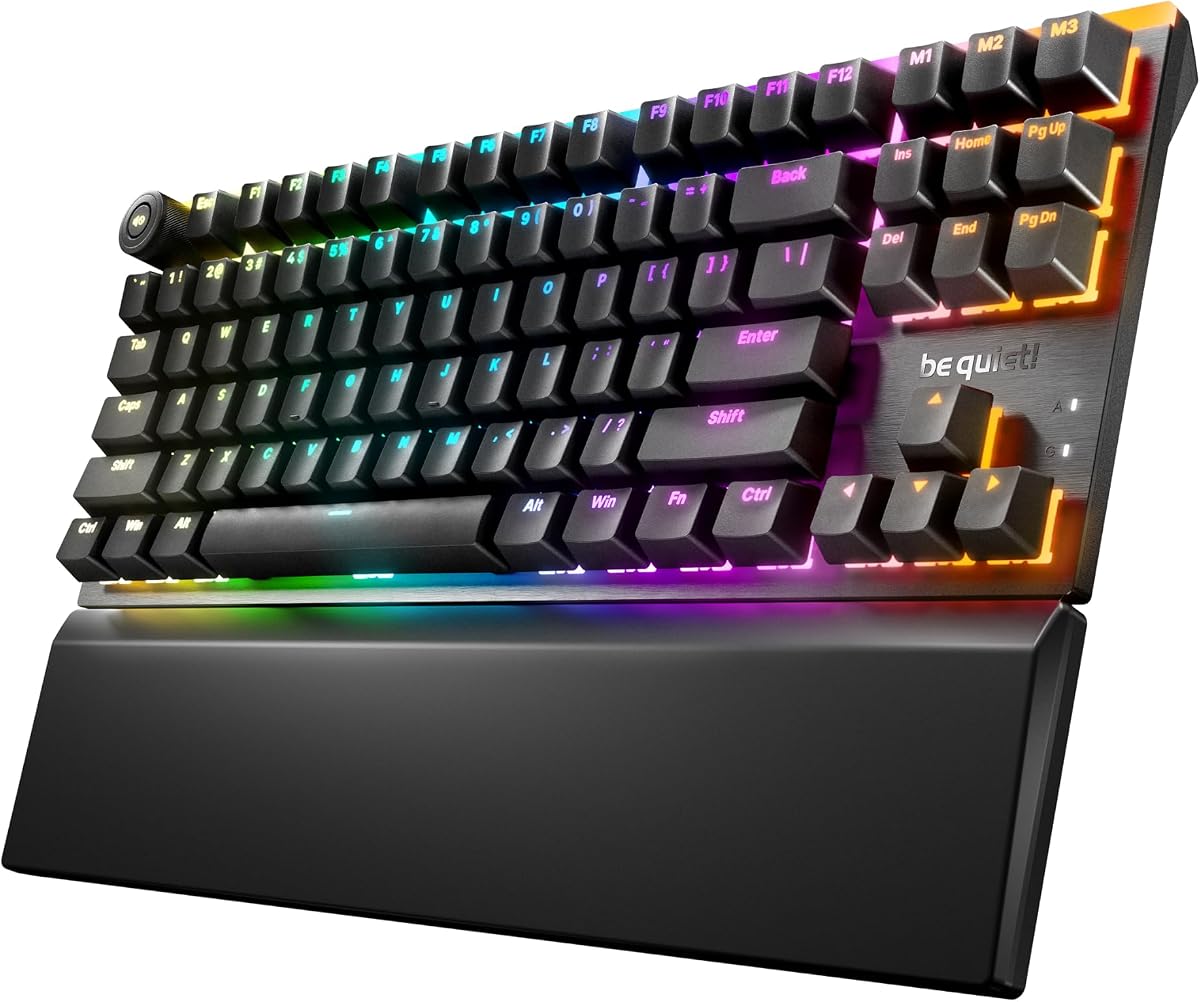
The be quiet! Light Mount TKL is designed for quiet environments with silent hot-swappable mechanical switches. It features pre-lubricated orange switches and three noise-reduction layers to minimize typing noise. The brushed aluminum top plate and durable PBT keycaps ensure a premium feel.
We may earn a commission when you buy through this link, at no additional cost to you.
Advanced sound dampening creates an exceptionally quiet mechanical keyboard experience ideal for shared spaces. The magnetic palm rest and programmable media wheel add to the comfort and control. ARGB lighting enhances the setup while maintaining a clean aesthetic.
The higher price point may not suit budget-conscious buyers seeking basic features. The reliance on proprietary software for customization can be a limitation. However for those prioritizing silence and build quality these are acceptable compromises.
Choose this keyboard if noise reduction is a top priority for your workspace. It is perfect for productivity-focused setups and late-night gaming. The 5-pin hot swap support ensures you can upgrade switches if needed later.
Three integrated noise-reduction layers minimize typing noise and unwanted resonance for quiet typing.
Pre-lubricated orange be quiet! Silent V2 Switches provide smooth, linear, ultra-quiet keystrokes.
We may earn a commission when you buy through this link, at no additional cost to you.
Selecting a 5 pin hot swappable keyboard involves considering several factors to ensure it meets your typing and gaming needs.
Layout size dictates the physical footprint and key count of your keyboard. Options range from compact 60% boards that maximize mouse space to full-size models that include numpads. Choose based on your desk size and whether you need number pad functions daily.
Select a layout that balances ergonomics with available desk space for optimal comfort.
Confirm that the board supports both 3-pin and 5-pin switches. Some boards only support specific brands or pin counts which limits upgrade options. Check the product details carefully to ensure it allows the switch types you prefer for customization.
Universal hot swap support provides maximum flexibility for future modifications and switch upgrades.
Switches determine the tactile feel and sound of your keystrokes. Linear switches are smooth and quiet, while tactile and clicky switches provide more feedback. Consider your environment and personal preference when selecting pre-installed switches or replacement options.
Choose switches that match your noise tolerance and typing style for the best experience.
Materials like aluminum plates and PBT keycaps contribute to durability and typing feel. A solid case reduces flex and noise, enhancing the premium experience. Look for reviews mentioning stability and sound dampening when evaluating build quality.
Prioritize keyboards with robust construction to ensure longevity and a satisfying typing session.
Decide between wired and wireless connectivity based on your usage. Wired connections offer zero latency which is crucial for competitive gaming. Wireless options provide flexibility but may require charging and can introduce slight lag.
Opt for wired connections for gaming and wireless for productivity setups needing desk flexibility.
Lighting features allow customization to match your aesthetic. Some keyboards offer per-key RGB while others have zone lighting. Software quality matters for remapping keys and creating macros so check for user-friendly options.
Ensure the software is intuitive and supports advanced features if customization is important.
Keycaps affect the texture and sound of your typing. Double-shot PBT keycaps are durable and resist shine over time. ABS keycaps are cheaper but may develop a glossy look with heavy use.
Invest in PBT keycaps for a better feel and long-lasting appearance.
Comfort is essential for long typing sessions. Adjustable feet and tilt angles help position the keyboard correctly. Palm rests can add support if you type for hours each day.
Choose a board with ergonomic features to reduce strain during extended use.
To swap switches, use a switch puller to gently lift the stem and pull the switch out of the socket. Align the pins with the socket holes and push down firmly until the switch sits flush with the PCB. Avoid using excessive force to prevent bending pins or damaging the socket.
Clean your keyboard regularly by removing keycaps and using compressed air to blow out debris. A soft brush can help reach between keys. Wipe the case and keycaps with a damp cloth to remove dust and oils buildup.
Store your keyboard in a dry place away from direct sunlight. If you plan to store it for a long period remove the keycaps and switches if possible to prevent sticking. Always unplug the device before performing any maintenance tasks.
The main difference is the number of pins used to stabilize the switch stem. 5-pin switches have two extra pins that offer more stability and reduce wobble compared to 3-pin switches. Most hot-swap boards support both types allowing you to mix switch brands freely.
Yes, that is the definition of a hot-swappable keyboard. These boards have sockets that allow you to insert and remove switches without tools. Simply use a puller to extract the old switch and plug in the new one.
Hot-swap sockets are designed to withstand many insertion and removal cycles. The durability depends on the quality of the PCB and sockets. High-end boards generally use metal sockets that last longer than cheaper plastic alternatives.
Yes, 5-pin sockets are universally compatible with 3-pin switches. The extra pins on a 3-pin switch simply remain unused. This ensures you can upgrade or change switches without worrying about the pin count.
Many keyboards come with proprietary software or support open-source firmware like QMK. Some models are plug-and-play but software allows macros and lighting customization. Check the product page for specific software requirements.
You can safely remove keycaps and switches to clean underneath. Use compressed air to clear dust from the sockets and wipe the PCB gently. Ensure the board is dry before reinstalling any components.
We have reviewed ten top-rated keyboards offering various layouts and features for different needs. From the compact FANTECH Maxfit61 to the premium be quiet! Light Mount, there is an option for everyone.
Prioritize factors like sound dampening, switch compatibility, and ergonomics to match your daily usage. Whether you are a gamer or a typist, a hot-swap board offers customization that pays off long-term.
Prices and availability can change quickly so check current listings before buying to ensure you get the best deal available today.