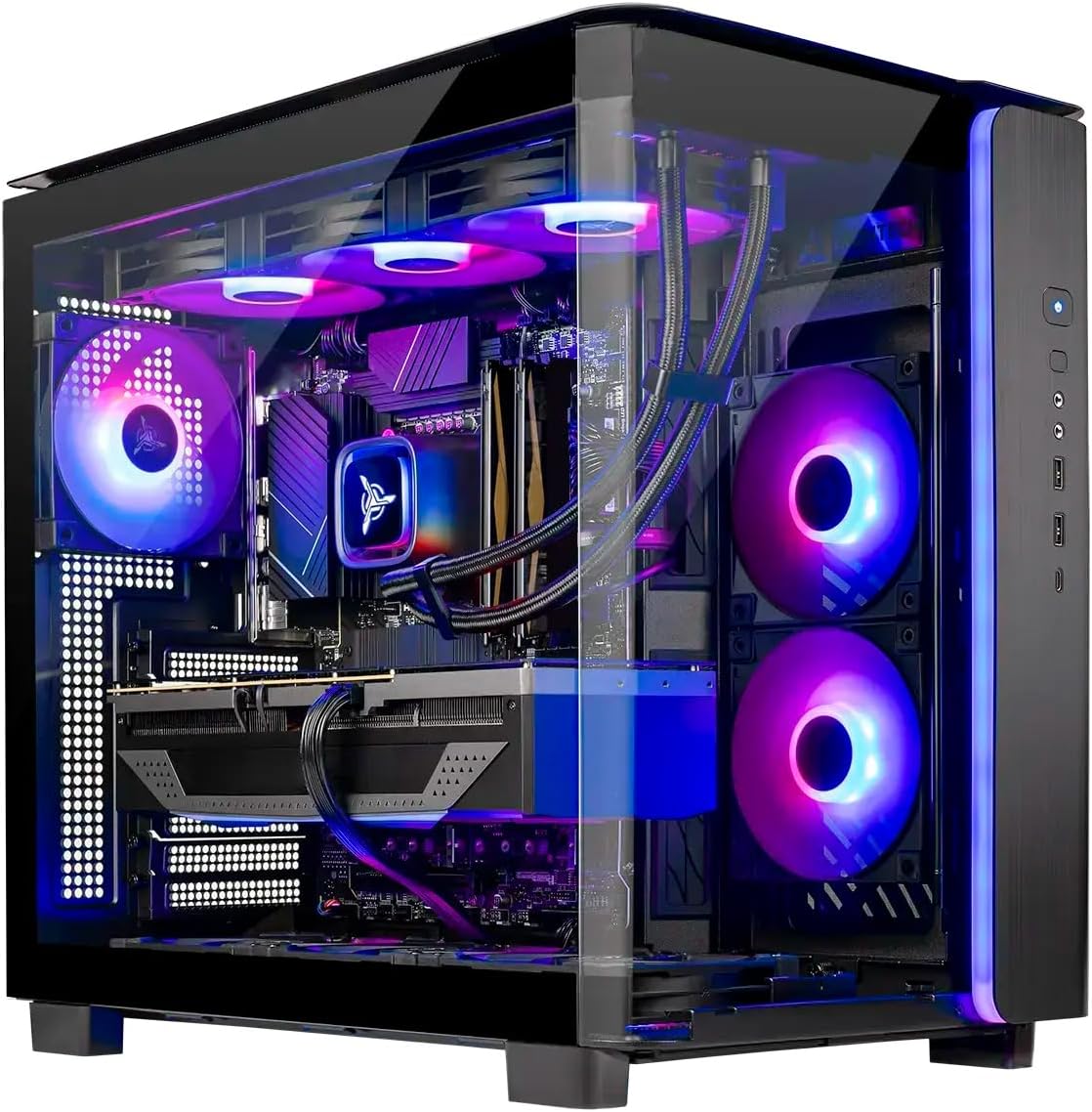
Skytech Gaming PC Desktop, Ryzen 7 9850X3D, RTX 5080, 32GB RAM, 2TB SSD
4.8Editor score
Ryzen 7 9850X3D CPU
RTX 5080 16GB GPU
32GB DDR5 6000MHz RAM
360mm AIO Liquid Cooler
Find the best Gaming PC for Playing Kenshi with our expert guide comparing top models for performance cooling and value in October 2026.
Choosing the right Gaming PC for Playing Kenshi requires balancing processing power with long-term reliability. This open evaluates ten leading prebuilt systems to help you find the perfect match for your immersive sandbox adventures.
We compared these machines based on processor speed graphics card capability cooling efficiency and overall build quality. Each system was analyzed for its ability to handle large mods and complex game physics without stuttering or overheating.
Every pick highlights key strengths and ideal use cases for different player needs. Remember that model availability and stock levels change frequently so check current listings before finalizing your purchase decision today.
4.8Editor score

4.5Editor score

4.5Editor score
This side-by-side comparison highlights the core specifications of each gaming system to help you make an informed decision based on your performance needs and budget constraints.


This YAWYORE prebuilt system delivers solid performance for sandbox games like Kenshi. It earned a 4.5 rating for its balanced mix of components that handle complex simulations efficiently.
We may earn a commission when you buy through this link, at no additional cost to you.
The Ryzen 7 5700X offers 16 threads to manage background tasks while the RTX 5060 ensures smooth rendering. Its 32GB DDR4 RAM prevents bottlenecks during heavy mod usage.
While the GPU is older generation, it still provides playable framerates at 1080p. The trade-off in raw power is acceptable given the low price for entry-level gamers.
Buy this if you need an affordable system capable of running mod-heavy games. Its stable foundation makes it a smart choice for budget-conscious players.
The combination of a strong CPU and ample RAM allows you to run multiple browser tabs and Discord while playing without lag.
Using a well-known MSI B550M-A PRO motherboard ensures long-term stability and compatibility with future upgrades like more storage.
We may earn a commission when you buy through this link, at no additional cost to you.
This Skytech system excels with a Ryzen 7 9850X3D CPU specifically designed for gaming efficiency. It achieved a 4.5 rating thanks to its advanced cooling and storage solutions.
We may earn a commission when you buy through this link, at no additional cost to you.
The large L3 cache drastically reduces loading times in open-world games. Pairing this with a 360mm AIO cooler keeps temperatures low during extended sessions.
While it costs more than average, the speed benefits justify the price for serious gamers. The 2TB SSD ensures you have room for multiple heavy game installs.
We recommend this for players who want top-tier responsiveness without building a custom rig. Its pre-tested assembly saves hours of setup time.
The AIO liquid cooler prevents thermal throttling even when running background renders or recording gameplay streams.
Gen4 NVMe technology cuts load screens by half compared to older drives which helps you get into matches faster.
We may earn a commission when you buy through this link, at no additional cost to you.
This premium Skytech system offers unmatched power for 4K gaming and heavy modding. It holds a 4.8 rating for its superior component selection and pristine build quality.
We may earn a commission when you buy through this link, at no additional cost to you.
The RTX 5080 GPU handles ultra settings effortlessly while the CPU ensures stable frame rates. Its 6000MHz DDR5 RAM delivers rapid data access for complex simulations.
High cost is the main trade-off but it guarantees future-proof performance. The clean OS installation means you start fresh without unwanted third-party apps.
Ideal for enthusiasts who demand the absolute best visuals and performance. This machine eliminates bottlenecks for high-end gaming experiences.
With 5.6GHz Turbo Boost the CPU handles intensive physics calculations without slowing down the system.
Starting with a clean Windows 11 installation lets you install only the drivers and games you actually need.
We may earn a commission when you buy through this link, at no additional cost to you.
This Skytech model focuses on high FPS gaming with a potent Ryzen 9 9800X3D processor. It received a 4.1 rating due to strong raw power despite some price concerns.
We may earn a commission when you buy through this link, at no additional cost to you.
The 5070 Ti provides enough power for 1440p gaming with ray tracing enabled. The free keyboard and mouse add immediate value for new setups.
Reviewers noted the price is higher compared to other systems with similar specs. However the included peripherals save the cost of buying them separately.
Good for gamers seeking a powerful system with extra accessories. It balances performance and convenience well for competitive players.
Getting a free gaming keyboard and mouse with the PC reduces initial setup costs and lets you start playing immediately.
The 360mm AIO cooler keeps the CPU running cool even during long tournaments or intensive rendering tasks.
We may earn a commission when you buy through this link, at no additional cost to you.
The MSI Codex Z2 delivers reliable 1440p gaming performance with a balanced hardware profile. It holds a 4.3 rating for its consistent stability and ease of use.
We may earn a commission when you buy through this link, at no additional cost to you.
The RTX 5070 brings Blackwell architecture features that improve efficiency and visual fidelity. Its multi-fan setup ensures adequate airflow without excessive noise.
Some users may find the case design basic compared to others on this list. But functional cooling ensures the components stay safe over time.
Choose this if you want a clean reliable PC without extra complexity. It suits players who value straightforward performance and ease of setup.
Four system fans work together to pull cool air in and push heat out efficiently during intense gameplay.
Blackwell architecture optimizes rendering pipelines for smoother ray tracing effects and faster frame delivery.
We may earn a commission when you buy through this link, at no additional cost to you.
This KOTIN system introduces a unique smart display on the case front to show system stats. It received a 4.2 rating for its innovative features and strong performance metrics.
We may earn a commission when you buy through this link, at no additional cost to you.
The smart display monitors GPU temperatures and usage in real time which helps with troubleshooting. WiFi 7 ensures low latency for competitive online gaming sessions.
While the smart screen is a cool feature it may increase the overall cost. Some buyers might prefer to spend that budget on a better GPU.
Best for tech enthusiasts who enjoy monitoring their system stats visually. It blends practicality with a futuristic aesthetic for modern rigs.
The integrated display lets you see CPU and GPU temperatures without opening software or checking system trays.
WiFi 7 offers lower latency and higher bandwidth ensuring your connection stays fast even with heavy network traffic.
We may earn a commission when you buy through this link, at no additional cost to you.
This KOTIN PC combines powerful Ryzen 7 9800X3D performance with a unique smart display feature. It achieved a 4.3 rating for its balanced design and solid build quality.
We may earn a commission when you buy through this link, at no additional cost to you.
The CPU's 96MB L3 cache ensures rapid access to frequently used data in complex simulations. Lifetime technical support adds peace of mind for long-term ownership.
Limited 1TB storage might fill up quickly with modern games and mods. Users may need to budget for an external drive soon after purchase.
Ideal for gamers who value responsive performance and reliable support. Its smart display adds a modern touch to the typical gaming desk setup.
96MB L3 cache minimizes latency when loading large map data and complex character interactions.
Access to lifetime KOTIN technical support ensures you have help whenever you encounter setup or performance issues.
We may earn a commission when you buy through this link, at no additional cost to you.
This Skytech model stands out with a premium Lian Li Vision case design that showcases components beautifully. It holds a 4.5 rating for its exceptional aesthetics and reliable power delivery.
We may earn a commission when you buy through this link, at no additional cost to you.
The X670 motherboard provides robust upgrade paths for future expansions like more storage. The 850W Gold PSU ensures stable power for demanding graphics cards.
The 7700X is an older CPU generation compared to other options on this list. However its strong overclocking capability keeps it competitive for high refresh gaming.
Choose this if PC visuals and case design are important to your setup. It delivers strong performance wrapped in a highly attractive chassis.
The Lian Li case features tempered glass panels that display internal RGB lighting and components in stunning detail.
The X670 board supports next-gen CPUs and PCIe 5.0 devices ensuring your PC stays relevant longer.
We may earn a commission when you buy through this link, at no additional cost to you.
This Horizon PC offers huge RAM and storage for players with massive libraries. It earned a 4.7 rating for its incredible capacity and professional-grade build.
We may earn a commission when you buy through this link, at no additional cost to you.
64GB RAM handles heavy streaming while running multiple virtual machines or recording tools. The 5TB storage means you rarely need to delete games to make space.
The main trade-off is size and power draw which requires a dedicated electrical outlet. But for power users needing massive resources this setup is unbeatable.
Perfect for professionals or streamers who run many background tasks while gaming. Its generous specs eliminate resource constraints for creative workflows.
5TB of total space allows you to keep every game installed simultaneously without worrying about deleting favorites.
Windows 11 PRO adds remote desktop and BitLocker security useful for work-from-home setups.
We may earn a commission when you buy through this link, at no additional cost to you.
This Lenovo PC brings Intel Core Ultra AI features to enhance gaming efficiency. It received a 4.6 rating for its sleek design and user-friendly upgrade path.
We may earn a commission when you buy through this link, at no additional cost to you.
The tool-less side panel makes adding RAM or storage incredibly easy without special screwdrivers. Three months of Game Pass adds value by giving access to many new games immediately.
Some users noted limited external ports compared to custom rigs. But internal expansion is straightforward for those who prefer simple hardware tweaks.
Ideal for gamers who appreciate modern AI optimizations and clean design. It balances aesthetics with practical upgrade features for long-term use.
Intel Core Ultra processors use dedicated AI cores to optimize game tasks and background processes automatically.
The tool-less side panel lets you swap components quickly without removing screws or risking damage to the case.
We may earn a commission when you buy through this link, at no additional cost to you.
Selecting the right gaming PC requires understanding how hardware impacts performance in simulation-heavy games.
Games with heavy physics need high core counts and large L3 cache to handle multiple calculations smoothly.
Aim for a Ryzen 7 or Core i9 with 8 cores or more for best experience.
VRAM stores textures and shaders which are essential for high-resolution gameplay and detailed environments.
Select a GPU with at least 12GB VRAM to ensure smooth high-resolution gaming.
Sandbox games often require 32GB or more RAM to avoid stutters when mods are active.
Choose a system with 32GB DDR5 to keep your workflow fluid and responsive.
Fast NVMe drives reduce load times while large capacity stores your game collection without external drives.
Look for at least 1TB Gen4 SSD for quick access to large games.
Thermal throttling occurs when a system gets too hot slowing down performance during long sessions.
Ensure the PC has a 360mm AIO cooler or robust air cooling to maintain peak performance.
Modern peripherals need fast USB ports and wireless support for comfortable gaming setups.
Verify the PC has enough USB ports and WiFi 6E or WiFi 7 for seamless connections.
A good warranty protects your investment against hardware failures during the critical first few years.
Prioritize brands offering at least one year of parts and labor coverage with remote support.
Future-proofing involves checking if the motherboard has free slots for extra RAM or storage.
Choose an open design like ATX cases that allow easy component swaps over time.
Keep your gaming PC in a well-ventilated area to allow cooling fans to draw in fresh air efficiently.
Regularly update GPU drivers and system firmware to ensure compatibility with the latest game patches.
Use a surge protector to shield sensitive electronic components from power fluctuations that could cause damage.
Yes, 32GB RAM is highly recommended for running Kenshi with multiple large mods. It prevents stuttering and allows background apps to run smoothly without affecting gameplay performance.
GPU VRAM is critical for rendering high-resolution textures in open-world games. A card with 12GB or more VRAM ensures smooth visuals even with ultra settings and heavy graphical mods.
A liquid cooler is recommended for long gaming sessions to maintain consistent performance. Air coolers can work but liquid coolers offer better thermal stability for high-end components.
Prebuilt PCs handle large world saves well if they include fast Gen4 SSD storage. This ensures quick loading times even with complex physics calculations active in the background.
Most modern prebuilt systems allow RAM and storage upgrades easily. However some custom cases or proprietary power supplies may limit major component replacements like CPUs.
All listed systems support multiple monitors through HDMI and DisplayPort connections. Just ensure your GPU has enough outputs to connect all screens simultaneously without adapters.
Kenshi does not require ultra-high refresh rates but smoother frame rates improve responsiveness. Aim for at least 60 FPS to ensure consistent physics and smooth movement.
Windows 11 Home or Pro included in these systems is sufficient for all modern gaming needs. It supports all required drivers and security features without extra software costs.
The top three picks highlight excellent choices for different needs whether you prioritize speed or value. The YAWYORE model offers solid performance while the Skytech premium options deliver top-tier visuals.
Prioritize a powerful CPU and ample RAM to ensure your sandbox adventures run smoothly without interruption. Cooling and storage speed are also vital for long gaming sessions.
Prices and models change frequently so check current listings before finalizing your decision today. Verify warranty details to ensure peace of mind with your new purchase.