
NetumScan USB 1D Barcode Scanner
4.4Editor score
Plug and play USB connectivity
High resolution CCD sensor
Durable anti shock design
This guide compares the top barcode scanner for library solutions based on connectivity battery life and decoding accuracy to help you choose the right tool
Libraries require efficient tools to manage vast collections quickly. A reliable barcode scanner for library operations ensures patrons can check out items without delays. The right device handles various codes and integrates smoothly with existing software systems.
We evaluated ten top models based on connectivity options battery life and decoding accuracy. Each product was analyzed for its suitability in quiet environments like reading rooms. Durability and ease of use were key factors in our selection process.
Each pick highlights unique strengths for different library sizes and budgets. You will find wired and wireless options to match your workflow needs. Please note that product availability and features may change over time.
4.4Editor score

4.4Editor score

4.3Editor score
The following table provides a side by side overview of the key specifications and capabilities of each model. This helps you quickly identify which scanner matches your specific library requirements.




The NETUM Bluetooth Barcode Scanner stands out for its versatility and reliability. With a rating of 4.4 stars it has earned trust among users who need consistent performance. Its ability to switch between Bluetooth and wired modes makes it adaptable to various library setups.
We may earn a commission when you buy through this link, at no additional cost to you.
Its high resolution CCD sensor ensures accurate reading of worn or damaged book spines. The device supports three scanning modes including auto sensing which reduces hand fatigue during long cataloging sessions. The large internal storage allows you to scan thousands of items even without immediate network access.
While the device is robust the initial configuration requires scanning specific setting barcodes from the manual. Additionally it does not support all POS systems which may limit integration in some retail library environments. These limitations are minor compared to its overall utility for general circulation tasks.
Librarians managing large collections will find this scanner particularly useful for its balance of features and durability. It is recommended for libraries needing a device that can handle high volume scanning with minimal downtime. Its quiet operation ensures it does not disturb patrons in reading areas.
The scanner supports Bluetooth and2.4G wireless and wired USB connections ensuring it works with laptops tablets and mobile devices without needing extra adapters.
The CCD sensor engine decodes even tightly spaced or smudged barcodes quickly which is essential for older books with worn labels in library stacks.
We may earn a commission when you buy through this link, at no additional cost to you.
The NetumScan USB 1D Barcode Scanner is an excellent choice for libraries seeking a cost effective solution. Its 4.4 star rating reflects user satisfaction with its performance and build quality. The plug and play USB design makes it incredibly easy to set up without technical expertise.
We may earn a commission when you buy through this link, at no additional cost to you.
Equipped with a CCD sensor it captures 1D codes from paper and screens with high accuracy. The device is built to withstand drops and daily wear making it suitable for busy circulation desks. Its ergonomic design ensures comfortable handling even during extended scanning periods.
The primary limitation is its wired connection which restricts movement around the library. Users must remain close to the computer or USB port while scanning. This can be inconvenient for inventory checks in distant aisles where a wireless scanner might be preferred.
For small libraries or those on a tight budget this model offers outstanding value. It is ideal for fixed workstations where mobility is not a priority. Libraries should consider this if they need a reliable scanner for basic checkout and check-in tasks.
Connect the USB cable to any port and the device is ready to use immediately without downloading drivers or configuring software settings.
The sturdy ABS housing allows the scanner to survive accidental drops from significant heights ensuring longevity in high traffic environments.
We may earn a commission when you buy through this link, at no additional cost to you.
The Eyoyo Mini 1D Bluetooth Scanner is designed for portability and quiet operation. Its small size and light weight make it easy to carry around the library for on the go scanning. Users appreciate the vibration mode which alerts them without making noise.
We may earn a commission when you buy through this link, at no additional cost to you.
It supports Bluetooth and 2.4G wireless connections offering flexibility in how it links to devices. The scanner handles standard 1D barcodes efficiently and works well with various operating systems. This makes it suitable for libraries using tablets or mobile devices for circulation.
While the battery life is decent it may require more frequent charging compared to larger models. Also it does not support 2D codes which limits its use for QR based inventory systems. These factors should be weighed against its convenience and silent operation.
This scanner is perfect for librarians who need a discreet tool for checking items in quiet zones. Its portability makes it ideal for outreach programs or scanning items in different rooms. It is a strong choice for those prioritizing ease of use and silence.
The vibration mode allows you to confirm scans without the audible beep which is essential in study halls and reading rooms.
Weighing only 35 grams this scanner reduces hand fatigue during long inventory walks or when scanning large batches of books.
We may earn a commission when you buy through this link, at no additional cost to you.
The Tera 5100 Purple Barcode Scanner is built for reliability and durability. With a 4.5 star rating it is known for its robust build and useful battery indicator. This feature helps users stay aware of power levels preventing unexpected interruptions during busy shifts.
We may earn a commission when you buy through this link, at no additional cost to you.
Its IP54 rating means it can resist dust and light splashes which is beneficial for libraries with high dust levels. The silicone cover protects against drops ensuring the device lasts longer even with rough handling. The wireless range allows free movement across large library spaces.
It does not support 2D codes which may be a drawback if your library uses QR codes for inventory. However for standard book barcodes it performs exceptionally well. The combination of durability and range makes it a strong contender for large library facilities.
Libraries looking for a rugged device that can handle daily wear and tear should consider this model. It is especially useful for outdoor events or mobile libraries where equipment might face harsher conditions. The battery indicator adds a layer of convenience that improves workflow efficiency.
The built in light shows remaining power so you never face the anxiety of a sudden power loss during critical scanning tasks.
The IP54 rating and silicone cover protect against environmental hazards ensuring consistent performance in challenging library conditions.
We may earn a commission when you buy through this link, at no additional cost to you.
The Tera HW0009 Pro is a premium option designed for advanced library needs. Its standout feature is the built in screen which allows easy configuration without needing a computer. This convenience saves time and simplifies setup for technical staff.
We may earn a commission when you buy through this link, at no additional cost to you.
It supports both 1D and 2D codes making it versatile for libraries using QR codes or ISBNs on modern books. The charging cradle ensures the device is always ready when needed and the battery life supports all day operation. It works with many devices and systems seamlessly.
While it is more expensive than basic models the added features justify the cost for those needing flexibility. The bulkiness might be an issue for small hands but the ergonomic design compensates. It is a robust choice for libraries requiring high functionality.
Libraries with diverse scanning requirements will find this device valuable for its adaptability. It is recommended for institutions that need to scan varied barcode types and want to streamline their workflow. The cradle and screen offer a level of convenience that enhances daily operations.
The built in screen lets you adjust language volume and connection types directly on the scanner without accessing software menus.
This capability ensures compatibility with modern QR codes and traditional barcodes making it suitable for evolving library inventory systems.
We may earn a commission when you buy through this link, at no additional cost to you.
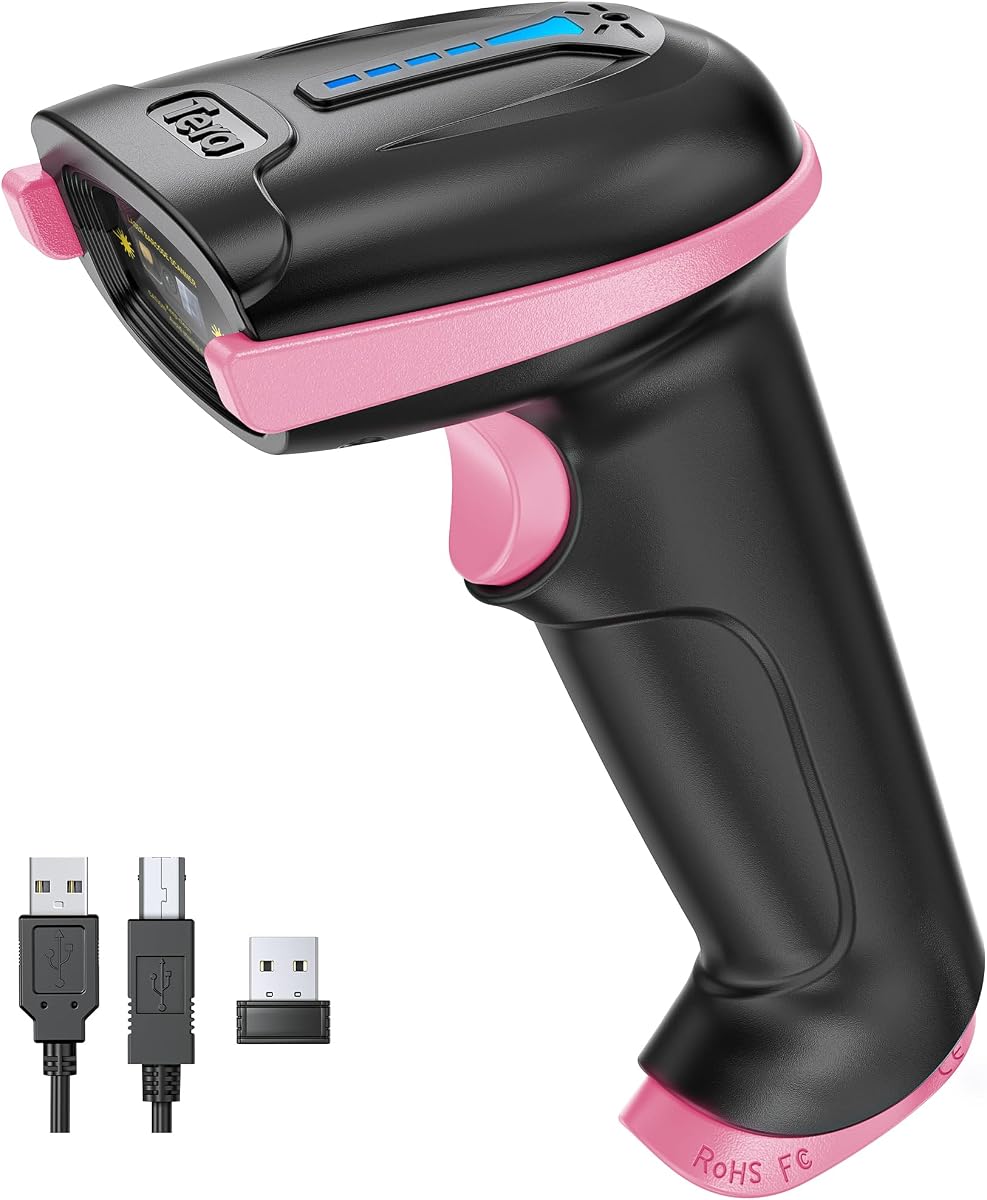
The Tera 5100 Pink Barcode Scanner combines functionality with a unique aesthetic choice. Its pink color makes it easily distinguishable among other devices which helps in shared workspaces. It shares the same high durability features as the purple version making it very reliable.
We may earn a commission when you buy through this link, at no additional cost to you.
Users appreciate the battery indicator and dust resistance which contribute to its long term usefulness. The wireless range allows staff to move freely while scanning items across the library. It is a practical tool that performs well in daily library tasks.
Like other models in this line it does not support 2D codes. This may be a consideration if your library uses QR codes for digital resources. However for standard circulation and inventory it is a strong performer with a high user rating.
Libraries looking for a reliable scanner that stands out visually will enjoy this model. It is particularly suitable for teams who want to reduce the risk of device mix ups. Its performance matches that of more traditional colors ensuring no compromise on utility.
The pink design helps distinguish this scanner from others in shared environments preventing confusion and misplaced devices.
With a range of up to 328 feet staff can scan items throughout the library without being tethered to a desk.
We may earn a commission when you buy through this link, at no additional cost to you.
The WoneNice USB Laser Barcode Scanner is known for its speed and reliability. It scans up to 200 times per second which is ideal for high traffic checkouts. The plug and play design ensures it works with most operating systems without issues.
We may earn a commission when you buy through this link, at no additional cost to you.
Its laser beam is effective for reading printed barcodes on paper and labels. The device includes 300 configurable options allowing detailed customization for specific library workflows. It is built to handle drops and daily use making it suitable for busy environments.
The laser technology may struggle with screens which limits its use for digital barcodes. Additionally the wired connection means staff cannot move freely while scanning. These factors should be considered when choosing between laser and CCD models.
Libraries needing a fast reliable scanner for fixed checkout points will find this model excellent. It is particularly useful for environments where speed is critical and mobility is not a priority. The configuration options allow for tailored settings to match specific needs.
Scanning up to 200 times per second reduces wait times for patrons during peak hours at the circulation desk.
The 300 configurable settings allow you to adjust prefixes suffixes and other parameters to fit your library's unique systems.
We may earn a commission when you buy through this link, at no additional cost to you.
The Symcode Wireless Barcode Scanner offers impressive range and flexibility for library use. It supports both wireless and wired connections ensuring compatibility with various setups. The 400 meter transmission range allows staff to scan even in distant corners of large buildings.
We may earn a commission when you buy through this link, at no additional cost to you.
Its storage mode is a valuable feature for offline data collection which is useful when network access is limited. The network mode supports multiple scanners connecting to one receiver ideal for team based inventory tasks. This makes it scalable for larger operations.
The laser beam limits reading of screen based barcodes which may be a constraint. Also it is limited to 1D codes which might not cover modern QR needs. However for traditional libraries it offers robust connectivity and performance.
Libraries with large floor plans will benefit most from the extended wireless range. It is a strong choice for inventory management teams that need to collaborate efficiently. The storage and network modes provide added flexibility that enhances productivity.
With a range of up to 400 meters this scanner allows staff to move freely without losing connection to the main system.
The network mode allows multiple scanners to connect to one receiver enabling simultaneous data collection by different staff members.
We may earn a commission when you buy through this link, at no additional cost to you.
The Eyoyo Portable Mini 1D Bluetooth Scanner in Pink is a stylish and functional device. It is designed to be lightweight and easy to carry making it ideal for mobile staff. The pink color adds a touch of personalization which can boost user satisfaction.
We may earn a commission when you buy through this link, at no additional cost to you.
It supports Bluetooth and 2.4G wireless modes ensuring it connects easily to tablets and PCs. The vibration mode ensures quiet operation which is vital in reading zones. Its compact size makes it easy to store in drawers or pockets when not in use.
The battery life is sufficient for moderate daily use but may need recharging frequently for heavy duty tasks. Also it is limited to 1D codes which restricts its use for QR based systems. These trade-offs are balanced by its portability and design.
Libraries looking for a personal device for individual staff members will find this model appealing. It is suitable for small to medium libraries where mobility is key. The combination of style and function makes it a pleasant addition to any library team.
The pink color makes this scanner stand out and adds a friendly touch to daily tasks improving user enjoyment and engagement.
Its small form factor allows it to be easily stored in small spaces making it convenient for mobile staff or pop up events.
We may earn a commission when you buy through this link, at no additional cost to you.
The Barcode Scanner with Stand offers a unique hands-free solution for library tasks. It includes an adjustable stand which allows items to be scanned without holding the device. This is useful for high volume checkouts where efficiency is critical.
We may earn a commission when you buy through this link, at no additional cost to you.
It supports both 1D and 2D codes ensuring compatibility with modern barcodes and QR codes. The auto sensing feature means the scanner activates automatically when an item is presented. This reduces the need for manual triggers and speeds up the process.
The wired connection limits movement which can be a drawback for mobile inventory checks. While it has a lower rating than other models the stand feature provides a specific utility that others lack. It is a niche tool that solves specific workflow challenges.
Libraries with fixed checkout points will benefit most from this scanner. It is particularly useful for environments where staff handle multiple items at once. The stand feature adds convenience that can improve throughput during busy periods.
The adjustable stand allows you to place items on the surface and scan them without holding the scanner which speeds up checkouts.
This scanner can read both traditional and QR codes ensuring it is future ready for evolving inventory and digital systems.
We may earn a commission when you buy through this link, at no additional cost to you.
Selecting the right barcode scanner requires understanding your library's specific needs. This guide outlines the key factors to consider when evaluating different models.
Libraries should decide between wired and wireless connectivity based on their workflow. Wired models offer stable connections but limit movement while wireless models provide flexibility for mobile staff. Bluetooth and USB options allow compatibility with various devices.
Ensure the scanner can read both 1D and 2D codes if your library uses QR codes. Some models are limited to traditional ISBNs which may be insufficient for digital assets. Check the product specs for compatible code formats.
For wireless scanners consider how long the battery lasts on a single charge. Models with charging cradles or long standby times reduce downtime during shifts. This is crucial for libraries with continuous operating hours.
Scanners in libraries often face drops and dust so look for models with protective covers. IP ratings and anti shock designs extend the device lifespan. This reduces maintenance costs and ensures consistent performance.
Fast scanning speeds are essential during peak hours to avoid long lines. A high resolution sensor ensures accurate reads even with damaged barcodes. This prevents errors in circulation and inventory records.
Libraries need quiet environments so choose scanners with mute or vibration modes. Loud beeps can disturb patrons in study areas. Features that allow sound control improve the user experience for everyone.
Look for plug and play models that do not require complex software installation. Simple setup saves time for technical staff and ensures quick adoption by users. This is key for libraries with limited IT resources.
Some scanners offer offline storage which is useful for inventory tasks outside network range. This ensures data is not lost if the connection drops. Consider this feature if you conduct off site scans.
Begin by connecting the scanner to your device via USB or Bluetooth. Follow the pairing instructions to ensure it recognizes your computer or tablet. Test a few scans to confirm it inputs data correctly into your system.
Keep the scanning window clean with a soft cloth to maintain accuracy. Avoid dropping the device and store it in a safe place when not in use. Regular cleaning prevents dust buildup which can interfere with performance.
Recharge wireless scanners regularly to avoid unexpected power loss. Check battery indicators and charge when levels are low to maintain consistent operation. Proper care ensures your device remains reliable over time.
Most barcode scanners are designed to act as keyboard inputs which works with any system that accepts text. Always check your library software requirements to ensure compatibility. Wired models are generally more straightforward to integrate than wireless ones.
Laser scanners use a light beam and are fast but cannot read screen codes. CCD sensors use a camera which can read codes from screens and paper. CCD is often preferred for libraries needing versatility.
Battery life varies by model but many wireless scanners last 8 to 20 hours on a full charge. Some offer standby times lasting days if usage is light. Check specifications for exact estimates based on your workflow.
Most modern scanners are plug and play and require no additional software. They function as input devices similar to a keyboard. However configuration may be needed for specific barcode formats.
High resolution sensors in many models can read worn or smudged barcodes effectively. Laser models may struggle with damaged codes but CCD scanners often handle them better. Choose a model with strong decoding capabilities for older collections.
Stands are optional but useful for high volume checkouts to enable hands-free scanning. They can speed up the process but are not necessary for individual item checks. Consider your volume and workflow when deciding.
Choosing the right barcode scanner can significantly improve library efficiency and patron experience. The models reviewed offer a range of options from budget friendly wired units to premium wireless devices.
Prioritize features like connectivity durability and battery life based on your specific operational needs. Quiet operation and accurate decoding are essential for maintaining a pleasant environment for patrons.
Keep in mind that product availability and specifications may change. Always check the latest details before purchasing to ensure the scanner meets your current requirements. A well chosen tool will serve your library for years to come.