
VEIKK VK1200 V2
4.3Editor score
Full-laminated anti-glare glass
Single-cable USB-C connectivity
Two battery-free pens included
Finding a cheap drawing tablet with screen can transform your creative workflow without breaking the bank. These devices offer a natural pen-on-paper feel directly on a display, making digital art more intuitive and accessible for beginners and professionals alike.
We have carefully evaluated ten top-rated models based on display quality, pressure sensitivity, compatibility, and overall value. Our analysis focuses on real-world performance and user feedback to ensure you get the most reliable tools for digital illustration and design work.
Each pick in this list highlights specific strengths tailored to different needs such as portability, color accuracy, or extra shortcut keys. Please note that product availability and pricing can change frequently, so verify the latest details before making your final purchase decision.
4.3Editor score

4.4Editor score

4.5Editor score
As an Amazon Associate we earn from qualifying purchases.
The following table provides a side-by-side comparison of all ten models featured in this guide. It highlights key specifications such as screen size, resolution, color gamut, pressure sensitivity, and unique features to help you quickly identify the model that fits your specific creative needs.




The XP-PEN Artist12 stands out as a top contender for beginners and intermediate artists seeking a cheap drawing tablet with screen. With a solid 4.4 rating, it delivers consistent performance for digital drawing and animation tasks without requiring a standalone setup.
We may earn a commission when you buy through this link, at no additional cost to you.
Its 11.6-inch Full HD IPS display offers vibrant visuals thanks to 72% NTSC color coverage. The battery-free stylus provides a natural feel with 8192 pressure levels, allowing for precise line weight control. Additionally, the slim programmable touch bar adds versatility for common commands like zooming or scrolling.
While it lacks tilt support and needs dual cables for connection, these trade-offs are minimal for the price point. The inclusion of an anti-reflective protector reduces glare, making long sessions more comfortable. Most users find the driver software straightforward and reliable.
This model is ideal for students or hobbyists who need a reliable display for Photoshop or Clip Studio. If you prioritize color fidelity and ease of use over advanced features like tilt, the Artist12 remains a strong recommendation for your digital art setup.
The display presents vivid images with 72% NTSC gamut ensuring your artwork looks true to life on screen for better color matching.
The hexagonal pen design prevents rolling and offers a non-slip grip, making it comfortable to hold during extended creative sessions.
We may earn a commission when you buy through this link, at no additional cost to you.
The VEIKK VK1200 V2 is an excellent choice for those seeking a cheap drawing tablet with screen without compromising on modern features. It features a full-laminated screen that minimizes parallax, ensuring your cursor aligns perfectly with the pen tip for accurate drawing.
We may earn a commission when you buy through this link, at no additional cost to you.
This model supports single-cable connectivity via USB-C, which simplifies setup significantly compared to older dual-cable options. The anti-glare glass provides a natural paper-like texture, reducing eye strain. With 8192 pressure levels and tilt recognition, it offers smooth strokes and shading capabilities.
Although it does not come with a stand and might need an adapter for older laptops, the package includes two pens and extra nibs for convenience. The compact design makes it portable enough for artists on the go. Drivers are updated regularly to ensure stability.
If you are looking for the most cost-effective entry into pen displays, this model delivers exceptional value. It is particularly well-suited for sketching and digital inking tasks where screen clarity and responsiveness are priorities over large screen real estate.
The anti-glare glass surface reduces reflections and provides a paper-like texture that enhances control and comfort during drawing.
USB-C single-cable connectivity transmits data power and video signals simultaneously making it easy to connect to modern laptops.
We may earn a commission when you buy through this link, at no additional cost to you.
For artists seeking top-tier performance in a cheap drawing tablet with screen category, the HUION Kamvas 13 Gen 3 offers impressive upgrades. It features a fully laminated screen with Canvas Glass 2.0 which reduces glare and improves touch accuracy significantly.
We may earn a commission when you buy through this link, at no additional cost to you.
The standout feature is the Advanced PenTech 4.0 technology which supports 16384 pressure levels and 2g Inertia Acceleration Force for fluid stroke rendering. Color accuracy is enhanced with 99% sRGB coverage and factory calibration reports ensuring precise color representation for professional work.
The dual dial buttons provide convenient access to brush size or scroll functions without taking your hand off the screen. While it sits at a higher price point, the build quality and features justify the investment. Connectivity is simplified with a single USB-C cable for data and power.
This device is ideal for illustrators who require high fidelity and quick controls. If you want a reliable display that balances performance with portability, the Kamvas 13 Gen 3 is a leading option worth considering for serious creative projects.
16384 levels of pressure sensitivity allow for nuanced brush strokes and detailed artwork with consistent performance across various apps.
Factory calibrated color reports ensure accurate colors from the box which is crucial for print-ready artwork and professional design.
We may earn a commission when you buy through this link, at no additional cost to you.
The GAOMON PD1161 is a robust option for users needing a cheap drawing tablet with screen that supports tilt for shading. Its matte film surface mimics paper texture well reducing reflections and improving control during long drawing sessions on the 11.6 inch display.
We may earn a commission when you buy through this link, at no additional cost to you.
With 8192 pressure levels and tilt recognition, this monitor offers a versatile workflow for illustrators. The eight customizable shortcut keys are a major benefit allowing quick access to tools like eraser or zoom. The driver software supports a wide range of creative applications seamlessly.
Although connection requires HDMI and USB ports which may need converters for modern laptops, the versatility is notable. The pen is battery-free and lightweight for comfortable use. Warranty support is solid providing peace of mind for new buyers starting their digital art journey.
This model fits well for those who need tilt support without spending heavily. It is a strong candidate for students or hobbyists who need efficient workflows and reliable hardware that performs well across various creative software platforms.
Tilt recognition allows artists to shade naturally by changing the angle of the pen without switching tools in the software.
Eight programmable shortcut keys provide quick access to commands improving workflow speed and reducing reliance on keyboard shortcuts.
We may earn a commission when you buy through this link, at no additional cost to you.
The Artisul D16 offers a spacious 15.6 inch workspace which is rare in the cheap drawing tablet with screen range. It features full-laminated technology that ensures precise cursor positioning making it ideal for detailed illustration and animation projects on a larger canvas.
We may earn a commission when you buy through this link, at no additional cost to you.
With 8192 pressure levels and a battery-free stylus users can create with confidence. The package includes a dial for quick adjustments and seven customizable hotkeys for enhanced productivity. The adjustable stand supports multiple angles for comfortable ergonomic positioning during work.
This unit is available as refurbished which provides a lower cost entry while maintaining quality. The display brightness is adjustable to suit different lighting conditions. Its larger area reduces the need to zoom frequently improving overall workflow efficiency for complex compositions.
For artists needing more screen real estate without the high price of premium monitors this model is a practical choice. It suits those working on detailed designs or requiring multiple tools open simultaneously while maintaining a compact design relative to standard monitors.
The larger 15.6 inch area provides more room for detailed work reducing the need for constant zooming and scrolling while creating.
An adjustable stand allows for comfortable viewing angles reducing strain on the neck and back during extended work sessions.
We may earn a commission when you buy through this link, at no additional cost to you.
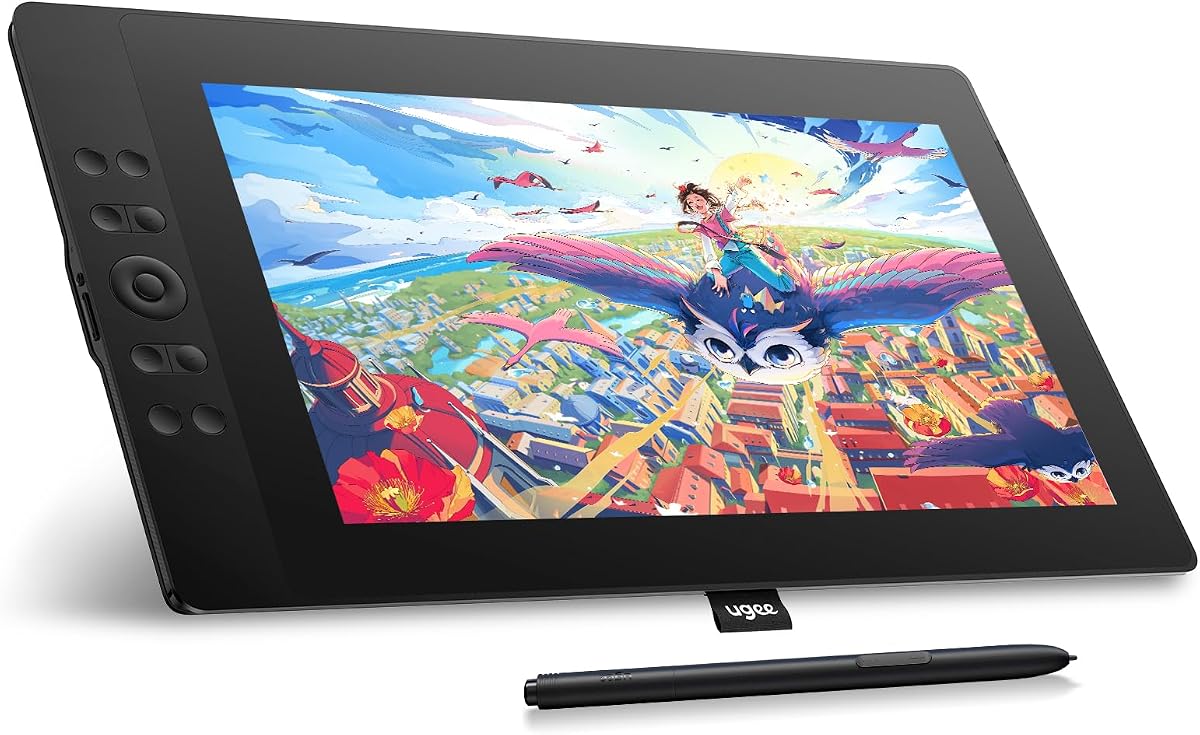
The UGEE UE16 stands out with its impressive 143% sRGB color gamut allowing for rich and vivid colors in artwork. This feature is perfect for designers who need accurate color reproduction. The 16K pressure sensitivity ensures smooth transitions between stroke weights and fine details.
We may earn a commission when you buy through this link, at no additional cost to you.
It offers four color space modes including Adobe RGB and DCI-P3 for versatility across different media. The screen is full-laminated to reduce parallax and improve accuracy. A scroll wheel and eight physical shortcut keys offer quick access to essential tools without interrupting the creative flow.
Compatibility extends to Android devices supporting USB 3.1 Gen 1 allowing mobile connectivity. The slim body provides a comfortable grip and aesthetic appeal. While cables are packed separately requiring careful unboxing the performance quality compensates for the setup process.
This model is a strong contender for professionals needing wide color accuracy in an affordable package. If color fidelity and connectivity options are important to your workflow this tablet delivers excellent performance for design and illustration tasks.
The 143% sRGB gamut allows for accurate color reproduction essential for print-ready designs and vibrant digital illustrations.
Compatibility with Android devices enables portable workflows allowing users to create on the go with modern laptops or tablets.
We may earn a commission when you buy through this link, at no additional cost to you.
The VEIKK VK1200 provides a reliable entry point for those looking for a cheap drawing tablet with screen. It features an 11.6-inch LED display with 8192 pressure levels and tilt support enabling versatile drawing techniques without a steep learning curve for beginners.
We may earn a commission when you buy through this link, at no additional cost to you.
Accessories like two pens and 28 replacement nibs allow users to experiment with different styles immediately. An included artist glove keeps the hand clean and prevents smudges during drawing. The shortcut keys simplify common tasks like undo or brush selection improving workflow efficiency.
While the display is not full-laminated, performance remains stable for most tasks. Drivers are available to customize keys for specific software. The package value is high due to the inclusion of extras. It is a practical choice for students needing basic features.
This tablet is best suited for beginners or casual artists who need a functional tool to start creating. If you prefer a simple setup with essential features like tilt and shortcuts this model offers a balanced option for daily creative use.
Including two pens and 28 nibs offers great value allowing users to keep spares handy for uninterrupted creative sessions.
Tilt support allows for natural shading effects mimicking traditional art tools for a more expressive drawing experience.
We may earn a commission when you buy through this link, at no additional cost to you.
The RubensTab T11 Pro is unique as a standalone device that does not require a computer connection. This makes it a distinct option among cheap drawing tablet with screen choices for users who prioritize mobility and independence for sketching or note-taking tasks.
We may earn a commission when you buy through this link, at no additional cost to you.
It features a 10.1-inch Full HD screen and a 5800mAh battery supporting up to five hours of continuous use. The device comes pre-installed with professional drawing apps making it ready to use out of the box. Multi-touch functionality allows for intuitive zooming and panning.
While it is not designed for heavy professional workflows its portability is a major strength. It supports USB-C charging and is compatible with mobile power banks for extended use. The adjustable stand case adds convenience for travel and desktop setups.
This model is ideal for travelers or students who need a self-contained solution. If you want to create anywhere without relying on a laptop this tablet offers a practical way to capture ideas on the go.
No computer required allows users to create anywhere using built-in apps and battery power for unmatched portability and freedom.
The built-in battery supports up to five hours of continuous use allowing for uninterrupted creative sessions during travel.
We may earn a commission when you buy through this link, at no additional cost to you.
The VEIKK VK1200V2 brings upgraded performance with 16384 pressure levels in an affordable package. This high sensitivity allows for more nuanced line work and shading. The 120% sRGB color gamut ensures vibrant and lifelike colors for digital artwork on the 11.6 inch display.
We may earn a commission when you buy through this link, at no additional cost to you.
Full-laminated design reduces parallax improving cursor accuracy and comfort. The lightweight build makes it easy to carry for travel or storage. Two styluses are included ensuring you always have a backup ready for continuous creative work without interruption.
Although it must be connected to a computer for use the driver support is available and updated. The hotkeys are customizable to improve efficiency during tasks. It supports Linux Windows and Mac systems offering wide compatibility for different user environments.
This model is a great upgrade for users seeking higher sensitivity without a premium price. It suits artists who need accurate line control and color quality in a portable and affordable drawing display for daily creative tasks.
16384 pressure levels provide detailed control over stroke thickness enabling precise artistic expression in digital drawings.
120% sRGB coverage ensures vibrant color reproduction making it suitable for projects requiring accurate digital color rendering.
We may earn a commission when you buy through this link, at no additional cost to you.
The XPPen Artist 12 Pro Lite features a fully-laminated display that eliminates parallax offering a paper-like feel for drawing. This design ensures precise cursor alignment which is critical for detailed work. The 11.6-inch screen provides enough space for most creative tasks.
We may earn a commission when you buy through this link, at no additional cost to you.
It supports up to 60-degree tilt allowing for natural shading adjustments without software switching. The red dial and eight shortcut keys add flexibility for controlling parameters quickly. A 3-in-1 cable simplifies connection removing the need for extra adapters for modern laptops.
Compatibility extends to ChromeOS and Linux adding versatility for diverse user environments. The lightweight construction makes it easy to transport. While it lacks some premium features its performance is consistent for basic drawing and annotation needs in various software apps.
This tablet is perfect for users needing a compact display with reliable performance. If you prioritize connection simplicity and tilt support for shading this model is a practical choice for students and professionals alike.
The red dial offers customizable control for brush size or opacity allowing quick adjustments without interrupting the workflow.
Up to 60-degree tilt support enables natural shading techniques mimicking traditional pencils for realistic digital drawings.
We may earn a commission when you buy through this link, at no additional cost to you.
Selecting the right pen display involves evaluating several technical factors that impact performance and usability.
Screen size determines your workspace and portability. Common sizes range from 10 to 15 inches with 1920×1080 resolution being standard for clear visuals.
Choose a size that fits your desk and travel needs. Larger screens offer more space for complex projects while smaller ones are easier to transport.
Pressure sensitivity ranges from 8192 to 16384 levels affecting how naturally your strokes appear. Higher numbers allow finer control over line width and opacity.
Look for at least 8192 levels for smooth drawing. Higher sensitivity can help with detailed shading and artistic control.
Color gamut coverage like sRGB or NTSC ensures your artwork looks true to life. Higher percentages provide more accurate color reproduction.
Check for 72% NTSC or 99% sRGB coverage. Good color accuracy is vital for design and professional illustration work.
Most pens are battery-free using EMR technology for ease of use. Tilt support allows shading by changing the pen angle without extra tools.
Verify if tilt is supported based on your needs. Ensure the pen feels comfortable and comes with extra nibs for replacement.
Connectivity options vary between USB-C and HDMI with USB-A. Some models support single-cable setups for simpler connection.
Ensure your computer has the necessary ports. A single USB-C cable is convenient but check for adapter requirements if needed.
Shortcut keys on the device or pen allow quick access to common commands like zooming or switching tools.
Look for customizable keys that fit your workflow. More keys can improve efficiency in complex software environments.
Drivers must support your OS including Windows macOS or Linux. Some also support Android devices for mobile workflows.
Verify compatibility before purchase to avoid software issues. Most popular brands support major desktop operating systems.
A durable body with anti-glare glass protects the screen during use. Full-lamination reduces parallax for better accuracy.
Choose a model with anti-slip backing for stability. A solid build ensures longevity especially for daily creative work.
Install the latest drivers before connecting your tablet to ensure smooth communication between hardware and software. Restart your computer after installation to apply all necessary settings correctly.
Adjust the pen pressure and tilt settings in the driver menu to match your drawing style. Experiment with different configurations to find what feels most natural for your strokes.
Clean the screen with a microfiber cloth to remove dust and smudges. Avoid harsh chemicals and keep the device away from direct sunlight to maintain display quality.
Most cheap drawing tablets with screens require a connection to a computer or laptop to function as secondary displays. However some standalone models exist that can run apps independently without external hardware.
Resolution impacts clarity and detail visibility. Full HD resolution is standard and sufficient for most digital art tasks providing sharp visuals for precise strokes.
Use a soft microfiber cloth to wipe the screen gently. Avoid using paper towels or harsh chemicals that could damage the anti-glare coating.
8192 pressure levels are standard and work well for beginners. Higher levels like 16384 offer more precision for detailed work but are often found in premium models.
Most models support macOS with drivers available from the manufacturer. Always check system requirements before purchase to ensure full compatibility.
Many models come with multiple replacement nibs to extend usability. Check the package contents before buying to ensure you have enough spares.
We have highlighted ten top options that balance affordability with performance. Each model offers unique strengths whether it be color accuracy portability or sensitivity.
Prioritize features that match your workflow such as screen size and compatibility. A good fit ensures long-term satisfaction and creative freedom.
Always verify current pricing and availability before purchasing since deals can change frequently. This guide aims to help you find the most reliable tools for your art journey.