
Integral Crypto-197 256-Bit
4.1Editor score
FIPS 197 Certified Security
Brute Force Attack Protection
Waterproof Double Layer Design
This guide compares the top encrypted USB flash drives for security, speed, and durability to help you choose the best hardware protection for your sensitive
In an era where data breaches are increasingly common, securing your digital assets is more critical than ever. Encrypted USB flash drives offer a robust solution by combining portable storage with advanced hardware encryption. These devices ensure that your files remain inaccessible to unauthorized users, even if the drive is lost or stolen. Choosing the right one requires understanding key features like encryption standards, authentication methods, and build quality to meet your specific security needs effectively.
To compile this comprehensive list, we evaluated ten leading encrypted USB flash drives based on their security protocols, performance metrics, and user experience. We focused on models that offer hardware-based encryption, such as AES 256-bit, which provides superior protection compared to software solutions. Our analysis also considered factors like physical durability, compatibility across operating systems, and additional features like brute force protection. This rigorous comparison helps you identify the most reliable options available in the current market.
Each pick in this guide highlights unique strengths, whether it is top-tier government certification, ease of use, or rugged design for harsh environments. We have organized the products to help you find the best fit for your budget and security requirements. Please note that product availability and pricing can change frequently, so we recommend verifying the latest details before making a purchase. This guide serves as a trusted resource to streamline your decision-making process for secure portable storage.
4.1Editor score
4.6Editor score

4.5Editor score
This side-by-side comparison highlights the key specifications and security features of the top ten encrypted USB flash drives to help you make an informed decision based on your specific needs.


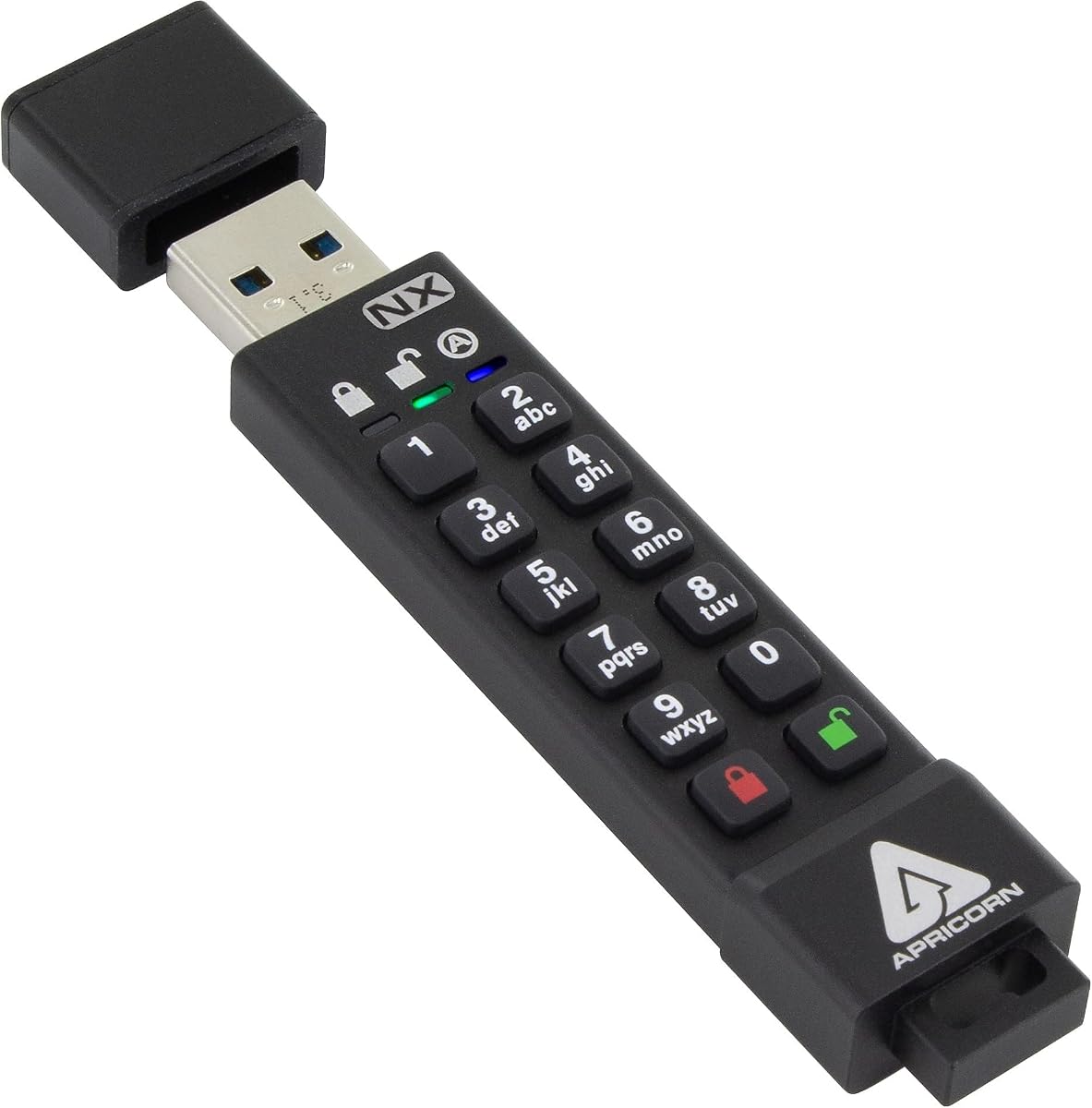
The Apricorn Aegis Secure Key 3 NX stands out as the top choice for users prioritizing maximum security compliance. With FIPS 140-2 Level 3 validation, this drive ensures that your data is protected by military-grade standards. It combines hardware encryption with flexible access modes, making it ideal for both personal and enterprise use cases.
We may earn a commission when you buy through this link, at no additional cost to you.
Its standout features include separate admin and user modes, allowing for granular control over who can modify or view data. The inclusion of two read-only modes provides an extra layer of safety for critical files that should not be altered. Additionally, data recovery PINs ensure that you can regain access if your primary credentials are lost.
While the 8GB capacity may seem limited compared to modern standards, this drive is designed for high-security applications where portability and compliance are more important than storage size. The price point is higher than budget options, but the level of security and validation justifies the investment for serious users.
We recommend this drive for government contractors, legal professionals, or anyone handling highly sensitive information. If you need a reliable, certified solution that balances security with usability, the Apricorn Aegis Secure Key 3 NX is the best overall choice available today.
The FIPS 140-2 Level 3 certification means this drive meets rigorous federal standards for cryptographic modules, ensuring it can withstand sophisticated physical and logical attacks.
With separate admin and user modes, administrators can enforce policies while users access data securely, and read-only modes prevent accidental modification of critical files.
We may earn a commission when you buy through this link, at no additional cost to you.
The Kingston IronKey Vault Privacy 50 delivers top-tier security with FIPS 197 validation and XTS-AES 256-bit hardware encryption. It protects against modern threats like BadUSB attacks with digitally-signed firmware, ensuring your drive cannot be compromised by malicious software. The multi-password option allows flexible configurations to meet diverse security requirements.
We may earn a commission when you buy through this link, at no additional cost to you.
Its passphrase mode offers enhanced security by allowing longer, more memorable passwords without sacrificing protection. Dual read-only settings prevent accidental data modification, making it suitable for critical backups. Being TAA compliant, it meets trade agreements act standards for government and enterprise procurement.
While it comes at a premium price, the advanced security features justify the cost for organizations needing robust protection. The complexity of setup might challenge casual users, but those prioritizing security will appreciate the comprehensive threat mitigation. It balances high performance with military-grade safeguards effectively.
We recommend this drive for enterprises and professionals handling sensitive business data. If you need a secure, compliant solution with advanced attack protection, the Kingston IronKey Vault Privacy 50 is the best premium option available.
The drive includes protection against BadUSB attacks using digitally-signed firmware, ensuring that malicious code cannot execute on the device and compromise connected systems.
Users can choose from complex passwords or memorable passphrases, with multi-password support allowing different access levels for various users or scenarios.
We may earn a commission when you buy through this link, at no additional cost to you.
The Integral Crypto-197 256-Bit offers an affordable entry into secure storage without compromising on essential protections. It is FIPS 197 certified, providing U.S. government-approved security standards at a budget-friendly price. The auto-lock feature encrypts data immediately when removed from a PC, ensuring protection even if the drive is misplaced.
We may earn a commission when you buy through this link, at no additional cost to you.
Its zero footprint design means no software installation is required, simplifying setup and avoiding license fees. The dual-layer waterproof construction protects against water immersion and physical drops, making it durable for everyday use. With brute force protection, data is erased after failed access attempts to prevent unauthorized entry.
While the 4GB capacity is limited for large files, it is ideal for storing critical documents or credentials. Some users may find the interface basic compared to higher-end models, but the core security functions are reliable. The price makes it accessible for individuals needing basic encryption.
We recommend this drive for students or casual users needing secure portable storage on a budget. If you want certified security without spending a lot, the Integral Crypto-197 is the best budget option to consider today.
The cryptographic key automatically encrypts all data and locks when the drive is removed from a computer, ensuring files remain protected if the device is lost or stolen.
The dual-layer design with a rubberized silicone outer case and hardened internal case protects the electronics from water, drops, and physical impacts.
We may earn a commission when you buy through this link, at no additional cost to you.
The Apricorn Aegis Secure Key 3 NXC brings modern connectivity to secure storage with its USB 3.2 Type C connector. It maintains the high security of the Aegis line with FIPS 140-2 Level 3 validation and 256-bit AES-XTS hardware encryption. The software-free authentication ensures compatibility across all systems without requiring drivers.
We may earn a commission when you buy through this link, at no additional cost to you.
Its 128GB capacity is significantly higher than many secure drives, allowing for larger backups and file transfers. Separate admin and user modes provide flexible access control, while the power supply options via USB port or internal battery ensure reliability. This drive is ideal for professionals using newer devices with Type C ports.
While the Type C connector limits compatibility with older USB-A ports without an adapter, it aligns with current device trends. The price reflects the advanced features and higher capacity, making it a strong choice for those needing more storage space. It balances security and modern design effectively.
We recommend this drive for tech-savvy users and businesses transitioning to USB-C ecosystems. If you need secure storage with high capacity and modern connectivity, the Apricorn Aegis Secure Key 3 NXC is an excellent choice.
The USB 3.2 Type C connector ensures compatibility with the latest laptops, tablets, and smartphones, making file transfers faster and more convenient.
With 128GB of storage, this drive allows you to store significantly more encrypted data compared to standard secure drives, perfect for large file backups.
We may earn a commission when you buy through this link, at no additional cost to you.
The iStorage datAshur PRO 4 GB features hardware PIN authentication via a built-in keypad, eliminating the need for software installation. It is FIPS 140-2 Level 3 certified, ensuring compliance with strict data regulations like GDPR and HIPAA. The AES-XTS 256-bit encryption protects data in real time during transfers.
We may earn a commission when you buy through this link, at no additional cost to you.
Its IP57 certification provides dust and water resistance, making it durable for outdoor or industrial environments. Compatible with various operating systems including Windows, macOS, and Linux, it offers broad usability. The 7-15 digit PIN requirement ensures strong access control without relying on potentially vulnerable software.
While the physical keypad adds bulk and requires manual entry, it prevents software-based keylogging attacks. The 4GB capacity may be limiting for large files, but it is sufficient for secure documents. The lack of software dependencies simplifies use across different systems effectively.
We recommend this drive for users who prefer keypad security over software. If you need a reliable, certified solution that works across multiple devices, the iStorage datAshur PRO is a strong option.
The built-in PIN keypad allows users to authenticate without typing on a keyboard, preventing keyloggers from capturing credentials.
This drive works on any device with a USB port including Windows, macOS, Linux, and Chrome without requiring any additional drivers or software.
We may earn a commission when you buy through this link, at no additional cost to you.
This encrypted USB drive offers AES256-bit hardware encryption with an independent chip to prevent brute-force attacks at the hardware level. It includes a key unlock design with no password trace, ensuring that access details are not stored on the device. After ten incorrect password attempts, the drive resets and erases data to protect against theft.
We may earn a commission when you buy through this link, at no additional cost to you.
The automatic lock feature engages within 30 seconds of disconnection or removal from a computer, ensuring data remains secure if the drive is left unattended. Its aluminum alloy shell provides durability, while USB 3.0 speeds allow for quick file transfers. The FAT32 file system supports broad compatibility across systems.
While the wipe function after failed attempts can be a safety net, it may lead to accidental data loss if a user mistypes too often. The design prioritizes security over recovery options, which may not suit all users. However, it is affordable for secure portable storage needs.
We recommend this drive for users needing basic hardware security without software dependency. If you want a simple, reliable way to protect files on a budget, this drive is a practical option.
After ten incorrect password inputs, the drive automatically resets and erases all data, ensuring that unauthorized users cannot access your sensitive information.
The drive locks itself after 30 seconds of inactivity or when unplugged, preventing access if the device is lost or left in public.
We may earn a commission when you buy through this link, at no additional cost to you.
The Lexar 128GB JumpDrive F35 PRO offers biometric security through fingerprint authentication, allowing quick access for up to ten different fingerprints. This provides an extra layer of security for confidential files without the need to remember complex passwords. It also includes 256-bit AES encryption to protect data from unauthorized access.
We may earn a commission when you buy through this link, at no additional cost to you.
With read speeds up to 400MB/s and write speeds up to 300MB/s, it delivers high-performance file transfers. The USB 3.2 Gen 1 interface ensures compatibility with modern systems. The fingerprint sensor recognizes users in less than one second, making it convenient for daily use.
While biometric access is convenient, it may require initial setup and can sometimes fail if fingers are wet or dirty. The 128GB capacity is generous, but the price may be higher than standard drives. For users seeking fast access without passwords, it is a strong option.
We recommend this drive for professionals needing quick, secure access to large files. If you prefer fingerprint authentication over typing passwords, the Lexar JumpDrive F35 PRO is a great choice.
The fingerprint sensor recognizes authorized users in less than one second, providing secure access without the delay of typing passwords.
With transfer speeds up to 400MB/s read and 300MB/s write, this drive handles large file backups and transfers efficiently.
We may earn a commission when you buy through this link, at no additional cost to you.
The iStorage datAshur PRO2 32 GB is a rugged option with IP68 certification for complete dust and water resistance. It features FIPS 140-2 Level 3 certification for compliance with data regulations and includes hardware PIN authentication via a built-in keypad. AES-XTS 256-bit encryption protects data in real time during transfers.
We may earn a commission when you buy through this link, at no additional cost to you.
Its compatibility with all operating systems including Windows, macOS, and Linux ensures broad usability without drivers. The 32GB capacity offers more storage than standard secure drives. With USB 3.2 speeds, file transfers are fast and efficient. The rugged design makes it suitable for outdoor or harsh environments.
While the PIN keypad adds some bulk, it provides secure access without software vulnerabilities. The IP68 rating ensures protection against extreme conditions. The higher price reflects the durability and security standards, making it ideal for field professionals.
We recommend this drive for professionals working in challenging environments. If you need a waterproof, certified solution, the iStorage datAshur PRO2 is a top choice.
The IP68 rating ensures the drive is dust and waterproof, protecting it from submersion and harsh conditions.
FIPS 140-2 Level 3 certification helps ensure compliance with GDPR, CCPA, and HIPAA regulations for sensitive data handling.
We may earn a commission when you buy through this link, at no additional cost to you.
The Kingston Ironkey D500S offers an industry-first dual hidden partition feature allowing users to keep personal and professional data separate. It features XTS-AES 256-bit encryption with FIPS 140-3 Level 3 pending certification for military-grade security. Brute force and BadUSB protection safeguards against unauthorized access and malicious USB attacks.
We may earn a commission when you buy through this link, at no additional cost to you.
The rugged zinc casing provides penetration attack protection ensuring physical durability. Multi-password options with complex and passphrase modes allow flexible security configurations. The crypto-erase password offers emergency data destruction capabilities. This drive balances security features with practical usability effectively.
While the 16GB capacity may be limiting for some, the dual partition adds functional value. The price reflects advanced security features not found in other drives. For users needing compartmentalized storage, this is a unique option.
We recommend this drive for professionals managing separate data streams. If you need dual partitions with top-tier protection, the Kingston Ironkey D500S is ideal.
Dual hidden partitions allow you to keep personal and professional files separate within a single secure device, improving organization and privacy.
The rugged zinc casing is designed to protect against physical attacks and ensure durability in demanding environments.
We may earn a commission when you buy through this link, at no additional cost to you.
The Kingston 8GB D300S provides reliable encryption in a compact form factor ideal for portability. It uses hardware-based AES 256 XTS encryption to protect data without requiring software installation. The 8GB capacity is sufficient for critical documents and small files. Its design emphasizes simplicity and reliability.
We may earn a commission when you buy through this link, at no additional cost to you.
As a trusted brand, Kingston ensures consistent quality and performance. The drive supports cross-platform compatibility without drivers, making it easy to use across systems. While the storage is limited compared to larger drives, it excels as a secure portable key. The price is affordable for essential hardware encryption.
Users needing more storage may find the 8GB limiting, but it serves as a secure backup or transfer tool. The hardware encryption ensures data remains protected without software dependencies. It is a practical choice for basic security needs.
We recommend this drive for users needing a simple, compact secure key. If you prioritize portability and reliability, the Kingston 8GB D300S is a solid choice.
Hardware-based AES 256 encryption protects your files without requiring any software installation, ensuring ease of use across different computers.
Backed by Kingston's reputation for quality, this drive delivers consistent performance and durable storage for your sensitive files.
We may earn a commission when you buy through this link, at no additional cost to you.
Selecting the right encrypted USB flash drive requires evaluating several critical factors to ensure it meets your security and performance needs effectively.
Look for drives with hardware-based encryption such as AES 256-bit or higher. Hardware encryption is more secure than software solutions because it does not rely on the host computer's resources or operating system. Certified standards like FIPS 140-2 Level 3 indicate compliance with rigorous government security protocols.
Consider how you will access the drive. Options include PIN entry via a keypad, passwords, or biometric scanning. Keypads prevent keylogging attacks while passwords offer flexibility. Choose a method that balances security with ease of use for your workflow.
Check for physical ratings like IP67 or IP68 for water and dust resistance. Rugged designs protect against drops and impacts especially if you carry the drive in a bag or pocket. Durable materials like aluminum or zinc casing enhance longevity and protection against physical attacks.
Secure drives often have lower capacities compared to standard drives due to the cost of encryption components. Determine how much data you need to store and choose accordingly. Higher capacity options may be pricier but offer more flexibility for larger file sets.
Ensure the drive matches your devices ports. USB 3.0 and USB 3.2 offer faster speeds while Type C connectors are ideal for modern laptops. Verify compatibility with your operating system to avoid driver issues or performance bottlenecks.
Look for extras like brute force protection that wipes data after failed attempts or dual partition options for separating personal and business files. Some drives include read-only modes to prevent accidental modification of critical files. These features add layers of protection tailored to specific threats.
Choose drives that work across Windows macOS Linux and mobile systems without requiring software installation. Universal compatibility ensures you can access your data on any device without compatibility barriers or additional setup steps.
Determine your budget based on the sensitivity of your data. High-security certifications and advanced features increase the price but are necessary for enterprise use. For personal use, basic hardware encryption may be sufficient at a lower cost.
To begin using your encrypted USB flash drive insert it into a compatible USB port. Depending on the model you may need to enter a PIN or password via a keypad or your computer screen. Once authenticated the drive appears as a normal storage device allowing you to save or access files securely.
Hardware encryption uses a built-in chip to encrypt data independently of the host computer making it more secure and faster. Software encryption relies on programs installed on the computer which can be vulnerable to malware and system errors. Hardware drives also do not require drivers for compatibility.
Most encrypted drives do not allow data recovery without the correct credentials to ensure security. Some models provide recovery PINs or emergency crypto-erase options but these must be set up in advance. Always store recovery codes securely outside the device itself.
FIPS certified drives meet strict government standards which are essential for handling sensitive data like legal or financial records. For personal use basic hardware encryption may suffice but FIPS certification provides an extra layer of reliability and compliance.
Many modern encrypted drives offer cross-platform compatibility without requiring additional software. Look for models that support Windows macOS and Linux to ensure you can access your files across different operating systems seamlessly.
Encrypted USB drives have similar lifespans to standard flash drives typically lasting several years with normal use. Durability depends on build quality and usage habits so choose a rugged model if you plan to carry it daily.
It is generally safer to unplug the drive when not in use as some models feature auto-lock when removed. Keeping it unplugged prevents unauthorized access if the device is left unattended on a computer.
Choosing the right encrypted USB flash drive depends on your specific security needs budget and the environments in which you use it. The Apricorn Aegis Secure Key 3 NX leads in compliance while the Kingston IronKey Vault Privacy 50 offers premium features for enterprises. Budget users will find the Integral Crypto-197 a reliable entry point.