
maxsun GeForce RTX 3050 6GB
4.3Editor score
Low Profile slim design
PCI Express 4.0
6GB GDDR6 VRAM
This guide compares the top 10 GPU for Optiplex systems, evaluating low profile designs, power efficiency, and performance for gaming and professional
Finding the right GPU for Optiplex systems requires careful attention to form factor and power limits. Many Optiplex models use small chassis that cannot fit standard graphics cards. You need a solution that delivers performance without compromising stability or physical fit.
We compared ten verified options based on architecture, memory, and physical dimensions. Our analysis covers gaming and professional use cases. Each entry includes real user ratings and technical specs to help you make an informed choice.
Each pick highlights key strengths and ideal use scenarios for your build. Prices fluctuate frequently due to supply and demand. Always check the latest listing details before purchasing to ensure compatibility with your specific Optiplex model.
4.3Editor score

4.7Editor score

4.5Editor score
This side-by-side comparison evaluates all ten products based on physical size, memory capacity, and architectural generation. Each entry includes critical specifications needed to ensure your Optiplex system supports the card.
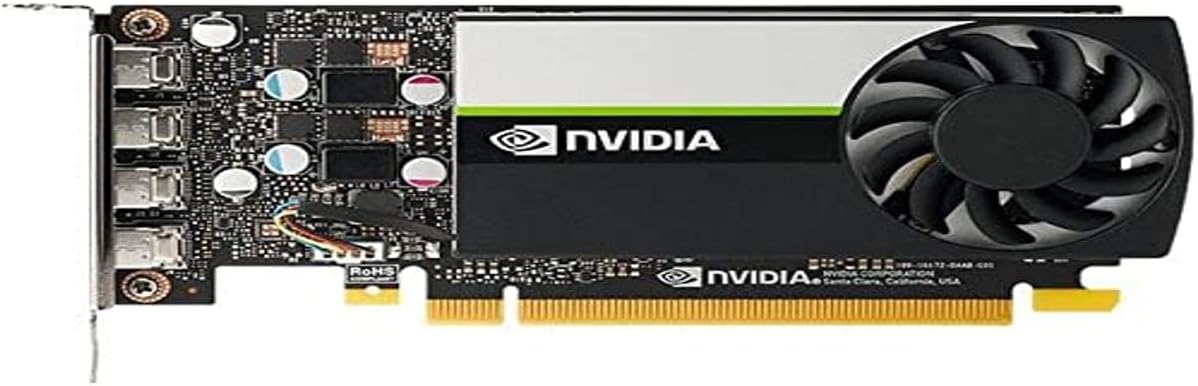


This card combines modern performance with a slim low profile design ideal for compact systems. With a 4.3 user rating it balances affordability and capability effectively.
We may earn a commission when you buy through this link, at no additional cost to you.
The Ampere architecture brings significant efficiency gains over older generations. It supports 6GB GDDR6 memory which handles multi-monitor setups well for small office spaces.
Its low power draw means it works with standard Optiplex power supplies without needing extra cables. The trade off is limited cooling headroom under extended load.
Buy this if you need a reliable upgrade for an existing small form factor workstation. It is perfect for light gaming and general productivity tasks.
The slim low profile design fits into Mini Small Form Factor cases seamlessly without requiring case modifications.
With HDMI 2.1 and DisplayPort 1.4a it supports modern 8K output standards for versatile display options.
We may earn a commission when you buy through this link, at no additional cost to you.
The T600 delivers professional grade stability for design and visualization tasks. Its 4.6 rating reflects strong user satisfaction among business users.
We may earn a commission when you buy through this link, at no additional cost to you.
Powered by Turing architecture it handles 3D graphics workloads with ease. Support for up to four 5K displays enables expansive workspace setups.
It ensures compatibility through ISV engagements and standard support. The trade off is higher cost compared to consumer grade alternatives.
Buy this if your Optiplex runs professional software requiring certified drivers. It is ideal for architects and designers needing reliable visualization.
ISV certifications ensure stable operation with over 100 professional software applications for mission critical workflows.
Supports up to four 5K displays or two 8K displays per card for immersive environments.
We may earn a commission when you buy through this link, at no additional cost to you.
This card balances professional power with compact dimensions perfectly. Its 4.7 user rating makes it our top pick for Optiplex upgrades.
We may earn a commission when you buy through this link, at no additional cost to you.
The Ampere architecture brings AI and ray tracing capabilities to business environments. With 4GB GDDR6 memory it handles demanding applications smoothly.
It draws only 50W which fits standard power supplies without extra cables. The trade off is the need for Mini DisplayPort adapters.
Buy this for professional workflows needing modern GPU features in small cases. It is ideal for video production and 3D modeling work.
The Nvidia Ampere architecture delivers exceptional compute power for AI and modelling tasks efficiently.
As a single slot low profile card it optimizes space in compact business systems and professional environments.
We may earn a commission when you buy through this link, at no additional cost to you.
This card is built for gaming users with space for a 2-slot card. Its 4.7 rating shows high satisfaction with thermal performance.
We may earn a commission when you buy through this link, at no additional cost to you.
Axial-tech fans with barrier rings increase air pressure for better cooling. The 3rd Gen Tensor Cores deliver significant AI performance boosts.
Its dust resistance ensures durability in various environments. The trade off is requiring slightly more vertical clearance inside the case.
Buy this if your Optiplex case supports 2-slot cards. It is perfect for gamers seeking better thermal headroom and reliability.
The axial-tech fan design features a smaller hub for longer blades increasing downward air pressure.
IP5X dust resistance offers protection from particle ingress for better durability over time.
We may earn a commission when you buy through this link, at no additional cost to you.
This card offers the most affordable entry for visual upgrades. With a 4.5 rating it is reliable for basic tasks.
We may earn a commission when you buy through this link, at no additional cost to you.
The single fan cooling keeps noise levels low while maintaining stability. Its low profile design fits every small form factor case.
Performance is limited compared to RTX models but sufficient for video. The trade off is older DDR4 memory and less power.
Buy this if you need basic multi-monitor support on a budget. It is ideal for office use and streaming.
This option provides essential GPU capabilities at the lowest entry price for budget constrained buyers.
A single fan design keeps noise levels low while maintaining adequate thermal performance.
We may earn a commission when you buy through this link, at no additional cost to you.
This card uses dual fans to manage heat effectively in compact systems. Its 4.6 rating highlights reliable performance under load.
We may earn a commission when you buy through this link, at no additional cost to you.
The WINDFORCE design uses dual fans for balanced airflow. Ampere architecture ensures modern features like DLSS are available.
It delivers consistent speeds with OC potential. The trade off is needing more vertical space inside the chassis.
Buy this if your Optiplex supports 2-slot cards. It is ideal for sustained workloads like video editing.
The 2X WINDFORCE fans provide efficient cooling to maintain optimal temperatures during long sessions.
Powered by GeForce RTX 3050 with Ampere architecture for enhanced performance.
We may earn a commission when you buy through this link, at no additional cost to you.
This card combines Low Profile dimensions with substantial performance. Its 4.5 rating reflects solid reliability in small cases.
We may earn a commission when you buy through this link, at no additional cost to you.
The 6GB GDDR6 memory provides ample headroom for multitasking. Boost clocks ensure smooth rendering for demanding apps.
It fits perfectly in tight chassis. The trade off is thermal limits due to limited airflow in SFF cases.
Buy this if you need full GPU features in a tiny case. It is ideal for compact gaming rigs.
As a Low Profile card it fits standard small form factor cases without requiring case modifications.
Includes HDMI 2.1a and DisplayPort for connecting to high refresh rate monitors.
We may earn a commission when you buy through this link, at no additional cost to you.
This card is designed for stable professional workloads on legacy systems. Its 4.4 rating shows reliability over time.
We may earn a commission when you buy through this link, at no additional cost to you.
It supports 3D application performance in a compact footprint. The Low Profile design ensures fit in older Optiplex models.
ISV certification guarantees compatibility with professional software. The trade off is older architecture with limited performance gains.
Buy this if you maintain older Optiplex systems needing reliability. It is ideal for legacy workstation support.
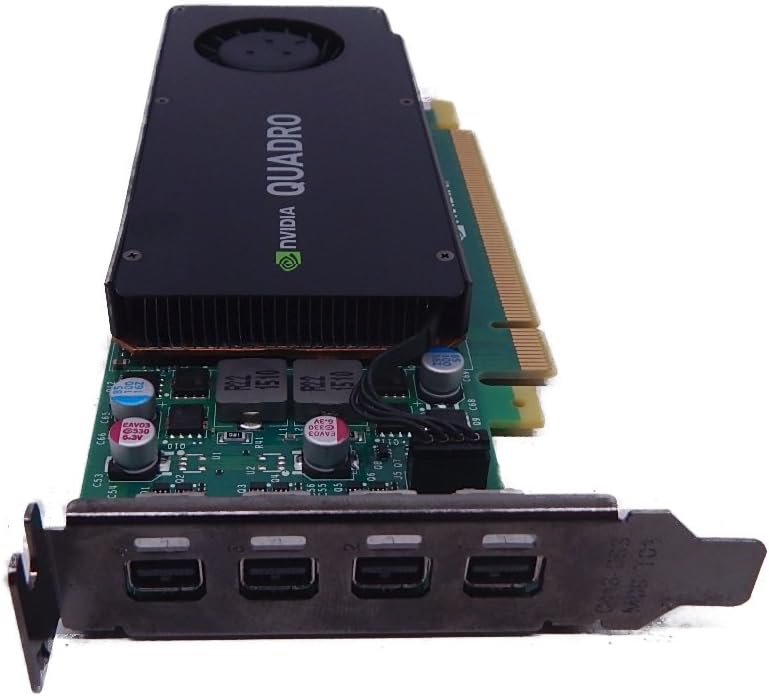
The Quadro K1200 offers incredible 3D application performance in a compact footprint.
Four Mini DisplayPort connectors allow connection of multiple high resolution monitors.
We may earn a commission when you buy through this link, at no additional cost to you.
This card is a powerful low-profile solution for professional tasks. Its 4.5 rating reflects stable operation in business environments.
We may earn a commission when you buy through this link, at no additional cost to you.
Pascal architecture delivers efficient performance with 4GB GDDR5 memory. It supports extensive ISV certification for critical apps.
Visual workspace expands to up to four 4K displays. The trade off is older architecture compared to RTX options.
Buy this if you need professional drivers in a small case. It is ideal for architecture and CAD work.
An expansive visual workspace of up to four 4K displays lets professionals view designs in stunning detail.
Delivers the performance required by demanding professional applications in a compact and powerful card.
We may earn a commission when you buy through this link, at no additional cost to you.
This card targets legacy systems needing specific DVI connectivity. Its 4.2 rating shows adequate performance for older builds.
We may earn a commission when you buy through this link, at no additional cost to you.
Quadro K1200 ensures stability with ISV certified drivers. It fits into older chassis using legacy PCI Express slots.
Ideal for maintaining existing workflows without hardware upgrades. The trade off is limited bandwidth from the 2.0 bus.
Buy this for specific legacy DVI display requirements. It is ideal for older Optiplex systems needing stability.
Designed for systems with PCI Express 2.0 x16 slots and DVI display requirements.
Quadro engine ensures reliable performance with professional applications for workstation needs.
We may earn a commission when you buy through this link, at no additional cost to you.
Selecting a GPU requires matching physical constraints with performance needs. Below are the critical factors to consider before upgrading your Optiplex.
Most Optiplex models use Small Form Factor cases. Check if your chassis supports full size or only low profile cards. Measure your vertical clearance to avoid conflicts.
Always verify low profile compatibility before purchasing.
Many Optiplex systems lack extra power connectors. Choose cards that draw power from the PCIe slot. Check your power supply wattage.
Select cards under 75W for compatibility.
VRAM capacity determines how many displays and complex scenes you can handle. For 4K setups choose at least 4GB GDDR6. 6GB provides extra headroom for multitasking.
Prioritize 6GB for future proofing.
Count your current monitors and ensure the card matches their connectors. HDMI 2.1 supports higher refresh rates while DisplayPort handles 8K. Consider adapters for Mini DP.
Match connectors to your existing monitors.
Modern Ampere and Turing architectures offer better efficiency than older Pascal models. Look for support for DLSS and hardware ray tracing. This improves gaming and rendering speeds significantly.
Prefer newer architectures for performance.
Active cooling fans are essential for sustained loads. Passive cards may throttle in confined spaces. Axial-tech fans provide better airflow in compact cases.
Choose cards with active cooling.
ISV certifications ensure stability with professional apps. If you use CAD or editing tools look for Quadro or professional RTX models. Avoid generic gaming cards for critical business work.
Check ISV certification for stability.
Prices vary widely based on performance. Budget cards suffice for office use while premium cards support rendering. Compare value per core rather than price alone.
Prioritize value over lowest price.
Install your card carefully by aligning it with the PCIe slot and securing it to the case bracket. Ensure the low profile bracket is fully seated.
Connect any display cables directly to the new GPU ports rather than the motherboard. Verify that all connections are tight.
Update drivers via the official manufacturer site to ensure optimal performance. Periodically check for dust buildup inside the chassis.
Most small form factor models accept low profile cards but you should check your manual. Full size cases may accept standard cards but always measure physical dimensions first. Some models like Optiplex Micro only support specific cards.
Many Optiplex units have proprietary power supplies that cannot be easily replaced. If you need more wattage look for GPUs that draw under 75W from the PCIe slot. Some larger cases allow internal PSU swaps.
Gaming GPUs focus on frame rates and ray tracing while professional GPUs prioritize stability and ISV certifications. For design work professional cards ensure your apps do not crash under load. Both can display video but drivers differ.
Check the official Dell compatibility list for your model. Look at your physical space and power supply capacity. Some models block expansion slots with internal components preventing GPU installation entirely.
Yes always download the latest drivers from the manufacturer. Windows updates can override settings and reduce performance. Keep drivers current to ensure security and stability for your system.
You do not need to reinstall the OS. Install the card and then download drivers. Windows will detect the hardware but you should update the driver for best results.
Ensure your monitor is connected to the GPU ports not the motherboard. Check if your BIOS is set to prioritize PCIe graphics. You may need to update BIOS firmware for compatibility.
This usually indicates a power issue. Verify your power supply is sufficient. If the card needs external connectors check your case. Some cards exceed the power budget of standard Optiplex units.
We reviewed ten options ranging from budget gaming cards to professional workstation solutions. The RTX A400 stands out for balanced power in a compact package.
Prioritize physical fit and power draw over raw performance. A card that does not fit or lacks power is useless regardless of specs.
Always verify current compatibility lists before purchasing. Prices change often so check the latest listings for availability.