
10Gb PCIe Network Card, VunLink 10GbE RJ45 Ethernet Card
4.3Editor score
Realtek RTL8127AT Chipset
PCIe 4.0 x1 Interface
Low Power Consumption Design
This guide compares the top 10GbE Network Card for PC options available in 2026, evaluating performance, compatibility, and value for gamers and professionals.
Modern computing demands high-speed data transfer to keep up with bandwidth-intensive tasks like 4K streaming, large file backups, and online gaming. A 10GbE Network Card for PC transforms your desktop into a powerhouse capable of handling gigabit speeds and beyond, ensuring your system stays connected to the future of networking technology.
We have carefully evaluated ten leading network adapters based on their chipset performance, compatibility with various operating systems, and overall build quality. Each product was analyzed for its ability to deliver stable connections, low latency, and ease of installation across different motherboard configurations to help you make an informed decision.
Every selection in this list highlights specific strengths ranging from budget-friendly options to enterprise-grade dual-port solutions. While prices may fluctuate due to market demand and availability, these models consistently represent the best value and performance for users seeking to upgrade their local area network infrastructure significantly.
4.3Editor score

4.3Editor score

4.2Editor score
This side-by-side comparison breaks down the key specifications and capabilities of each adapter to help you identify which model aligns best with your specific hardware requirements and performance expectations for your next network upgrade.


The Vogzone 10GbE PCIe card stands out as a top-tier solution for users needing enterprise-grade performance on a desktop. With a 4.3 rating, it delivers reliable speeds and features like SR-IOV that are crucial for virtualization enthusiasts running home labs or server environments effectively.
We may earn a commission when you buy through this link, at no additional cost to you.
This adapter is powered by the original Intel X550-T2 controller, ensuring stability and compatibility across Windows, Linux, and VMware systems. The dual RJ45 ports allow for link aggregation or failover, while the built-in NVM utility simplifies firmware updates without needing a bootable USB drive for maintenance.
While it offers robust features, users may need to manually configure 2.5G or 5G speeds if auto-negotiation fails, which can be a minor hurdle for less technical users. The price is also higher than single-port Realtek alternatives, but the dual-port capability and enterprise features justify the cost for power users.
If you need a reliable dual-port 10G adapter for virtualization or server tasks, this card is an excellent choice. It balances high performance with comprehensive OS support, making it a versatile upgrade for those who need more than just basic connectivity in their PC setup.
Having two RJ45 ports allows you to set up failover configurations or link aggregation, ensuring your network connection stays active even if one cable fails or a switch port goes down.
The included NVM Update Utility lets you refresh the card's firmware directly within your operating system, saving time and reducing downtime during maintenance cycles for servers or workstations.
We may earn a commission when you buy through this link, at no additional cost to you.
The VunLink 10GbE network card is a fantastic entry point for anyone wanting to upgrade to 10G speeds without breaking the bank. With a 4.3 rating, it offers stable performance for NAS, home labs, and gaming PCs while keeping power consumption low compared to older 10G solutions.
We may earn a commission when you buy through this link, at no additional cost to you.
Powered by the latest Realtek RTL8127 chipset, this card supports speeds up to 10Gbps with seamless auto-negotiation down to 1Gbps. Its PCIe 4.0 x1 interface makes it compatible with a wide range of slots, including x1, x4, x8, and x16, ensuring flexibility for different motherboard layouts.
Some users may find that driver installation is required for certain Linux distributions or older Windows versions, which can add a step to the setup process. Additionally, while it works well in most cases, specific NAS compatibility might vary based on the kernel version or OS configuration.
For budget-conscious buyers looking to boost their network speed, this card delivers great value. It provides essential 10G capabilities with modern efficiency, making it an ideal choice for home users who want faster file transfers without spending on enterprise-grade hardware.
Using a PCIe 4.0 x1 interface means the card is future-proof and offers full-featured 10GbE networking while occupying minimal space on your motherboard for better airflow.
The RTL8127 controller is engineered for lower power use and heat output, which helps keep your system cool and reduces electricity costs during long periods of network activity.
We may earn a commission when you buy through this link, at no additional cost to you.
The TP-Link TX401 is a premium 10GbE adapter designed to offer a hassle-free upgrade experience for PC users. With a 4.2 rating, it delivers extreme speeds up to 10 Gbps and includes a CAT6A cable to maximize performance out of the box without additional purchases.
We may earn a commission when you buy through this link, at no additional cost to you.
One of its standout features is the QoS technology, which prioritizes network traffic for gamers to reduce lag and avoid congestion during intense online sessions. It is fully compatible with Windows 10/11 and Linux, making it a versatile option for diverse operating system needs.
While it offers many conveniences, it is limited to a single port, which may not suit users needing redundancy or multiple connections. The price is also on the higher side compared to similar single-port cards, though the included cable and warranty help offset the cost.
If you want a reliable, easy-to-install 10G solution with added gaming features, the TX401 is a strong contender. Its comprehensive support and quality accessories make it a worthwhile investment for home users seeking high-speed networking with minimal setup hassle.
The package includes a 1.5m CAT6A Ethernet cable rated for 10Gbps, saving you the trouble of buying a compatible cable separately and ensuring you get the best speeds from day one.
Quality of Service technology helps prioritize gaming traffic on your network, ensuring your PC gets the bandwidth it needs to maintain smooth, low-latency connections during online play.
We may earn a commission when you buy through this link, at no additional cost to you.
The Intel X540T2 is a trusted dual-port adapter known for its stability and performance in data center environments. With a 4.4 rating, it offers a single-chip solution that integrates both Mac and Phy, providing reliable 10GbE performance for demanding network applications.
We may earn a commission when you buy through this link, at no additional cost to you.
It supports flexible I/O virtualization with up to 64 virtual ports, making it ideal for virtualization hosts or advanced users who need to partition network traffic. The adapter is also capable of delivering LAN, iSCSI, and FCoE services in a unified low-cost package.
Users should be aware that this card may consume more power than newer Realtek solutions and might be heavier on your system's thermal load. Additionally, while it supports standard cabling, its age means it lacks some modern features like PCIe 4.0 support found in newer cards.
For users who prioritize brand reliability and dual-port functionality in a server or workstation, the X540T2 is an excellent choice. Its proven track record and enterprise features make it a robust upgrade for those needing stable, high-speed connectivity over the long term.
This adapter allows you to handle LAN, storage, and fiber channel traffic through a single card, simplifying your server setup and reducing the number of PCIe slots needed in your chassis.
With support for flexible I/O virtualization, you can create multiple virtual ports to isolate traffic effectively, which is crucial for running virtual machines without network bottlenecks.
We may earn a commission when you buy through this link, at no additional cost to you.
The TRENDnet TEG-10GECTX is a reliable 10G adapter that stands out for its NDAA and TAA compliance, making it a suitable choice for government and enterprise contracts. With a 4.1 rating, it provides solid performance with support for 2.5G speeds over standard cabling options.
We may earn a commission when you buy through this link, at no additional cost to you.
It features a PCIe Gen 2 3.0 x4 interface that converts a standard slot into a 10G Ethernet port with LED indicators for easy status monitoring. The card is backed by three years of manufacturer protection, giving you peace of mind regarding quality and long-term support.
While it is compliant and reliable, the PCIe 3.0 interface is not the latest standard, and it lacks some advanced features found in newer Realtek-based adapters. The basic design means it may not offer the latest power-saving or optimization technologies available in 2026 models.
For organizations requiring compliance or users needing a straightforward, backed-by-warranty upgrade, this adapter is a solid pick. It delivers necessary 10G functionality with a strong support structure, ensuring your network remains functional and supported for years to come.
NDAA and TAA compliance ensures this card meets the regulatory requirements for government installations, simplifying the procurement process for public sector projects and contractors.
With three years of manufacturer protection, TRENDnet backs this product heavily, providing a safety net for you if any hardware issues arise during normal usage conditions over time.
We may earn a commission when you buy through this link, at no additional cost to you.
The YuanLey 10G Base-T adapter is a great option for users looking for strong long-term support and modern hardware specs. With a 4.4 rating, it offers fast Ethernet speeds and includes both standard and low-profile brackets for flexible installation across different PC cases.
We may earn a commission when you buy through this link, at no additional cost to you.
Powered by the Realtek RTL8127AT controller, this card features a PCIe 4.0 x1 interface for efficient bandwidth usage and low latency. It supports auto-negotiation at multiple speeds and includes Wake-on-LAN functionality to manage your devices remotely even when the system is off.
One potential downside is that the brand is less prominent than giants like Intel, which might lead to fewer community resources or tutorials if you encounter issues. The driver package is basic, and while lifetime support is promised, response times may vary depending on your specific query.
If you value responsive customer service and modern design, this card is a great value. It brings enterprise-level features like WOL to the consumer market, making it a strong upgrade for home users who want to stay connected and manageable from anywhere.
Wake-on-LAN allows you to power on your computer from another device on the network, which is incredibly useful for accessing files or managing servers without physically touching the machine.
The promise of lifetime technical support means you can reach out for help anytime you face setup issues, providing a safety net for your network upgrade investment over the years.
We may earn a commission when you buy through this link, at no additional cost to you.
The WAVLINK 10G PCIe adapter is designed with robust metal shielding to minimize electromagnetic interference and improve signal stability. With a 4.3 rating, it delivers fast transmission speeds and features excellent heat dissipation to maintain steady performance during long file transfers.
We may earn a commission when you buy through this link, at no additional cost to you.
This card works with Windows 10, 11, and Linux, and includes a low-profile bracket for compact builds. It supports PCIe x4, x8, and x16 slots, ensuring flexibility across various motherboard designs. The metal casing also helps keep the card cool under heavy network loads.
Users may encounter antivirus flags during driver installation due to digital signature recognition, which can be a minor hurdle. It is important to download the latest drivers from the official website to ensure safety and compatibility with your system configuration.
For those who value build quality and signal integrity, this adapter is a solid choice. It combines modern connectivity with durable construction, making it a reliable upgrade for users who want a stable network link that can handle demanding tasks efficiently.
The metal shielding protects against electromagnetic interference, ensuring your connection stays stable even in environments with lots of other electronic devices or wireless signals around the PC.
Excellent heat dissipation design helps reduce temperatures quickly, maintaining network stability even when the card is pushed to its limits with constant high-speed data transfers.
We may earn a commission when you buy through this link, at no additional cost to you.
The NICGIGA 10GbE adapter leverages the Intel X540 controller to deliver stable and extreme speeds for server and desktop use. With a 4.3 rating, it prevents packet loss effectively and offers reliable support for Windows Server and VMware environments where uptime is critical.
We may earn a commission when you buy through this link, at no additional cost to you.
This card is designed for PCIe X8 or X16 slots and includes both standard and slim brackets for different applications. Its excellent heat dissipation keeps the system stable even during heavy network loads, ensuring consistent performance for demanding local data transmission tasks.
Since it requires a larger slot, it may not fit in systems with limited PCIe space or only x1 slots. The single-port limitation also means it lacks redundancy for users who require failover capabilities in their network setup for continuous uptime needs.
For users seeking a reliable single-port Intel solution for virtualization or server work, this is a strong contender. It provides the trust associated with Intel hardware at an accessible price, making it a practical choice for many professional and enthusiast setups.
Compatible with VMware and ESX, this adapter works seamlessly in virtualized environments, ensuring your virtual machines get the network performance they need without stability issues.
The card's heat dissipation design ensures it stays cool during operation, preventing thermal throttling and maintaining consistent network speeds even during extended periods of heavy usage.
We may earn a commission when you buy through this link, at no additional cost to you.
The TP-Link TX201 offers a fantastic middle-ground upgrade for those who need more than Gigabit but don't need full 10G speeds. With a 4.7 rating, it delivers speeds up to 2.5 Gbps, which is significantly faster than typical Gigabit adapters for most home networks.
We may earn a commission when you buy through this link, at no additional cost to you.
It is backwards compatible with multiple data rates, automatically negotiating between 2.5G, 1G, and 100Mbps connections as needed. The card supports Windows and Linux, and includes both low-profile and full-height brackets for flexible installation in standard or mini tower cases.
While it is not a 10G card, it may still require Cat6 cabling to achieve the full 2.5G speed in some scenarios. For users with routers that support 2.5G, this is an excellent option that avoids the higher cost and heat of true 10G adapters.
If you want a reliable speed bump without overspending, this card is the right choice. Its high rating reflects its stability and ease of use, making it a perfect fit for home users who want faster file transfers and better online experiences.
At 2.5 Gbps, this adapter provides a 2.5x speed increase over standard Gigabit networks, allowing for much quicker backups and file transfers on home and office networks.
Wake on LAN allows you to remotely turn your computer on or off, which is helpful for managing devices when you are not at home or the office.
We may earn a commission when you buy through this link, at no additional cost to you.
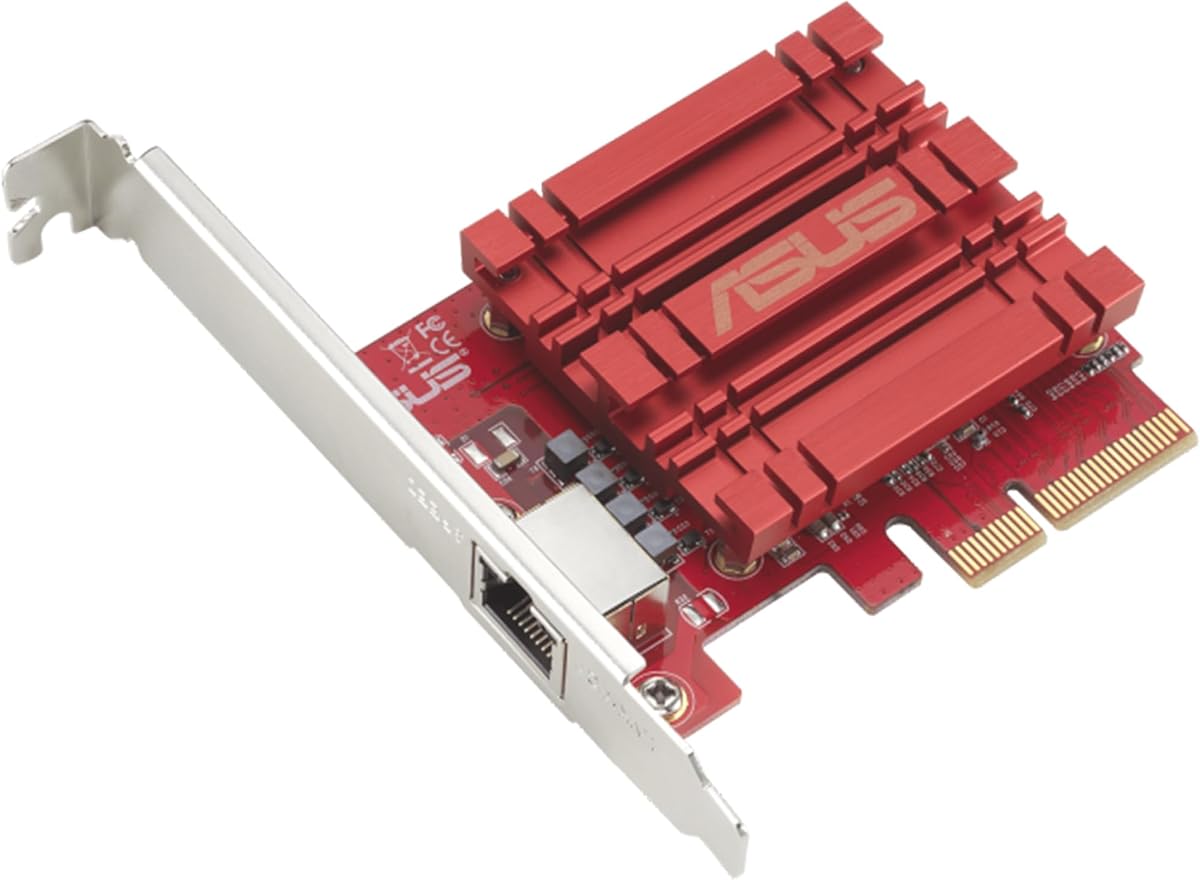
The Asus NADACA0140 network card delivers hyper-fast 10Gbps networking for bandwidth-demanding tasks with a trusted brand name. With a 4.1 rating, it ensures seamless data transfer speeds that are up to 10 times faster than older adapters for improved workflow efficiency.
We may earn a commission when you buy through this link, at no additional cost to you.
It features an RJ45 port that supports multiple standards including 10Gbps, 1Gbps, and 100Mbps for smooth backward compatibility. Built-in QoS technology allows you to prioritize bandwidth for specific data packets, ensuring a smooth online experience for critical applications.
While it is a solid card, it only has a single port and lacks some premium accessories like cables or detailed manuals. Users should ensure their motherboard has a compatible PCIe slot, as it is not a plug-and-play solution without driver setup in some cases.
If you want an upgrade from a brand known for quality, this card is a good pick. It provides essential 10G performance with flexible OS support, making it a reliable option for desktops needing a straightforward and stable network speed increase.
Known for quality control, this card ensures you get a reliable networking component that stands up to daily use, reducing the risk of connectivity drops or hardware failures.
The card offers Windows and Linux support, ensuring flexible OS integration for users running different distributions without worrying about driver compatibility issues during setup.
We may earn a commission when you buy through this link, at no additional cost to you.
Selecting the right 10GbE Network Card requires understanding your specific needs, existing hardware, and budget. Below are key factors to consider before making your purchase.
The chipset determines the speed and stability of your connection. Intel chips are known for reliability and virtualization support, while Realtek chips offer cost-effective solutions with modern PCIe 4.0 interfaces. Consider your use case when choosing between enterprise-grade and consumer-grade hardware.
Choose Intel for servers and virtualization, and Realtek for general home and office use.
Check your motherboard for available PCIe slots. Most 10G cards use x4 or x1 slots, but performance may vary. Newer cards support PCIe 4.0 which offers better bandwidth but works fine with 3.0. Ensure your slot type matches the card to avoid bottlenecks.
Match the card's interface to your motherboard's available slots for best performance.
Single-port cards are sufficient for most home users, but dual-port adapters allow redundancy or link aggregation. If you are setting up a server or need failover, dual ports are worth the extra investment. For basic use, one port is enough to get 10G speeds.
Use dual ports for redundancy and link aggregation in professional environments.
Ensure the card supports your OS. Windows 10/11 support is standard, but Linux or VMware users should check compatibility lists. Some cards offer better support for virtualization, which is crucial for homelab enthusiasts. Verify driver availability before purchasing.
Confirm driver support for your specific OS version before buying.
To achieve 10G speeds, you need Cat6a cables and compatible switches. If your current cables are Cat5e, you might be limited to lower speeds. Ensure your network gear supports 10Gbase-T to make full use of the adapter's capabilities.
Verify you have Cat6a cables and a 10G switch for full speeds.
Older Intel chips may consume more power than newer Realtek solutions. If you care about energy efficiency or heat management in a compact build, look for cards explicitly designed for low power. This impacts your system temperatures and electricity usage over time.
Opt for low-power designs if you care about heat and efficiency.
A good warranty and responsive support can save you time and money. Brands like TP-Link and TRENDnet offer multi-year warranties. Some cards promise lifetime technical support which is valuable for complex setups. Check the reputation of the brand for after-sales service.
Prioritize brands with strong warranty and support offerings.
Prices range from budget-friendly options to enterprise-grade models. Determine if you need advanced features or just a speed boost. Often, mid-range cards offer the best balance of performance and cost. Don't overpay for features you won't use like failover or 10G ports.
Select a price range that fits your needs and actual feature requirements.
Start by installing the card into an available PCIe slot on your motherboard. Ensure the system is powered down and use proper static precautions. Secure the bracket with a screw and connect a Cat6a Ethernet cable to the port. You may need to install the latest drivers from the manufacturer's website for the best performance.
Once installed, check your operating system settings to ensure the connection is recognized and set to the highest possible speed. Configure any necessary QoS settings or virtualization features if supported. This step ensures your card is optimized for your specific workflow and network environment.
Regularly update your drivers and firmware to maintain security and performance. Keep the card cool by ensuring your PC case has good airflow around the expansion slots. If you notice connection drops, try reseating the card or testing with a different Ethernet cable to rule out hardware issues.
Yes, to achieve full 10Gbps speeds, both your PC and the switch must support 10Gbase-T. If connected to a standard Gigabit switch, the card will negotiate down to 1Gbps. For multi-Gig speeds, ensure your router or switch supports 2.5G/5G/10G rates.
Cat5e cables are typically limited to 1Gbps. To achieve 2.5G or higher speeds, you should use Cat6 or Cat6a cables which are rated for higher bandwidth. Upgrading your cabling ensures you do not bottleneck your new network card.
Most 10GbE PCIe cards do not require external power connectors and draw power from the PCIe slot. However, high-performance dual-port models may need additional power. Check the specific product specs to be sure before installation.
Yes, many of these cards are specifically recommended for NAS and servers. They support high-throughput transfers and stable connections required for storage servers. Always check Linux or NAS OS compatibility before purchasing for home lab use.
Yes, they can significantly reduce latency if your ISP or local network supports high speeds. The QoS features on some cards prioritize gaming traffic. However, you need a router and internet plan capable of matching these speeds for real-world benefits.
You need an available PCIe x1 or x4 slot. PCIe 4.0 is ideal but PCIe 3.0 also works. Ensure your BIOS supports the card, and that you are not sharing bandwidth with other devices on the same bus which might limit performance.
Choosing the right 10GbE Network Card for PC depends on balancing performance with budget and specific needs. The Vogzone X550-T2 excels in dual-port redundancy, the VunLink offers the best budget value, and the TP-Link TX401 provides premium features like an included cable.
Consider your specific environment and whether you need enterprise features like virtualization support or simple home use. Ensuring your cabling and router are ready to support these speeds is just as important as the card itself to achieve the best results.
Prices and availability fluctuate regularly so always check current listings before purchasing. With careful selection and installation, you can transform your network experience and enjoy faster downloads, smoother streaming, and quicker file transfers across your devices.