
TP-Link Nano AC600
4.5Editor score
Compact Nano Size Design
Dual Band Connectivity
Easy Plug And Play
This guide compares the top 5GHz WiFi Dongle models for speed and range helping you choose the right adapter for desktops and laptops in 2026.
Finding a reliable 5GHz WiFi Dongle is essential for modern computing needs. Whether you are streaming high definition video or engaging in competitive gaming online stable wireless connectivity is key to a seamless experience.
We evaluated ten top rated adapters based on performance range and compatibility. Our analysis focuses on real world usability and technical specifications to ensure you get the most value for your investment in network hardware.
Each pick highlights specific strengths and ideal use cases for different users. Keep in mind that availability and pricing can fluctuate so checking current stock levels before purchase is always a smart move for shoppers.
4.5Editor score

4.4Editor score

4.1Editor score
The following table provides a side by side overview of key specifications across all ten models to help you quickly identify the adapter that best matches your specific network requirements and device compatibility needs.


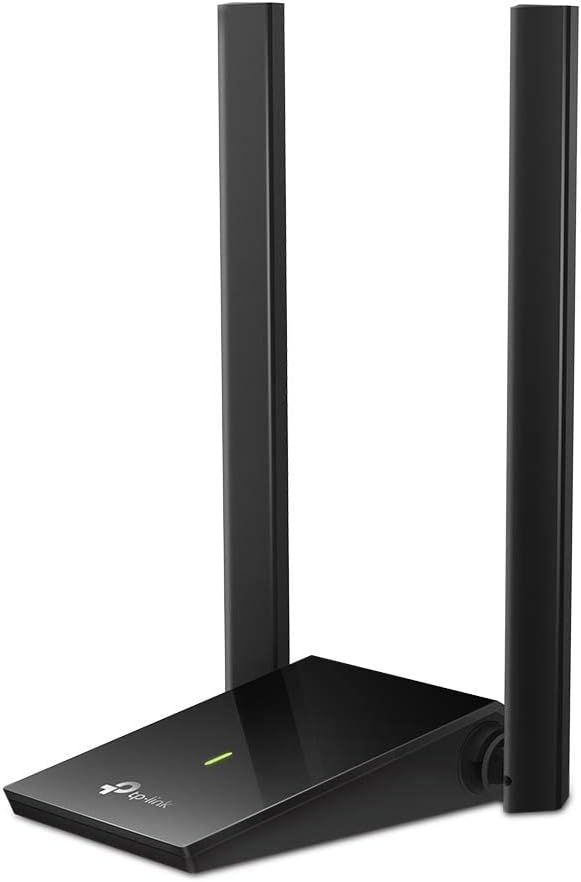


The TP-Link AC600 stands out as a top choice for users seeking reliable connectivity. With a strong rating and proven performance it delivers consistent speeds for everyday tasks and entertainment alike.
We may earn a commission when you buy through this link, at no additional cost to you.
Its dual band capability ensures you can access the faster 5GHz band when needed while maintaining flexibility with 2.4GHz. The high gain antenna significantly boosts signal strength allowing for stable connections even at a distance.
While it lacks macOS support this is a minor trade-off for the robust performance it offers on Windows machines. The adjustable antenna design lets you optimize positioning which is crucial for maximizing throughput.
This adapter is ideal for anyone looking to upgrade an older PC without spending a fortune. It balances affordability with high quality engineering making it a safe bet for home and office networks.
Switching between 2.4GHz and 5GHz bands ensures you always have the best available connection for your specific activity.
The external antenna design provides a significant boost over internal wireless cards found in many laptops.
We may earn a commission when you buy through this link, at no additional cost to you.
For users needing a discreet and affordable solution this Nano adapter is hard to beat. Its tiny size allows it to remain plugged in without cluttering your workspace or laptop ports.
We may earn a commission when you buy through this link, at no additional cost to you.
Despite its small stature it delivers solid performance on both frequency bands. The dual band support ensures you can avoid congestion by utilizing the less crowded 5GHz spectrum effectively.
The main limitation is range compared to models with external antennas but it works well in smaller rooms or near the router. It is perfect for desktops where portability is not a primary concern.
This model is perfect for travelers or anyone with limited desk space. It provides a cost effective way to add modern WiFi standards to older hardware without any hassle.
The miniature footprint ensures your USB ports remain accessible for other devices like mice or drives.
Compatibility with both Windows and Mac systems makes it a versatile choice for mixed environments.
We may earn a commission when you buy through this link, at no additional cost to you.
This adapter brings higher speeds to the table with its AC1300 standard. It is a significant upgrade for those who need more bandwidth for streaming or file transfers across their local network.
We may earn a commission when you buy through this link, at no additional cost to you.
The inclusion of USB 3.0 ensures the adapter can handle faster data rates without bottlenecks. MU-MIMO technology helps maintain stability when multiple devices are competing for bandwidth on the same router.
While it lacks an external antenna the internal design is optimized for good performance. Users should ensure their USB ports support 3.0 to get the full benefit of the increased throughput capabilities.
Ideal for power users who need extra speed without the bulk of a large adapter. It strikes a good balance between performance and convenience for modern desktop setups.
The USB 3.0 connection allows for quicker file moves between networked computers.
MU-MIMO helps keep your connection smooth even when family members are streaming different videos.
We may earn a commission when you buy through this link, at no additional cost to you.
This model offers a compelling mix of features at a competitive price point. The dual external antennas are a standout feature providing better range and signal stability than many competitors in this category.
We may earn a commission when you buy through this link, at no additional cost to you.
Users can expect reliable speeds for HD streaming and online gaming. The USB 3.0 port ensures that the adapter can keep up with modern network demands without slowing down your system.
The main drawback is the lack of Mac support which limits its audience to Windows users. However for those on Windows the setup is generally straightforward with online help available if needed.
Great for anyone looking to extend their WiFi reach without investing in a new router. It is a practical upgrade for older PCs that need a reliable connection to the internet.
The two external antennas work together to capture and transmit signals more effectively.
USB 3.0 compatibility ensures you get the full speed of your wireless connection.
We may earn a commission when you buy through this link, at no additional cost to you.
Bringing WiFi 6 technology to desktops this adapter is a great step forward for network performance. It offers lower latency and better efficiency in crowded wireless environments compared to older standards.
We may earn a commission when you buy through this link, at no additional cost to you.
The built in driver support simplifies installation significantly saving you time and effort. You can get online quickly without hunting for discs or downloads which is a big plus for most users.
Keep in mind that to fully benefit from the speed you need a compatible router. Even so it future proofs your setup and offers a clear advantage over older AC adapters in busy households.
This is an excellent choice for Windows users wanting to modernize their network hardware. It is easy to use and offers the latest security features to keep your data safe.
WiFi 6 prepares your device for the next generation of wireless networking standards.
Advanced encryption ensures your wireless traffic remains private and protected from prying eyes.
We may earn a commission when you buy through this link, at no additional cost to you.
This adapter combines the benefits of WiFi 6 with a powerful external antenna for excellent range. It is designed to handle weak signals and bring a strong connection to distant parts of your home.
We may earn a commission when you buy through this link, at no additional cost to you.
The ability to act as a hotspot adds versatility to the device. You can share your connection with mobile devices or other gadgets easily without needing extra hardware.
Setup is simple thanks to preloaded drivers on supported systems. This makes it a user friendly option for those who are not tech savvy but still want high speed internet.
Ideal for large homes or offices where signal strength might drop. It ensures you stay connected anywhere in your space without needing a signal repeater.
The large antenna reaches further into rooms than smaller internal wireless cards usually do.
Turning your PC into a router allows you to share internet with smartphones and tablets.
We may earn a commission when you buy through this link, at no additional cost to you.
For those who demand the fastest possible speeds this model delivers. It utilizes the latest WiFi 6 standards to maximize throughput and minimize latency for demanding applications.
We may earn a commission when you buy through this link, at no additional cost to you.
The included extension cable is a thoughtful addition that helps place the adapter in a better spot for signal reception. This flexibility is key to getting the best performance out of any USB adapter.
While it is pricier than other options the performance gain is noticeable for heavy users. It handles multiple streams and large file downloads with ease making it worth the investment for power users.
Best suited for gamers and professionals who need a stable fast connection. If you want the best performance possible this adapter offers a robust solution for your desktop.
The AX1800 standard ensures you get near full gigabit wireless speeds when paired with a good router.
The cable lets you move the device away from metal cases that might block signals.
We may earn a commission when you buy through this link, at no additional cost to you.
This adapter excels at providing a stable and strong signal thanks to its dual high gain antennas. It is an excellent choice for environments where interference might otherwise cause connection drops.
We may earn a commission when you buy through this link, at no additional cost to you.
The adjustable nature of the antennas allows for precise optimization of signal strength. This means you can point the device directly at your router for the best possible link quality.
It supports both major operating systems making it a versatile choice for any household. The USB 3.0 connection ensures that the antenna hardware is matched by fast data transfer capabilities.
Highly recommended for desktops that need a reliable long term connection. It combines robust hardware with user friendly features to deliver consistent internet access day after day.
Two antennas working together provide a more consistent connection in busy network environments.
Works seamlessly with both Windows PCs and Macs for broader household compatibility.
We may earn a commission when you buy through this link, at no additional cost to you.
Security and speed combine in this adapter to offer a premium experience. It supports WPA3 encryption which provides robust protection for your data against modern threats.
We may earn a commission when you buy through this link, at no additional cost to you.
The advanced cooling design helps maintain performance during long use sessions. This prevents overheating which can sometimes be an issue with smaller adapters under heavy load.
It also functions as a hotspot allowing you to share your connection with other devices easily. This dual functionality makes it a versatile tool for various networking needs.
Perfect for security conscious users who want top tier speed and protection. It is a reliable upgrade for anyone wanting to ensure their home network is secure and fast.
WPA3 ensures that your wireless connection is shielded from unauthorized access effectively.
Ventilation keeps the unit cool so speeds remain steady during intensive downloads.
We may earn a commission when you buy through this link, at no additional cost to you.
This mini adapter brings modern WiFi 6 capabilities to a tiny footprint. It is perfect for users who want the latest tech without adding bulk to their laptop or desktop.
We may earn a commission when you buy through this link, at no additional cost to you.
While it uses USB 2.0 it still delivers good speeds for most everyday tasks. The small size means it stays hidden in the background and does not get in the way of other cables.
It is a great option for laptops or small form factor PCs where space is limited. Just ensure you are comfortable with USB 2.0 limitations if you need extreme data transfer speeds.
Ideal for users seeking a lightweight and modern connectivity solution. It offers a seamless upgrade path for smaller devices needing better wireless performance.
The small size makes it easy to carry in a laptop bag without taking up space.
Even in a small package you get the latest WiFi 6 standards for better network efficiency.
We may earn a commission when you buy through this link, at no additional cost to you.
Selecting the right adapter involves considering several technical factors that impact your daily usage. Understanding these elements will help you make an informed decision that matches your specific needs.
Modern adapters support various standards from AC to the latest AX or WiFi 6. Higher standards offer faster speeds and better handling of multiple devices simultaneously. Look for at least AC1300 or AX900 to ensure future proofing.
Prioritize models that support the latest WiFi standards to get the best performance over time.
External antennas generally provide better range than internal ones. Models with high gain antennas can penetrate walls more effectively. Consider if you need an adjustable antenna for optimal positioning in your home.
Choose an adapter with external antennas if your router is far from your desk.
The USB version on the adapter affects data transfer rates. USB 3.0 offers significantly faster speeds than USB 2.0 and reduces bottlenecks. Ensure your PC has a compatible USB port to utilize the full potential of the device.
USB 3.0 is highly recommended for fast wireless data transfers and reduced lag.
Check that the adapter supports your specific version of Windows or Mac. Some newer models may not support older operating systems like Windows 7. Always verify driver availability before purchasing to avoid installation issues.
Confirm driver support for your specific OS version to ensure smooth setup.
Newer adapters often support WPA3 encryption which provides stronger security than older standards. This is crucial for protecting your data on public or private networks. Look for the latest security features to keep your connection safe.
Look for WPA3 support to ensure the highest level of wireless data security.
Nano adapters are discreet but might offer less range due to smaller antennas. Larger desktop models offer better performance but take up more space. Decide based on whether you need a portable solution or a permanent desktop fix.
Select a size that fits your needs between portability and maximum signal range.
Some adapters come with extra features like AP mode to turn your PC into a hotspot. Others include extension cables for better placement. These features can add versatility depending on how you plan to use the device.
Check for useful extras like hotspot mode or extension cables before buying.
Prices vary widely based on features and performance. Higher prices usually reflect better range and speed capabilities. Balance your budget with the performance level you truly need for your daily activities.
Invest in a model that offers the best value for your specific performance needs.
Begin by inserting the adapter into an available USB port on your computer. If drivers are not installed automatically download them from the manufacturer website to ensure proper functionality.
Once installed open your network settings to select your preferred 5GHz network. Adjust antenna direction if available to point towards your router for maximum signal strength.
Regularly check for firmware updates to maintain optimal performance. Avoid moving the device excessively to prevent wear on the USB connection and maintain stable contact.
The primary benefit is reduced interference and higher speeds compared to 2.4GHz networks. Since fewer devices use this band you get a more stable connection for streaming and gaming. It is ideal for modern high bandwidth activities.
It depends on your routers capabilities. If your router supports 5GHz bands the adapter will work seamlessly. If it only supports 2.4GHz you might need to upgrade your router to utilize the 5GHz features fully.
Most modern adapters come with preloaded drivers for Windows 10 and 11. However some models may require manual installation from the manufacturer website. Always check the product details for driver requirements before use.
Many adapters support macOS but compatibility varies by model. Always check the specific product specifications to confirm Mac support. Some budget models might limit compatibility to Windows systems only.
First ensure the antenna is oriented correctly towards the router. If using a desktop try moving it to a different USB port that has better line of sight. An extension cable can also help place the adapter in a better spot.
Yes if you have a WiFi 6 router and need better performance in crowded areas. It offers lower latency and better battery efficiency. Even with older routers it provides a future proof upgrade for your PC.
AC refers to WiFi 5 while AX refers to the newer WiFi 6 standard. AX offers faster speeds better congestion handling and improved security. It is the better choice for modern high speed networks.
Yes USB 3.0 ports provide faster data transfer than USB 2.0 ports. Using the correct port ensures you get the full speed of your adapter. Check your PC ports to match the adapter requirements for best results.
We have covered a wide range of options from budget friendly models to high performance units. Each adapter offers unique strengths tailored to different user needs and environments.
Focus on speed requirements and range needs when making your final decision. Ensure compatibility with your operating system and existing hardware for a smooth experience.
Remember to check current availability and specifications before purchasing as models may update. We hope this guide helps you find the perfect adapter to enhance your wireless setup.