
CENMATE Aluminum 8 Bay Hard Drive Enclosure
4.3Editor score
Tool free installation
USB 3.0 interface
Hot swappable drives
Aluminum alloy build
Finding the right storage solution is crucial for modern workflows. Eight bay hardware RAID enclosures offer massive capacity and redundancy. They ensure your data stays safe while providing fast access speeds.
We evaluated ten top models based on connectivity, build quality, and compatibility. Our team analyzed specifications and user feedback to create this comprehensive list. Each option serves different needs from budget to professional use.
Every pick includes detailed pros and cons to guide your decision. Prices and availability change frequently so verify details before buying. These enclosures deliver robust performance for demanding storage requirements today.
4.3Editor score

5.0Editor score

3.7Editor score
As an Amazon Associate we earn from qualifying purchases.
This side by side comparison highlights key differences across all ten models. We examine interface types, drive support, and unique features to help you find the perfect match for your setup needs.

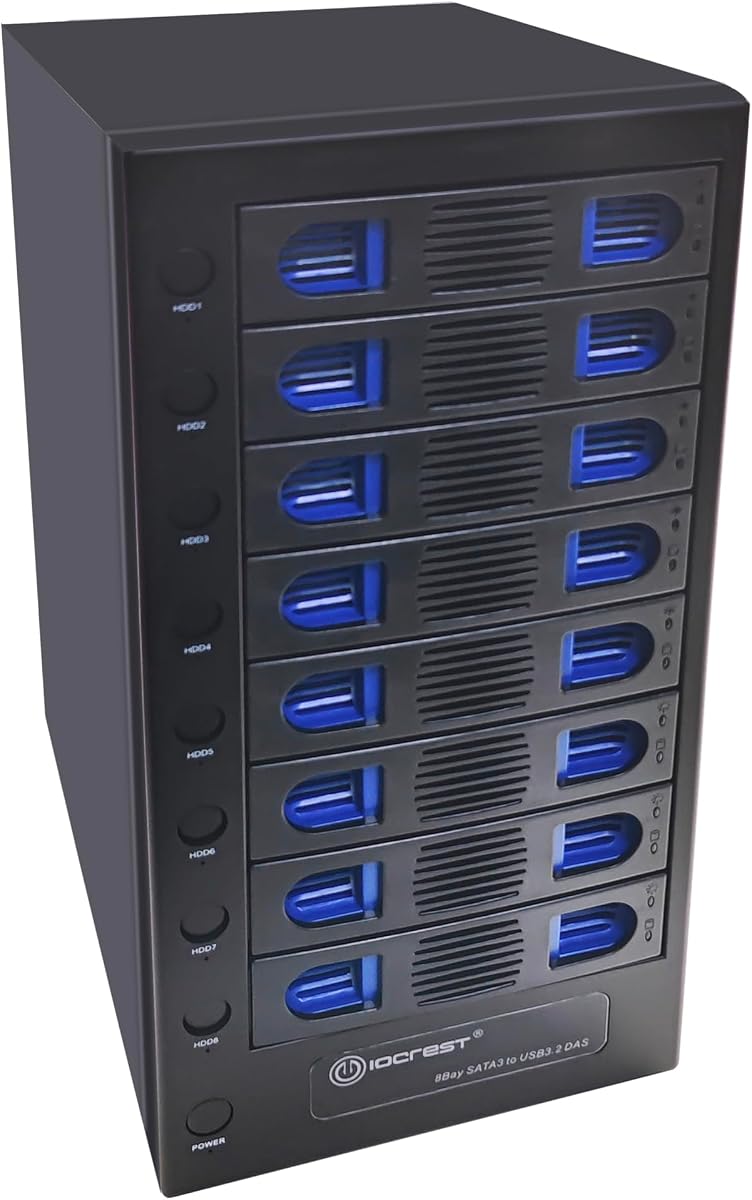


This CENMATE enclosure provides a robust entry into RAID storage for budget conscious users. It supports up to 160TB across eight bays with flexible RAID configurations. The aluminum build ensures durability while fans manage heat effectively during operation.
We may earn a commission when you buy through this link, at no additional cost to you.
The JMS567 and JMB393 chip combination delivers stable data transfer speeds via USB 3.0. Users can choose from eight different RAID modes including RAID 0, 5, and 50 to balance speed and redundancy. The tool free design simplifies drive installation significantly.
However, the setup process requires careful attention to avoid data loss. Switching RAID modes involves physical toggles and reset button combinations which can be confusing. Fan noise may also disturb quiet environments but remains within acceptable limits.
Buyers needing affordable RAID capacity without spending heavily on Thunderbolt options will find this ideal. It suits personal backups or small business archives where budget matters more than extreme speed. Follow instructions closely to ensure safe data management.
Eight RAID modes let you tailor storage speed and safety to your specific workflow needs without extra software.
Dual cooling fans prevent overheating during heavy loads ensuring your drives stay cool during long data operations.
We may earn a commission when you buy through this link, at no additional cost to you.
The SanDisk Professional G-RAID Shuttle offers top tier performance for creative professionals needing massive fast storage. Its Thunderbolt 3 interface delivers read speeds up to 1900MB/s and writes up to 2000MB/s. Eight removable Ultrastar drives ensure reliability and easy maintenance.
We may earn a commission when you buy through this link, at no additional cost to you.
Pre-configured RAID 5 balances performance with data protection out of the box. You can switch to other modes like RAID 0 or 10 via software for different needs. The daisy chain feature allows connecting up to five additional devices for scaling capacity.
Cost is the main drawback here as this unit commands a premium price for its enterprise grade features. USB C compatibility is standard but some older systems may require adapters. Despite the cost it remains a top choice for video editing.
This array is perfect for studios or field work requiring transportable high speed storage. It handles multi-stream 4K and 8K video editing smoothly. Invest here if you need enterprise reliability without compromising on transfer speed or capacity.
Ultra fast transfers enable smooth editing of large video files without lag during playback or export.
Easy to swap drives mean you can maintain or upgrade storage without opening the enclosure or tools.
We may earn a commission when you buy through this link, at no additional cost to you.
This CENMATE DAS enclosure focuses on simplicity and speed without RAID complexity. It supports hot swapping allowing drive changes while powered on for continuous workflows. The aluminum construction paired with fans keeps temperatures stable during heavy file transfers.
We may earn a commission when you buy through this link, at no additional cost to you.
USB 3.0 provides speeds up to 5Gbps which is sufficient for most backup and media tasks. Daisy chain expansion lets you connect up to three devices totaling 480TB of storage capacity. Plug and play compatibility ensures it works with Windows Mac and Linux.
Lack of hardware RAID means data safety relies on external software solutions or your own backup strategy. Fan noise might be noticeable in quiet rooms but is manageable with placement. It remains a cost effective way to expand storage.
Users wanting raw capacity and speed without managing RAID arrays will appreciate this design. It suits photographers or editors needing quick access to large media libraries. The hot swap feature adds convenience for frequently changing drives.
Swap drives without powering down the system ensuring uninterrupted work during long data processing tasks.
Connect multiple units via USB HOST port to scale storage capacity far beyond a single enclosure limit.
We may earn a commission when you buy through this link, at no additional cost to you.
The OWC ThunderBay 8 provides eight universal bays for 2.5 or 3.5 inch drives with Thunderbolt 3 connectivity. It supports daisy chaining six units together for massive storage expansion potential. Thumb screw release trays make drive installation quick and tool free.
We may earn a commission when you buy through this link, at no additional cost to you.
Thunderbolt certification ensures compatibility with both Mac and Windows systems without driver issues. The enclosure acts as a reliable bridge between internal drives and high speed external ports. It includes a Thunderbolt cable for immediate use out of the box.
Without built-in RAID this unit relies on your operating system for data management. The price point is higher than USB options but justified by the bandwidth speed and build quality. Fans run quietly enough for office environments.
This enclosure fits well in creative studios needing scalable high speed storage. It allows flexible drive choices without locking you into proprietary hardware. Choose this if Thunderbolt bandwidth is essential for your workflow speed.
Accommodates any SATA drive type giving you flexibility to use existing or new hard drives easily.
Link up to six enclosures to reach petabyte scale storage capacity for enterprise level archiving needs.
We may earn a commission when you buy through this link, at no additional cost to you.
This CENMATE enclosure upgrades connectivity to USB 3.2 Gen 2 offering transfer speeds up to 10Gbps. It supports hot swapping drives without shutdown for continuous data workflows. Aluminum alloy build and dual fans ensure stability and cooling during operation.
We may earn a commission when you buy through this link, at no additional cost to you.
The UASP protocol enhances transfer efficiency reducing latency compared to standard USB connections. Daisy chain expansion allows connecting multiple units for up to 480TB total capacity. Compatibility spans Windows Mac and Linux without needing extra drivers.
Lack of RAID means you must manage data safety externally via backups. Fan noise is present but generally acceptable for office settings. The price is competitive for 10Gbps performance in an eight bay design.
Users needing faster USB speeds without Thunderbolt costs will find this suitable. It works well for media production where quick file access matters more than redundancy. Hot swap support adds flexibility for changing drives on the fly.
Double the speed of USB 3.0 enables quicker backups and file transfers for demanding workloads.
Remove and insert drives while powered on to maintain workflow continuity without system downtime.
We may earn a commission when you buy through this link, at no additional cost to you.
This enclosure features independent switches for each drive allowing precise power management. Smart fan control adjusts speed based on thermal sensors to balance noise and cooling. USB 3.2 ensures fast transfers while supporting drive sizes up to 22TB per bay.
We may earn a commission when you buy through this link, at no additional cost to you.
Steel housing provides sturdy protection for drives against physical shocks or bumps. Tool free trays make drive installation effortless without needing extra hardware or tools. It is compatible with all major operating systems including Windows and Chrome OS.
Independent switches mean you can power down unused drives to save energy or reduce heat. However, the lack of RAID requires users to handle data protection independently via backups. Weight is higher due to steel construction which might affect portability.
Users needing granular control over drive power will appreciate these unique features. It suits home labs or small offices where specific drives need to be isolated. The smart fan ensures quiet operation during idle periods.
Turn off individual drives to save power or reduce heat when full capacity is not needed.
Automatic speed adjustment based on temperature keeps noise low while protecting drive health.
We may earn a commission when you buy through this link, at no additional cost to you.
The OWC ThunderBay Flex 8 combines storage with a dock and PCIe expansion in one unit. Front USB-C and USB-A ports plus card readers enhance its utility for creatives. SoftRAID management allows advanced RAID setups on supported systems.
We may earn a commission when you buy through this link, at no additional cost to you.
Top bays support U.2 NVMe SSDs for future ready storage speed and density. The PCIe slot accepts capture cards or additional storage controllers adding versatility to your workstation. Thunderbolt 3 ensures high bandwidth for connected devices.
Setup complexity can be higher due to multiple integrated functions requiring careful planning. Cost reflects the additional utility beyond simple storage. Noise levels vary based on drive load and expansion card usage.
Professionals needing a central hub for storage and peripheral expansion will benefit greatly. It reduces clutter by combining multiple dock functions into a single chassis. Ideal for video editors managing complex media workflows.
Add network cards or capture hardware internally to expand your computer's capabilities via Thunderbolt.
Quick access card readers and USB ports streamline file transfer from cameras and mobile devices.
We may earn a commission when you buy through this link, at no additional cost to you.
This QNAP enclosure is designed for seamless expansion of existing QNAP NAS systems via Thunderbolt. It supports 10Gbps speeds for rapid file access and archiving tasks. The included JBOD Manager utility simplifies drive configuration and health monitoring.
We may earn a commission when you buy through this link, at no additional cost to you.
Plug and play direct attached storage works well with Windows and MacOS too. The tower design saves space while keeping drives accessible for maintenance. It acts as a straightforward way to add storage without buying new NAS hardware.
Full feature set shines brightest when paired with QNAP NAS systems. Outside that ecosystem it functions as a standard high-speed DAS. Ensure you have USB-C ports on your computer for connectivity.
QNAP users looking to scale storage easily will find this the perfect partner. It also serves general users needing fast external storage with reliable management software. Ideal for backup repositories and media libraries.
JBOD Manager provides seamless drive health tracking and configuration for existing QNAP systems.
Use JBOD to maintain separate drives without RAID for flexible and straightforward storage management.
We may earn a commission when you buy through this link, at no additional cost to you.
This case allows complete DIY NAS builds with hot swap bays and dedicated cooling. Dual independent air channels separate heat from drives and motherboard ensuring lower overall temperatures. It supports Mini ITX and Micro ATX boards for flexibility.
We may earn a commission when you buy through this link, at no additional cost to you.
Front panel USB and power buttons offer easy access for daily use. Indicator lights monitor each drive status for real-time visibility. Full steel construction provides solid protection for internal components against physical damage.
Assembly is required which may deter those wanting plug and play simplicity. You must source motherboard and power supply separately adding to total cost. This offers total control over NAS configuration and performance.
DIY enthusiasts building home media servers or small business backups will love the flexibility. It runs quietly thanks to temperature controlled fans and optimized airflow. Choose this if you want to customize hardware and software fully.
Separating airflow prevents motherboard heat from affecting drives maintaining stable temperatures for all parts.
Select any compatible motherboard and OS to tailor the system to your specific storage needs.
We may earn a commission when you buy through this link, at no additional cost to you.
This ICY DOCK cage converts a 5.25 inch internal bay into eight 2.5 inch drive slots. Full metal structure ensures durability while locking trays keep drives secure against vibration. It supports both SATA and SAS drives for server environments.
We may earn a commission when you buy through this link, at no additional cost to you.
Locking trays prevent accidental disconnection during transport or maintenance. The backplane design simplifies cabling inside the case for cleaner builds. It serves as an internal expansion solution rather than an external enclosure.
Limited to internal use means no external connectivity like USB or Thunderbolt. You need a desktop case with free 5.25 inches to install it. It is ideal for servers needing compact internal drive density.
Users building compact workstations or servers will benefit from the space saving design. It keeps SSDs secure while allowing easy access for upgrades. Choose this for internal expansion where external access isn't required.
Secure trays ensure drives stay connected even during movement reducing risk of internal damage.
Utilize existing 5.25 bay space efficiently for dense internal storage without taking up more room.
We may earn a commission when you buy through this link, at no additional cost to you.
Choosing the right 8 bay hardware RAID enclosure involves assessing speed, capacity, and RAID support. This guide breaks down key factors to help you make an informed decision.
The interface determines maximum data transfer rates. USB 3.0 offers 5Gbps while USB 3.2 Gen 2 reaches 10Gbps. Thunderbolt 3 provides 40Gbps for professional needs. Choose based on your workflow speed requirements.
Prioritize faster interfaces if you handle large video files or frequent backups.
RAID enclosures combine drives for redundancy or speed while DAS treats them as independent. RAID offers data safety but requires setup complexity. DAS is simpler and flexible but relies on backups for safety.
Select RAID for critical data and DAS for raw capacity needs.
Check max capacity per drive to ensure future upgrades are possible. Most support 20TB to 22TB drives. Verify total capacity matches your growth plans for the next few years.
Choose models supporting higher capacities for long-term scalability.
Ensure the enclosure supports your drive sizes like 2.5 or 3.5 inches. Some also support NVMe or SAS drives for specialized needs. Always check the drive list before purchasing to avoid fit issues.
Verify drive compatibility to ensure all your existing drives fit correctly.
Active cooling fans keep drives cool during heavy loads. Look for models with adjustable fans or thermal sensors to manage noise. Good cooling extends drive lifespan and prevents overheating failures.
Opt for active cooling to maintain drive health over time.
Hot swap support allows drive changes while the system is running. This minimizes downtime during maintenance or upgrades. Not all enclosures offer this feature so check specifications carefully before buying.
Prioritize hot swap if you need continuous uptime without shutdowns.
Aluminum and steel housings offer better heat dissipation and protection. Check for sturdy tray mechanisms and locking features. Robust build quality ensures reliability especially in high traffic environments.
Choose durable materials to protect your valuable data from physical damage.
Some enclosures include management software like SoftRAID or JBOD Manager. These tools simplify configuration and monitoring. Ensure OS compatibility before relying on specific software features for your needs.
Check software tools match your operating system for easy setup.
Before inserting drives, ensure the enclosure is powered off to prevent electrical issues. Insert drives into bays carefully ensuring they snap into place securely. Use the tool free mechanism where available for easier installation.
For RAID configurations, back up all existing data before setting up any array. Switch RAID modes using the physical toggle and reset button as instructed. This process formats drives so plan accordingly for data migration.
Maintain airflow around the enclosure to ensure fans work efficiently. Avoid placing it in enclosed cabinets that trap heat. Regularly check drive health indicators and run diagnostics to prevent data loss.
Yes most 8 bay enclosures support mixing 2.5 and 3.5 inch drives as long as they fit in the trays. Ensure they match the required interface such as SATA for compatibility. Using different sizes does not affect operation but may impact RAID alignment.
Most models are sold as empty enclosures requiring you to purchase drives separately. Some premium options like SanDisk include pre installed drives in the box. Check product details to confirm if drives are included or not before buying.
RAID 5 provides data redundancy allowing one drive failure without data loss. RAID 0 offers speed but no protection so any drive failure loses all data. Choose RAID 5 if safety matters more than pure speed performance.
Most USB enclosures work with Macs without extra drivers for basic use. RAID features might require Mac specific software or configuration. Always check OS compatibility in product specs to ensure seamless Mac integration.
Fans usually operate between 40 and 50 decibels which is noticeable but manageable. Some models have silent modes or adjustable speeds. If noise is a concern choose models with adjustable fans or passive cooling options.
Yes most 8 bay enclosures come with external DC power adapters. This ensures stable power for multiple drives during heavy loads. Using external power prevents instability and protects your hardware from power issues.
We reviewed ten top 8 bay hardware RAID enclosures for November 2026 offering varying speeds and features. The SanDisk G-RAID Shuttle leads for performance while CENMATE DAS offers budget friendly simplicity.
Prioritize interface speed and RAID needs based on your specific data management goals. Ensure cooling and build quality match your environment requirements for reliable long term use.
Always verify current pricing and stock before purchase since costs fluctuate regularly. Check compatibility with your existing system to avoid setup issues later.