
ASRock DeskMini X300
4.2Editor score
Ultra-compact 1.92L form factor
Supports AMD AM4 Ryzen CPUs
Triple display capability included
2.5G LAN port equipped
This guide compares the top ten barebone PCs with AMD processors for 2026. Find the perfect mini PC for gaming, home servers, or office work with our expert
Choosing a barebone PC with AMD processors gives you freedom to customize RAM and storage. These compact units often deliver high performance for gaming or office tasks while saving desk space and energy costs significantly.
We reviewed ten models focusing on AMD architecture support and build quality. Our comparison includes mini PCs for gaming, NAS setups, and general productivity to help you find the right balance of power and price.
Each pick highlights key features like port availability and expansion options. Prices change frequently so always check the current listings before buying. This list helps you narrow down the best barebone AMD systems available today.
4.2Editor score

4.0Editor score

3.1Editor score
The following table compares the key specifications of all ten barebone PCs with AMD processors. This side-by-side view helps you quickly identify which model fits your specific performance and connectivity needs.





The AOOSTAR MACO delivers exceptional performance with its AMD Ryzen 7 PRO 8845HS processor. This mini PC is a powerful choice for users needing a compact yet capable system for gaming or productivity tasks.
We may earn a commission when you buy through this link, at no additional cost to you.
It features the Radeon 780M graphics which handles 4K video editing and AAA gaming smoothly. The OCuLink eGPU support allows you to upgrade graphics performance further if needed later.
While the package does not include RAM or storage you gain full control over your final build. You can install up to 128GB of RAM and choose your preferred storage drives easily.
This model is best for enthusiasts who want a balanced mini PC. It offers rich connectivity and robust cooling making it a top choice for demanding barebone builds.
The Zen 4 architecture provides fast clock speeds and efficient multitasking capabilities for any workload.
OCuLink support ensures minimal latency when connecting external GPUs for enhanced gaming or rendering performance.
We may earn a commission when you buy through this link, at no additional cost to you.
The AOOSTAR GEM12+ is built for demanding gaming and creative workloads. It uses the same powerful Ryzen 7 PRO 8845HS CPU and Radeon 780M graphics found in high-end mini systems.
We may earn a commission when you buy through this link, at no additional cost to you.
Its ability to support four simultaneous 4K displays makes it ideal for multi-monitor setups. You can connect multiple screens for productivity or immersive entertainment experiences easily.
Users should note that this is a pure barebone kit. You must purchase and install RAM and storage drives before using the device for any tasks.
This mini PC is perfect for gamers who need a compact setup. The cooling system ensures stable performance even during long gaming sessions or heavy rendering tasks.
Connect up to four screens for a productive workstation without needing a large desktop tower.
The vapor chamber helps maintain lower temperatures under load to prevent thermal throttling.
We may earn a commission when you buy through this link, at no additional cost to you.
The AOOSTAR GEM12+ PRO offers added convenience with its fingerprint unlock feature. This is a premium mini PC that brings enterprise-grade security to a compact barebone form factor.
We may earn a commission when you buy through this link, at no additional cost to you.
You can monitor CPU and GPU data in real-time through dedicated software. This level of control is great for optimizing performance during gaming or content creation tasks.
It requires separate purchase of RAM and storage but supports up to 128GB of memory. The dual M.2 slots allow for significant internal storage expansion if needed.
This model is ideal for users who prioritize security and customization. It combines powerful AMD silicon with useful quality-of-life features in a small chassis.
Fingerprint recognition simplifies login without needing complex passwords for daily access.
Track system performance metrics directly from the built-in display interface with ease.
We may earn a commission when you buy through this link, at no additional cost to you.
The ASRock DeskMeet X300 is a versatile barebone kit that supports a wide range of Ryzen processors. It is an excellent choice if you want flexibility in CPU selection and upgrade paths.
We may earn a commission when you buy through this link, at no additional cost to you.
It includes a 500W power supply which is generous for a compact system. The PCIe 3.0 x16 slot allows you to install a discrete graphics card if the integrated GPU is not enough.
This unit is larger than typical mini PCs but offers more expansion options. It is well-suited for users who need a balance between size and upgradeability for their PC build.
Consider this model if you have older DDR4 components or want a powerful CPU. It provides a reliable foundation for a custom desktop system at a reasonable price.
The AM4 socket allows you to choose from many Ryzen generations for custom builds.
Full size PCIe slot lets you add dedicated graphics or other expansion cards easily.
We may earn a commission when you buy through this link, at no additional cost to you.
The MINISFORUM X1 Lite brings powerful Ryzen processing to a small package. It supports DDR5 memory and offers triple display output for a versatile workspace or media setup.
We may earn a commission when you buy through this link, at no additional cost to you.
It features a full-blood USB4 port which provides high-speed data transfer and charging capabilities. This port supports PD input and output giving you flexible power options on the go.
Users should note that OCuLink support requires an adapter plate installation. While this adds a step it enables external GPU connections for extra graphical power if needed.
This mini PC is great for travelers or those with limited desk space. Its compact size and robust connectivity make it a solid choice for portable barebone systems.
Connect up to three displays for better multitasking and media viewing flexibility.
The USB4 port handles large files and fast data movement with ease.
We may earn a commission when you buy through this link, at no additional cost to you.
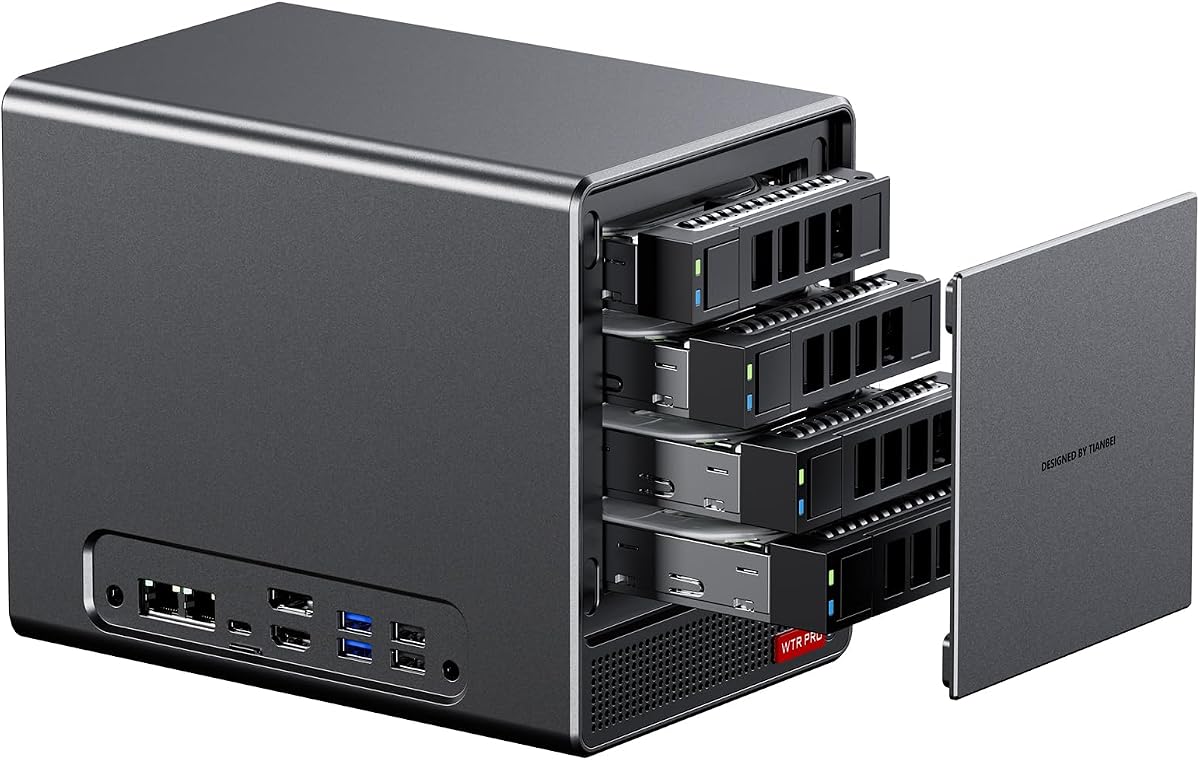
The AOOSTAR WTR PRO is designed specifically for network attached storage applications. It features four drive bays and supports up to 88TB of storage capacity for massive media libraries.
We may earn a commission when you buy through this link, at no additional cost to you.
It comes with dual 2.5G LAN ports which enable high-speed network connections. This makes it ideal for file servers or soft routing setups in home offices.
The unit is built for continuous operation with a dustproof design. Its fan system ensures quiet performance even during extended heavy load tasks.
Choose this model if you need a dedicated home server. The combination of storage bays and networking ports makes it a powerful NAS solution.
Four drive bays allow you to scale your storage needs easily over time.
Dual 2.5G LAN ensures quick file transfers and reliable network performance.
We may earn a commission when you buy through this link, at no additional cost to you.
The ASRock DeskMini X300 is a small yet capable mini PC. It is one of the most affordable barebone kits available and supports a wide range of Ryzen processors.
We may earn a commission when you buy through this link, at no additional cost to you.
It offers triple display output which is rare at this price point. You can connect three monitors for productivity without needing a large tower.
The system is compact enough to fit in tight spaces. It supports both M.2 and SATA storage giving you flexibility in how you store your data.
This is a great entry level choice for a custom mini PC. It balances price and features well for budget conscious builders.
At just 1.92L this unit saves significant desk space compared to full towers.
Choose your own CPU and RAM to match your specific budget and performance needs.
We may earn a commission when you buy through this link, at no additional cost to you.
The ASUS ExpertCenter PN54 features the latest Ryzen AI processors for next-level computing. It stands out with its advanced NPU which accelerates AI tasks significantly.
We may earn a commission when you buy through this link, at no additional cost to you.
It supports Wi-Fi 7 which provides ultrafast connectivity. This ensures your mini PC stays connected with minimal latency even in congested network environments.
The chassis is ultra-thin and made from eco-conscious materials. It uses a tool-less design allowing for easy component upgrades without extra tools.
This is a premium choice for those who want the best. It brings top-tier features to a compact barebone package for professional use.
The NPU handles complex AI workloads efficiently without taxing the main CPU.
The chassis is made with sustainable materials for reduced environmental impact.
We may earn a commission when you buy through this link, at no additional cost to you.
The AOOSTAR WTR PRO 4+2 offers expanded storage with six drive bays. This configuration is perfect for users needing massive capacity for a home server or media center.
We may earn a commission when you buy through this link, at no additional cost to you.
It supports multiple operating systems including Linux and Windows. This flexibility makes it a great choice for diverse software environments and server tasks.
Users should note that Linux may require configuration for full SATA speeds. A simple udev rule can resolve this issue for optimal performance.
Consider this for robust home lab or server applications. It balances capacity and performance in a compact barebone form factor.
Six drive bays allow for extensive storage scaling without external hard drives.
Support for Linux and Windows ensures you can run your preferred OS.
We may earn a commission when you buy through this link, at no additional cost to you.
The ASUS ExpertCenter PN54-S1 is a lightweight barebone kit ideal for basic tasks. It features a tool-free design which makes installing components simple for any user.
We may earn a commission when you buy through this link, at no additional cost to you.
It supports Wi-Fi 7 for fast and reliable wireless connections. This ensures you stay connected without wires even in crowded network environments.
The chassis is built for durability and 24/7 operation. It includes a three year warranty which adds peace of mind for long term use.
Choose this model for simple office or light home tasks. It offers reliability and ease of use at a moderate price point.
Tool-free design allows quick access to internal components for upgrades.
The durable chassis ensures stable operation for continuous tasks.
We may earn a commission when you buy through this link, at no additional cost to you.
Selecting the right barebone PC requires understanding your needs and the options available. This guide covers essential factors to help you make a smart decision.
The CPU determines overall speed and multitasking ability. For gaming or heavy workloads look for Ryzen 7 models. For basic office tasks Ryzen 5 or lower may suffice.
Check clock speeds and core counts to ensure the processor matches your software requirements.
Integrated graphics are critical for mini PCs since they often lack slots for discrete GPUs. Radeon 780M is a top choice for AAA gaming and video editing.
Verify the graphics capabilities if you plan to do any gaming or creative work on the device.
Barebone kits do not include RAM or storage so you must buy them separately. Ensure the PC supports DDR5 for better performance.
Check how many slots are available for expansion. More slots mean you can upgrade later as needs grow.
Ports determine what devices you can connect. Look for USB4 or Thunderbolt for high-speed data. HDMI and DP ports allow multi-monitor setups.
Count how many USB ports and video outputs you need for your specific peripherals.
High speed LAN is important for file transfers. Look for 2.5G LAN ports or Wi-Fi 6e support.
Choose a model with dual LAN if you need network redundancy or advanced routing.
Compact PCs can overheat if cooling is poor. Vapor chamber cooling is superior to standard fans for high load tasks.
Read reviews to ensure the device does not throttle under sustained use.
Features like OCuLink allow external GPU connections. This is great if you need more graphics power later.
Check if the unit has M.2 slots or PCIe expansion for future hardware additions.
Energy efficiency reduces electricity costs. Look for TDP ratings between 35W and 65W.
Lower power models are better for 24/7 server or office use.
Install RAM and storage drives carefully. Follow the manual to slot them into the correct sockets. Connect power and video cables before turning on the unit.
Keep the unit in a well ventilated area. Ensure dust does not clog the vents or fans. Clean filters regularly with compressed air.
Update drivers and BIOS regularly from the manufacturer. This ensures optimal performance and security. Check for system updates frequently.
A barebone PC is a chassis and motherboard kit that comes without CPU RAM or storage. You install these components yourself to customize the system. This saves money and allows flexibility.
Yes many AMD mini PCs support gaming thanks to Radeon graphics. Models with Radeon 780M can run AAA titles at decent settings. However they are best for indie or older games.
It depends on the socket type. AM4 sockets allow CPU swaps if the motherboard supports it. Newer mini PCs often have soldered CPUs which cannot be upgraded.
Most barebone kits do not include an operating system. You will need to install Windows or Linux yourself using a USB drive. Some sellers offer bundles with preloaded OS.
Most models support up to 64GB or 128GB of RAM. Check the motherboard specs to see how many slots exist and what speed they support. Dual channel config is best for performance.
OCuLink is a high bandwidth interface for external GPUs. It offers faster speeds than USB4 or Thunderbolt. It allows you to connect desktop graphics cards for better gaming.
Wi-Fi 7 is newer and faster than Wi-Fi 6. It reduces latency significantly. However most apps work fine with Wi-Fi 6e. Choose 7 only if you have a compatible router.
Many models are designed for quiet operation. However high performance fans may spin louder under load. Check decibel ratings in reviews if silence is important.
The AOOSTAR MACO and GEM12+ are top picks for performance and flexibility. They offer strong Ryzen processors and modern connectivity. These suits are great for gaming and office work.
When choosing prioritize your need for ports and cooling. Ensure the unit supports the RAM and storage you want to add. Consider if you need expansion features like OCuLink.
Prices change so check current listings before buying. Compare models carefully to find the best fit. With these options you can build a powerful custom PC.