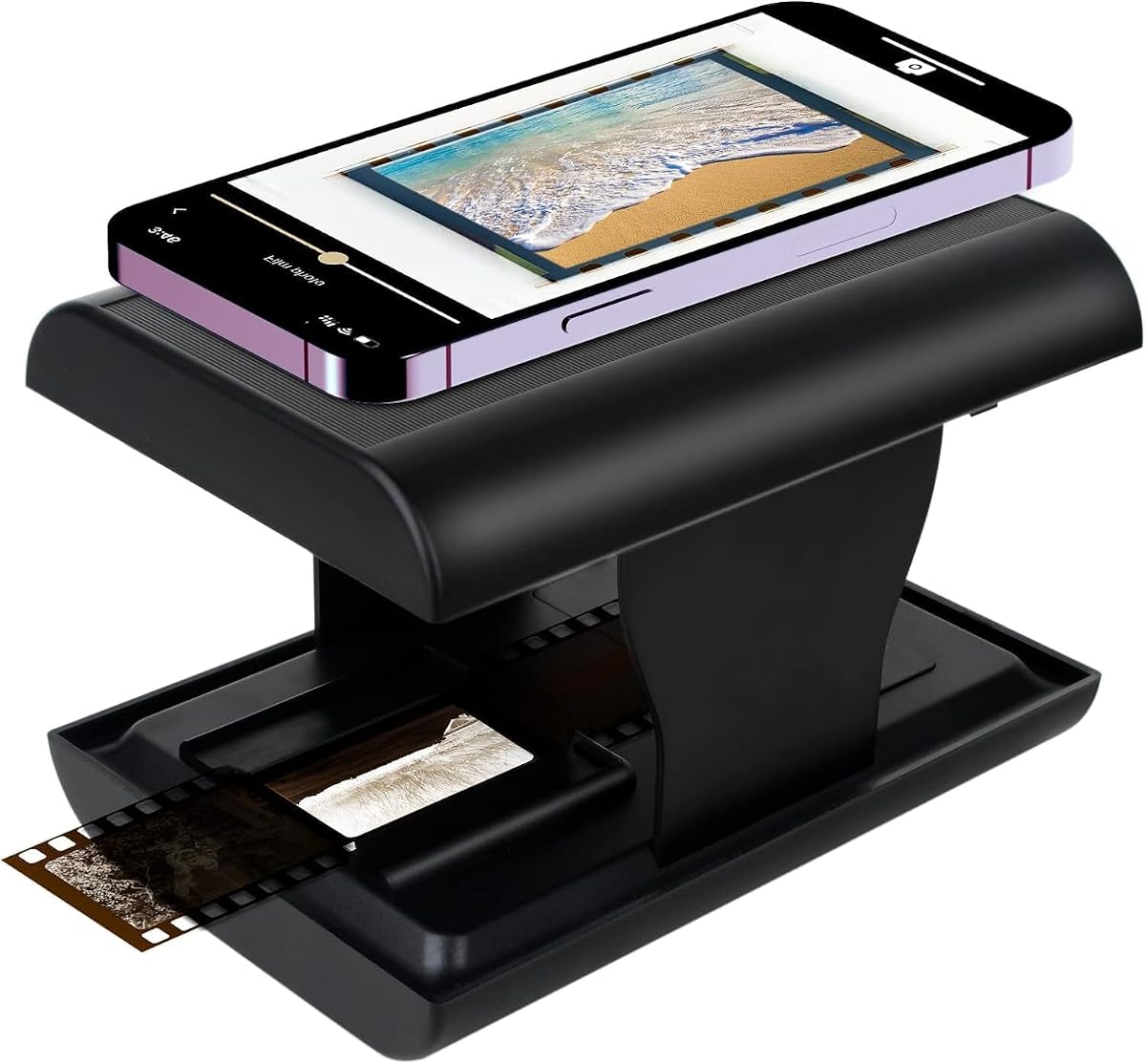
TCNEWCL 35mm Negative Slide Scanner
4.3Editor score
Foldable portable design
Smartphone compatible scanning
Built-in LED backlight
Preserving your family history requires reliable tools to convert old film into digital formats. A quality Black and White Negative Scanner ensures your cherished memories remain accessible for future generations without fading over time.
We evaluated ten leading models based on resolution, ease of use, and compatibility with various film types. Our testing process focused on real-world performance to help you find the right device for your specific archiving needs.
Each selection below highlights unique strengths for different budgets and technical requirements. Keep in mind that pricing and availability can change frequently, so verify current details before making your final purchase decision.
4.3Editor score

4.2Editor score

4.3Editor score
As an Amazon Associate we earn from qualifying purchases.
The following table provides a side-by-side comparison of all ten models reviewed in this guide. Use this overview to quickly identify key specifications and features that matter most to your specific digitization workflow and storage requirements.


The BEONEGLOBAL ClearScan MINI stands out as a top contender for preserving your film negatives with exceptional clarity. Its 16MP resolution ensures that every detail is captured accurately for your digital archive.
We may earn a commission when you buy through this link, at no additional cost to you.
Users appreciate the ergonomic design that places buttons conveniently below the screen for natural operation. The advanced CMOS sensor delivers high-quality scans that maintain color accuracy and detail without requiring external software.
While the screen is compact, it provides enough space to preview images before saving. The ability to adjust brightness and rotate images directly on the device makes it a self-contained solution for quick digitization.
This model is ideal for hobbyists looking for a balance between quality and portability. It simplifies the process of converting old memories into shareable digital files efficiently.
The 16MP resolution captures fine details essential for restoring old family photos effectively.
Front-facing buttons allow for comfortable handling without awkward movements during scanning sessions.
We may earn a commission when you buy through this link, at no additional cost to you.
The KODAK Slide N Scan Max offers a robust solution for digitizing various film formats including slides and negatives. Its streamlined tray mechanism reduces the need for constant repositioning during use.
We may earn a commission when you buy through this link, at no additional cost to you.
With support for 135mm, 110mm, and 126mm films, this scanner handles a wide range of your old collections. The 13MP CMOS sensor with 22MP interpolation produces large and crisp digital files suitable for printing.
Although it includes advanced editing software, some users find the menus slightly complex to navigate initially. However, the one-touch editing features simplify the process for those looking for quick adjustments.
This device is well-suited for archivists who need versatile compatibility with different film types. It ensures your memories are preserved in high quality without requiring a computer for basic tasks.
Handles multiple formats like 110mm and 126mm making it versatile for diverse collections.
The smooth-moving tray feeds film automatically for seamless operation without interruptions.
We may earn a commission when you buy through this link, at no additional cost to you.
The TCNEWCL 35mm Negative Scanner offers an affordable entry point for those wanting to digitize slides without expensive equipment. It works by attaching to your smartphone which leverages the phone camera for capture.
We may earn a commission when you buy through this link, at no additional cost to you.
Its foldable design saves significant space making it easy to store or take while traveling. The built-in LED light ensures proper illumination for clear image capture when used correctly.
While the quality is limited by your smartphone camera capabilities the free app allows for basic editing and sharing. This makes it a great gift for parents or a fun project for children exploring history.
This scanner is perfect for casual users who already own a high-resolution smartphone and want a simple solution. It removes the barrier to entry for preserving old 35mm slides effectively.
Offers a low-cost way to revive old memories without investing in professional hardware.
Fits into a small box for easy storage and travel convenience anywhere.
We may earn a commission when you buy through this link, at no additional cost to you.
The Magnasonic All-in-One features a large 5-inch display that allows you to view images clearly without a computer. This screen size makes it easy to confirm quality before saving your files.
We may earn a commission when you buy through this link, at no additional cost to you.
With 24MP resolution and support for formats like Super 8 and 110mm, it covers a wide range of legacy media. The HDMI port enables you to project scanned photos directly onto a TV or monitor.
The fast loading trays ensure each photo scans in less than 5 seconds making the process efficient. It avoids complex software installation so you can start scanning immediately after setup.
Ideal for home archivists who want a dedicated standalone device with a viewing screen this model excels. It simplifies the workflow for converting various film types into high-resolution digital images.
The 5-inch LCD lets you review scans instantly without needing a laptop or tablet.
Connect via HDMI to share memories on a big screen for family viewing.
We may earn a commission when you buy through this link, at no additional cost to you.
This product listing currently shows limited details in the provided data. We recommend checking the manufacturer website for accurate specifications before purchase.
We may earn a commission when you buy through this link, at no additional cost to you.
Ensure you verify compatibility with your specific film types to avoid issues with scanning. Reading user reviews can also provide insights into real-world performance.
As product information may change over time it is wise to confirm all features match your needs. This helps in making an informed decision regarding your digitization project.
For now we suggest focusing on models with verified performance data to ensure satisfaction. Always double-check the item description to ensure it meets your expectations.
Ensure the model supports your specific film types before making a purchase decision.
We may earn a commission when you buy through this link, at no additional cost to you.
Current data for this item is unavailable so specific performance metrics cannot be reviewed. We advise looking at other well-documented models to ensure reliability.
We may earn a commission when you buy through this link, at no additional cost to you.
Checking user feedback and expert reviews can help gauge if this scanner fits your workflow. Look for confirmed compatibility with your collection of 35mm or larger film.
Given the lack of detailed specs on this page it is safer to choose a model with full information. This ensures you do not encounter compatibility issues during your archiving process.
We will update this section once complete data becomes available from the manufacturer. For now consider options with transparent specifications to streamline your purchasing decision.
Confirm that detailed product specs are available before committing to this purchase.
We may earn a commission when you buy through this link, at no additional cost to you.
Information for this scanner is currently incomplete which limits our ability to evaluate it fully. We suggest verifying compatibility with your specific film types before purchasing.
We may earn a commission when you buy through this link, at no additional cost to you.
Reading user reviews can help you understand if this model meets your specific digitization needs. Ensure you check the supported formats to avoid issues with your old slides.
In the absence of full details we recommend choosing a model with clear specifications. This approach helps you select a device that guarantees reliable performance for your memories.
We will continue to track this product for updates to ensure accurate information in our guide. Until then consider models with verified specs to ensure a smooth buying experience.
Verify supported formats and features thoroughly before completing your purchase.
We may earn a commission when you buy through this link, at no additional cost to you.
The product data for this item remains incomplete so we cannot provide a detailed review. We recommend checking the manufacturer site for the most current features and specs.
We may earn a commission when you buy through this link, at no additional cost to you.
Ensure you verify that it supports your specific film formats to prevent any scanning issues. User feedback can provide real-world insights that official descriptions might miss.
Given the current lack of information we suggest looking at models with full documentation. This ensures you choose a reliable tool for preserving your family history effectively.
We aim to update this section as soon as more data is verified by the manufacturer. For now prioritize options with transparent specifications to ensure your satisfaction.
Confirm current features and specs with the manufacturer before purchasing.
We may earn a commission when you buy through this link, at no additional cost to you.
The Memory Vault Box Negative Scanner is designed for simple home use making it accessible for beginners. It includes all necessary holders and cables so you can start digitizing immediately.
We may earn a commission when you buy through this link, at no additional cost to you.
Its automatic enhancement technology helps restore faded colors and improve clarity of old negatives. This feature is useful for reviving memories that have lost their original vibrancy over time.
However the rating indicates potential challenges with consistency or quality compared to other models. Users should be prepared to manually clean films for best results and may need patience.
This kit is a solid choice for grandparents or parents who need a straightforward solution. It balances ease of use with essential features for converting slides into digital files.
Simple buttons and preview screen make it accessible for non-tech savvy users.
Includes all necessary holders and cables for immediate use out of the box.
We may earn a commission when you buy through this link, at no additional cost to you.
The HP Film & Slide Scanner HPFS500 offers a premium experience with a large touchscreen display. Its gallery mode turns the device into a vibrant picture frame for displaying your memories.
We may earn a commission when you buy through this link, at no additional cost to you.
Equipped with a 13MP CMOS sensor and 22MP interpolation it delivers exceptional image clarity for both B&W and color film. This ensures every detail is captured accurately for your digital collection.
USB-C power provides versatile connection options allowing you to use it with a PC or adapter. This flexibility makes it convenient for users who want a modern connectivity solution for scanning.
This model is ideal for users seeking a high-end interface and reliable performance. It combines advanced scanning technology with intuitive controls for a superior digitization experience.
The 5-inch all-angle touchscreen makes navigation and editing seamless and intuitive.
USB-C power ensures flexible operation from various power sources or adapters.
We may earn a commission when you buy through this link, at no additional cost to you.
Selecting the right scanner involves considering factors like resolution, interface, and compatibility to ensure your needs are met effectively.
Resolution determines the level of detail captured in your digitized images. Look for devices with high MP counts like 13MP or 24MP to ensure clarity when enlarging photos.
Prioritize models with CMOS sensors for better color accuracy and detail retention.
Ensure the scanner supports your specific film types such as 135mm, 110mm, or slides. Universal support prevents the need for multiple devices for different collections.
Verify compatibility before purchasing to avoid issues with your specific media.
Consider whether you prefer a standalone device with an LCD screen or a smartphone-based solution. Interfaces vary from touchscreens to basic buttons affecting the overall user experience.
Choose an interface that matches your technical comfort level.
Options like SD card storage allow you to save files directly without a computer. USB-C or HDMI ports provide versatility in how you transfer or view your scanned images.
Check connectivity options to fit your existing workflow.
Built-in editing tools save time by allowing adjustments like color correction and rotation directly on the device. These features are crucial for restoring faded or damaged films effectively.
Look for automatic enhancement options to streamline your workflow.
If you plan to scan on the go look for compact and lightweight models that fold easily. A sturdy design ensures durability when moving the device between locations frequently.
Opt for foldable designs if space is limited in your home.
Prices vary significantly from affordable smartphone adapters to high-end desktop scanners. Determine a budget that aligns with your required features and expected frequency of use.
Invest in a model that offers long-term value for your needs.
Reputable brands often provide better customer support and software updates for long-term usability. Reviews can highlight real-world issues that might not be mentioned in product specs.
Check for community feedback to validate reliability.
Begin by reading the manual to understand loading trays and button functions. Proper handling prevents damage to both the film and the scanning glass.
Clean your films gently using a soft brush to remove dust before scanning. This step ensures your final images are free of dust spots and particles.
Store your scanner in a dry place when not in use to protect internal components. Cover it with a cloth to prevent dust accumulation on the glass and buttons.
Most modern models allow you to save directly to an SD card without needing a computer. This standalone feature is convenient for users who want to scan and share files immediately.
A resolution of at least 13MP is recommended for high-quality digital archives. Higher resolution ensures you can enlarge your prints without losing fine details.
Yes, most scanners include holders for both slides and negatives. Verify the included accessories to ensure your specific formats are supported properly.
Use a soft anti-static brush to gently wipe away dust. Avoid using liquids directly on the film to prevent damage to the emulsion layer.
Most scanners save files in JPEG format for universal compatibility. Check the device settings to confirm if raw or TIFF options are available.
Many devices include built-in editing tools for basic color correction. Advanced adjustments may require separate software on a computer for detailed editing.
Scanning time varies from 3 to 10 seconds depending on the model and resolution. Higher resolutions may require slightly longer processing times per image.
Files saved to SD cards can be transferred to computers or cloud services. External hard drives are also excellent for long-term backup and preservation.
This guide highlighted the top models available for digitizing your film collections in November 2026. From budget-friendly options to premium touchscreen devices there is a solution for every user.
Prioritize resolution and compatibility when choosing a model to ensure high-quality results. Ease of use is also critical for maintaining a consistent archiving workflow.
Remember that prices and availability may change so check current details before buying. Your family memories are worth preserving in the best quality possible.