
Brother HL-L2405W
4.1Editor score
Affordable home office option
30 ppm print speed
250-sheet paper tray
Easy mobile printing support
This expert guide compares the top ten Brother laser printers for small offices and homes, evaluating speed connectivity features and value to help you choose.
Choosing the right Brother laser printer can transform your workflow by delivering crisp monochrome or vibrant color output with remarkable speed and efficiency. Whether you run a small business or manage a busy home office, finding a model that balances performance and cost is essential for daily productivity.
We have carefully analyzed the latest Brother laser printer models available this month to identify the most reliable and feature-rich options on the market. Our comparison focuses on print quality, connection flexibility, paper handling capabilities, and long-term value to ensure you get a device that meets your specific demands.
Each pick in this guide highlights key strengths and potential trade-offs so you can make an informed decision based on your printing volume and budget. Please note that product prices and availability can change frequently so we recommend checking current listings before finalizing your purchase.
4.1Editor score

4.1Editor score
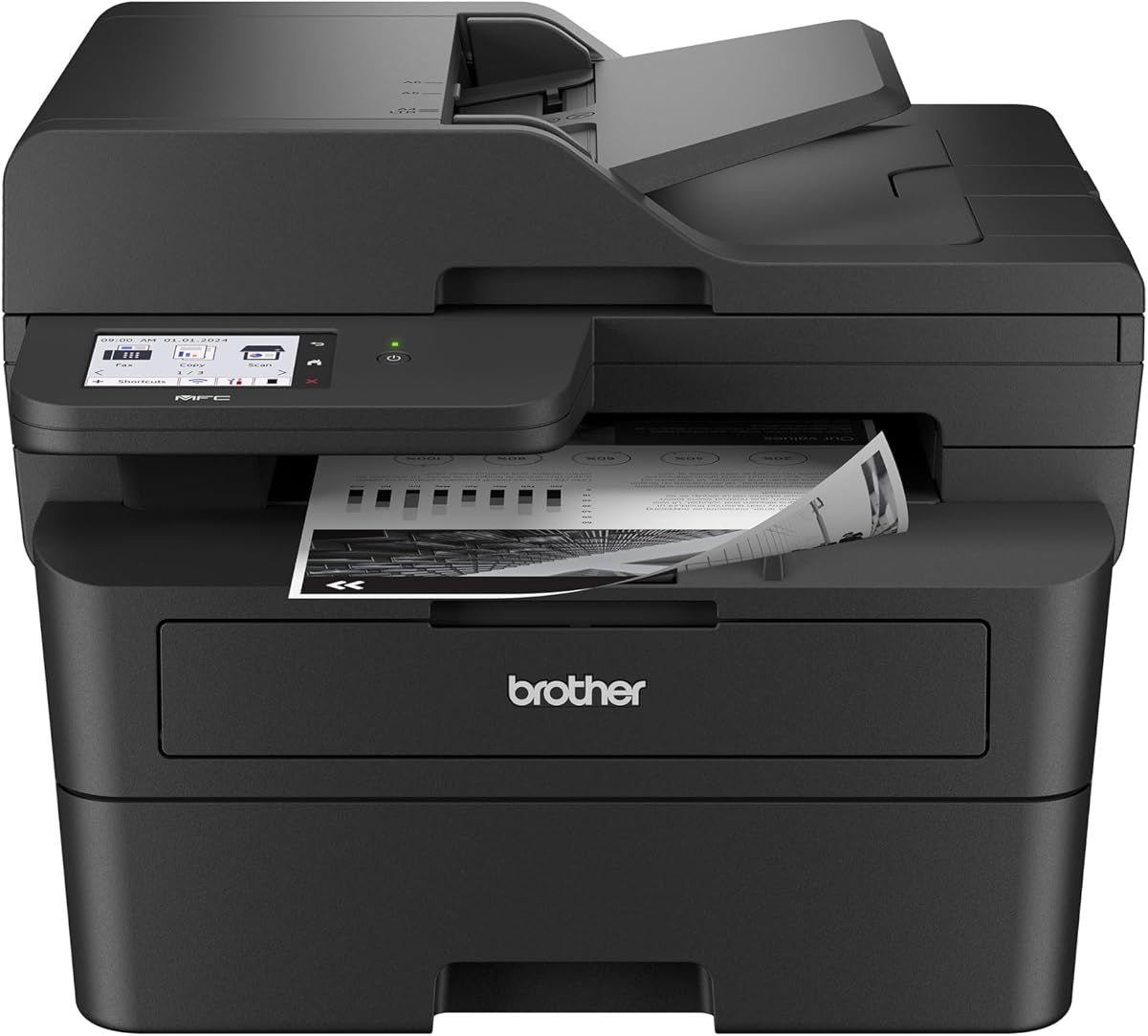
4.2Editor score
This side-by-side comparison highlights the key specifications and capabilities of ten top-rated Brother laser printers to help you quickly identify the model that fits your specific office or home needs.





The Brother DCP-L2640DW stands out as a highly capable monochrome multifunction printer designed for small businesses and home offices. With its robust build and impressive print speed this device delivers consistent quality while keeping operational costs low for everyday document needs.
We may earn a commission when you buy through this link, at no additional cost to you.
Its standout qualities include a fast 36 pages per minute output speed and a 50-page auto document feeder that streamlines scanning and copying tasks. The dual-band wireless connectivity ensures stable connections across multiple devices making it easy for teams to share this printer seamlessly.
While it lacks color printing and fax capabilities which might be necessary for some users the trade-off is acceptable given its efficiency and space-saving footprint. The included mobile app simplifies remote management allowing you to order supplies or track toner usage from anywhere.
This model is ideal for professionals who prioritize speed and reliability over color output. If you need a dependable workhorse for text documents and simple graphics the DCP-L2640DW offers excellent value and performance for its class.
The 50-page auto document feeder allows you to process multi-page documents quickly without manual page turning ensuring smooth workflow for reports and contracts.
With the Brother Mobile Connect app you can print scan and manage printer settings remotely which enhances productivity for those working from different locations.
We may earn a commission when you buy through this link, at no additional cost to you.
The Brother HL-L2405W is an excellent choice for individuals or small home offices that primarily need reliable black and white printing. Its compact design fits easily into tight spaces while delivering crisp text output at a reasonable speed for daily tasks.
We may earn a commission when you buy through this link, at no additional cost to you.
Key strengths include its user-friendly setup and strong wireless connectivity that supports multiple devices through dual-band Wi-Fi. The printer also works with Alexa voice commands which adds convenience for users who prefer hands-free printing commands.
Although it does not offer scanning or copying functions this limitation keeps the price point very competitive for budget-conscious buyers. The single-purpose focus ensures consistent performance without the extra bulk or cost of multifunction components.
This printer is best suited for students or remote workers who mainly print documents and rarely need to copy or scan. For basic printing needs the HL-L2405W provides a cost-effective solution that balances quality and affordability.
Compatibility with Alexa allows you to trigger print jobs using voice commands making it easier to manage tasks while working on other projects.
The small footprint ensures this printer can be placed on desks or shelves without cluttering your workspace which is vital for home offices.
We may earn a commission when you buy through this link, at no additional cost to you.
The Brother MFC-L2900DW is a premium all-in-one printer designed for small businesses that demand high performance and robust connectivity. It combines fast printing speeds with advanced document handling and security features to support demanding office workflows.
We may earn a commission when you buy through this link, at no additional cost to you.
Its standout feature is the responsive 3.5-inch touchscreen that simplifies navigation and provides direct access to cloud services like Google Drive and Dropbox. The advanced security protocols ensure that sensitive business documents are protected during transmission and printing.
While the price is higher than entry-level models the added capabilities such as single-pass scanning and energy-efficient design justify the investment. The printer reduces paper waste through automatic duplex printing which aligns with sustainable office practices.
This model is perfect for growing businesses that need a reliable central printer for multiple users. The combination of speed security and ease of use makes the MFC-L2900DW a top-tier choice for professional environments.
Triple layer security features protect your network and documents from unauthorized access ensuring peace of mind for business-critical printing tasks.
An enhanced fuser design reduces electricity consumption and warms up faster from sleep mode lowering operational costs and saving time.
We may earn a commission when you buy through this link, at no additional cost to you.
The Brother MFC-L2820DW brings comprehensive functionality to small offices needing fax capabilities alongside printing and scanning. Its compact design hides a powerful engine that delivers quick output and reliable document management for various professional tasks.
We may earn a commission when you buy through this link, at no additional cost to you.
Key strengths include the intuitive 2.7-inch touchscreen that makes navigation easy and the ability to connect directly to cloud services for seamless document handling. The built-in fax feature ensures compatibility with legacy systems still used in certain industries.
The main trade-off is the monochrome output which limits its use for colorful marketing materials. However for businesses focusing on text and grayscale documents this limitation is often acceptable given the device versatility and space-saving size.
This printer is ideal for small offices that need a one-stop solution for printing scanning copying and faxing. The balance of features and compact form factor makes it a strong contender for diverse professional needs.
Direct access to services like Google Drive and Dropbox streamlines document workflows by allowing easy saving and printing from the cloud.
The included fax function supports traditional business communications ensuring you can send and receive documents without extra equipment.
We may earn a commission when you buy through this link, at no additional cost to you.
The Brother HL-L3220CDW offers a compelling entry point into color laser printing for home offices that need vibrant graphics and crisp text. It delivers professional quality documents that stand out while maintaining efficiency through duplex printing features.
We may earn a commission when you buy through this link, at no additional cost to you.
Its standout qualities include advanced wireless capabilities with security protocols that safeguard sensitive business documents during transmission. The 250-sheet paper tray reduces refill frequency ensuring smooth operation during busy printing sessions without constant interruption.
While it is slower than monochrome counterparts the color capability justifies the trade-off for marketing materials and presentations. The manual feed slot adds versatility allowing you to print on envelopes and specialty media with ease.
This printer is best suited for small businesses or freelancers who need color prints without investing in a larger multifunction unit. The balance of quality and compact design makes it a strong choice for visual document needs.
Stunning laser-quality output ensures your documents stand out from competition making it ideal for presentations and client-facing materials.
Built-in security protocols safeguard sensitive business documents during transmission ensuring data privacy across your network devices.
We may earn a commission when you buy through this link, at no additional cost to you.
The Brother HL-L2480DW is a versatile multifunction printer that balances speed and convenience for small teams and home offices. It offers a flatbed scanner and touchscreen interface making it easy to manage complex scanning and copying tasks.
We may earn a commission when you buy through this link, at no additional cost to you.
Key strengths include its fast 36 pages per minute output speed and intuitive navigation which reduce wait times and improve workflow. The inclusion of voice command support adds another layer of accessibility for users who prefer hands-free operations.
One trade-off is the lack of fax functionality and a smaller auto document feeder compared to higher-end models. However for general office tasks the device performance and reliability make these omissions acceptable for most users.
This model is recommended for users who need robust scanning and printing capabilities without the bulk of a full office center. Its compact design and high satisfaction rating make it a dependable choice for daily use.
The included flatbed scan glass allows you to scan fragile or thick items that cannot be run through an automatic feeder.
Integration with Alexa enables hands-free printing and scanning which boosts convenience for busy professionals multitasking in the office.
We may earn a commission when you buy through this link, at no additional cost to you.
The Brother MFC-L2900DW delivers professional-grade performance with lightning-fast output and advanced scanning capabilities. It is designed to elevate business efficiency by combining speed with smart features that streamline document workflows effectively.
We may earn a commission when you buy through this link, at no additional cost to you.
Key strengths include single-pass two-sided scanning which drastically reduces processing time for multi-page documents. The responsive touchscreen and cloud-ready features allow seamless integration with services like Google Drive and Dropbox.
One trade-off is the higher price point compared to consumer models which may not be justified for low-volume users. However for businesses with frequent printing needs the efficiency gains and durability justify the investment.
This model is ideal for offices that prioritize high throughput and smart connectivity. The balance of speed user interface and energy efficiency makes it a top choice for demanding professional environments.
Maximize productivity with rapid document processing that handles two-sided scanning in a single pass saving time and effort.
Navigate effortlessly through printing and scanning functions using a large display that simplifies complex settings for all users.
We may earn a commission when you buy through this link, at no additional cost to you.
The Brother HL-6210DW is built for high-volume environments that demand exceptional speed and paper capacity. It dominates office printing tasks with 50 pages per minute output ensuring large jobs are completed efficiently.
We may earn a commission when you buy through this link, at no additional cost to you.
Key strengths include the robust 520-sheet main tray and expandable capacity which minimize refills and reduce downtime. The Gigabit Ethernet ensures stable network sharing across a business environment without congestion or latency issues.
While the physical footprint is larger and operational costs are higher due to toner needs the efficiency gains for heavy users are significant. The triple layer security ensures network safety which is crucial for enterprise deployments.
This printer is best suited for businesses with high daily print volumes. The combination of speed capacity and security makes it a reliable choice for demanding office environments.
Expand up to 1660 sheets with optional trays ensuring uninterrupted professional-grade performance for massive document batches.
Safeguard your business printer with advanced security features ensuring comprehensive protection for devices and documents.
We may earn a commission when you buy through this link, at no additional cost to you.
The Brother MFC-L3720CDW combines color laser printing with full multifunction capabilities making it a powerful tool for businesses needing vibrant documents. It delivers exceptional speeds for a color device while offering extensive connectivity options.
We may earn a commission when you buy through this link, at no additional cost to you.
Key strengths include the 3.5-inch color touchscreen with customizable shortcuts that streamline frequent tasks. The mobile command center allows remote access and management ensuring users can handle documents from anywhere.
While it is slower than monochrome units the color capability justifies the speed reduction for marketing materials. The generous paper capacity ensures it can handle heavy workflows without constant interruptions.
This model is best for small businesses requiring full color capabilities in a single unit. The combination of smart features and print quality makes it a strong choice for modern offices.
Leverage remote access capabilities and toner monitoring directly from your mobile device through the exclusive companion app.
Transform your workflow with direct access to popular cloud services for seamless document management across platforms.
We may earn a commission when you buy through this link, at no additional cost to you.
The Brother Work Smart 1360 is an affordable color inkjet all-in-one designed for home users needing basic printing and scanning. It offers a compact design and cloud connections to support simple document tasks without high costs.
We may earn a commission when you buy through this link, at no additional cost to you.
Key strengths include the easy-to-use color display and cloud app connections that simplify printing from various services. The duplex feature helps save paper costs while maintaining a small footprint on your desk.
While the speed is slower compared to laser printers the price point makes it accessible for light users. The limited paper capacity is a trade-off but manageable for occasional printing needs.
This printer is best for students or home users needing budget-friendly color capabilities. Its simplicity and low cost make it a viable choice for low-volume printing tasks.
Print from and scan to popular cloud apps via a simple color display ensuring easy access from any device.
This compact wireless printer is designed for everyday home office needs providing beautiful prints for standout results.
We may earn a commission when you buy through this link, at no additional cost to you.
Selecting the right printer requires balancing speed connectivity and features to match your specific workflow needs effectively.
Print speed is critical for productivity especially if you frequently handle large batches of documents. Models like the HL-6210DW offer 50 ppm speeds ideal for high-volume offices while smaller units might suffice for light personal use.
Assess your average monthly print volume to ensure the printer can handle your workload without excessive warm-up times.
Decide whether you need color output for marketing or presentations or if monochrome is sufficient for standard text. Color printers offer versatility but often come with higher operational costs compared to black and white models.
Choose monochrome for cost efficiency if color is rarely needed for daily business documents.
Modern offices require flexible connectivity to support multiple devices and remote workers. Look for models with dual-band Wi-Fi Ethernet and mobile app support to ensure seamless integration with your current network setup.
Prioritize dual-band wireless for stable connections in environments with many connected devices.
Consider whether you need scanning copying and faxing in one device to save space. All-in-one models streamline workflows but basic printers may be preferable for simple tasks.
Select an all-in-one unit if you regularly handle document management tasks beyond printing.
A larger paper tray reduces the frequency of refills which improves productivity during busy periods. Some models support expandable trays which are beneficial for high-volume environments.
Ensure the paper capacity matches your daily printing demands to avoid interruptions.
Look for printers compatible with high-yield toner cartridges to lower long-term costs. Brother offers a refresh subscription service that can provide savings on genuine supplies.
Calculate the cost per page based on toner capacity before making your purchase decision.
Business printers should include advanced security protocols to protect sensitive data. Triple layer security features ensure that documents and network connections are safeguarded during transmission.
Prioritize secure printing options if you handle confidential business information regularly.
Compact models are essential for home offices with limited desk space. Ensure the dimensions fit your designated area while still providing necessary paper capacity.
Choose a design that balances size with functionality to maintain an organized workspace.
Set up your printer by connecting it to your wireless network and installing the mobile app for easy access. This ensures you can print remotely and monitor toner levels from any device.
Regularly update the printer firmware through the manufacturer website to ensure optimal performance and security. Keeping software current helps prevent connectivity issues and maintains data safety.
Maintain consistent print quality by using genuine toner cartridges and avoiding paper jams. Store paper in a cool dry place to prevent moisture damage that can cause feeding errors.
Laser printers use toner powder to produce sharp text at high speeds while inkjet printers use liquid ink which is better for photos. Laser models are generally more durable and cost-effective for high-volume text printing.
Use the printer control panel or mobile app to access network settings and select your wireless network. Enter your password to secure the connection and ensure all devices can communicate properly.
Yes most modern Brother models support printing directly from smartphones and tablets via the Brother Mobile Connect app. This feature allows remote printing and scanning from almost anywhere with internet access.
This service allows you to receive genuine toner automatically when your current supply runs low. It ensures you never run out of supplies and offers potential savings on replacement costs.
Enable automatic duplex printing settings to print on both sides of a page. This simple step halves your paper consumption and reduces environmental impact significantly.
Dual-band Wi-Fi supports both 2.4GHz and 5GHz frequencies ensuring stable connections in busy networks. This reduces interference and improves overall print reliability across multiple devices.
Most models include a standard one-year limited warranty covering manufacturing defects. Additional support options like online chat are often available for the life of the device.
Genuine toners ensure consistent print quality and protect the printer from potential damage. They also maintain the validity of your warranty and provide better page yield.
The Brother DCP-L2640DW HL-L2405W and MFC-L2900DW stand out as top choices for efficiency and reliability across different office sizes. Each model offers distinct advantages depending on whether you prioritize speed or compact design.
Prioritize factors like print speed and security features to match your specific workflow demands effectively. Consider whether color output is necessary for your daily tasks before finalizing your purchase.
Always check current prices and availability since they can fluctuate based on market conditions. This ensures you secure the best deal while getting a printer that truly meets your needs.