
Inwa Computer Speakers for Desktop PC Monitor
4.3Editor score
Plug and play USB connectivity
Clear and balanced audio output
Adjustable clip mount design
This comprehensive guide compares the top clip on speakers for laptop users focusing on audio quality, ease of installation, and value to help you choose the
Finding the right audio solution for your workspace can be challenging especially when desk space is limited. Clip on speakers for laptop offer a sleek and efficient way to enhance your sound experience without cluttering your valuable workspace. These devices attach directly to your monitor or laptop screen providing immediate audio improvements while maintaining a clean and organized setup for professionals and students alike.
To compile this definitive list we evaluated numerous models based on critical factors such as sound clarity, bass response, connectivity options, and build quality. We considered user feedback and technical specifications to ensure each recommendation meets high standards of performance and reliability. This comparison covers a wide range of budgets and needs ensuring there is an ideal option for every type of user seeking better audio from their computing setup.
Each pick in this guide highlights specific strengths and use cases helping you identify which model aligns best with your daily tasks and preferences. Keep in mind that product availability and pricing can fluctuate frequently so always verify current details before making a final decision. Our goal is to provide you with clear and actionable insights to streamline your shopping experience and enhance your digital environment effectively.
4.3Editor score

4.5Editor score

4.2Editor score
This side-by-side comparison highlights the key specifications and unique features of each selected model to help you quickly identify the right fit for your specific audio requirements and workspace constraints.


This speaker system offers a premium audio experience for laptop and desktop users seeking enhanced sound without occupying desk space. With a solid rating and strong user feedback it stands out for its adaptive channel switching technology and powerful bass response.
We may earn a commission when you buy through this link, at no additional cost to you.
The built-in G-sensor ensures left and right channels adjust automatically based on clip position maintaining accurate stereo imaging. Dual ultra-magnetic drivers and passive radiators deliver loud and rich sound suitable for media consumption and professional tasks.
While it excels in audio quality the unit requires a USB connection for power and audio transmission which may limit flexibility for some setups. The lack of wireless connectivity means cables are necessary though the included USB-C adapter broadens device support significantly.
Ideal for users prioritizing sound fidelity and minimal footprint this model is a top choice for office environments and home workstations. Its intuitive touch controls and plug-and-play setup make it accessible for tech-savvy and casual users alike.
The G-sensor ensures perfect stereo alignment regardless of whether the speaker is mounted on the top or bottom of the monitor for consistent audio positioning.
Patented clamp allows smooth placement on desks or monitors freeing up valuable workspace while keeping audio equipment securely attached and organized.
We may earn a commission when you buy through this link, at no additional cost to you.
Praised for its versatility and user-friendly features this speaker earns a top spot for those needing both wired and wireless connectivity. Its high rating reflects satisfaction with sound quality ease of use and innovative additions like synchronized lighting.
We may earn a commission when you buy through this link, at no additional cost to you.
The G-sensor switches audio channels in under half a second ensuring stereo accuracy when clipped to different monitor positions. Bluetooth 5.3 supports stable streaming while the built-in microphone enhances video conferencing clarity for remote professionals.
Users should note that mounting on ultra-thin laptop screens is not recommended due to potential instability. The RGB lighting adds visual flair but requires USB power which may slightly impact cable management in minimalist setups.
Perfect for gamers and content creators this model balances performance with style. The combination of dual modes adjustable lighting and reliable sound makes it a standout choice for modern workspaces seeking both function and flair.
Switch seamlessly between Bluetooth for wireless flexibility and USB for low-latency audio ensuring optimal performance for gaming or video streaming tasks.
Syncs with audio rhythm and system notifications offering customizable visual effects that energize your workspace without compromising sound quality.
We may earn a commission when you buy through this link, at no additional cost to you.
Offering exceptional value this speaker delivers clear audio and reliable performance at a budget-friendly price. Its high rating indicates strong user satisfaction with its ease of use and ability to improve laptop audio effectively.
We may earn a commission when you buy through this link, at no additional cost to you.
Dual 5W drivers provide balanced sound suitable for daily tasks and entertainment. The ultra-narrow clip ensures monitors remain unobstructed while one-touch controls simplify operation for quick adjustments during calls or media playback.
While it lacks advanced features like bass boosting or lighting the straightforward design ensures stability and ease of setup. Users may find the control options limited compared to premium models but sufficient for everyday needs.
An ideal choice for students and office workers this model offers a no-fuss upgrade to built-in audio. Its universal compatibility and simple design make it a practical solution for anyone needing better sound without complexity.
Works with Windows macOS ChromeOS and Linux allowing broad device support without requiring additional drivers or configuration steps for hassle-free setup.
Power volume and mute are easily accessible on the top panel enabling quick adjustments without interrupting your workflow during important tasks.
We may earn a commission when you buy through this link, at no additional cost to you.
This model is recognized for its intuitive volume knob and sturdy build quality providing a reliable audio solution for various computing setups. Users appreciate the simplicity and effectiveness of its design in delivering clear sound.
We may earn a commission when you buy through this link, at no additional cost to you.
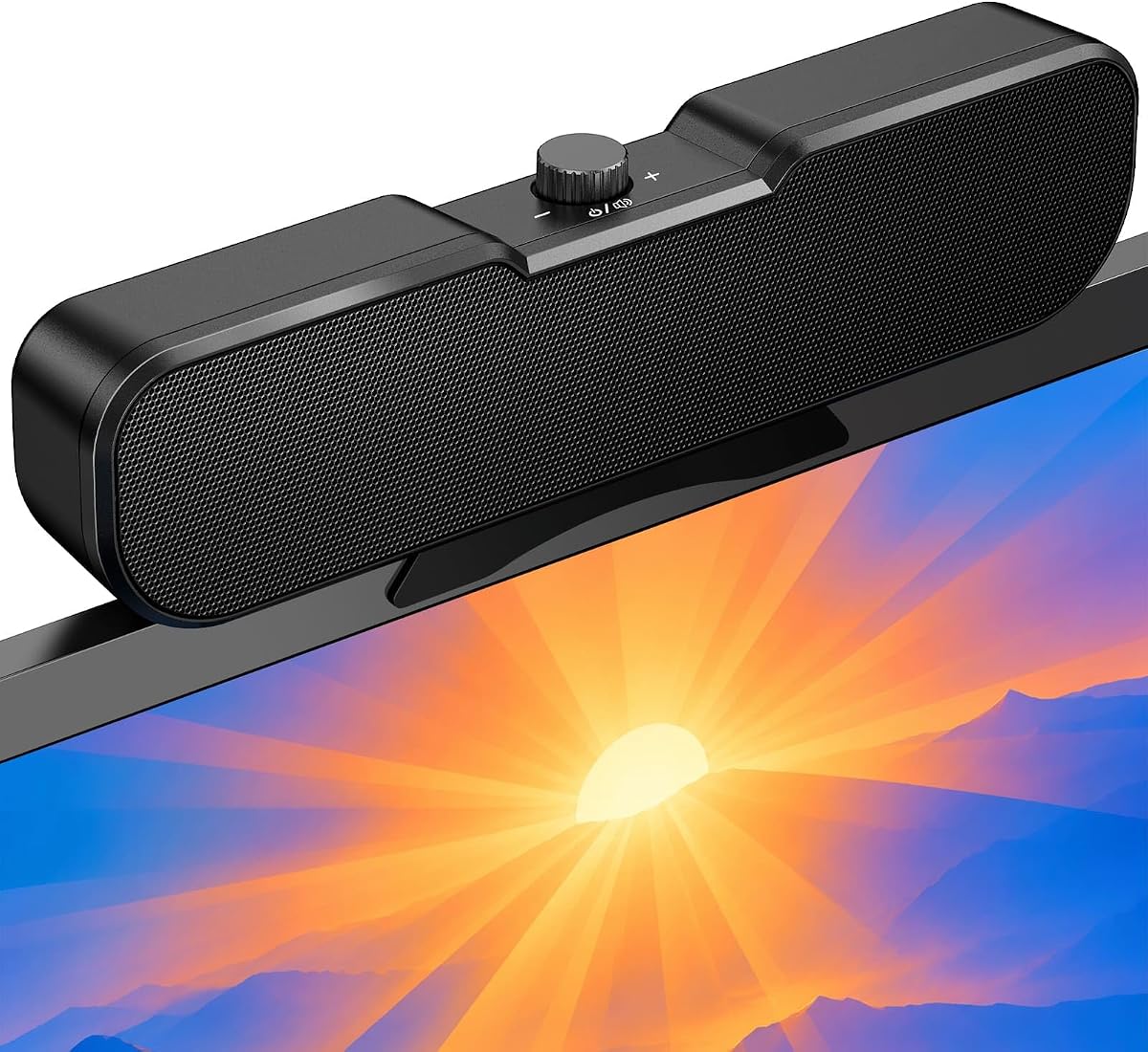
The innovative knob allows quick power and volume adjustments without navigating menus. Its non-slip clamp secures the speaker firmly to monitors reducing risk of slips while keeping the desktop clutter free.
While it lacks wireless connectivity the included cable tie and compact design help manage cables neatly. The lack of extra buttons simplifies operation but may limit customization for users seeking more control options.
Perfect for those valuing simplicity this speaker offers a direct and effective way to boost laptop audio. Its portability and straightforward setup make it a strong contender for travel or multi-device environments.
One knob handles power and volume for fast and precise adjustments without complicated button combinations for seamless user experience.
Non-slip fit on screens between 0.1 and 0.98 inches ensures secure placement and prevents damage to monitor surfaces during use.
We may earn a commission when you buy through this link, at no additional cost to you.
Designed to deliver impressive sound from a compact form this speaker focuses on bass quality and ease of mounting for enhanced media experiences. Its rating highlights user satisfaction with audio depth and build.
We may earn a commission when you buy through this link, at no additional cost to you.
Super-magnetic drivers and a passive radiator work together to produce rich low frequencies. The patented clamp allows quick attachment to monitor edges saving desk space while maintaining stability during use.
Volume control relies on system settings which may reduce tactile feedback but simplifies hardware design. This approach ensures fewer parts to fail but may inconvenience users preferring physical volume adjustment.
Ideal for multimedia enthusiasts this model brings deep bass to any workstation. Its straightforward setup and reliable performance make it a solid option for users prioritizing sound impact over extra features.
Passive radiator enhances low-frequency output for immersive audio experiences in music movies and video content without external subwoofers.
Secure clips fit monitor edges from 0.1 to 1 inch thick ensuring stable placement and minimizing desk clutter effectively.
We may earn a commission when you buy through this link, at no additional cost to you.
This speaker offers versatile connectivity and precise control features appealing to users who value tactile interaction and broad device support. Its design includes specific elements for quick audio management during tasks.
We may earn a commission when you buy through this link, at no additional cost to you.
The volume wheel provides smooth and precise adjustments surpassing standard button controls. An M-button offers one-touch muting for efficient transitions during meetings or media playback without interrupting audio flow.
The spring-loaded clip with silicone protection ensures safe attachment to various monitor thicknesses up to 1.26 inches. While designed for clipping it can also sit flat on desks for flexible placement options.
Perfect for professionals seeking control precision this model balances utility with ease of use. Its compatibility across systems and intuitive controls make it a practical choice for diverse computing environments.
Intuitive tactile wheel allows fast and exact volume changes without repeated button presses enhancing efficiency during frequent audio adjustments.
One-touch mute button enables instant silence during calls or distractions offering quick control without navigating software menus.
We may earn a commission when you buy through this link, at no additional cost to you.
This speaker focuses on delivering clear stereo sound with minimal setup hassle. Its design emphasizes ease of use and reliable audio performance for daily computing tasks and entertainment.
We may earn a commission when you buy through this link, at no additional cost to you.
Two large speakers and a passive radiator ensure balanced sound projection forward for an immersive listening experience. The spring clip attaches securely to monitors up to 1.18 inches thick without damaging surfaces.
Controls include volume up down and mute buttons positioned for convenient access. While simple this layout avoids complexity and ensures quick adjustments without interrupting workflow during tasks.
Ideal for users needing a straightforward audio upgrade this model provides dependable performance and support. Its plug-and-play nature makes it accessible for all skill levels seeking better sound without technical barriers.
Large-sized speakers and passive radiator produce 10 watts of power for clear stereo audio suitable for calls and media consumption.
Customer service resolves issues within 24 hours ensuring peace of mind and reliability for long-term usage satisfaction.
We may earn a commission when you buy through this link, at no additional cost to you.
This product entry lacks current data in the supplied information so detailed review is not possible. Users should verify status and specifications directly on the product page before considering purchase.
We may earn a commission when you buy through this link, at no additional cost to you.
The provided link leads to a product page where real-time details may be available. Checking ratings and user reviews directly can offer insights into current performance and reliability of this item.
Without specific features or audio specs it is difficult to compare this model against others in this guide. Prospective buyers should exercise caution and confirm availability before making a purchasing decision.
This placeholder indicates a gap in current product data. Regular updates may restore information so checking back later or contacting customer service could yield more accurate details for evaluation.
Check the product page for updated details or contact seller support to confirm availability and specifications before purchase.
We may earn a commission when you buy through this link, at no additional cost to you.
Selecting the ideal clip on speakers for laptop involves evaluating several key factors to ensure compatibility performance and durability for your specific needs and workspace.
Most clip-on speakers rely on USB-A or USB-C connections for both power and audio transmission making it essential to verify your laptop has the correct ports. Some models include adapters or offer Bluetooth dual mode for greater flexibility with various devices and setups.
Always check the port types and cables provided to ensure seamless integration with your current computing environment before purchase.
Look for speakers with dual drivers and passive radiators for balanced stereo sound and deeper bass response which enhances music and media experiences. Higher wattage generally indicates louder output but clarity and distortion levels at high volumes matter more.
Prioritize models with reviews praising clear audio and rich low frequencies for your daily use cases and content consumption habits.
Clip strength and padding are critical to ensure the speaker stays securely on your monitor without damaging the screen or slipping during movement. Adjustable or spring-loaded clips that accommodate various thicknesses add versatility for different monitor sizes and laptop designs.
Choose a design that complements your workspace aesthetic while providing reliable attachment to prevent accidents and maintain organization.
Physical controls like knobs wheels or buttons provide quicker access to volume and mute functions compared to navigating system settings repeatedly. Intuitive layouts simplify adjustments during calls or media playback reducing interruptions to your workflow.
Test the control type and responsiveness if possible or read user feedback to confirm ease of use for your routine tasks.
Ensure the speakers support your operating system including Windows macOS Linux or ChromeOS to avoid driver issues or audio routing problems. Some units may also work with tablets and phones which adds value if you use multiple devices regularly.
Verify compatibility details and adapter availability to guarantee the speaker works with all your primary devices out of the box.
Extra features such as built-in microphones RGB lighting or adaptive channel switching can enhance convenience and personalization depending on your preferences. These may add value but often come with increased complexity or power requirements.
Decide if additional functions align with your needs rather than opting for features you won't use frequently or find distracting.
Sturdy construction and quality materials ensure longevity especially if the speaker will be attached to moving devices or used daily in varied environments. Check reviews for feedback on clip durability and resistance to wear over time.
Select models known for reliable build quality to avoid frequent replacements and maintain consistent performance in the long term.
Determine a spending range based on required features and expected usage frequency to find the best balance between cost and performance. Sometimes higher-priced units offer better sound and longevity while budget models can suffice for basic needs.
Compare specs and user satisfaction across price points to make an informed choice that delivers lasting value for your investment.
Begin by clipping the speaker securely to the top or bottom edge of your monitor ensuring the padding protects the screen from scratches. Verify that the clip fits snugly without wobbling and that the unit sits flat for stable audio direction.
Connect the USB cable to your laptop and select the speaker as the playback device in your system sound settings. Adjust volume using the speaker controls and system mixer to find the optimal balance for your environment.
Periodically clean the speaker and clip with a dry cloth to remove dust and debris that could affect sound or attachment. Avoid exposing the device to moisture or extreme temperatures to maintain performance and extend its lifespan significantly.
Most clip on speakers for laptop are plug-and-play and do not require additional drivers as they work with standard USB audio interfaces. Some models may need system audio settings adjusted to recognize the device correctly during initial setup.
Many clip on speakers are not recommended for ultra-thin laptop screens due to potential instability or risk of screen damage. Check the manufacturer specifications for compatible thickness limits before mounting to avoid accidental drops or bending.
The G-sensor detects the speaker orientation and automatically switches left and right audio channels to maintain correct stereo imaging. This ensures consistent sound positioning whether clipped to the top or bottom of the monitor during use.
Clip on speakers for laptop typically draw power from a USB connection to your computer which also transmits audio data. This eliminates the need for separate power adapters or batteries making setup simpler and cleaner on your desk.
Most models are designed for universal compatibility with both Mac and Windows operating systems along with ChromeOS and Linux. Ensure the USB connection matches your device ports and use any included adapters for seamless functionality across platforms.
Use a soft dry cloth to gently wipe the speaker surface and clip avoiding liquids that might seep into internal components. Regular dusting helps maintain sound quality and prevents buildup that could interfere with the clip mechanism over time.
This guide has highlighted ten top models including budget options and premium choices to suit varied preferences for sound quality and features. Each speaker brings unique strengths from adaptive channel switching to dual connectivity modes helping you find the ideal audio upgrade.
Prioritize sound clarity and mounting stability based on your primary use cases such as video calls gaming or media streaming. Understanding your specific needs ensures you choose a model that enhances your listening experience without compromising workspace organization.
Always verify current pricing and availability before finalizing your purchase as these details can change frequently. With the right clip on speakers for laptop you can transform your workspace into a more immersive and efficient environment today.