
Gigabit Dual NIC with Intel 82576 Chip
4.5Editor score
Intel 82576 Controller
Supports Windows 10/11
Low Profile Bracket Included
This guide compares the top dual RJ45 port network cards for servers and workstations, reviewing performance, compatibility, and reliability.
Finding the right dual RJ45 port network card is crucial for enhancing server performance and network redundancy. These adapters provide multiple Ethernet connections in a single PCIe slot, ideal for data centers and high-bandwidth applications requiring stable and fast connectivity.
We evaluated ten leading dual port network cards based on chipset reliability, operating system support, and physical form factors. Our analysis focuses on real-world performance metrics, compatibility with major server OSes, and build quality to ensure you select a solution that meets enterprise needs.
Each product overview highlights key specifications, pros, cons, and ideal use cases to help you make an informed decision. Please note that availability and pricing may vary over time, so verify current stock and details directly with the vendor before purchasing your next network adapter.
4.5Editor score

4.1Editor score

4.6Editor score
This comparison table outlines the key specifications of the top ten dual RJ45 port network cards to help you quickly identify the best fit for your server or workstation environment.


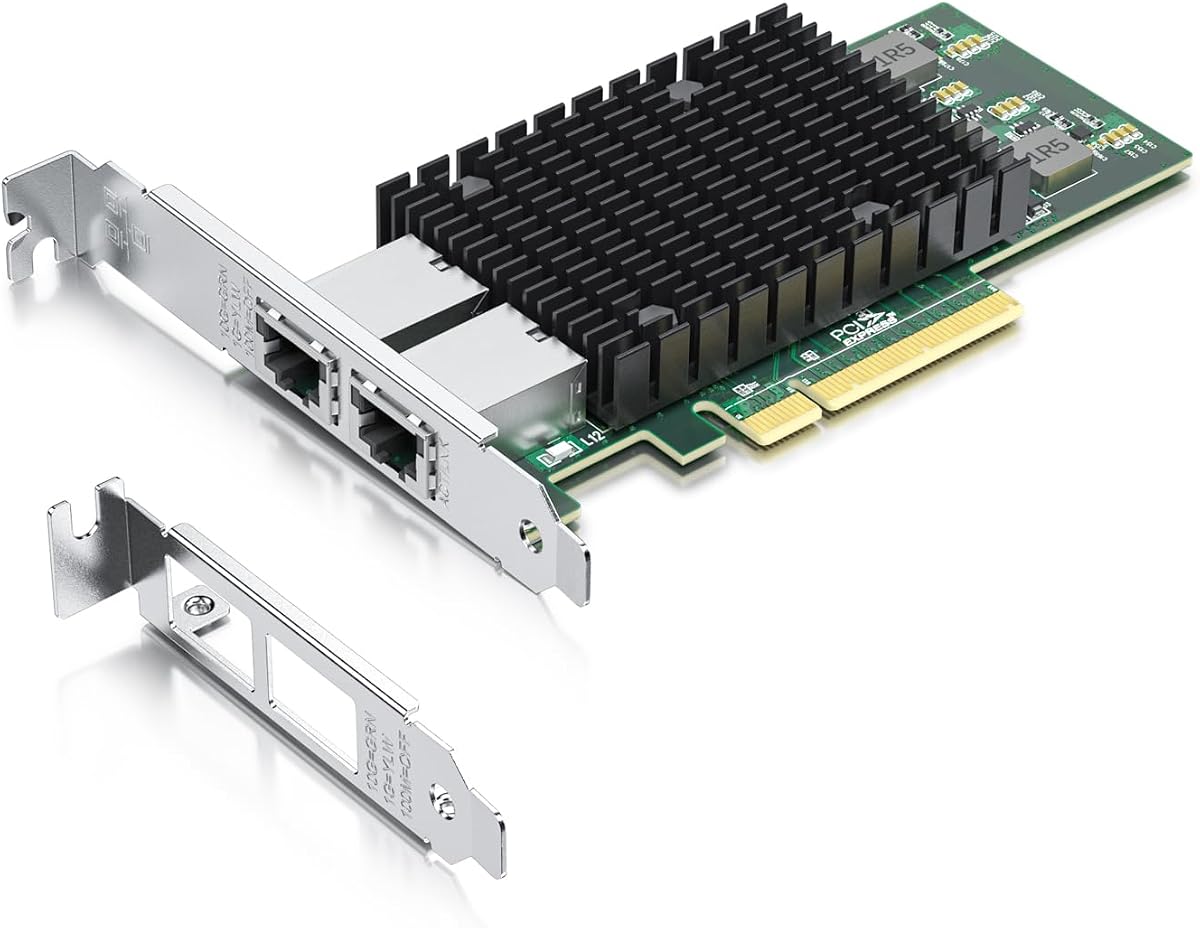

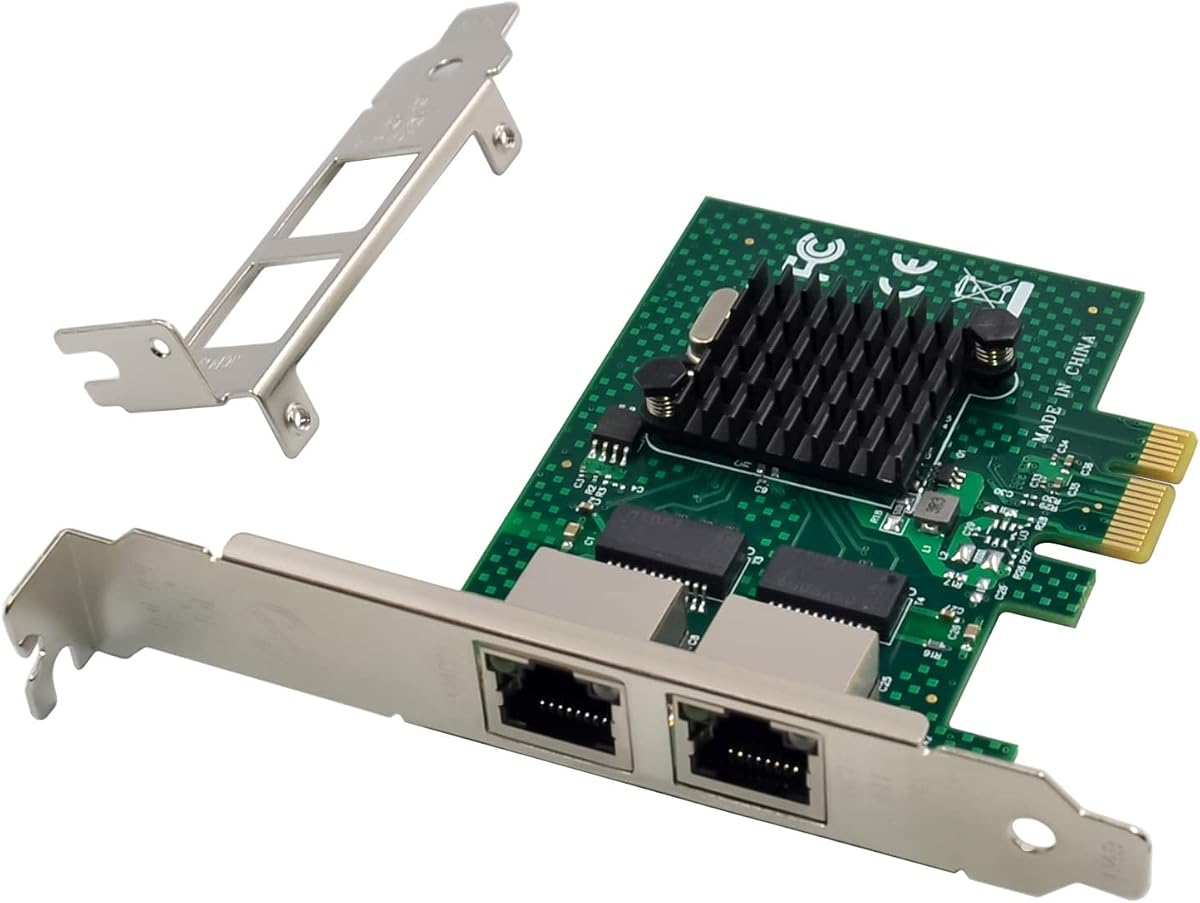
The 10Gtek 10Gb Dual RJ45 Port Network Card stands out with its original Intel X540 controller chip, offering reliable performance for servers and data centers. With a rating of 4.1 stars, users appreciate its stability and intelligent offloads that enhance server operations significantly.
We may earn a commission when you buy through this link, at no additional cost to you.
This adapter connects via PCIe Express 2.1 x8 lane, ensuring high throughput for 10Gbps data transfer. The dual copper RJ45 ports support Category-6A cables up to 100 meters, making it ideal for environments requiring extended cabling without signal degradation issues.
While it does not support hot swapping and requires manual setup for Windows 11, these are minor trade-offs given the card's robust performance and broad compatibility. Users should contact the vendor for installation guides if using Windows 11 specifically.
For businesses needing a dependable 10GbE solution, this card is a top recommendation. The included low profile bracket and 3-year warranty add value, ensuring easy installation in small form factor cases and long-term reliability.
The original Intel X540 controller chip ensures stable operation with intelligent offloads that reduce CPU load on servers.
Includes both standard and low profile brackets for easy installation in various server and desktop form factors.
We may earn a commission when you buy through this link, at no additional cost to you.
The 2.5GBase-T Dual Port Server Network Card features the newer Intel I226-V chipset, which improves error rates and stability over the previous I225 model. With a high 4.6 rating, it delivers efficient data transmission and lower power consumption.
We may earn a commission when you buy through this link, at no additional cost to you.
This card operates on PCIe 3.1 x1 lane and supports 2.5G, 1G, and 100Mbps speeds, providing backward compatibility with various network setups. It includes a low profile bracket and supports multiple operating systems including Windows 10 and 11.
While it lacks hot swap support and requires BIOS checks before purchasing, these are standard limitations for this category. Users should confirm motherboard compatibility with the I226-V chip to avoid potential installation issues.
This adapter is perfect for workstations needing faster than gigabit speeds without full 10G hardware. Its energy efficiency and broad OS support make it a strong choice for modern network upgrades.
The I226-V chipset offers better packet stability and lower power consumption than its predecessor.
Supports Windows 10/11, Linux kernels, FreeBSD, and VMware ESXi for diverse deployment options.
We may earn a commission when you buy through this link, at no additional cost to you.
The VIMIN 10G PCI-E Network Card utilizes the Intel X540-T2 chipset to deliver up to 10Gbps speeds over dual RJ45 copper ports. Rated 4.5 stars, it features excellent heat dissipation and a gold finger interface for stable connections.
We may earn a commission when you buy through this link, at no additional cost to you.
This card is compatible with PCIe x8 and x16 slots and comes with both standard and slim brackets to fit different server heights. Its design prioritizes thermal stability during heavy usage, ensuring consistent performance without overheating.
Users should note that it does not support 2.5G or 5G speeds, only 1Gbps or 10Gbps. This limitation may require checking network device compatibility before purchase to ensure full speed performance.
Ideal for high-end devices and servers, this card offers reliable 10GbE connectivity. Its robust build quality and broad OS compatibility make it a solid option for demanding network environments.
Features a dedicated heat sink to maintain stable temperatures during intensive data transfer operations.
Supports both PCIe x8 and x16 slots for versatile installation in various server chassis.
We may earn a commission when you buy through this link, at no additional cost to you.
The Dual-Port PCIe Gigabit Network Card supports Intel 82575/82576 chips, offering reliable 1000M speeds with PXE and iSCSI boot capabilities. With a 4.4 rating, it is compatible with a wide range of operating systems including Windows and Linux.
We may earn a commission when you buy through this link, at no additional cost to you.
Designed with a PCIe 2.1 x1 lane interface, this card is compatible with various slot types from x1 to x16. The imported alloy heat sink ensures it stays cool during operation, enhancing stability for continuous data tasks.
One limitation is lack of support for VMware ESXi 7.0 and above, which may impact virtualized environments. However, for physical servers or older systems, it provides a cost-effective dual port solution.
This card is ideal for legacy servers needing dual gigabit connectivity. Its broad OS compatibility and reliable chipset make it a solid choice for stable network performance.
Supports numerous operating systems including DOS and UnixWare for diverse legacy environments.
Imported alloy heat sink keeps the network card at optimal temperature for stable operation.
We may earn a commission when you buy through this link, at no additional cost to you.
The 10Gtek Gigabit Ethernet PCIe RJ45 Network Adapter features the Intel 82576 controller, providing stable gigabit performance for servers. With a 4.4 rating, it includes intelligent offloads and broad OS support including Windows Server.
We may earn a commission when you buy through this link, at no additional cost to you.
This adapter uses PCIe 2.0 x1 lane and connects via dual copper RJ45 ports supporting Category-5 cables up to 100m. It comes with a low profile bracket, making it easy to install in small form factor cases.
Users should note it does not support hot swapping or VMware ESXi 7.0 and above. These are standard limitations for budget-friendly cards but are important to consider for specific virtualization needs.
For cost-sensitive deployments, this card offers reliable performance and warranty support. Its compatibility with Windows Server and Linux makes it a practical choice for basic server upgrades.
The Intel 82576 controller supports offloads that enhance server stability and performance.
Includes low profile bracket for easy installation in small form factor server cases.
We may earn a commission when you buy through this link, at no additional cost to you.
The Gigabit Dual NIC with Intel 82576 Chip offers robust gigabit performance with QoS technology to optimize online experience. With a 4.5 rating, it supports Windows Server and Linux and includes both low profile and full-height brackets.
We may earn a commission when you buy through this link, at no additional cost to you.
This card connects via PCIe 2.0 x1 lane and supports 1Gbps and 100Mbps data rates. Its compatibility extends to CentOS, Ubuntu, FreeBSD, and VMware ESXi 5/6, making it versatile for various server environments.
Limitations include lack of support for VMware ESXi 7.0 and Mac OS, and it does not support Bypass Mode. These are acceptable trade-offs for the price and feature set offered.
For budget-conscious buyers needing reliable dual gigabit ports, this card delivers value. The included brackets and strong warranty support make it a practical choice for general server use.
Quality-of-Service technology streamlines online experience and ensures network stability.
Compatible with multiple Linux distributions including CentOS, Ubuntu, and Debian.
We may earn a commission when you buy through this link, at no additional cost to you.
The 10G Dual RJ45 Port PCI-E Network Card features the X540 controller chip to boost Ethernet speeds to 10Gb/s. With a 4.6 rating, it delivers stable 10Gbe connections that prevent packet loss for reliable server performance.
We may earn a commission when you buy through this link, at no additional cost to you.
This card operates on PCIe 2.0 x8 lane and supports multiple device connections for diverse OS needs. It includes both standard and low-profile brackets, plus QR codes for easy driver installation on various platforms.
It is limited to PCIe ports and does not support hot swapping. However, for high-speed data transfer requirements, its reliability and speed make it a premium choice worth considering.
For businesses needing ultra-high speed network connectivity, this card is an excellent investment. Its broad OS compatibility and lifetime technical support ensure long-term operational success.
Boosts Ethernet speeds up to 10Gb/s to handle heavy data transmission loads effectively.
Provides lifetime technical support for the entire product ensuring long-term reliability.
We may earn a commission when you buy through this link, at no additional cost to you.
The H!Fiber 10Gb PCI-E Network Card NIC features the Intel X540-BT2 controller and supports QoS technology for streamlined online experiences. With a 4.5 rating, it delivers 10Gbps speeds and broad OS support including VMware ESX.
We may earn a commission when you buy through this link, at no additional cost to you.
This card uses PCIe 2.1 x8 lane and is compatible with Cat6a cables for reliable 10GbE transitions. It includes low profile and full-height brackets, making it versatile for various server and desktop form factors.
It does not support 2.5G/5G speeds and requires manual Windows 11 driver setup. These limitations are manageable given its robust performance and compatibility features.
Ideal for businesses transitioning to 10GbE infrastructure, this card offers reliable performance and strong support. Its QoS technology and broad compatibility ensure smooth network operations.
QoS technology ensures network stability and streamlined online experiences for users.
Supports Windows Server, Linux, Ubuntu, and VMware ESXi for versatile deployments.
We may earn a commission when you buy through this link, at no additional cost to you.
The Dual-Port PCIe X4 Gigabit Network Card supports Intel 82576 chips and includes SR-IOV for advanced virtualization capabilities. With a 4.5 rating, it offers PXE remote boot and works with various OSes like Windows and Linux.
We may earn a commission when you buy through this link, at no additional cost to you.
This card connects via PCIe 2.0 x4 lane and includes an imported alloy heat sink for stable thermal performance. Its compatibility extends to FreeBSD, DOS, and UnixWare, making it highly versatile for legacy systems.
It does not support VMware ESXi 7.0 and above, which may limit modern virtualized server use. However, for older systems and SR-IOV needs, it provides strong value and performance.
Ideal for environments requiring SR-IOV and broad OS support, this card delivers reliable gigabit performance. Its heat sink and low profile options ensure efficient installation and operation.
Supports SR-IOV for advanced virtualization and resource allocation in virtualized environments.
Compatible with DOS and UnixWare for specialized legacy computing requirements.
We may earn a commission when you buy through this link, at no additional cost to you.
The Dual-Port PCIe Gigabit Ethernet Server Adapter uses the NetXtreme BCM5720-2P chipset, compatible with PCIe v1.X and v2.X interfaces. With a 4.6 rating, it supports VMware ESXi versions 5 through 8 and multiple Linux distributions.
We may earn a commission when you buy through this link, at no additional cost to you.
This card connects via PCIe x1 and includes a low profile bracket for easy installation. It is designed for cloud data center servers, HPC clusters, and NVMe storage disaggregation applications.
While it does not support hot swapping and is limited to older PCIe versions, its broad OS compatibility and application range make it valuable. Users should verify motherboard PCIe version compatibility before purchasing.
For cloud and enterprise servers needing Broadcom support, this adapter is a strong choice. Its wide OS compatibility and specialized application focus ensure reliable performance.
The BCM5720-2P chipset ensures stable operation across multiple server and cloud platforms.
Ideal for cloud servers, HPC clusters, and database environments requiring dual gigabit connections.
We may earn a commission when you buy through this link, at no additional cost to you.
Selecting the right dual RJ45 port network card requires evaluating several technical and compatibility factors to ensure optimal performance and stability for your server or workstation.
The network card's chipset is critical for performance and reliability. Look for cards with proven controllers like Intel X540, I226-V, or 82576. These offer stable data throughput, error correction, and support for advanced features like offloads and virtualization.
Prioritize cards with chipsets that match your network speed requirements, whether 1GbE, 2.5GbE, or 10GbE, to avoid bottlenecks and ensure smooth data transmission.
Ensure the card supports your operating system. Most cards support Windows Server, Linux, and VMware ESXi, but versions vary. Some older chipsets may not support newer OS versions like Windows 11 or ESXi 7.0+ without manual driver setup.
Always check the manufacturer's compatibility list for your specific OS version before purchasing to avoid driver issues during installation.
Dual RJ45 cards use PCIe slots like x1, x4, x8, or x16. Higher throughput cards usually require x8 lanes for optimal performance. Check your motherboard's available PCIe slots and their versions (2.0, 3.0, etc.) to ensure the card fits physically and electrically.
Select a card that matches your available slots to prevent installation conflicts and ensure maximum performance potential.
Verify that the card's ports match your cabling infrastructure. Dual RJ45 ports support Cat5e or Cat6a depending on speed. 10GbE cards typically require Cat6a for reliable 100m connections, whereas gigabit cards work with Cat5e up to 100 meters.
Ensure your network cables support the card's rated speeds to avoid performance limitations due to physical layer constraints.
Server cases vary in size, so cards often include both full-height and low-profile brackets. Check your chassis dimensions to confirm the bracket type needed. Standard cards fit most towers, while low-profile versions suit small form factor servers.
Choose a card with the appropriate bracket included or available to ensure easy installation without needing extra hardware.
For virtualized environments, features like SR-IOV, iSCSI boot, and PXE remote boot are valuable. Cards supporting these enable better VM performance and boot flexibility. Ensure these features are present if you run virtual machines or require network boot capabilities.
Look for support for these advanced protocols to maximize server functionality and virtualization capabilities.
Network cards can generate heat during intensive use, so models with alloy heat sinks are preferable. Proper thermal management ensures stable operation and prevents performance throttling due to overheating, especially in enclosed server chassis.
Choose cards with effective cooling solutions to maintain reliability and consistent performance under load.
A solid warranty and responsive customer support can save time and money. Look for vendors offering at least a 3-year warranty and 24/7 support. Lifetime technical support is a valuable bonus for long-term enterprise deployments.
Prioritize cards from manufacturers with strong reputations for after-sales support to ensure long-term reliability and assistance when needed.
Begin by shutting down your server or workstation and unplugging it from the power source. Open the chassis to locate an available PCIe slot that matches the card's requirements. Carefully insert the card into the slot until it clicks into place, then secure it with the provided screws.
Connect your Ethernet cables to the RJ45 ports on the card, ensuring they match the supported cable categories for optimal performance. Once connected, close the chassis and power on the system. Install the required drivers from the manufacturer's website or use the provided QR code for quick access.
To maintain your card, keep the server environment cool and dust-free to prevent overheating. Regularly update drivers through the vendor's support site to benefit from security patches and performance improvements. If issues arise, contact support early using the warranty details provided.
A dual RJ45 port network card is a PCIe adapter that provides two Ethernet ports with RJ45 connectors. It allows servers or workstations to connect to two network segments simultaneously, enhancing redundancy and bandwidth capabilities without requiring additional motherboard slots.
Intel chipsets like the X540 for 10GbE or the 82576 for gigabit are widely regarded for server performance. They offer stable throughput, broad OS compatibility, and advanced features like offloads and SR-IOV. Always verify chipset support for your specific OS version.
Some dual RJ45 cards support Windows 11 but may require manual driver setup or specific configuration. Check the product details or contact the vendor for guidance. Cards with newer chipsets like the I226-V generally have better Windows 11 support than older models.
PCIe x1 offers one lane for data transfer, suitable for gigabit cards, while x8 provides eight lanes for higher throughput needed by 10GbE adapters. Using a card in a mismatched slot may limit speed or cause compatibility issues, so verify slot and card lane requirements before purchasing.
Gigabit dual RJ45 cards typically work with Cat5e cables up to 100 meters. For 10GbE, Cat6a is recommended for reliable 100m connections. Using lower category cables may limit maximum speed or range, so match cable specs to the card's speed ratings.
Many cards support virtualization features like SR-IOV, PXE boot, and iSCSI boot, which are essential for efficient VM management. Check the specs for these features if you run VMware ESXi or other virtualization platforms. Newer chipsets usually have better virtualization support.
Download drivers from the manufacturer's website or use the provided QR code on the card packaging. For older cards, drivers may need manual setup on newer OS versions. Ensure you match drivers to your exact operating system version for optimal stability and performance.
Most dual RJ45 cards come with at least a 3-year warranty and lifetime technical support. Some vendors also offer 30-day free returns. Always confirm warranty terms before purchase to ensure long-term support and coverage against manufacturing defects.
We reviewed ten top dual RJ45 port network cards offering varied performance from gigabit to 10GbE speeds. Our picks include options with Intel and Broadcom chipsets suitable for different OS environments and server hardware configurations.
When selecting, prioritize chipset reliability, OS compatibility, and the number of PCIe lanes your server provides. Consider virtualization features and heat management for long-term operational success in demanding environments.
Always check current product availability and prices before purchasing, as offerings can change. Verify driver support for your specific OS version to ensure a smooth installation and reliable performance after deployment.