
Thermaltake View 380 TG ARGB
4.7Editor score
Hidden connector support
Pre-installed ARGB fans
Dual tempered glass
This guide compares the top dual system PC cases for enthusiasts who need separate cooling zones or parallel computing power in a single chassis.
Finding the right dual system PC case can transform how you manage complex builds. These specialized chassis offer unique layouts for improved airflow and distinct component separation.
We evaluated ten leading models based on thermal performance, build quality, and expansion potential. Each option was selected to meet diverse needs ranging from budget builders to premium enthusiasts.
Every pick highlights specific strengths like cable management, fan support, and unique mounting features. Please note that pricing and availability may change frequently on retail platforms.
4.7Editor score

4.6Editor score

4.7Editor score
This side-by-side comparison highlights the key specifications and unique features of each dual system PC case to help you find the perfect fit for your next build.


The ASUS TUF Gaming GT502 stands out as a premier choice for dual system PC cases due to its innovative internal layout. It separates the main components from the PSU and drive bays to improve thermal performance significantly. The rating of 4.6 reflects its robust construction and thoughtful design features that appeal to serious builders.
We may earn a commission when you buy through this link, at no additional cost to you.
Its dual-chamber design allows for independent cooling zones for the CPU and GPU which is crucial for high-performance builds. The included vertical mount helps banish GPU sag while providing a unique look. Tool-free side panels make accessing internals simple without needing extra tools during maintenance.
One trade-off is the lack of included fans which means you must budget for cooling separately. However the premium materials and sturdy structure justify the cost for those seeking reliability. The tinted glass offers a stylish view without being overly reflective or distracting.
This case is ideal for users who prioritize build quality and thermal efficiency in a dual chamber layout. If you want a clean modern look with practical cooling advantages the GT502 is a top recommendation for your next system.
The split design ensures hot air from the PSU does not mix with CPU cooling air improving overall system stability.
Press button side panels let you access components quickly for upgrades or cleaning without unscrewing anything.
We may earn a commission when you buy through this link, at no additional cost to you.
The Thermaltake View 380 TG ARGB offers exceptional value for builders looking for a dual system PC case without breaking the bank. Its dual chamber layout provides decent airflow separation while the included ARGB fans save you extra cost. The rating of 4.7 highlights its popularity among budget-conscious enthusiasts.
We may earn a commission when you buy through this link, at no additional cost to you.
It supports hidden-connector motherboards which helps achieve a clean aesthetic by removing visible cables. The pillarless front and side tempered glass panels offer an unobstructed view of your components. This design choice modernizes the look significantly compared to traditional cases with bezels.
While it lacks advanced cable management tools the simplicity can be a pro for those who prefer straightforward setups. The glass panels are sturdy but require careful handling during installation. Overall it delivers a lot of features for the price point.
Choose this case if you want a stylish and functional dual system PC case on a tight budget. It is perfect for entry-level builds where visual appeal and basic performance are the main priorities.
Pre-installed ARGB fans provide immediate visual flair without needing to purchase separate lighting components.
The pillarless glass design creates a seamless look that showcases your hardware beautifully.
We may earn a commission when you buy through this link, at no additional cost to you.
The NZXT H9 Flow RGB+ represents the pinnacle of dual system PC cases with its panoramic wraparound glass and optimized airflow. The dual-chamber design separates components effectively to reduce heat buildup. With a 4.7 rating it proves that premium materials and engineering pay off in user satisfaction.
We may earn a commission when you buy through this link, at no additional cost to you.
Its support for back-connect motherboards like ASUS BTF makes cable management nearly invisible for a pristine look. The perforated steel panels ensure efficient cooling for high-end hardware without blocking visibility. This case is designed to showcase every detail of your build clearly.
The main drawback is the high price point which may not suit everyone. Additionally the large glass panels add weight making it harder to move. However the build quality and aesthetic appeal justify the investment for serious enthusiasts.
If you want the best visual and thermal performance in a dual system PC case this is the top choice. It is ideal for high-end builds where budget is less of a concern than quality.
Back-connect motherboard compatibility hides all cables behind the motherboard for a stunning clean finish.
The wraparound glass panels provide a seamless view of your entire setup without obstruction.
We may earn a commission when you buy through this link, at no additional cost to you.
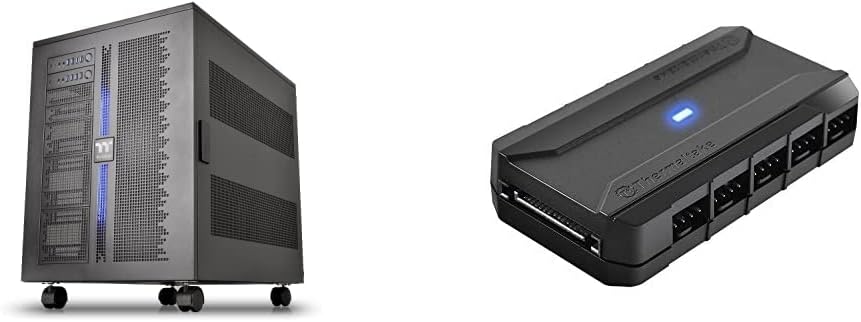
The Thermaltake Core W200 is unique as it supports two separate systems in a back-to-back configuration. This true dual system capability is unmatched by most other cases on the market. It is designed for users who need parallel computing power without two separate footprints.
We may earn a commission when you buy through this link, at no additional cost to you.
Its modular design allows for full breakdown which makes cleaning and component swaps easier. The included Commander FP hub powers up to 10 PWM fans simultaneously for extensive cooling control. You can install up to 600mm radiators for serious custom liquid cooling setups.
The sheer size of this case means it requires a lot of desk space. It is also quite pricey compared to standard single system cases. However the functionality it offers is essential for specific workstation needs.
Choose this if you truly need two independent systems in one chassis. It is perfect for homelab enthusiasts or professionals needing redundancy in a single physical unit.
Host two motherboards and PSUs simultaneously to maximize productivity without extra desk clutter.
The chassis supports massive radiators ensuring optimal temperatures for high-performance hardware.
We may earn a commission when you buy through this link, at no additional cost to you.
The Cooler Master HAF II 500 focuses heavily on thermal performance with oversized fans and low resistance design. Its dual 220mm front fans push significant air through the chassis keeping temps low. The 4.8 rating confirms its effectiveness as a cooling-focused case.
We may earn a commission when you buy through this link, at no additional cost to you.
Split-level cable management helps optimize routing space leaving room for oversized exhaust cooling. It supports two GPUs up to 3.6 slots thick which is great for multi-GPU builds. The storage cage adapts to different PSU lengths offering flexibility.
The aesthetic is functional with mesh panels that may not appeal to those preferring glass. The size is substantial so ensure you have enough space for this unit. For pure performance though it is hard to beat.
This case is best for users prioritizing raw airflow and GPU cooling capacity. It fits well in workshops or setups where cooling efficiency matters most over aesthetics.
The 220mm fans provide massive airflow to cool high-end components efficiently.
Supports two heavy GPUs without sag issues thanks to the dual-mode holder.
We may earn a commission when you buy through this link, at no additional cost to you.
The Antec Flux Pro stands out as a full tower dual system PC case with six PWM fans included right out of the box. This reduces setup time and cost significantly for new builders. The rating of 4.7 reflects its solid thermal performance and build quality.
We may earn a commission when you buy through this link, at no additional cost to you.
Its unique design combines metal glass and wood for a high-quality textured look. The innovative iShift PSU mount allows for a 90 degree orientation improving airflow. It supports multiple large radiators simultaneously for advanced cooling setups.
The assembly might be slightly more complex due to the unique features and size. The weight also makes it difficult to move once installed. However the included components add great value overall.
Choose this if you want a full tower with plenty of cooling included. It is a great option for users who want performance without buying extra fans.
Six pre-installed fans ensure your system is cooled immediately without extra purchases.
The mix of wood and metal gives a distinct premium look compared to standard cases.
We may earn a commission when you buy through this link, at no additional cost to you.
The ASUS ROG Strix Helios II is a premium dual system PC case built for showcase builds. Its diamond-grille front panel and dual glass panels make a bold statement. The rating of 4.3 indicates good performance though some users find the price high.
We may earn a commission when you buy through this link, at no additional cost to you.
It supports EATX motherboards and long GPUs up to 450mm providing ample room for expansion. The I/O panel includes two USB-C ports which adds modern connectivity. Cable management is made easy with various covers and clips included.
The main trade-off is the cost which reflects its high-end target audience. It is also quite heavy so securing it properly is important. For enthusiasts seeking a flagship case it fits well.
This case is ideal for users wanting a flagship look with robust support for top gear. It suits those building high-end gaming or workstation systems.
Aluminum and diamond-grille design offer a luxurious look that stands out.
Dual USB-C ports on the front panel provide convenient high-speed access.
We may earn a commission when you buy through this link, at no additional cost to you.
The HAVN HS 420 uses a hybrid structure to optimize GPU cooling with balanced airflow. Its SimpliCable routing system is user-friendly helping keep cables neat easily. The rating of 4.6 shows strong satisfaction with its thermal and design features.
We may earn a commission when you buy through this link, at no additional cost to you.
The UniSheet glass panel provides a curved view with minimal distortion for a sleek look. It supports multiple large radiators which is great for liquid cooling enthusiasts. Vibration isolation pads on fan brackets reduce noise effectively.
Some users may find the unique design choices take time to get used to. Storage space is somewhat limited compared to traditional towers. However the airflow optimization is a significant plus.
Pick this if you want a modern mid tower with excellent thermal engineering. It is great for builders who value quiet and efficient cooling.
The UniSheet panel offers a continuous curved view that minimizes visual distortion.
Top-to-bottom guides make routing cables clean and easy without clutter.
We may earn a commission when you buy through this link, at no additional cost to you.
The Thermaltake Capo X allows parallel operation of two independent mATX systems in one chassis. This is one of the few true dual system cases on the market today. With a perfect 5.0 rating it clearly satisfies those needing this specific functionality.
We may earn a commission when you buy through this link, at no additional cost to you.
Each system has its own I/O panel which allows independent access without interference. Hidden connector support keeps cables invisible for a clean look. Detachable GPU braces ensure stability for cards in either system.
The size is larger than standard cases requiring a dedicated desk setup. It is a specialized tool rather than a general-purpose build case. For those needing dual system capabilities it is unmatched.
Choose this if you need two systems running in parallel efficiently. It fits homelabs or professional setups where redundancy is key.
Each system has separate I/O ports allowing you to control power and USB access individually.
Hidden connector support helps achieve a cable-free look even with two systems.
We may earn a commission when you buy through this link, at no additional cost to you.
The NZXT H6 RGB+ brings dual chamber design to a smaller footprint which is rare in the market. Its curved glass panel creates a seamless aesthetic that looks premium. The rating of 4.4 reflects its popularity among builders wanting style and function.
We may earn a commission when you buy through this link, at no additional cost to you.
Angled front-right fans deliver targeted airflow to your hottest components for efficient cooling. An integrated anti-sag bracket supports heavy GPUs without extra effort. The mesh panels ensure air moves freely while keeping dust out.
The main trade-off is the lack of included fans which adds to the total cost. The compact size also limits expansion options compared to full towers. However the style is unmatched.
This case is perfect for users wanting a compact dual chamber case. It suits builders who want a clean look without taking up too much space.
The single-piece curved glass bends tightly to avoid visual seams and distortion.
Despite its smaller size the airflow design keeps heat levels low for your GPU.
We may earn a commission when you buy through this link, at no additional cost to you.
Choosing the right case requires balancing size, cooling, and specific dual system needs.
True dual system cases like the Thermaltake Core W200 support two separate motherboards while dual chamber cases isolate components in one system.
Select true dual systems if you need parallel processing, otherwise dual chamber is sufficient for single builds.
Look for large fan mounts and perforated panels to ensure adequate cooling for high-performance components.
Cases with multiple fan options like the HAF II 500 offer better thermal control.
Ensure the case supports your motherboard size whether ATX EATX or mATX to avoid fit issues.
Check hidden connector support if you prefer cable-free aesthetics.
Modern GPUs are long and heavy so look for anti-sag brackets and clearance up to 400mm.
Vertical mounts can improve airflow and aesthetics but may require adapters.
Integrated routing guides and tie points help keep cables tidy inside the dual system.
Cases with separate channels offer cleaner builds and better airflow.
Sturdy steel and aluminum ensure durability while glass adds aesthetic appeal.
Prioritize build quality for cases that will be moved frequently.
Tempered glass panels showcase components but can increase weight and fragility.
Choose pillarless glass for a modern seamless look if budget allows.
Check for sufficient USB ports including Type-C for modern peripheral needs.
Dual I/O zones are essential if running two separate systems.
Install components carefully ensuring the GPU and PSU align with the dedicated chambers to maintain airflow paths.
Regularly clean filters and fans to prevent dust buildup which can hinder cooling efficiency over time.
Check that cable management straps are secure to avoid accidental disconnection or obstruction of airflow.
A dual system PC case provides dedicated airflow zones or physical separation for multiple systems. This improves thermal performance and organization for complex builds.
Most of these cases support two GPUs especially models designed for high-end builds. Ensure you check clearance limits for thickness and length.
Yes models like the Thermaltake Core W200 and Capo X support two separate mATX systems. This allows for parallel computing in one chassis.
Yes isolating the PSU and drives in a secondary chamber prevents heat mixing with CPU cooling air. This often leads to lower CPU temperatures.
Some cases include fans like the Antec Flux Pro and HAVN HS 420 while others do not. Check product specs to see what is included before buying.
Look for cases with dedicated channels and built-in straps. Dual chamber cases typically route power cables to the PSU chamber to keep the main area tidy.
Several models on this list support hidden connector motherboards like ASUS BTF. This helps achieve a clean look by hiding connectors behind the motherboard.
Select based on your motherboard size and GPU length. Full towers offer the most space while mid towers balance size and capacity.
Our top picks offer a range of options from budget-friendly to premium dual system PC cases.
Prioritize airflow and motherboard compatibility when selecting a model for your build.
Always verify current pricing and availability before making your final purchase decision.