
ARCTIC Case Fan Hub
4.7Editor score
10-fold PWM distributor
SATA power input
Simple cable management
Discover the top fan control hub for PC options to manage cooling and lighting. This guide compares features, compatibility, and performance for every build
Managing multiple case fans and RGB lighting can quickly become a messy challenge for any PC builder. A reliable fan control hub for PC helps centralize connections and ensures stable power delivery for your cooling system.
We evaluated ten top-rated hubs based on port counts, PWM support, ARGB compatibility, and mounting options. Each product offers unique advantages for different chassis layouts and motherboard configurations.
Every pick highlights key specifications and real-world usability notes to help you choose the right hub. Keep in mind that stock and pricing may change frequently on retail platforms.
4.7Editor score
4.6Editor score

4.7Editor score
This side-by-side comparison reviews every hub to highlight port counts, power requirements, and mounting styles for informed decisions.


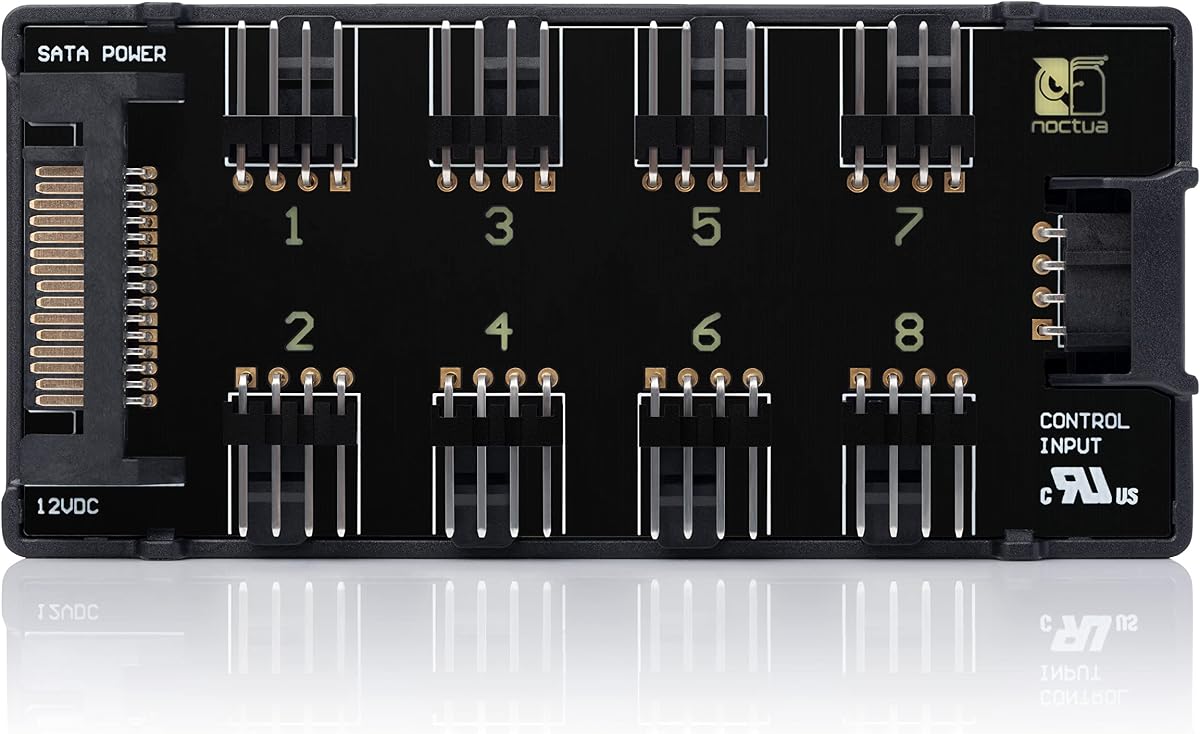
The Noctua NA-FH1 is a premium 8-port PWM fan hub known for exceptional build quality and safety. It allows you to connect multiple fans securely using magnetic mounting and short circuit protection.
We may earn a commission when you buy through this link, at no additional cost to you.
Its dual input system supports both SATA and standard 4-pin headers simultaneously. This flexibility ensures stable power delivery across all connected devices without voltage drop or signal loss.
While it lacks ARGB capabilities, it excels in thermal management. The included input cable and fuse protection make it a reliable choice for demanding cooling setups.
Ideal for builders prioritizing cooling efficiency and reliability. This hub offers peace of mind with safety compliance and a solid warranty from Noctua.
You can use both SATA and 4-pin inputs at once for maximum power headroom and signal stability.
Built-in fuses protect against overcurrent and short circuits, ensuring your fans and motherboard stay safe.
We may earn a commission when you buy through this link, at no additional cost to you.
The ARCTIC Case Fan Hub provides ten PWM slots for the most affordable price. It simplifies cable management by connecting all fans through a single motherboard header.
We may earn a commission when you buy through this link, at no additional cost to you.
It draws power directly from a SATA connection, preventing voltage loss and ensuring every fan runs at optimal speeds. The compact design fits easily inside any PC case.
The hub lacks lighting features, making it purely functional for cooling. This focus allows it to perform reliably without extra complexity or cost for users needing just fan control.
Perfect for budget builds needing maximum cooling. It offers ten ports with synchronous control for efficient airflow with minimal hassle.
Add ten more fan slots without spending much. This hub is ideal for budget builders needing extra airflow.
One cable connects everything to the motherboard. Just plug in SATA and the PWM header to start.
We may earn a commission when you buy through this link, at no additional cost to you.
The ARCTIC Fan Controller offers unique individual control over ten PWM ports. This allows precise tuning for each fan to match airflow requirements perfectly.
We may earn a commission when you buy through this link, at no additional cost to you.
It supports Windows and Linux natively, making it versatile across operating systems. Each port handles up to two amps for reliable power even with heavy-duty fans.
Despite lacking RGB features, it excels in performance and compatibility. The magnetic or adhesive mounting provides flexibility for securing the hub inside the chassis.
Best for advanced users needing granular control. Its individual port management sets it apart for custom cooling configurations.
Adjust each fan individually instead of locking them together. This gives you full control over airflow zones.
Works seamlessly on Linux systems too. Native driver support ensures compatibility across different platforms.
We may earn a commission when you buy through this link, at no additional cost to you.
Thermalright ARGB Hub expands eight fan groups with lighting and cooling. It synchronizes ARGB and PWM signals for cohesive performance.
We may earn a commission when you buy through this link, at no additional cost to you.
SATA power ensures stability under load. Strong adhesive or magnetic options keep the hub fixed securely inside your PC.
While it doesn't control speed, it handles connections well. Users must match correct pin headers to avoid damage during setup.
Great for builds needing both light and fans. It keeps cables neat and supports standard ARGB devices efficiently.
Connect lights and fans through one hub. This reduces clutter and keeps internal wiring tidy.
Powered directly by SATA to avoid voltage drops. Ensures fans and lights run consistently at full load.
We may earn a commission when you buy through this link, at no additional cost to you.
Thermalright ARGB HUB X12 supports twelve groups with white aesthetics. It handles both ARGB and PWM to maximize cooling and style.
We may earn a commission when you buy through this link, at no additional cost to you.
SATA direct input maintains stable performance. The design fits easily while keeping cables organized across your build.
Note that SATA power and headers are separate. You must connect properly to avoid lighting or fan issues.
Ideal for large setups needing extra ports. This hub expands capacity while maintaining clean internal organization.
Handle up to twelve fan groups. Ideal for massive builds requiring extensive airflow management.
Combines PWM and ARGB connections. Reduces motherboard header usage for easier management.
We may earn a commission when you buy through this link, at no additional cost to you.
The upHere Hub combines nine PWM ports with ARGB and a remote. It syncs lighting via the included panel.
We may earn a commission when you buy through this link, at no additional cost to you.
Magnetic mounting makes positioning easy. The kit includes all cables needed for quick setup and power.
Control is manual via the remote rather than software. This works well for those who prefer physical switches.
Great for custom RGB builds with extra fans. The remote adds convenience for changing lighting and cooling settings.
Change lighting and effects without opening the case. The remote provides easy access to adjustments.
Powered directly from the PSU for reliability. Ensures consistent performance even with all fans connected.
We may earn a commission when you buy through this link, at no additional cost to you.
The Thermalright Integrated Hub offers ten slots for standard PWM fans. It simplifies wiring by consolidating all connections.
We may earn a commission when you buy through this link, at no additional cost to you.
SATA input provides stable power delivery under load. The compact size and adhesive ensure it fits neatly inside.
Note that the SATA cable is sold separately. You must have one ready to complete the installation effectively.
Perfect for standard cooling setups needing more ports. It keeps airflow efficient without requiring complex features.
Centralize ten connections easily. Keeps the inside of the case tidy and organized.
SATA power keeps operation stable. Prevents voltage drop when all fans are running at full speed.
We may earn a commission when you buy through this link, at no additional cost to you.
Thermalright X8 Hub handles eight groups for fans and lights. It ensures clean cable management across both systems.
We may earn a commission when you buy through this link, at no additional cost to you.
SATA power delivers consistent performance under heavy loads. The black finish blends seamlessly into most PC interiors.
Remember that it does not control speed. The hub simply expands connections so the motherboard can manage settings.
Ideal for builds needing both RGB and cooling. This hub organizes wiring for better airflow and aesthetics.
Connect both lighting and cooling fans easily. Reduces the number of headers needed on the motherboard.
Direct SATA power ensures stability. Maintains smooth operation even when all connected fans run at full speed.
We may earn a commission when you buy through this link, at no additional cost to you.
The J-10 Pro supports ten ARGB sets with remote and key control. It offers flexible options for managing lighting and fans.
We may earn a commission when you buy through this link, at no additional cost to you.
SATA input ensures reliable power. Magnetic mounting allows secure placement anywhere inside the chassis.
Note that it focuses on lighting expansion. Users must connect headers correctly to avoid potential hardware damage.
Perfect for those needing multiple control methods. This hub supports ARGB expansion with added convenience options.
Use either the remote or chassis key. This flexibility makes it easy to manage lighting without software.
Built-in magnets secure the hub easily. Flexible placement ensures it stays fixed without adhesive damage.
We may earn a commission when you buy through this link, at no additional cost to you.
Thermalright ARGB X8 provides eight groups at an affordable price. It expands connections cleanly with SATA power input.
We may earn a commission when you buy through this link, at no additional cost to you.
The design ensures stable output under heavy load. Black coloring keeps the interior looking professional and tidy.
Ensure you have a SATA cable ready. The hub works well but requires proper connection to avoid issues.
Best for budget-friendly builds needing RGB. It keeps wiring organized and expands lighting and fan ports easily.
Expand eight groups without overspending. Ideal for value builds needing more ports for cooling and lights.
Compact size fits anywhere easily. Organizes internal wiring to improve airflow and cooling efficiency.
We may earn a commission when you buy through this link, at no additional cost to you.
Choosing the right fan control hub for PC requires evaluating port counts, power sources, and feature sets.
Evaluate how many fans you need. Most hubs support eight to ten connections. If your case has many fans, ensure the hub provides enough slots.
Choose at least one port per fan for stability.
Most hubs support standard PWM signals for speed control. Ensure it can pass signals from your motherboard header.
PWM hubs manage cooling while RGB hubs manage lighting.
If you have RGB fans, check for ARGB compatibility. Many hubs support both PWM and 5V ARGB for lighting synchronization.
Make sure the hub supports 3-pin ARGB for proper syncing.
Hubs require stable power. Most use direct SATA input from the PSU to prevent motherboard overloading.
Always verify SATA power cable inclusion before purchasing.
Secure mounting is essential for safety. Options include strong adhesive, magnets, or screw holes.
Magnetic hubs offer flexibility while adhesive ensures stability.
Safety is critical for electrical components. Look for fuses or short circuit protection.
These features protect your hardware from overcurrent risks.
Some hubs include remote or button controls. Others rely on software integration.
Consider if you need manual adjustments or software syncing.
Durable plastics and sturdy connectors are key. Check product reviews for reliability and longevity.
Quality construction ensures consistent performance over time.
Install the hub securely using included adhesive or magnets inside the case.
Connect the SATA power cable to the PSU for stable power delivery.
Plug fans into the hub headers and the hub header into your motherboard.
Most hubs use a SATA power connection from the PSU. This prevents motherboard header overload and ensures stable performance under heavy cooling loads.
Only hubs with advanced controllers offer individual speed control. Standard hubs synchronize all fans on the same PWM signal for uniform performance.
RGB fans use 4-pin 12V headers while ARGB uses 3-pin 5V addressable headers. Ensure the hub supports the correct pin type for your devices.
Using external hubs generally does not void motherboard warranties. However always follow manufacturer guidelines to avoid electrical issues or damage.
Check if fans spin and lights sync when connected. Use monitoring software to confirm speeds are registering correctly on your motherboard.
Most hubs support 4-pin PWM fans. 3-pin fans require adapters or specific hubs designed for mixed fan types.
Each hub offers unique strengths from budget to premium categories. Choosing the right one depends on your specific fan count and lighting needs.
Prioritize safety features and power stability. Good hubs keep cables organized and fans running smoothly.
Always check current stock and availability for your region before ordering.