
iKKEGOL Upgraded USB Triple Foot Pedal
4.4Editor score
Optical quiet switches
Wide ergonomic pedal design
Plug and play USB
This guide compares the top foot pedals for transcriptionists to help you find the right device for hands-free control and efficiency.
Transcription work demands precision and speed. A reliable foot pedal allows you to control audio playback without interrupting your typing flow. This makes the process smoother and helps maintain focus on detailed content.
We evaluated ten leading foot pedals based on durability, ergonomic design, and software compatibility. Each option offers unique features suited for different transcription needs. Our analysis highlights the strengths and limitations of every model included.
Every product in this list provides specific insights into performance and usability. Prices may fluctuate over time due to market conditions. Please verify current pricing and availability before making your final purchasing decision today.
4.4Editor score

4.5Editor score

4.2Editor score
This table provides a side-by-side comparison of all ten selected foot pedals. It highlights key specifications and design elements to help you quickly identify the model that fits your workflow needs.


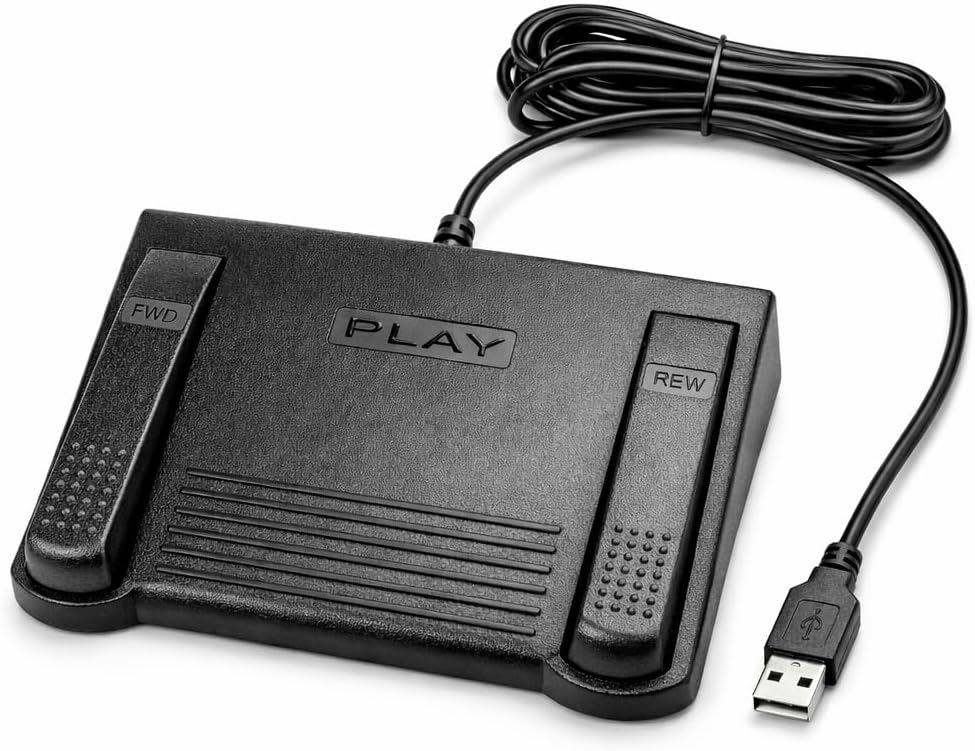

The Infinity 3 USB Foot Pedal Control stands out as a top choice for transcriptionists seeking reliability. It holds a strong 4.5 star rating from users who value consistent performance in professional environments.
We may earn a commission when you buy through this link, at no additional cost to you.
Its sturdy design features ultra-heavy-duty micro switches that ensure countless hours of trouble-free operation. The ergonomic layout includes a wide central sloping Play pedal that allows easy foot movement between controls.
While it lacks advanced customization features, its simplicity ensures you spend less time configuring and more time transcribing. The lack of battery backup is acceptable given it plugs directly into your computer via USB.
This pedal is ideal for professionals who need a dependable tool for daily transcription work. It offers excellent value through its durability and ease of use in fast-paced settings.
The wide central pedal reduces strain by allowing natural foot movement between play and rewind functions during long sessions.
Heavy-duty micro switches prevent failure over time, ensuring your device remains responsive even after years of heavy use.
We may earn a commission when you buy through this link, at no additional cost to you.
The iKKEGOL Upgraded USB Triple Foot Pedal Switch offers exceptional value for budget-conscious transcriptionists. With a 4.4 star rating, it delivers solid performance for everyday transcription tasks without breaking the bank.
We may earn a commission when you buy through this link, at no additional cost to you.
Its optical switches operate quietly, reducing noise distractions during work. The wide pedal design ensures comfort, and the heavy-duty construction can bear significant weight for long-lasting use.
While not purpose-built for specific transcription software, its programmable nature allows flexibility. The basic software setup is straightforward, though it may require initial configuration compared to dedicated units.
Choose this pedal if you want reliable hands-free control at a lower cost. It suits general users who need versatility across different applications including transcription and media playback.
Optical switches minimize noise during operation, keeping your workspace quiet and helping you maintain concentration on content.
The enlarged pedal area reduces foot strain, allowing comfortable use even during extended transcription sessions.
We may earn a commission when you buy through this link, at no additional cost to you.
The Philips LFH-2330 Configurable USB Foot Control represents a premium choice for serious transcriptionists. It holds a 4.2 star rating based on its advanced features and professional-grade build quality.
We may earn a commission when you buy through this link, at no additional cost to you.
Its slim design minimizes foot movement, reducing physical strain during long work sessions. The four pedals are fully configurable via a user-friendly wizard, allowing customization to match your specific workflow.
The anti-slip bottom ensures stability on any desk surface. While the price is higher, the ergonomic benefits and customization options justify the investment for daily professional users.
This model is ideal if you need precise control and comfort. Its design focuses on reducing fatigue, making it a top choice for those prioritizing physical well-being during transcription.
The slim profile reduces the distance your foot travels, helping prevent fatigue over long transcription periods.
Four configurable pedals allow you to map commands exactly to your needs, improving efficiency and reducing key presses.
We may earn a commission when you buy through this link, at no additional cost to you.
The VEC in-USB-2 Infinity Digital Foot Control offers a unique combination of durability and battery power. With a 4.4 star rating, it appeals to those who need long-lasting performance without constant recharging.
We may earn a commission when you buy through this link, at no additional cost to you.
It features a rechargeable battery providing up to 1000 hours of use, plus heavy-duty components rated for 2 million depressions. A mechanical stop prevents accidental triggers when pressing side pedals.
While the battery adds weight, the convenience of wireless capability is significant. Compatibility with most leading transcription brands ensures it fits diverse setups. Regular charging cycles are needed but infrequent.
Choose this pedal for flexibility and reliability. It suits users who value long battery life and durable switches without sacrificing control accuracy during transcription.
Up to 1000 hours of battery use ensures minimal downtime between charges, keeping your workflow uninterrupted.
A mechanical stop secures the center pedal, preventing accidental activation when your foot rests on side controls.
We may earn a commission when you buy through this link, at no additional cost to you.
The Philips ACC2330 4-Pedal Foot Control features unique toe touch control for precise operation. It holds a 4.1 star rating among users who need specialized digital dictation capabilities in professional settings.
We may earn a commission when you buy through this link, at no additional cost to you.
Its design allows heel swinging for movement, reducing foot strain. The increased center pedal width avoids unintended presses. Toe sensitivity allows for quick control changes without lifting the foot.
While it requires practice to master toe control, the precision benefits are worth the effort. It is designed specifically for digital systems, so compatibility must be checked before purchase.
This pedal suits professional dictators who need nuanced control. If you prioritize precision and ergonomic relief over simplicity, it is a strong candidate for your transcription workflow.
Toe-based control allows quick transitions between play and stop without moving your whole foot or hand.
Swing movement reduces strain by allowing natural motion during long periods of transcription work.
We may earn a commission when you buy through this link, at no additional cost to you.
The Express Scribe Transcription Foot Pedal ECS-FPAE offers seamless integration for Express Scribe users. With a 3.8 star rating, it delivers reliable performance for those invested in this specific software ecosystem.
We may earn a commission when you buy through this link, at no additional cost to you.
Its internal board is customized for Express Scribe, ensuring precise control. The oversized pedal design allows comfortable transitions between play, fast-forward, and rewind functions. It requires no manual configuration out of the box.
However, it only works with Express Scribe, limiting flexibility for users switching software. The 1-year warranty adds confidence. It is a solid choice for dedicated Express Scribe subscribers needing plug-and-play functionality.
Choose this if you already use Express Scribe. It simplifies your setup by removing configuration steps and providing a hardware tailored to your software needs.
The internal board ensures flawless communication with Express Scribe for reliable playback control during transcription.
Large pedals make foot transitions easy, reducing fatigue during extended transcription tasks.
We may earn a commission when you buy through this link, at no additional cost to you.
The Infinity USB Digital Foot Control IN-USB3 delivers a low-profile solution for transcriptionists. It holds a 4.5 star rating, showing strong user satisfaction with its straightforward design and reliable digital performance.
We may earn a commission when you buy through this link, at no additional cost to you.
Its low profile design ensures it fits easily under desks without taking up space. The larger non-slip surface area provides stability, reducing the risk of sliding during use.
While features are basic compared to premium models, it focuses on essential playback control. It works seamlessly with computers via USB, making it an easy addition to any workstation setup.
This model suits users needing simple, space-saving foot control. If you prioritize compact design and non-slip stability over advanced options, it is a reliable choice.
A low design ensures the pedal fits neatly under your desk, maximizing usable workspace.
The broad surface prevents shifting, ensuring consistent pedal response during transcription sessions.
We may earn a commission when you buy through this link, at no additional cost to you.
The ECS-IN-USB-1 Foot Pedal Transcription Foot Control offers straightforward hands-free control. It holds a 3.5 star rating, indicating solid functionality with room for improvement in feedback.
We may earn a commission when you buy through this link, at no additional cost to you.
Designed for comfort, the ergonomic layout supports natural foot positioning to minimize strain. It works with most major transcription platforms, making it adaptable for medical or legal workflows.
The 1-year warranty provides assurance for professional use. While the rating is average, it delivers consistent responsiveness for daily workloads. It focuses on core transcription needs without complexity.
Choose this pedal for broad compatibility and ease of use. It suits professionals needing reliable, hands-free audio control across various software environments.
Contoured layout aligns with natural foot movement to reduce strain during long transcription periods.
Compatibility with major software ensures it works in diverse transcription settings without extra setup.
We may earn a commission when you buy through this link, at no additional cost to you.
The DAC 3 Function Foot Pedal FP-110-USB holds a perfect 5.0 star rating from users. It is tailored for specific workflows where job management is as important as playback control.
We may earn a commission when you buy through this link, at no additional cost to you.
Its buttons are clearly labeled for Next Job, Rew/Play, and Record functions. This design streamlines tasks that involve managing multiple files or sessions in transcription software.
While specialized, it ensures compatibility with certain computer software designed for foot control. The large buttons reduce error during operation. It requires specific software to function optimally.
Select this pedal if your workflow involves frequent job switching. It offers precision and clarity for professionals who need structured control over transcription sessions.
Buttons like Next Job and Record help manage transcription sessions efficiently without keyboard input.
Clearly marked buttons reduce accidental presses and ensure quick access to essential functions.
We may earn a commission when you buy through this link, at no additional cost to you.
The iKKEGOL Upgraded USB Triple Foot Pedal Mechanical offers deep programmability for workflow optimization. It holds a 4.3 star rating, praised for its mechanical precision and versatile functionality.
We may earn a commission when you buy through this link, at no additional cost to you.
Mechanical switches provide tactile feedback and long life. The ElfKey software allows mapping of macros and commands, speeding up transcription tasks. It works across Windows, Mac, and Linux with proper setup.
While initial configuration takes time, the customization potential is high. The wide design ensures comfort, and TPU rubber feet keep it stable. It suits power users who need custom foot commands.
Choose this pedal for advanced customization. It is ideal for users who want to tailor foot actions to specific shortcuts or multi-step workflows.
Use ElfKey software to program complex macros that automate repetitive steps in your transcription workflow.
Once configured, the pedal works across multiple operating systems, offering flexibility for different devices.
We may earn a commission when you buy through this link, at no additional cost to you.
Selecting the right foot pedal involves evaluating features, comfort, and compatibility. This section breaks down the critical factors to consider before purchasing.
Ensure the pedal works with your transcription software. Some models are exclusive to specific programs, while others offer broad support across platforms. Verify the manufacturer lists your software explicitly to avoid integration issues.
Always check software compatibility before purchasing.
Transcriptionists often work for hours, so the pedal should minimize foot strain. Look for sloping surfaces, wide pedals, and low profiles that allow natural movement. A comfortable design prevents fatigue and supports long-term health.
Prioritize ergonomic features for comfort.
Professional use demands sturdy construction. Switches should be rated for high cycles of use. Heavy-duty materials and stable rubber feet ensure the pedal withstands daily use without slipping or breaking over time.
Choose durable materials for longevity.
Pedals use mechanical, optical, or micro switches. Mechanical switches offer tactile feedback but can be noisy. Optical switches are quiet. Micro switches are compact. Select based on your noise sensitivity and feedback needs.
Choose switches based on noise and feedback.
Most pedals use USB for plug-and-play connectivity. Some may require proprietary dongles or additional software drivers. Ensure your computer has the required ports and drivers available for seamless setup.
Verify USB connectivity matches your setup.
Some pedals allow you to reassign functions via software. This flexibility is valuable for specialized workflows. Others come fixed with standard play/pause controls. Decide if you need custom macros or standard controls.
Consider customization needs.
Battery-powered pedals offer wireless flexibility but need recharging. Look for long life ratings like 1000 hours. Wired models eliminate this concern but restrict movement. Choose based on your workspace needs.
Check battery specs for wireless units.
A solid warranty protects your investment. Most offer 1-year parts and labor coverage. Reliable customer support ensures quick resolution of technical issues. Always check warranty terms before finalizing a purchase.
Confirm warranty details before buying.
Plug the pedal into a USB port and install any required software. Test each foot function to ensure correct mapping. If your software needs configuration, use the provided wizard to align pedal actions with playback controls.
Keep the pedal surface clean by wiping it regularly with a dry cloth. Avoid placing heavy objects on the pedals to prevent mechanical strain. Ensure the non-slip feet remain clean and intact for stability.
For battery-operated models, recharge the unit when indicators signal low power. Store the cable neatly to avoid tangling. Periodically check USB connections for dirt or damage to maintain consistent performance.
Many models like the Infinity and iKKEGOL support both Windows and Mac. Check specific product listings for OS compatibility. Some may need drivers or software tweaks to function correctly on macOS systems.
Some pedals require companion software like ElfKey or a wizard. Others work out-of-the-box with standard controls. Follow the manufacturer's manual to map keys to playback actions for your transcription software.
Optical and micro switches are generally quiet, suitable for office use. Mechanical switches can produce audible clicks. Check product descriptions for noise ratings if you work in shared spaces or noise-sensitive environments.
First check the USB connection and reinstall software if needed. Ensure the device is recognized by your system. Contact support if the unit is under warranty. Most issues relate to drivers or hardware connection.
Most pedals are software-agnostic and work with popular transcription apps. Some, like Express Scribe, may have exclusive models. Always verify the product lists your software before purchasing to ensure seamless integration.
Use a soft dry cloth to wipe down the surface. Avoid using liquids directly on switches. For stubborn dirt, slightly dampen the cloth. Ensure the unit is powered off during cleaning to protect electronics.
Yes, many pedals are programmable for gaming or presentations. Universal HID pedals allow customization beyond transcription. Check if the model supports custom commands for broader utility in your workflow.
Most pedals last years of daily use. Switches are often rated for millions of presses. With proper care and clean environments, they provide reliable service. Warranty coverage supports replacement if issues arise early.
We reviewed ten top foot pedals for transcriptionists, including the Infinity 3 USB, iKKEGOL, and Philips models. Each offers unique strengths for different needs and budget levels. These options ensure you can find the right device for your workflow.
Prioritize ergonomics, software compatibility, and durability when choosing. A comfortable pedal reduces strain, and compatible models save setup time. Consider your specific software requirements to avoid integration issues after purchase.
Prices and availability may change. Always check current listings before buying. This guide provides a solid starting point, but verifying real-time details ensures you make the best choice for your transcription needs.