
FINTIE Keyboard Case for Samsung Galaxy Tab S10 Lite/S10 FE/S9 FE 5G 10.9"
4.4Editor score
Rechargeable battery with Type C
Multiple viewing angles with anti slip
Slim design with S Pen holder
Finding the right keyboard case for your Galaxy Tab S10 Lite can transform your tablet into a powerful productivity machine. These accessories combine protection with typing convenience, allowing you to work or create anywhere. A good case offers responsive keys, durable materials, and smart features like auto wake sleep functions.
We evaluated ten distinct models based on compatibility, build quality, typing experience, and additional features like trackpads or backlighting. Our analysis focuses on real-world usability for students, professionals, and creatives who rely on their tablets daily. Each option was chosen to provide unique value across different needs and budgets.
This guide breaks down every product with detailed pros, cons, and specifications to help you decide quickly. You will see how each case handles typing, protection, and device access. Keep in mind that availability and offers may shift, so verify current details before finalizing your purchase decision.
4.4Editor score

4.7Editor score

4.5Editor score
As an Amazon Associate we earn from qualifying purchases.
Compare all ten options side by side to find the perfect match for your Galaxy Tab S10 Lite setup. Each entry highlights core specifications and design traits so you can see which features matter most to your workflow.
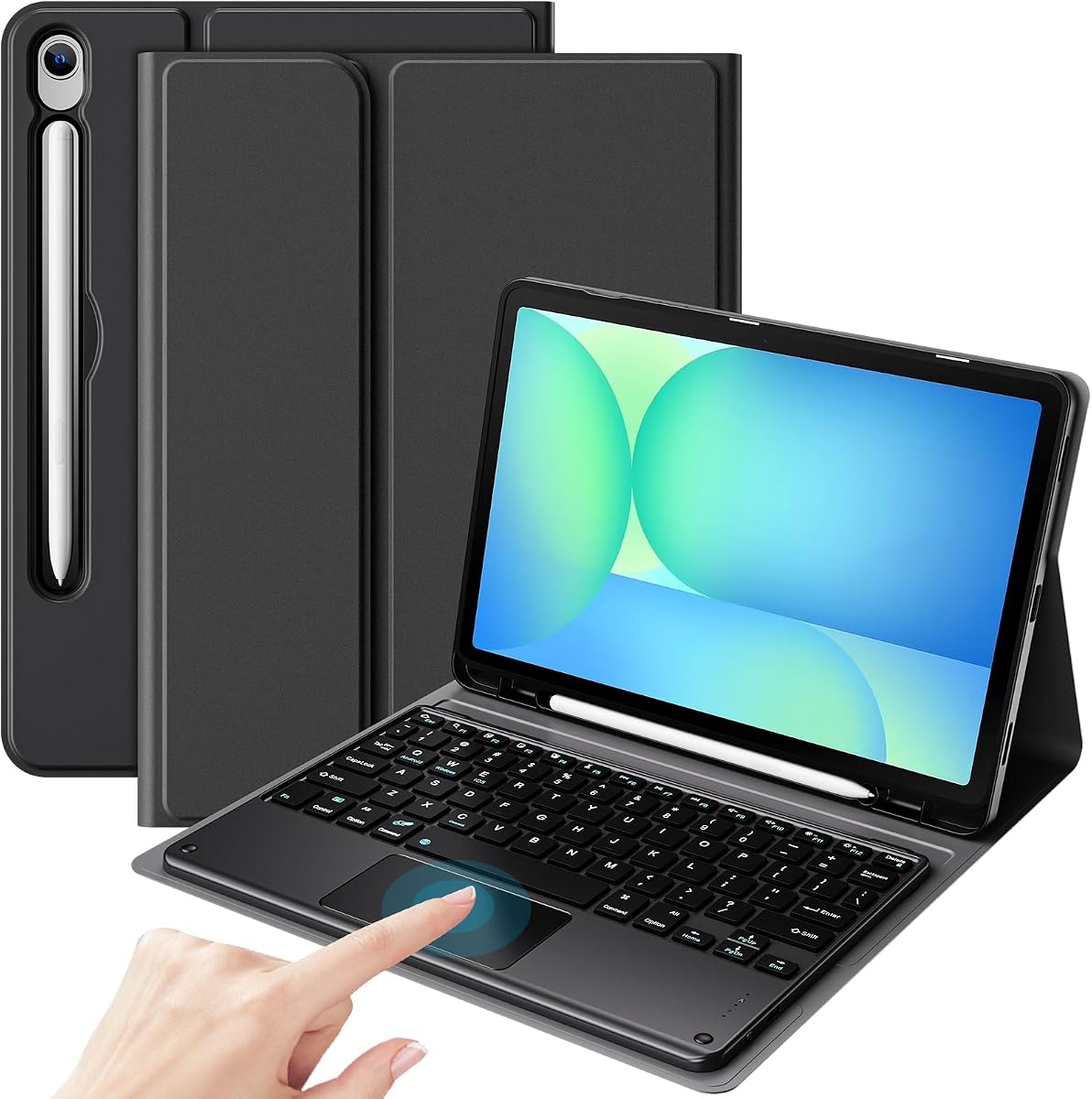


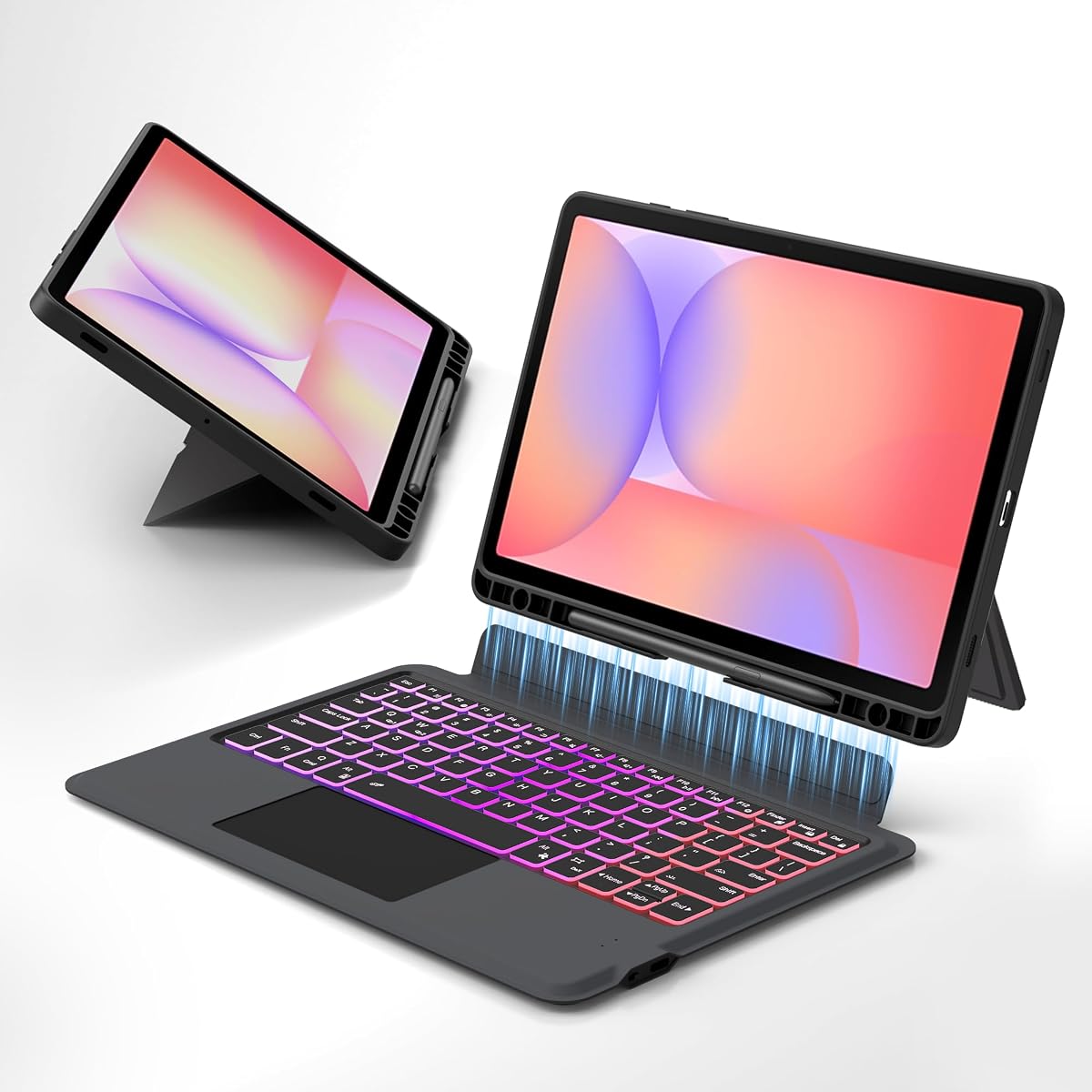

The FINTIE Keyboard Case ranks as a top budget choice for Galaxy Tab S10 Lite owners seeking reliable typing without overspending. It achieves a strong 4.4 rating by combining essential features like rechargeability and pen storage. Users appreciate its simple design that focuses on core functionality over extra bells and whistles.
We may earn a commission when you buy through this link, at no additional cost to you.
Its standout quality lies in the quick Type C charging that powers the keyboard in just two hours. This eliminates frequent battery anxiety during work sessions. The multiple viewing angles allow you to shift the tablet easily along the cover for comfortable typing or media consumption. The S Pen holder keeps your stylus attached securely.
While it lacks a trackpad, the mechanical scissor keys offer a quiet and tactile typing experience. The trade-off is manageable for those who rely on touch or a separate mouse. The anti-slip grooves and stand provide solid stability. It supports auto sleep and wake to preserve battery life effectively.
This case suits students or casual users who need basic protection and typing. It offers excellent value for the investment with durable PU leather. We recommend it for anyone prioritizing simplicity and portability. Check the model number before buying to ensure compatibility with your specific device variant.
The Type-C fast charging fully powers the keyboard in just 2 hours, eliminating the need for battery replacements.
Built-in S Pen holder lets you grab your pen effortlessly whenever you want, making it easy to carry your pen with your device.
We may earn a commission when you buy through this link, at no additional cost to you.
The Dexnor Case stands out as the Best Premium pick with a 4.5 rating and robust features. It offers a laptop-like experience for professionals who need efficiency. The aluminum alloy hinge ensures long-term durability while supporting seamless adjustments for perfect viewing angles. Two S Pen holders provide extra convenience for stylus users.
We may earn a commission when you buy through this link, at no additional cost to you.
Its high-precision multi-touch trackpad enables mouse-like controls for navigation without touching the screen. This is ideal for document editing and web browsing. The backlit keyboard features seven solid colors and adjustable brightness levels for low-light typing. The 650mAh battery lasts up to 200 hours of work time on one charge.
Users value the sturdy stand that transforms the tablet instantly for business or travel. While the price is higher, the build quality justifies the cost. The lifetime technical support and warranty add security. Note that it does not fit the larger 12.4 inch models, so verify your device size first.
Choose this case if you demand reliability and advanced controls. It excels in protection and typing comfort with auto wake sleep saving power. The included USB-C cable and guide simplify setup. It remains a top choice for power users needing a versatile keyboard setup.
Enjoy mouse-like controls for efficient document editing, web browsing, and presentation building with the multi-touch trackpad.
The long-lasting 650mAh battery provides up to 200 hours of working time and 1200 hours of standby time on a single charge.
We may earn a commission when you buy through this link, at no additional cost to you.
This Keyboard Case earns Editor's Choice with a 4.7 rating by balancing style and function. It includes a wireless mouse alongside a vibrant RGB keyboard. The rainbow backlight cycles through patterns automatically or stays on a solid color. Users love this visual flair and the comfort during night work sessions.
We may earn a commission when you buy through this link, at no additional cost to you.
The built-in pen slot keeps your stylus secure when not in use. Multi-angle adjustment with anti-slip grooves ensures stability for writing or streaming. Premium PU leather protects from water splashes and dust effectively. The auto wake/sleep function extends battery life by managing power states automatically.
While the keyboard needs pairing separately, the shortcut keys boost efficiency for tasks. The mouse makes navigation smoother than touch alone. Some may find the extra mouse adds weight, but it increases productivity. The package includes the case, keyboard, mouse, and cable for immediate use.
Ideal for creatives who want aesthetic customization and a full navigation set. It offers versatile options for reading, typing, and drawing. We recommend this for those who value color and functionality. Ensure your tablet model matches before ordering to avoid fit issues.
Featuring 7 adjustable backlight colors and a breathing light mode that automatically cycles through patterns for a unique visual experience.
Our tablet case also comes with a mouse to help you with document editing and other tasks on your tablets.
We may earn a commission when you buy through this link, at no additional cost to you.
ProCase Keyboard Case delivers a strong 4.5 rating with its focus on gestures. The responsive touchpad supports multi-gesture controls like swiping and switching apps without touching the screen. This feature enhances navigation speed for file management and browsing. The adjustable stable stand works well on laps or desks without wobbling.
We may earn a commission when you buy through this link, at no additional cost to you.
Its detachable magnetic keyboard allows quick switching between laptop and tablet modes. The stand is sturdy enough for video calls and typing tasks. A built-in slot keeps your stylus secure and accessible. The ultra-slim design ensures portability while shielding against drops and scuffs effectively.
Users find the low power design extends usage time significantly. The simple layout makes it easy to use right away. Some may miss color variety but the functionality remains solid. The case fits models like S10 Lite and S9 FE precisely as described in settings.
This option suits users who value quick gestures and stable typing. It balances slim design with full protection well. We recommend it for office work where reliability matters. Always check model numbers before purchase to ensure correct fit.
The responsive touchpad supports various gestures to browse pages and manage files easily without touching the screen.
Three adjustable angles work perfectly for typing and video calls while sitting steadily on desks or laps with no wobbling.
We may earn a commission when you buy through this link, at no additional cost to you.
This Case Keyboard offers a unique pink variant with 4.3 ratings for those who prefer style. It features a detachable magnetic keyboard with rainbow backlighting. The 7 iridescent colors help you choose a favorite for smooth typing at night. Internal honeycomb grid cushions impact to reduce heat and extend device life.
We may earn a commission when you buy through this link, at no additional cost to you.
Users appreciate the 3 viewing angles supported by anti-slip slots. The built-in pen holder makes carrying your pen effortless. Auto sleep/wake protects battery life by managing power states automatically. The lightweight design allows for easy storage and portability in bags.
It provides full 360° protection against bumps and scratches. The keyboard attaches securely to turn the tablet into a mini laptop. Some users report minor issues with backlighting consistency but overall comfort remains high. The package includes keyboard, mouse, and cable for setup.
Ideal for personal users needing protection and light functionality. The honeycomb pattern is a unique selling point for durability. We suggest this for those who want a vibrant look. Verify compatibility before buying as it supports multiple Galaxy models.
The inner layer provides cushioning with Honeycomb grid pattern which protects your tablet from overheating and increases its lifespan by more than 30%.
Use the selectable backlight mode to choose your favorite color from 7 iridescent colors for smooth typing in the dark.
We may earn a commission when you buy through this link, at no additional cost to you.
This Keyboard Case earns a 4.4 rating for its unique pulse lighting mode. It allows switching to pulse lighting for a unique visual experience. The high-sensitivity touchpad supports quick navigation and gesture controls effectively. Users find the lightweight design convenient for carrying with keyboard and mouse inside.
We may earn a commission when you buy through this link, at no additional cost to you.
The three-point stand design allows free adjustment of viewing angles. Precise cutouts ensure all ports and sensors work properly. The honeycomb mesh inner layer prevents overheating and extends tablet lifespan. It features a scratch-resistant leather outer layer for durability against daily bumps.
While it offers good versatility, some users may find the stand slightly complex to adjust. The touchpad remains responsive for most tasks. The auto sleep feature saves power when the lid closes. The package includes case, keyboard, mouse, and cable as standard.
Best for users wanting visual flair and reliable protection. The pulse mode adds style for dark environments. We recommend it for casual typing and reading. Always check model numbers to ensure correct fit before ordering online.
You can also switch to a pulse lighting mode for a unique visual experience even when working in the dark at night.
The inner layer uses a honeycomb mesh design for cushioning preventing overheating and extending the tablet's lifespan by over 30%.
We may earn a commission when you buy through this link, at no additional cost to you.
Samsung Book Cover Keyboard offers a slim and practical solution with a 4.6 rating. Its dedicated key gives instant access to AI assistance for Bixby or Gemini. Users value this quick help without navigating menus. It installs instantly with magnets that hold it securely in place.
We may earn a commission when you buy through this link, at no additional cost to you.
Wireless Keyboard Sharing lets you connect to compatible Galaxy devices easily. This enhances productivity when working across multiple devices. The slim design maintains a modern look while protecting the device. It delivers a convenient PC-like experience when paired with DeX Mode.
The keyboard features standard keys for typing and navigation. Some may find the AI feature optional but it adds value. It remains a premium option for Samsung ecosystem users. Always verify compatibility with your specific Tab S10 Lite variant before purchase.
Ideal for professionals needing AI and cross-device connectivity. It remains lightweight for daily travel. We recommend it for tech-savvy users. Check current listings to ensure it supports your exact model number.
The dedicated key gives you quick access to AI assistance. Simply tap it and let Bixby or Gemini handle your query.
With Wireless Keyboard Sharing, you can connect to compatible Galaxy devices and type or navigate on them with ease.
We may earn a commission when you buy through this link, at no additional cost to you.
GreenLaw Keyboard Case ranks 4.4 and supports two devices simultaneously via dual Bluetooth. You can switch between Tablet and smartphone with a quick keypress. This is perfect for users managing multiple inputs. The precision touchpad allows precise movement for navigation.
We may earn a commission when you buy through this link, at no additional cost to you.
Its 7-color backlit lets you adjust brightness easily. The detachable design means the keyboard can work alone when needed. Protective case has 3 built-in card slots for storage. The viewing angle can be adjusted to 110 to 130 degrees comfortably.
While the price is higher than budget options, the dual connection adds unique value. Users appreciate the smooth typing and stable magnetic fix. Some may find setup slightly complex initially. It remains a strong choice for power users needing flexibility.
Best for those needing dual device support and storage. The slim design ensures comfort while typing. We recommend checking your tablet model first. It offers practicality for daily workflows with smart features.
Dual Bluetooth channels support 2 devices simultaneously so you can work steadily with your Tablet and smartphone on the go.
The touchpad records the smallest movements allowing you to interact quickly and precisely with just one hand.
We may earn a commission when you buy through this link, at no additional cost to you.
This DEX Mode Keyboard features one-click DEX mode for PC-like experience. It holds a 4.3 rating for its 270-degree stepless stand. Users appreciate the precise hinges for flexible angles. The smart trackpad keyboard combines functions for better document editing.
We may earn a commission when you buy through this link, at no additional cost to you.
Its spring mechanism keys ensure tactile response for faster typing. Auto wake/sleep protects battery by managing states automatically. Built-in S Pen holder keeps your stylus accessible always. The design allows keyboard and case to be used separately when needed.
The 4 versatile usage modes let you type or view without removing the tablet. Some may find the assembly complex but flexibility is high. Precise sections enable full access to all device connections. The high-end ABS material makes it durable for daily use.
Best for users needing DEX support and stepless angles. It balances laptop and tablet use effectively. We recommend it for professionals. Ensure your model matches before ordering to avoid fit issues.
Combined with DeX Mode, the keyboard delivers a convenient PC-like experience with one-click access to productivity features.
Adopts alloy hinges with 270-degree stepless adjustment allowing your tablet to be used in multiple scenarios like work or reading.
We may earn a commission when you buy through this link, at no additional cost to you.
Magic Style Case Keyboard tops ratings with 4.8 and ergonomic design. The floating cantilever stand allows easy angle adjustment. Users love the 125-degree viewing angle for comfort. The scissor-switch structure offers perfect bounce for smooth and accurate typing.
We may earn a commission when you buy through this link, at no additional cost to you.
Type-C fast charging fully powers keyboard in just a few hours. 7 solid color backlights ensure clear visibility in any lighting. The stain-resistant material makes it easy to clean. Premium materials deliver long-lasting reliability and superior user experience.
It features dedicated shortcut keys for immediate efficiency. The keyboard is detachable for lightweight cover use. Some may find the price high but quality is superior. It remains a top pick for those valuing build quality.
Ideal for users needing comfort and style in typing. The fast charging is a major benefit for daily use. We recommend it for professionals. Always check current model compatibility before purchasing online.
The ergonomic 125-degree viewing angle ensures maximum comfort for study, work and entertainment.
The surface is made of stain-resistant material making it easy to remove stains so you do not have to worry about using it anywhere.
We may earn a commission when you buy through this link, at no additional cost to you.
Choosing the right case involves evaluating features that match your workflow. We analyze key factors to help you narrow down options effectively.
Verify your model number like SM-X400 or SM-X406B before purchase to ensure exact fit. Many cases support multiple models but some exclude specific variants. Check the settings of your tablet to avoid incompatibility issues.
Always confirm your device model matches the product description precisely.
Look for mechanical scissor keys or spring mechanisms for tactile response. Good spacing reduces errors during long typing sessions. Ensure the layout is QWERTY and supports your OS shortcuts comfortably.
Prioritize tactile response and key layout for efficient typing.
Multi-touch trackpads with gestures like swipe or app switching boost navigation. High sensitivity allows control without touching screen. If you need mouse-like navigation, ensure this feature is included in the case.
Choose a model with multi-touch gestures for smoother workflow.
Backlit keys help in dark environments with adjustable colors or brightness. Some offer RGB rainbow effects while others have single solid tones. Ensure you can turn off the lights to save battery when not needed.
Select backlight options that match your low-light needs.
Adjustable stands with anti-slip grooves provide secure viewing. Hinges should lock at multiple angles for typing and reading. Look for sturdy hinges that prevent wobbling during use.
Ensure the stand offers multiple secure angles for viewing.
Full 360-degree protection prevents drops and scratches. Interior cushioning like honeycomb patterns helps prevent overheating. Outer materials should be durable against daily wear and tear.
Pick cases with full edge coverage and durable outer layers.
Check battery capacity like 650mAh for longer usage hours. Fast charging reduces wait time for recharging. Auto wake/sleep extends standby time significantly for better power management.
Look for high capacity and fast charging capabilities.
Some cases include mouse, S Pen holders or card slots. Check if accessories are bundled with the main unit. These add-ons enhance usability for professionals or students.
Value bundled accessories that match your workflow needs.
Attach the keyboard to the case using magnetic alignment or clips. Connect to your tablet via Bluetooth settings. Ensure the auto wake/sleep function activates when opening the cover.
Adjust the viewing angle by sliding or locking the hinge into place. Test the multi-touch gestures or keys to confirm functionality before using for critical tasks.
Clean the surface with a dry cloth to avoid stains. Charge the keyboard using the included cable when the battery indicator shows low levels.
Check the model number in your tablet settings like SM-X400 or SM-X406B. The product description will list compatible models. Ensure the case explicitly states support for your specific device model.
Most keyboard cases allow charging via USB-C port on the tablet. Ensure the case does not block the charging port. Verify cutouts are precise for access to ports without removing the case.
Yes many cases include built-in S Pen holders. The pen can be stored on the keyboard or the case. Ensure the holder is designed for your specific S Pen model.
Battery life varies from 60 to 200 hours depending on backlight usage. Higher brightness reduces runtime. Auto sleep functions help extend standby time significantly.
Yes most models feature detachable magnetic keyboards. You can remove the keyboard to use the case as a stand. The case usually retains protection without the keyboard attached.
Many options offer backlighting with colors and brightness levels. Some feature rainbow RGB while others have solid tones. You can often toggle lights off to conserve battery.
No most use standard Bluetooth pairing without drivers. Simply enable Bluetooth on tablet and select keyboard. Auto sleep/wake works via magnets without software.
No compatibility is often specific to S10 Lite or S9 FE. Do not assume they fit all tablets. Always check the compatibility list before purchasing.
We reviewed ten cases offering protection, typing, and navigation for Galaxy Tab S10 Lite. The FINTIE and Dexnor models stood out for value and premium build. Each pick provides unique features like trackpad or backlit for different users.
Prioritize compatibility and comfort when choosing. Look for features like auto wake/sleep and stable stands. Ensure the case meets your workflow requirements.
Remember that prices change so verify current details online. Check reviews for latest feedback before finalizing. This guide helps you make informed decisions efficiently.