
Tomee 16MB Memory Card
4.7Editor score
251 blocks of memory
Affordable price point
Full GameCube compatibility
This guide compares the top GameCube Memory Card options for Wii and GameCube consoles to help you choose the right storage solution for your saves.
Preserving your gaming progress is essential for any serious collector or casual player. A reliable GameCube Memory Card ensures your saves remain safe across sessions without risking data loss from hardware failures.
We evaluated ten top-rated memory cards based on compatibility, storage capacity, build quality, and user feedback. Each option offers unique features ranging from massive block counts to sleek designs for your console setup.
Every pick in this list highlights specific strengths and ideal use cases for different players. Keep in mind that pricing and availability can fluctuate over time, so check current listings before purchasing your next accessory.
4.7Editor score

4.7Editor score

4.8Editor score
This side-by-side comparison highlights the key specifications and features of each memory card option to help you quickly identify the best fit for your gaming needs.
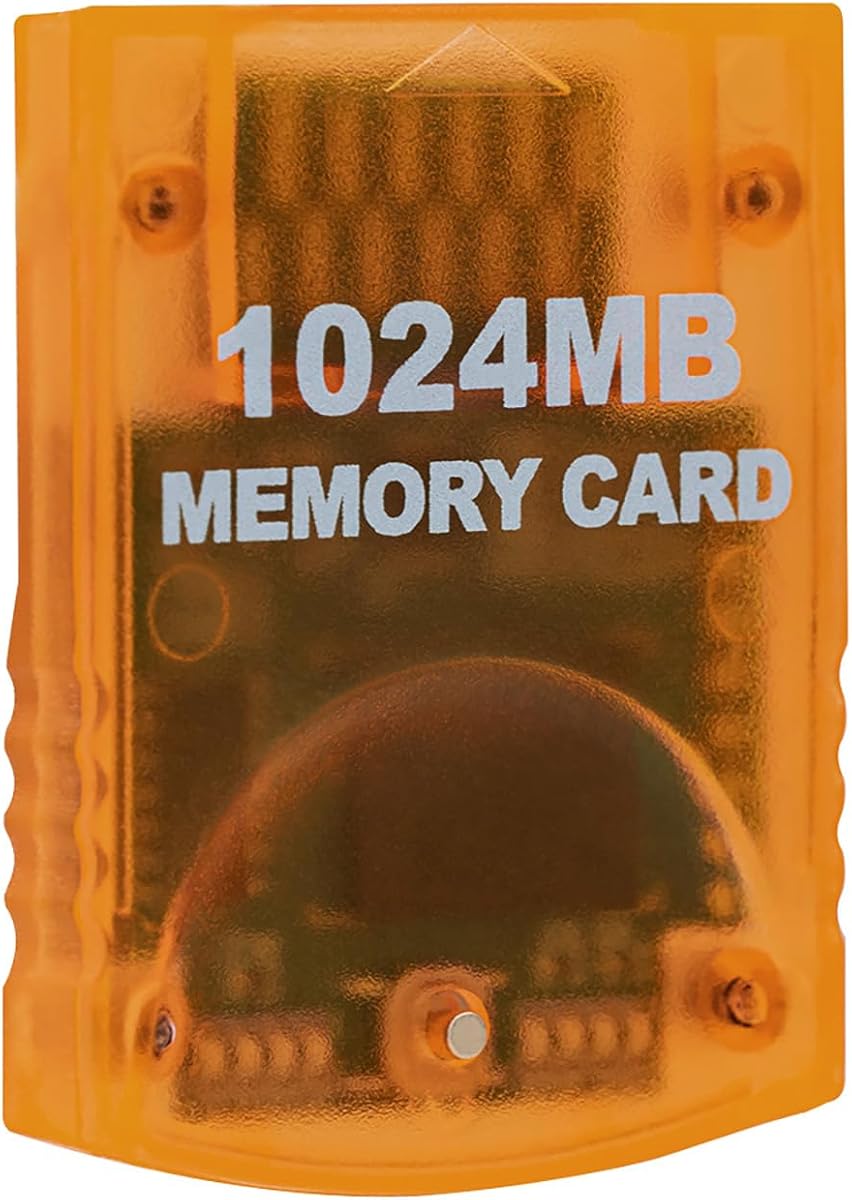


This Tolesum 1024MB card stands out as the top pick for serious collectors needing maximum storage. It delivers 16344 real uncompressed blocks which ensures reliability across all GameCube titles without compatibility issues.
We may earn a commission when you buy through this link, at no additional cost to you.
The eight independent storage areas allow you to organize saves by game or region efficiently. Pressing the front button switches between areas while indicator lights show the active one clearly.
Trade-offs include its restriction to GameCube discs and original Wii models like RVL-001. You cannot use it for internal Wii saves or newer console versions which limits versatility slightly.
If you need massive reliable storage for classic games this card offers the best balance of capacity and price. It is the recommended choice for anyone wanting to preserve every save file.
With 16344 blocks you can store hundreds of game saves without worrying about space constraints or compression errors.
The button and indicator lights make managing multiple save areas intuitive and user-friendly during gameplay sessions.
We may earn a commission when you buy through this link, at no additional cost to you.
The Tomee 16MB card is the perfect entry-level choice for players with fewer save requirements. It offers 251 blocks which is sufficient for most single-player games and casual collectors.
We may earn a commission when you buy through this link, at no additional cost to you.
Users appreciate its simple functionality allowing easy loading saving copying and deleting of game data. The design fits snugly in the console slot without any wobble issues.
While it lacks the massive capacity of larger cards its reliability is strong among budget options. You should expect standard performance without premium features like area switching.
Buy this if you want a cost-effective reliable card for basic save needs. It delivers exactly what is promised without unnecessary extras or complications.
This card provides a budget-friendly solution that still maintains high standards for data integrity and compatibility.
Basic functions like loading and saving work seamlessly ensuring a smooth experience for everyday use.
We may earn a commission when you buy through this link, at no additional cost to you.
The MAYFLASH 512MB card boasts an impressive 4.8 rating reflecting strong user satisfaction and build quality. It provides 8172 blocks split into four areas for organized saving across different titles.
We may earn a commission when you buy through this link, at no additional cost to you.
Its translucent blue design adds a touch of style while maintaining the standard plug and play functionality. Users report smooth area switching via the button on the card.
Trade-offs include a higher price than basic options and lack of Wii U compatibility. However these do not impact core functionality for standard GameCube or original Wii use.
Choose this card if you value quality and design alongside solid storage capacity. It is a premium pick for those willing to pay slightly more for reliability.
With a 4.8 star rating this card proves its reliability and effectiveness through consistent positive feedback.
The translucent blue casing offers a visually appealing look that stands out on your console setup.
We may earn a commission when you buy through this link, at no additional cost to you.
The Mcbazel 1024MB card is a strong contender for high capacity storage at a competitive price. It features 16344 blocks split into eight parts ensuring you have ample space for all your game saves.
We may earn a commission when you buy through this link, at no additional cost to you.
Users highlight its high speed and efficient performance making saves fast and reliable. The design is easy to use with a button to switch between parts seamlessly.
Trade-offs involve its third party status and limited compatibility to specific Wii and GameCube models. It does not work with newer consoles or Wii internal saves.
This card is ideal for collectors needing maximum storage without overspending. It balances capacity and affordability well for classic game preservation.
Dividing storage into eight parts helps organize your saves effectively and prevents clutter in your card.
Fast data processing ensures smooth gameplay and quick save operations without noticeable lag during sessions.
We may earn a commission when you buy through this link, at no additional cost to you.
This Tolesum 512MB card offers a balanced mid-range solution with 8192 blocks and four data areas. The blue color adds a distinct look while maintaining standard compatibility with GameCube and original Wii.
We may earn a commission when you buy through this link, at no additional cost to you.
Its high speed and efficient design ensure quick data management during gameplay. Users appreciate the simplicity of pressing a button to switch areas.
Trade-offs include a slightly lower rating compared to top picks and generic warranty terms. However it still delivers reliable performance for most standard use cases.
Buy this if you need moderate storage and prefer a colorful option. It is a solid choice for casual players needing organized saves.
The four distinct areas help you categorize saves by game or genre effectively on one card.
A stylish blue translucent look that complements other console accessories without blending into the background.
We may earn a commission when you buy through this link, at no additional cost to you.
The Suncala 1024MB card stands out with a massive 60 months warranty backing its performance. It features an upgraded chip for faster data processing and offers 16344 blocks total storage.
We may earn a commission when you buy through this link, at no additional cost to you.
Its storage system includes eight improved sections for organized save management. Users report smooth steady gameplay without interruptions during save operations.
Trade-offs involve a slightly higher price point compared to basic options. However the long warranty and responsive customer service justify the investment for peace of mind.
This card is perfect for those seeking reliability and strong support. Choose it if warranty and speed are priorities alongside storage capacity.
A five year worry-free warranty provides excellent long-term security for your gaming data investment.
The innovation chip processes saves faster than older versions for a smoother uninterrupted gaming experience.
We may earn a commission when you buy through this link, at no additional cost to you.
This 16MB card is designed for essential save needs with a shock-resistant build that protects your files. It offers 251 blocks which is enough for a few major game saves per card.
We may earn a commission when you buy through this link, at no additional cost to you.
The streamlined profile fits snugly preventing wobble issues common in generic alternatives. Users value the durability and straightforward functionality for classic games.
Trade-offs are its low capacity and lack of advanced features. It is strictly for basic use rather than massive library collections.
Buy this if you need a robust standard card for a few favorites. It offers durability and simplicity for reliable data retention.
The durable build protects your save files from accidental drops ensuring data safety during active use.
A snug fit in the console slot eliminates the card wobble problem common with cheaper third party cards.
We may earn a commission when you buy through this link, at no additional cost to you.
The Mcbazel 256MB card offers a unique pink translucent design with 256MB split into two independent banks. It provides reliable high speed performance for quick saves and game management.
We may earn a commission when you buy through this link, at no additional cost to you.
Users report seamless gameplay with efficient data handling that avoids lag during operations. The button switching between banks is intuitive and easy to use.
Trade-offs include lower storage than larger 1GB options and no Wii U support. However it delivers solid value for those needing moderate space with a distinct look.
Choose this if you want a colorful moderate storage solution. It is a great pick for personalizing your console setup effectively.
The translucent pink casing offers a unique aesthetic choice for players looking to personalize their console accessories.
Two independent banks let you separate save types or games easily using simple button switches.
We may earn a commission when you buy through this link, at no additional cost to you.
This classic Gamecube Memory Card provides 16MB flash memory with 251 blocks to store your games and settings. It delivers a standard reliable experience for casual gamers and collectors.
We may earn a commission when you buy through this link, at no additional cost to you.
Users appreciate its proven performance for saving progress without issues or errors. The design is straightforward and compatible with most standard GameCube and Wii titles.
Trade-offs are its limited capacity and lack of area switching features. It is best suited for simple save needs rather than extensive libraries.
Buy this for a dependable standard memory card. It is a solid choice for preserving your classic game progress reliably.
Standard flash technology ensures your saved data is retained securely without risk of corruption.
A traditional design that matches the original aesthetic and functionality expected by legacy gamers.
We may earn a commission when you buy through this link, at no additional cost to you.
The AreMe GC2SD Adapter is a modern alternative that lets you use micro SD cards on GameCube and Wii. It offers massive storage potential via SD cards up to 512GB.
We may earn a commission when you buy through this link, at no additional cost to you.
Users highlight its transparency and support for idle micro SD cards. It is plug and play for storing games when paired with homebrew software.
Trade-offs are needing specific software like swiss for operation and lack of official save compatibility. It serves a niche audience seeking homebrew storage.
Buy this if you want to modernize storage with micro SD cards. It is a niche pick for homebrew enthusiasts looking for massive capacity.
This adapter allows you to use standard micro SD cards for massive storage compared to traditional memory cards.
Designed to work with homebrew loaders it provides a modern way to store games on legacy consoles.
We may earn a commission when you buy through this link, at no additional cost to you.
Selecting the right memory card requires considering several factors to ensure compatibility and performance with your specific console setup.
Memory cards come in capacities ranging from 16MB (251 blocks) to 1024MB (16344 blocks). If you have many games or large saves opt for 512MB or 1024MB cards to avoid frequent deletions.
Choose higher capacity cards for extensive game libraries to maximize save preservation and convenience.
Ensure the card supports your specific console model. Most require RVL-001 Wii or GameCube consoles. Check your console underside model number before purchasing to avoid fit issues.
Verify your console model number to ensure seamless hardware compatibility and data functionality.
Official Nintendo cards are rare now so most options are third party. Reputable brands offer comparable quality with better prices. Look for reviews confirming reliability and data safety.
Prioritize trusted third party brands with positive reviews for cost-effective reliable storage solutions.
The number of blocks determines how many saves you can store. Real uncompressed blocks are better than compressed ones to avoid title errors. Check block count before buying.
Choose cards with real uncompressed block counts to ensure compatibility and save integrity across games.
Some cards offer multiple storage areas and indicator lights for organization. Translucent colors like blue pink or orange help visually distinguish your card. Consider these features for better user experience.
Look for multiple areas and indicator lights to manage saves efficiently and visually identify your card.
Shock-resistant materials protect your saves from damage if the card is dropped. Ensure the card fits snugly to prevent wobble which can lead to connection issues over time.
Select cards with sturdy construction and snug fit to protect data and ensure stable connections.
Warranties provide peace of mind against manufacturing defects. Some brands offer up to 60 months of coverage. Check support availability in case you need assistance with your card.
Check for generous warranty periods to ensure long-term support and protection for your investment.
Decide if you need official saves or homebrew storage. Most traditional cards work for official games. SD adapters offer alternatives for homebrew but need specific software support.
Match the card type to your needs official games or homebrew to ensure functional compatibility.
Before inserting the card ensure your console is fully powered off to prevent data corruption. Slide the card gently into the memory card slot until it clicks into place securely.
To save data simply play your game normally and select the save option. The card will automatically store progress files. Use the button on the card to switch between areas if available.
Handle the card by its edges to avoid static buildup and keep it in a cool dry place when not in use. Clean the contacts with a dry cloth if you notice connection issues over time.
No most GameCube Memory Cards are designed for original GameCube or Wii RVL-001 consoles. The Wii U does not have a compatible memory card slot so these cards will not function there.
Reputable third party cards from trusted brands often match official quality at better prices. Check reviews and warranty details to ensure data safety and long-term reliability.
A 16MB card holds about 251 blocks which can save multiple small games. Larger 1024MB cards hold 16344 blocks allowing hundreds of saves depending on game sizes.
Some high capacity cards have button switches to toggle between storage areas. This helps organize saves by game or region without deleting old files unnecessarily.
These cards are for GameCube discs or Wii titles that support GameCube memory. Modern Wii games usually use internal memory or SD cards instead of physical memory cards.
Corruption can happen if the console is turned off during saving. Always power down safely and try a different slot. Replacing the card may be necessary if data is lost permanently.
The Tolesum 1024MB and Tomee 16MB cards top our list for offering the best balance of capacity and affordability. Whether you need massive storage or basic saves there is a pick here for you.
Prioritize storage capacity and compatibility when making your final decision. Ensure the card matches your console model and offers the block count needed for your game library.
Prices and availability change regularly so check current listings before purchasing. This guide ensures you have all the details needed to find the perfect GameCube Memory Card today.