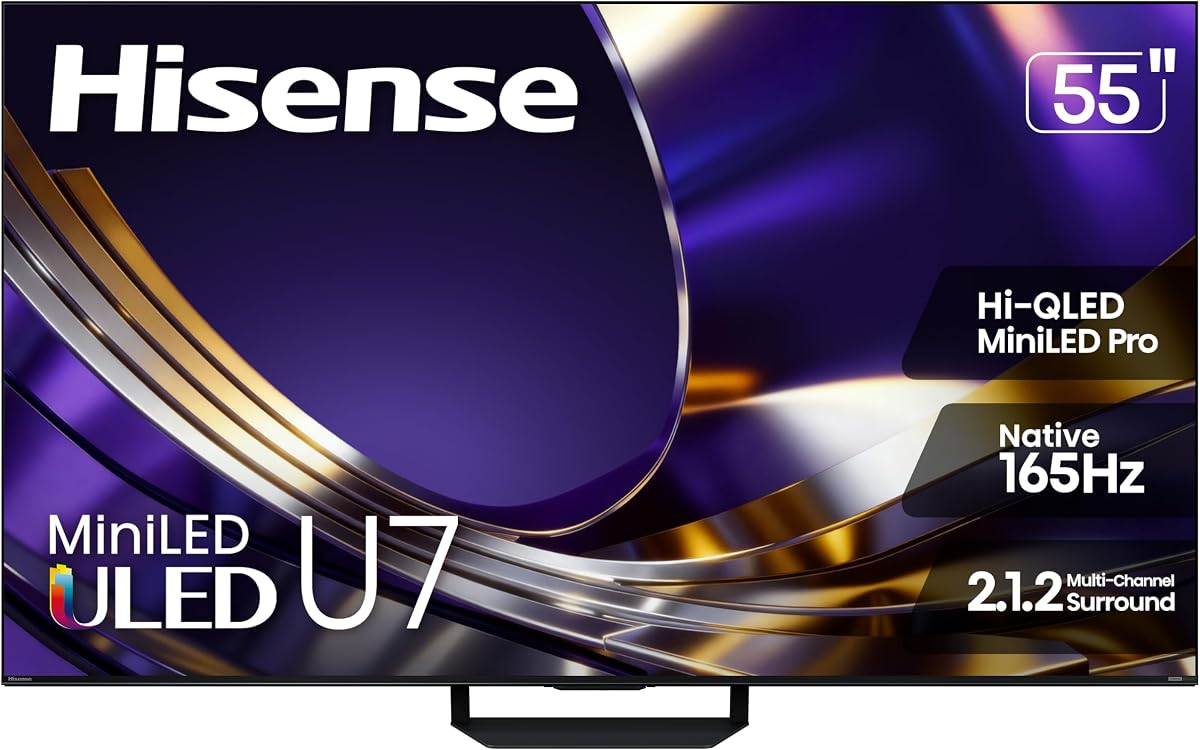
Hisense 55 U7 Mini LED
4.4Editor score
Native 165Hz Refresh Rate
Up to 3000 Nits
Anti-Reflection Glare-Free
This guide compares the top gaming TVs for PS5 and Xbox featuring high refresh rates and HDMI 2.1 to help you choose the perfect display for next generation
Finding the right display for your console setup is crucial for immersive gameplay. A dedicated gaming TV offers fast refresh rates and low input lag to ensure smooth action and responsive controls during intense matches.
We evaluated ten top models based on panel technology, connectivity options, and smart features. Each product was analyzed for its ability to handle 4K resolution and high frame rates required by modern gaming consoles.
Every pick highlights key strengths like HDR performance and variable refresh rate support. Please note that availability and specific model features may vary over time so verify details before purchasing.
4.4Editor score

4.1Editor score

4.3Editor score
The following table provides a side by side overview of the ten selected models allowing you to quickly compare their core specifications and gaming capabilities.




The Sony BRAVIA 3 II stands out as a top contender for console gamers seeking high fidelity visuals. It earns an Editor's Choice badge for its seamless integration with PlayStation 5 and robust smart features powered by Google TV and Gemini.
We may earn a commission when you buy through this link, at no additional cost to you.
Its XR Processor uses AI to optimize color and contrast in real time ensuring every frame looks its best. The HDMI 2.1 features deliver 4K 120Hz with Variable Refresh Rate and Auto Low Latency Mode for smooth responsive gameplay.
While the price is higher than many alternatives the dedicated Game Menu allows easy access to settings without diving into complex menus. The X-Balanced speakers provide deeper bass reducing the immediate need for external sound systems.
This TV is ideal for serious gamers who prioritize picture quality and console synergy. Its advanced processing and exclusive features make it a worthy investment for those wanting the best possible visual experience at home.
Auto HDR Tone Mapping optimizes contrast settings automatically for supported PS5 games ensuring accurate colors and brightness without manual tweaking.
The XR Processor analyzes content scene by scene to enhance details and reduce noise making even older content look sharper and more vibrant.
We may earn a commission when you buy through this link, at no additional cost to you.
The Hisense 55 U7 Mini LED delivers exceptional performance for gamers needing high brightness and fast response. Its premium features include a native 165Hz refresh rate and advanced local dimming zones for deep blacks and bright highlights.
We may earn a commission when you buy through this link, at no additional cost to you.
The Hi-QLED technology ensures a wide color gamut while the anti-reflection layer minimizes glare in bright rooms. This makes it suitable for daytime gaming sessions without sacrificing picture clarity or contrast depth.
Although it comes at a premium price the 2.1.2 channel audio system and IMAX Enhanced certification provide a cinematic experience. The Hi-View AI Engine Pro continuously adjusts settings to maintain consistency across different content types.
Buyers seeking top tier visuals and high dynamic range capabilities will appreciate this model. It balances high refresh rates with superior brightness control making it a strong choice for competitive and immersive gaming.
With up to 3000 nits of peak brightness HDR content pops with incredible intensity ensuring details are visible even in very bright scenes.
The dual-layer screen treatment reduces reflections from windows or lights allowing for a clear view regardless of ambient lighting conditions.
We may earn a commission when you buy through this link, at no additional cost to you.
The TCL 55 T7 offers impressive gaming specs at a budget friendly price point making it highly accessible. It features a 144Hz refresh rate and QLED technology which brings vibrant colors to next gen console games.
We may earn a commission when you buy through this link, at no additional cost to you.
Its TCL AIPQ Pro Processor optimizes color and contrast dynamically enhancing the viewing experience. The built-in Google TV allows easy access to streaming apps while voice control simplifies navigation.
While black levels may not match premium OLEDs the Motion Rate 480 ensures smooth motion during fast action. This model proves that high refresh rate gaming is achievable without breaking the bank.
It is an excellent choice for casual gamers or those upgrading from older displays. The combination of speed and smart features makes it a practical pick for everyday entertainment and gaming needs.
MEMC Frame Insertion technology combines multiple motion enhancement techniques to reduce blur and keep action sequences clear and fluid.
Quantum Dot technology covers nearly the entire DCI-P3 color space resulting in rich accurate colors that make games look more realistic.
We may earn a commission when you buy through this link, at no additional cost to you.
The iFFALCON 55 U85 is a compelling option with four HDMI 2.1 ports enabling multiple next gen consoles to be connected simultaneously. Its MiniLED panel delivers high brightness and deep blacks for a cinematic look.
We may earn a commission when you buy through this link, at no additional cost to you.
With Variable Refresh Rate up to 240Hz and FreeSync Premium Pro it handles competitive titles with minimal tearing or stuttering. Dolby Vision Gaming ensures HDR content is rendered accurately with zero setup required.
The inclusion of hotel mode and IP control suggests durability and flexibility for various environments. However users may find the menu navigation slightly complex compared to more streamlined smart platforms.
This TV is great for households with multiple consoles or PCs needing high speed connections. Its robust connectivity and gaming specific features make it a versatile choice for dedicated gaming rooms.
Four HDMI 2.1 ports allow you to connect two consoles and a PC without needing an expensive switch or dongle.
Switches automatically to optimized settings when a console is detected ensuring HDR and tone mapping are perfect out of the box.
We may earn a commission when you buy through this link, at no additional cost to you.
The Hisense 55 U6 Pro combines MiniLED backlighting with a native 144Hz refresh rate for smooth visuals. It features a glare-free panel ideal for bright rooms and includes a built-in subwoofer for deeper audio bass.
We may earn a commission when you buy through this link, at no additional cost to you.
Hi-QLED technology delivers accurate colors validated by Pantone ensuring realism in game environments. The Hi-View AI Engine automatically adjusts picture settings based on content type for consistent quality.
Fire TV provides access to popular apps but may include ads on the home screen. Despite this the anti-reflection coating and decent contrast make it a solid option for varied lighting conditions.
It is suitable for users wanting MiniLED benefits without the highest cost. The balanced feature set makes it a reliable choice for gaming and general streaming entertainment.
The anti-reflection treatment keeps the view clean and distraction free ensuring focus remains on the screen rather than reflections.
A built-in subwoofer pulls you into the heart of the moment providing deep bass without needing external speakers.
We may earn a commission when you buy through this link, at no additional cost to you.
The Samsung M70H features Mini LED technology and a dedicated Gaming Hub that brings cloud games and apps together in one place. Motion Xcelerator optimizes refresh rates for smooth visuals during sports or gaming.
We may earn a commission when you buy through this link, at no additional cost to you.
Color Booster transforms content into a visual masterpiece with vivid greens and reds. The Supreme Mini LED Dimming ensures deep contrast and bright highlights suitable for HDR gaming content.
It includes endless free content options on Samsung TV Plus which is appealing for casual viewing. However the Tizen OS can be less intuitive compared to other smart platforms.
This model is a good fit for fans of sports and cloud gaming. Its specialized features like Soccer Mode highlight its versatility beyond standard gaming requirements.
A central hub that combines console cloud services and apps allowing quick access to games without needing a physical console.
DLG 120Hz technology analyzes motion and optimizes the refresh rate to keep every scene sharp and fluid.
We may earn a commission when you buy through this link, at no additional cost to you.
The Roku 55 Select offers a simplified smart TV experience with sharp 4K QLED picture quality. It is designed for ease of use with fast Wi-Fi and an uncluttered remote control.
We may earn a commission when you buy through this link, at no additional cost to you.
Roku Smart Picture cleans up incoming signals and optimizes them for bright accurate colors. The interface avoids endless scrolling by providing personalized picks and quick access to your favorite apps.
While it lacks advanced gaming specs like HDMI 2.1 it serves well as a general entertainment display. The frameless design and clear sound make it a modern addition to any living room.
It is ideal for users prioritizing simplicity and streaming over high frame rate gaming. The simple setup and friendly interface make it a hassle-free option for basic viewing.
The setup takes minutes and the home screen remains uncluttered so finding shows is quick and easy.
The enhanced voice remote lets you search across apps easily and includes a lost remote finder to prevent misplaced devices.
We may earn a commission when you buy through this link, at no additional cost to you.
The TCL 65 QM6K provides a large 65 inch screen with QD-Mini LED technology for bold contrast. The Halo Control System reduces blooming ensuring dark scenes look deep and bright scenes stay crisp.
We may earn a commission when you buy through this link, at no additional cost to you.
With a native 144Hz refresh rate it handles fast action with minimal motion blur. Google TV offers a robust app ecosystem and Onkyo Audio delivers enhanced sound quality for movies and games.
While a soundbar is often recommended for immersive audio the built-in speakers are decent. The high brightness ensures visibility in various lighting conditions making it versatile for home use.
It is an excellent choice for those wanting a big screen without the premium cost. The combination of size and gaming features makes it a strong contender for living room setups.
Advanced local dimming eliminates haloing around bright objects enhancing shadow detail and picture accuracy.
Motion Rate 480 ensures incredible clarity and minimal blur making it ideal for fast-paced sports and gaming.
We may earn a commission when you buy through this link, at no additional cost to you.
The Samsung 50 U8000H features a Crystal Processor that enhances colors and sharpens details for vibrant 4K viewing. Motion Xcelerator provides smooth motion in games and sports up to 4K 60Hz performance.
We may earn a commission when you buy through this link, at no additional cost to you.
Color Booster supercharges content making fiery reds and sparkling blues come to life. The 4K Upscaling technology upgrades lower resolution content to crisp clarity improving the look of older shows.
It is a budget-friendly compact option suitable for bedrooms or smaller living rooms. While brightness is lower than MiniLED models it still delivers a visually pleasing experience.
Buyers looking for a smaller screen with reliable upscaling will find this model useful. It offers solid performance for standard streaming and casual gaming sessions.
Upgrades your favorite shows and movies to crisp 4K clarity even from lower quality sources with advanced algorithms.
Estimates and adjusts frame transitions in real time to ensure every play and scene looks realistic and clear.
We may earn a commission when you buy through this link, at no additional cost to you.
The Hisense 55 E6 delivers Hi-QLED color and a Total HDR Solution ensuring ink-black blacks and vibrant colors. AI Light Sensor automatically adjusts screen brightness in response to ambient light for comfort.
We may earn a commission when you buy through this link, at no additional cost to you.
Motion Rate 120 with MEMC creates ultra-crisp blur-free pictures. Fire TV integrates live channels and apps seamlessly on the home screen for easy navigation.
Game Mode Plus provides enhanced input lag reduction for better responsiveness. While it is a budget model the inclusion of Dolby Atmos and HDR 10+ Adaptive adds value.
It is a practical choice for users wanting smart features without a high cost. The AI Upscaler enhances lower resolution content making it a versatile display for general use.
Detects and adjusts screen brightness automatically in response to ambient light to save electricity and improve viewing comfort.
Uses machine learning models to enhance low-resolution content to near 4K quality for sharper textures and edges.
We may earn a commission when you buy through this link, at no additional cost to you.
Selecting the right TV requires balancing performance features with budget constraints. Understanding the core technical specifications ensures you get the best experience for your console.
Refresh rate determines how many frames per second the screen can display. A higher refresh rate like 120Hz or 144Hz ensures smoother motion and reduces motion blur during fast-paced gameplay which is crucial for competitive shooters or racing games.
Look for a TV with at least 120Hz native refresh rate to maximize the potential of next gen consoles.
HDMI 2.1 is essential for connecting consoles at full 4K 120Hz speeds. Ensure the TV has enough ports to connect all your devices without needing switches. Lack of this port may limit performance to 4K 60Hz which is significantly slower.
Confirm at least one HDMI 2.1 port is available for your primary console connection.
VRR synchronizes the TV refresh rate with the console frame rate to eliminate screen tearing and stuttering. It is a standard feature for smooth gaming on both PlayStation 5 and Xbox Series X models. FreeSync and G-Sync compatibility are also beneficial for PC gamers.
Ensure the TV supports VRR standards like FreeSync Premium Pro for optimal console integration.
OLED panels offer perfect blacks and infinite contrast but may be sensitive to burn-in. MiniLED and QLED panels provide high brightness and robust performance suitable for bright rooms. Choose based on your lighting conditions and preferred image style.
Consider MiniLED for brightness or OLED for deep blacks and contrast performance.
Input lag measures the delay between pressing a controller button and seeing action on screen. Low input lag is vital for precise timing in competitive games. Most modern gaming TVs have Game Modes that reduce this latency significantly.
Select a model with dedicated Game Mode to minimize input lag effectively.
High Dynamic Range enhances color and contrast for realistic visuals. Support for formats like Dolby Vision and HDR10+ ensures you get the best out of media. Brightness levels also impact HDR quality significantly so aim for high nits.
Verify support for major HDR formats to ensure accurate bright colors and shadows.
Built-in smart platforms allow streaming apps without extra devices. Google TV and Fire TV offer intuitive interfaces and voice control. Choose a system that supports your preferred apps and voice assistants for ease of use.
Pick a TV with a smart OS that integrates well with your existing digital ecosystem.
If multiple people view the screen from different positions look for wide viewing angles. IPS panels offer wide angles but lower contrast while VA panels offer better contrast but narrower angles. Consider your seating arrangement before buying.
Evaluate the seating layout to choose a panel type that suits your viewing needs.
Connect your console to the HDMI 2.1 port specifically designed for next gen gaming. Enable Game Mode in the settings to reduce input lag and activate Variable Refresh Rate for smoother visuals.
Calibrate picture settings using preset modes designed for gaming. This ensures accurate colors and contrast without manual adjustments. Check the Auto Tone Mapping feature if available for console specific optimization.
Keep the screen clean with a microfiber cloth to avoid scratches. Avoid direct sunlight to prevent glare and overheating. Update the TV firmware regularly to maintain compatibility and performance.
You should connect your PS5 to an HDMI 2.1 port to get 4K resolution at 120Hz. If your TV has only one such port use that one to ensure maximum performance. Some models label this port specifically for console gaming.
While many gaming TVs have decent built-in speakers a soundbar enhances immersion significantly. Models with Dolby Atmos support work well with external audio. It is optional but recommended for a richer cinematic experience.
Yes you can play at 120Hz on Xbox Series X if the TV supports HDMI 2.1 and 120Hz refresh. You may need to enable specific performance settings in the console menu. Ensure the game itself supports this frame rate.
MiniLED offers higher brightness and less risk of burn-in making it great for bright rooms. OLED provides perfect blacks and better viewing angles which is ideal for dark rooms. Choose based on your room lighting.
Input lag delays your controller actions appearing on screen which can hurt timing in competitive games. Low input lag ensures responsiveness and precise control during gameplay. Most gaming TVs have a specific Game Mode to reduce this delay.
VRR stands for Variable Refresh Rate and it matches the screen refresh rate to the console frame rate. This eliminates screen tearing and stuttering for smoother gameplay. It is a standard feature in modern gaming TVs.
We reviewed ten top models offering a range of options from budget to premium. The Sony BRAVIA 3 II leads for console integration while the Hisense U7 Mini LED excels in brightness and performance.
Prioritize refresh rate and HDMI 2.1 support to ensure future-proof performance. Consider room lighting and viewing angles to select the right panel type for your home setup.
Prices and models change frequently so verify current specs and deals before purchasing. Choosing the right display will significantly enhance your gaming and entertainment experience.