
Zalman T6 ATX Mid-Tower
4.3Editor score
Optimized cooling performance
Powder coated steel chassis
Versatile internal layout
Discover the top industrial PC cases for 2026. We compare durability, airflow, and expansion options to help you choose the perfect chassis for your workspace.
Finding the right industrial PC case is crucial for ensuring your hardware runs smoothly in demanding environments. A good case protects components from dust and heat while providing ample space for expansion and cooling.
We evaluated ten top-rated cases based on build quality, airflow design, and compatibility with various motherboards and components. Our list covers everything from budget-friendly towers to high-performance rackmount solutions.
Each pick highlights unique features and trade-offs to help you make an informed decision for your specific needs. Remember that availability and pricing can change, so verify details before purchasing.
4.3Editor score

4.8Editor score

4.6Editor score
This table provides a quick side-by-side comparison of the top industrial PC cases available this year. Use it to identify key specs and features that matter most for your build.


The Cooler Master HAF II 500 stands out as the top choice for users prioritizing thermal performance. With a 4.8 rating, this case offers an oversized cooling system that ensures components stay cool under heavy loads.
We may earn a commission when you buy through this link, at no additional cost to you.
Its design features two massive 220mm front intake fans and an 180mm rear exhaust fan, creating a high-airflow environment. The split-level cable management optimizes routing space, while the MasterRail mounting system supports various radiator sizes.
While the case is larger and pricier than standard towers, the trade-off is justified for intensive tasks like rendering or gaming. The dual-mode GPU holder adds stability for heavy graphics cards, making it a robust solution.
This case is ideal for enthusiasts and professionals needing maximum airflow and flexibility. If you demand top-tier cooling and build quality, the HAF II 500 is the recommended pick.
The large fan setup and low-resistance airflow design keep temperatures low during sustained workloads.
Accommodates oversized GPUs and multiple radiator configurations without compromising internal space.
We may earn a commission when you buy through this link, at no additional cost to you.
The Fractal Design Define 7 XL is a premium full tower designed for users who need extensive storage and a silent environment. Its brushed aluminum front door and solid construction make it a standout for professional workstations.
We may earn a commission when you buy through this link, at no additional cost to you.
With support for up to 18 HDDs and 5 SSDs, this case is perfect for data-intensive applications. The modular layout allows you to convert storage space for custom water cooling, offering versatility for future upgrades.
The price reflects its high-end features, but the investment pays off in durability and acoustic performance. The magnetic latching door and refined hinges enhance the user experience during maintenance and setup.
Buy this case if you value silence, aesthetics, and expandability. It is best suited for home labs, media centers, or office setups where noise levels and storage capacity are critical.
Multiple drive bays and modular brackets allow you to customize the case for HDDs, SSDs, or pumps.
Sound-dampening materials and tight seals keep noise levels low for peaceful environments.
We may earn a commission when you buy through this link, at no additional cost to you.
The Zalman T6 offers a balanced mix of quality and affordability, making it a top budget pick. With a 4.3 rating, it provides reliable performance for home workstations, offices, or casual gaming rigs.
We may earn a commission when you buy through this link, at no additional cost to you.
Its powder-coated steel chassis resists corrosion and withstands heat, while the optimized front mesh design ensures proper airflow. The case supports ATX, mATX, and mini-ITX boards, giving you flexibility in component choices.
While it lacks premium bells and whistles, the T6 delivers essential features like USB 3.0 and room for up to four fans. This simplicity helps keep costs down without sacrificing structural integrity.
Choose the T6 if you need a no-frills case that gets the job done efficiently. It is perfect for builders on a tight budget who still want a sturdy and functional chassis.
High-strength steel sheets provide a robust structure that protects internal components effectively.
Hairline pattern mesh and preinstalled rear fan promote excellent air circulation for stable performance.
We may earn a commission when you buy through this link, at no additional cost to you.
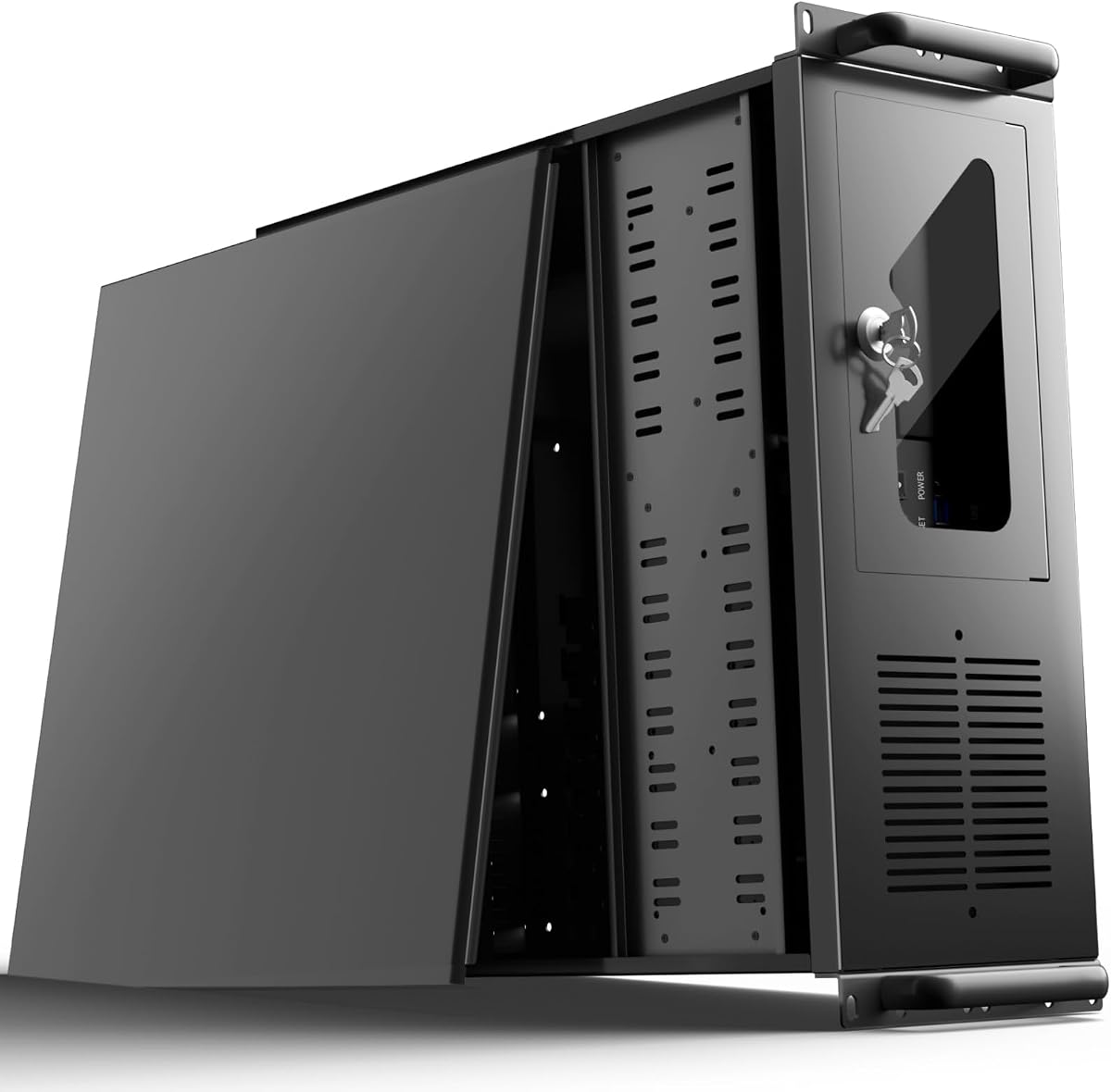
The UTLGAMENG 4U Rackmount is engineered for users needing significant storage and expansion in a server environment. It supports ATX, Micro-ATX, and Mini-ITX motherboards while accommodating up to 12 hard drives.
We may earn a commission when you buy through this link, at no additional cost to you.
With seven PCI slots, this case allows seamless integration of graphics cards and network adapters. The front USB 3.0 ports and LED indicators optimize management, while the key-lock adds security against unauthorized access.
Dust filters help maintain a clean internal environment, which is crucial for long-term reliability in data centers. However, the case requires careful planning due to its size and rack-mount focus.
This case is ideal for home labs or small business servers. If you need scalable storage and professional rack compatibility, the UTLGAMENG 4U is a solid functional choice.
Designed to grow with your needs by supporting multiple drives and expansion cards easily.
Robust locking mechanisms and filters protect hardware from tampering and dust accumulation.
We may earn a commission when you buy through this link, at no additional cost to you.
The Antec VSK4000E-U3 is a straightforward mid-tower case suitable for basic office or home builds. It uses SGCC steel to ensure durability, making it a reliable option for those on a strict budget.
We may earn a commission when you buy through this link, at no additional cost to you.
Its layout includes five internal HDD bays and three external 5.25 bays, providing ample room for legacy drives and storage. Front ports include USB 3.0 and audio, covering essential connectivity needs.
While it may not have advanced cooling features, it serves well for standard configurations. The steel construction ensures the case remains sturdy over time, even in frequent use.
Buy this case for simple setups where cost is the main factor. It is a good choice for entry-level PCs that do not require extensive modularity or premium aesthetics.
SGCC steel provides a strong framework that protects components without unnecessary added weight.
USB 3.0 and audio ports are readily accessible for connecting peripherals and storage devices.
We may earn a commission when you buy through this link, at no additional cost to you.
The Fractal Design North XL combines sleek aesthetics with powerful performance. Its wood and alloy front panel offers a unique look that elevates any gaming station or modern workspace.
We may earn a commission when you buy through this link, at no additional cost to you.
Despite the focus on looks, it delivers on functionality with support for large radiators and GPUs. Three included 140mm fans ensure strong airflow right out of the box, while the tempered glass side panel showcases your hardware.
The price is higher than standard cases, but the design quality and cooling performance justify it. It is a perfect match for builders who want their PC to look as good as it performs.
Select this case if you value design and performance equally. It is best for users who want a stylish chassis that does not compromise on thermal capabilities.
Real wood and aluminum accents provide a premium feel and distinct look compared to standard plastic cases.
Large front radiator support and included fans ensure components stay cool even in high-performance setups.
We may earn a commission when you buy through this link, at no additional cost to you.
The Silverstone FLP02 brings retro charm to modern hardware. It features a unique turbo button for instant full-speed cooling and supports hot-swap cages for convenient drive management.
We may earn a commission when you buy through this link, at no additional cost to you.
Its compatibility with 360mm liquid cooling and graphics cards up to 386mm ensures it handles high-end parts well. The front USB Type-C port adds modern convenience for fast transfers and device connectivity.
While the design is specific, it appeals to users who appreciate nostalgia blended with utility. The build quality remains consistent with Silverstone’s reputation for durability and precision engineering.
This case is great for hobbyists and collectors. If you want a system that stands out visually while supporting modern high-performance components, the FLP02 is an excellent option.
Expansion bays can accommodate hot-swap adapters for easy access to storage without opening the case.
Classic look combined with USB Type-C and liquid cooling support bridges old style with new tech.
We may earn a commission when you buy through this link, at no additional cost to you.
The Rosewill 4U Rackmount is designed for high-performance computing tasks like AI training and virtualization. It supports E-ATX motherboards and multi-GPU setups, making it a robust foundation for complex projects.
We may earn a commission when you buy through this link, at no additional cost to you.
Direct support for a 360mm AIO cooler and triple PWM fans ensures sustained performance under heavy loads. The USB 3.2 Type-C port on the front delivers fast transfer speeds, improving efficiency when handling large files.
Storage options are flexible with room for HDDs and SSDs, though the count is lower than other server cases. The standard 4U form factor ensures it integrates well into existing rack environments.
Choose this for specialized workstations or servers. If you need reliable cooling and modern connectivity for professional workloads, this chassis offers strong value and performance.
Designed to support the heat and hardware demands of rendering and AI applications effectively.
Front USB Type-C port enables quick file transfers, saving time during heavy data operations.
We may earn a commission when you buy through this link, at no additional cost to you.
The CORSAIR 4000D RS ARGB introduces a revolutionary modular system that lets you upgrade parts like the motherboard tray easily. With a 4.7 rating, it balances airflow and clean lines for a polished build.
We may earn a commission when you buy through this link, at no additional cost to you.
Three ARGB PWM fans are preinstalled, offering silent operation and daisy-chainable control. The InfiniRail mounting system provides unmatched flexibility for fan placement, allowing targeted airflow to critical components.
The 3D Y-pattern panel minimizes airflow restriction while maintaining a sleek look. It also supports new motherboard features like ASUS BTF and MSI Zero, keeping you ahead of the curve.
Ideal for users who love customization. If you want a case that can grow with your needs and offer excellent airflow, the 4000D RS ARGB is a top-tier pick.
FRAME system lets you change panels or trays to suit your evolving build preferences and needs.
3D Y-pattern panel and preinstalled fans deliver excellent cooling without unnecessary noise or turbulence.
We may earn a commission when you buy through this link, at no additional cost to you.
The NZXT H5 Flow proves that compact cases can still deliver outstanding performance. Its perforated PSU shroud and ultra-fine mesh panels create maximum airflow for optimal GPU cooling.
We may earn a commission when you buy through this link, at no additional cost to you.
Pre-installed quiet airflow fans ensure solid out-of-the-box performance, and it supports up to a 360mm radiator in the front. Cable management is seamless thanks to wide channels and hooks.
While the footprint is smaller, the design prioritizes airflow efficiency. Dust filters on all sides help keep the internal environment clean without restricting air intake.
Perfect for users with limited desk space. If you want a clean, powerful, and compact solution, the H5 Flow is an excellent choice for modern builds.
Despite smaller size, airflow design ensures high components remain cool during intense usage periods.
Minimalist design and cable channels keep the interior looking tidy and organized.
We may earn a commission when you buy through this link, at no additional cost to you.
Selecting the right industrial PC case depends on several key factors. Understanding these will help you find a chassis that balances performance, protection, and expandability for your specific needs.
Industrial environments demand cases made from robust materials like SGCC steel or aluminum. Look for powder-coated finishes that resist corrosion and protect against dust or moisture.
Prioritize cases with sturdy panels and secure locking mechanisms to ensure long-term reliability in demanding settings.
Thermal management is critical for industrial PCs running 24/7. Choose cases with mesh panels, large fan mounts, and support for liquid cooling to maintain safe temperatures.
Evaluate fan placement options and airflow paths to ensure components receive adequate fresh air even under heavy loads.
Ensure the case supports your motherboard size, whether ATX, E-ATX, or Mini-ITX. Also check clearance for graphics cards and CPU coolers.
A good industrial case accommodates a wide range of hardware configurations to future-proof your investment.
For data-heavy applications, prioritize cases with multiple drive bays. Look for 3.5-inch and 2.5-inch support along with hot-swap capabilities if needed.
Consider PCIe slot availability for adding network or expansion cards as your system requirements grow.
USB 3.0 or Type-C ports on the front panel enhance usability for transferring data or connecting peripherals frequently.
Additional audio jacks and status LEDs provide better control and monitoring of your system without opening the case.
Desktop towers save desk space, while rackmount options suit server rooms. Choose a form factor that fits your physical environment comfortably.
Measure your workspace beforehand to avoid purchasing a case that is too large or too small for your needs.
Cases with tool-less drive mounts and spacious interiors make building easier. Look for features like tempered glass or removable panels for maintenance.
Good cable management systems help keep wires organized, improving airflow and aesthetics while simplifying future upgrades.
Industrial cases vary widely in price. Balance your budget with the features you truly need, such as high-end cooling or extensive storage.
Investing in quality now often saves money later by reducing maintenance and preventing hardware damage due to poor protection.
Start by installing your motherboard and components according to the manual. Use cable management features to route wires neatly, ensuring unobstructed airflow for cooling.
Keep the interior clean by periodically checking dust filters and cleaning them with a soft brush or compressed air to prevent buildup on fans or radiators.
Ensure the case is placed in a well-ventilated area away from direct heat sources. Regularly inspect screws and mounts to maintain structural stability over time.
Industrial PC cases often feature stronger materials like SGCC steel, better dust filters, and support for heavy-duty hardware. They are designed to withstand continuous use in environments where regular cases might fail.
Several models like the Fractal Design Define 7 XL and Rosewill 4U support E-ATX. Always check the specs before buying to ensure your specific motherboard fits properly.
Use cases with mesh panels and large fans. Position intake fans at the front and exhaust at the rear to create efficient airflow paths that keep temperatures low.
Yes, rackmount cases fit standard server racks and offer better organization for multiple systems. They often include secure locks and professional features suitable for data centers.
Most modern industrial cases support radiators up to 360mm. Check the compatibility list for specific dimensions to ensure your liquid cooling setup fits.
Look for secure locks, high drive capacity, and efficient cooling systems. Front USB ports and LED indicators also help with quick management and monitoring.
Use cases with dust filters on intake vents. Clean filters regularly and place the PC in a low-dust environment to maintain internal cleanliness and airflow.
Modular cases offer flexibility for future upgrades. If you plan to change parts often, the added cost can be worth it for the convenience and customization options provided.
We have reviewed ten top-rated industrial PC cases ranging from budget towers to premium rackmount solutions. Each offers unique strengths tailored to different performance and storage needs.
Prioritize airflow, durability, and compatibility when selecting a case. Balancing these factors ensures your system runs reliably even under demanding workloads.
Always verify current availability and check user reviews before finalizing your purchase. The right case will protect your investment and enhance the overall performance of your build.