
Thrustmaster T-Flight Hotas X USB Flight Sim Stick & Throttle
4.5Editor score
Detachable throttle for flexible setup
Fully programmable flight controls
Precision joystick with adjustable resistance
This guide compares the top Mac Game Flight Controllers for realistic simulation on macOS including yokes joysticks and throttle systems for pilots.
Finding the right flight controller for your Mac can transform your simulation experience into something truly immersive. A good setup provides precise inputs and realistic feedback that mimics real aircraft controls. Whether you are training for a license or just enjoying the sky the right hardware matters.
We compared ten top flight controllers based on build quality programmability and macOS compatibility. Our analysis looks at ergonomics control range and software support to ensure smooth operation on your system. Each product offers unique strengths for different types of flight simulation enthusiasts.
Each pick shows how the device performs with popular simulators and its ease of setup. You will find options ranging from compact sticks to full yoke systems with throttle quadrants. Please note that availability and pricing can change so check current listings before buying.
4.5Editor score

4.4Editor score

4.6Editor score
The following table provides a side by side comparison of all ten flight controllers to help you identify key specifications at a glance.




The Honeycomb Alpha Flight Controls Yoke stands out as a top choice for serious Mac flight simulation enthusiasts. With a rating of 4.4 stars it offers a highly realistic experience that mimics real aircraft controls. Its self centering mechanism and smooth rotation provide precise inputs essential for accurate flying.
We may earn a commission when you buy through this link, at no additional cost to you.
This product features a full 180 degree yoke rotation supported by a solid steel shaft and dual linear ball bearings. The integrated switch panel includes master alternator avionics and light switches along with a 5 position ignition switch. These details allow pilots to manage systems just like in a real cockpit.
While the price is higher than budget options the build quality justifies the investment for long term use. The dual mounting solution with heavy duty clamps or Micro Suction Pads offers flexibility for different desk setups. However it does require ample space which may not suit smaller workstations.
Pilots and simulation students seeking authenticity will find this yoke system invaluable for training or entertainment. Its design by pilots and aerospace engineers ensures attention to detail often missing in generic controllers. For those prioritizing realism and control quality this is a strong recommendation.
The self centering mechanism provides smooth feedback without dead zones enhancing immersion during flights.
Built in switches for avionics and ignition reduce the need for extra hardware in your setup.
We may earn a commission when you buy through this link, at no additional cost to you.
The Thrustmaster T-Flight Hotas X offers an excellent entry point for those new to flight simulation on Mac or PC. With a high rating of 4.5 stars it delivers comfort and functionality at a budget friendly price. Its ergonomic design ensures you can fly for hours without hand fatigue.
We may earn a commission when you buy through this link, at no additional cost to you.
This controller features a detachable throttle allowing you to separate it for a more flexible cockpit setup. All 12 action buttons and 5 axes are fully programmable to match your preferred flight sim layout. The precision joystick includes an adjustable resistance dial for fine tuning stick tension.
Although it is designed primarily for PC users it remains a versatile choice for many simulation setups. The plug and play functionality lets you start flying immediately without complicated configuration. However the materials may feel less premium compared to higher end options in the market.
Beginners or casual gamers looking for an affordable yet capable controller will appreciate this Hotas system. It balances cost and performance well making it ideal for those testing their interest in flight sims. For budget conscious buyers this remains a highly recommended option.
Wide hand rests and natural throttle shapes reduce strain during long simulation sessions.
Customize all buttons and axes to suit civil aviation or military combat scenarios easily.
We may earn a commission when you buy through this link, at no additional cost to you.
The Logitech G Pro Flight Yoke System bundled with Rudder Pedals represents a comprehensive solution for flight simulation. Boasting an impressive 4.6 star rating this bundle provides realistic controls that enhance muscle memory and immersion. The combination of yoke and pedals covers essential aircraft inputs for thorough training.
We may earn a commission when you buy through this link, at no additional cost to you.
This setup features smooth and accurate self-centering rudder pedals that deliver differential toe brakes for precise runway control. The yoke offers 54 programmable controls including a POV hat and mode switch for extensive functionality. Foot rests are adjustable to accommodate a wide range of sizes with non-slip materials.
While the bundle is priced higher than individual components it offers a complete cockpit experience without needing separate purchases. The ergonomic design ensures comfort during extended flying sessions. However setting up a yoke and pedals requires considerable desk and floor space which may not suit everyone.
Pilots seeking to build a full simulation environment will benefit from this all-in-one bundle. It bridges the gap between amateur gaming and professional training tools effectively. For those ready to invest in a premium setup this system delivers exceptional value and performance.
Differential toe brakes provide precise control when taxiing or landing your aircraft accurately.
With 54 controls you can manage complex aircraft systems without switching inputs manually.
We may earn a commission when you buy through this link, at no additional cost to you.
The Logitech G X56 H.O.T.A.S is designed for intense combat simulations with military grade precision. With 189 programmable controls it offers unmatched customization for advanced pilots demanding specific performance levels. RGB backlighting adds immersion and helps identify controls in low light environments.
We may earn a commission when you buy through this link, at no additional cost to you.
This controller features hall effect sensors for accurate 16-bit axis control and an advanced 4-spring system for adjustable stick force. A mini analog stick allows separate control of pitch roll and weapons systems. Twin throttles with friction adjusters provide precise throttle management during flight.
However the X56 is compatible only with Windows systems which limits its direct use on Mac without virtualization. The sheer number of controls can be overwhelming for beginners and requires significant time to configure. Despite this complexity it remains a favorite among military flight sim enthusiasts.
Serious combat sim users who can access Windows will find this HOTAS system unmatched in capability. Its precision and customization options allow for highly detailed aircraft control. For those focused on fighter jets and space sims this is a top tier choice.
189 programmable controls let you map every aircraft function to your preference easily.
Hall effect sensors ensure smooth and accurate inputs without wear over time.
We may earn a commission when you buy through this link, at no additional cost to you.
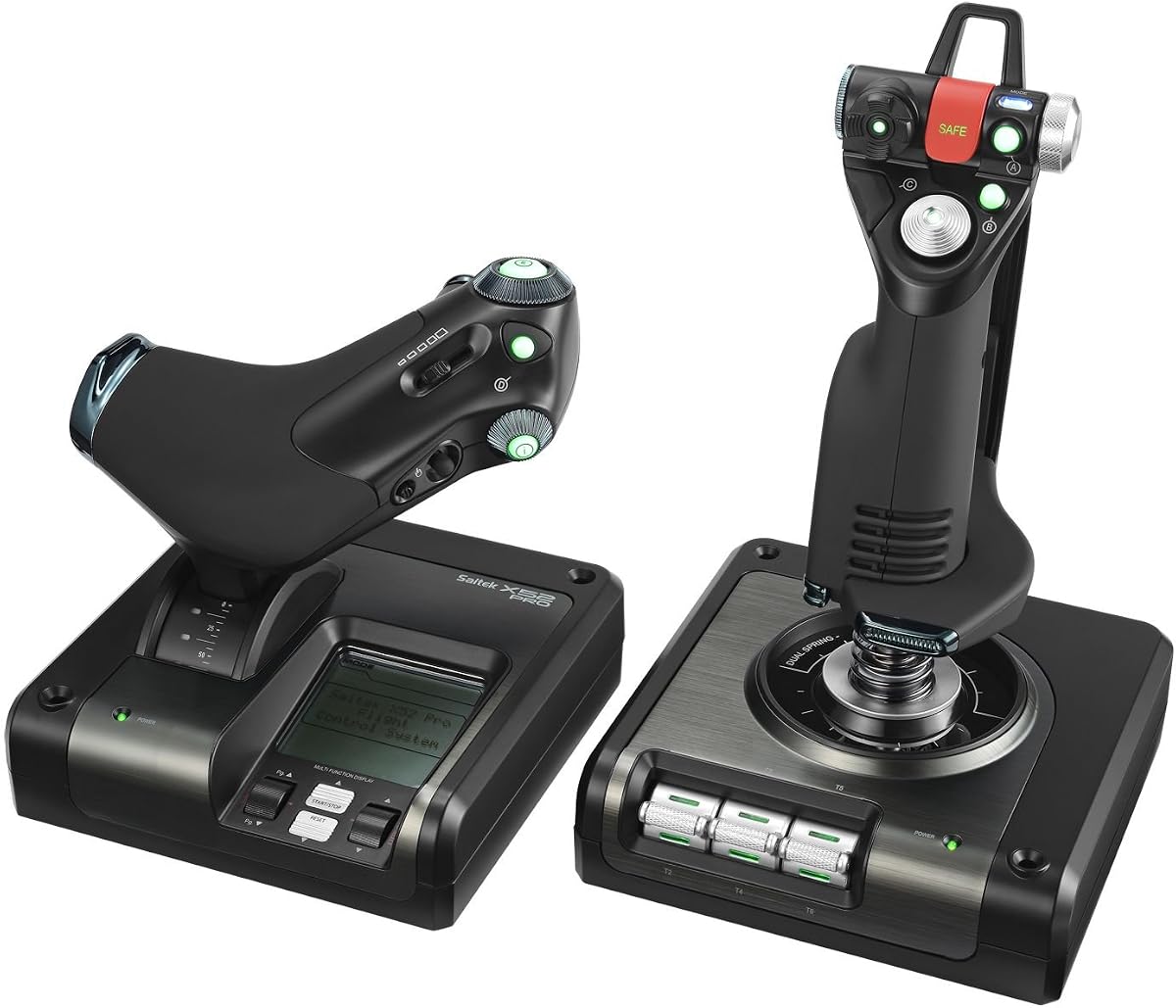
The Logitech G Saitek X52 Pro offers intuitive control through its illuminated LCD multi-function display. With a rating of 3.9 stars it balances functionality and ease of use for various flight sim titles. The progressive throttle includes resistance adjustment for precise engine management during flight.
We may earn a commission when you buy through this link, at no additional cost to you.
This controller features a precision centering mechanism with no contact technology to improve control over time. A 5 position handle adjustment system suits different hand sizes while a soft-touch contoured grip ensures comfort. Program the controller for each game using powerful smart technology software included.
Mac users will need to note that this system requires Windows 10 8.1 or 7 which may limit direct usage. The software dependency means an internet connection is needed for initial setup and customization. Despite this the build quality and ergonomics remain strong for dedicated simmers.
Pilots looking for a balance of customization and comfort will find the X52 Pro reliable. Its LCD display helps monitor essential flight data without switching windows. For those with Windows access this remains a solid option for civil and military simulations.
The multi-function display shows flight data and settings clearly during gameplay.
5 positions allow you to fit the controller to your hand size perfectly.
We may earn a commission when you buy through this link, at no additional cost to you.
The Turtle Beach VelocityOne Flightstick provides a compact and versatile option for universal flight simulation. With a 4.2 star rating it includes an integrated OLED flight management display for real-time data monitoring. High precision non-contact main axes ensure smooth and accurate control inputs.
We may earn a commission when you buy through this link, at no additional cost to you.
This controller features 27 programmable buttons and 8 axes including a POV hat and rapid-fire trigger. The touchpad navigation sensor allows full cursor control without needing a separate mouse during flight. An intuitive flight configuration wheel helps adjust settings on the fly easily.
While it is an excellent all-in-one stick it lacks a separate dedicated throttle lever which some sims may require. The ambidextrous design fits both left and right handed pilots comfortably. The OLED display is a standout feature but may require battery management for wireless models.
Pilots who prefer a single unit setup without multiple peripherals will appreciate this Flightstick. Its cross platform compatibility with Xbox and PC adds value for mixed gaming setups. For those seeking convenience and data display this is a compelling choice.
OLED flight management display keeps critical flight info visible at all times.
Full cursor control via touchpad streamlines menu interaction during flight.
We may earn a commission when you buy through this link, at no additional cost to you.
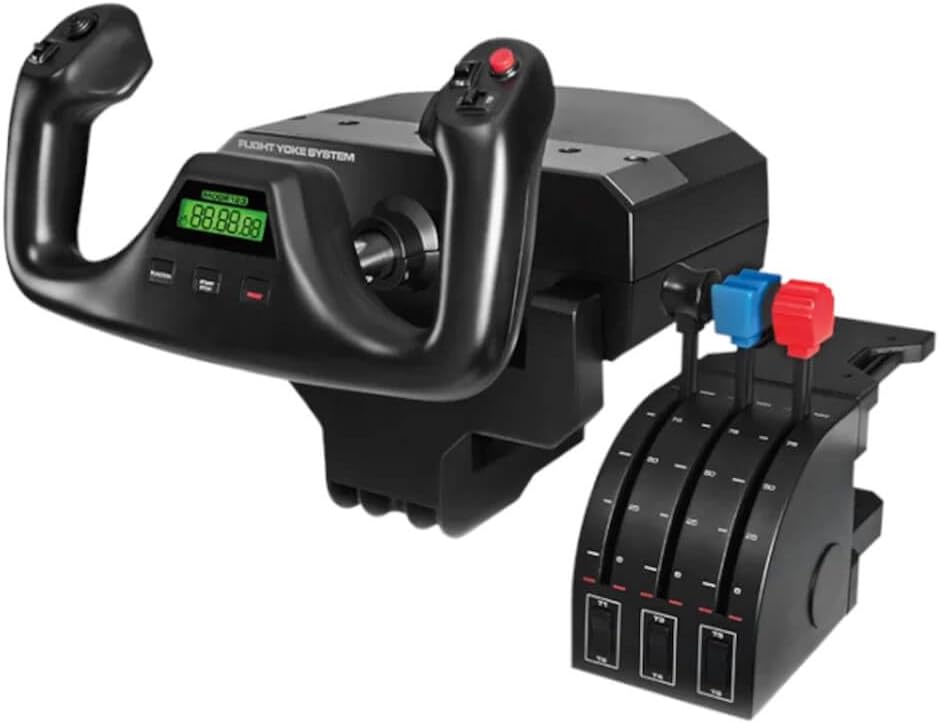
The Logitech G PRO Flight Yoke System delivers realistic controls ideal for new and experienced pilots alike. With a 4.3 star rating it features a stainless steel yoke shaft for robust smooth and accurate control. The system includes a throttle quadrant with 4.92 ft cable and 2 desk clamps.
We may earn a commission when you buy through this link, at no additional cost to you.
This setup offers a POV hat 14 button controls and a 3-position mode switch providing at least 54 programmable controls. The robust desk clamp ensures your controls stay secure during intense flight simulations. In the box you receive the flight yoke throttle quadrant and clamps.
Note that this system requires an optional software download for use with Microsoft Flight Simulator or X-Plane on Windows. Mac users may need compatibility solutions for full functionality. The realistic feel helps build muscle memory effectively which is crucial for flight training.
Pilots seeking a dedicated yoke experience without excessive cost will find this system appealing. Its focus on realistic inputs and durable build supports long-term use. For those prioritizing yoke realism over other peripherals this is a strong option.
Realistic controls help pilots develop skills that transfer to actual aircraft.
Two position desk clamp ensures secure attachment on various desk sizes.
We may earn a commission when you buy through this link, at no additional cost to you.
The Turtle Beach VelocityOne H.O.T.A.S provides an expandable ecosystem for pilots looking to grow their cockpit setup. It features 73 programmable inputs and 15 axes with high-resolution Hall-Effect sensors for precise control. Customizable RGB lighting enhances immersion matching your cockpit style perfectly.
We may earn a commission when you buy through this link, at no additional cost to you.
This controller includes a full-color display for real-time flight data and quick performance tuning. Swappable dual throttle detents deliver tactile thrust reference points while adjustable resistance allows comfort customization. The VelocityOne Flight Hangar app enables full customization and personalized settings.
Despite its advanced features it carries a lower rating of 2.6 stars which may indicate reliability or support concerns. The high number of axes and inputs can be complex to configure for average users. However its expandability offers long-term value for dedicated simmers.
Pilots planning a modular cockpit with pedals and additional mounts will find this system flexible. The detailed customization options allow tailored flight experiences. For those willing to manage setup complexity this offers significant potential.
Supports pedals and mounting solutions for a full custom cockpit build.
Full app customization allows precise tuning of every input and setting.
We may earn a commission when you buy through this link, at no additional cost to you.
The Logitech G PRO Flight Yoke System offers a comprehensive setup with 75 programmable controls and configurable throttle knobs. With a 4.4 star rating it provides a realistic experience for professional simulation. An integrated 1-USB 2.0 port hub adds convenience for connecting other devices.
We may earn a commission when you buy through this link, at no additional cost to you.
This system includes a separate three-axis lever throttle for precise engine management during flight. The stainless steel yoke shaft ensures durability and smooth pitch roll control. A 2-position clamp secures the yoke firmly while an LCD display offers quick visual feedback.
Mac users will need to check compatibility as this model is primarily designed for Windows systems. The USB hub simplifies connections but may add cable clutter to your desk. Despite this the detailed programmability supports complex aircraft configurations effectively.
Pilots needing advanced controls with integrated display will appreciate this Yoke System. It balances professional features with reasonable pricing for a full throttle setup. For those focused on realistic throttle control this remains a recommended option.
USB hub allows direct connection of peripherals without extra hubs.
Throttle knobs are adjustable to match your aircraft engine settings precisely.
We may earn a commission when you buy through this link, at no additional cost to you.
The Logitech G Saitek PRO USB Flight Yoke (Renewed) offers a cost-effective entry into realistic flight simulation. With a 4.2 star rating it features a stainless steel shaft for smooth and precise pitch and roll control. The integrated digital chronograph helps with IFR and cross-country procedures.
We may earn a commission when you buy through this link, at no additional cost to you.
This system includes a dedicated control quadrant with realistic throttle prop and mixture controls plus 14 buttons. The unit is compatible with Mac OSX operating systems which is rare for many flight controllers. Saitek's Smart Technology software allows complete customizability of control configuration.
Being renewed it may show minor cosmetic signs but provides full functionality for simulation use. The rudder pedals are sold separately which adds to the total cost for a full setup. However the compatibility with Mac makes it a unique choice for Apple users.
Mac pilots seeking an affordable yoke system will find this renewed model appealing. Its build quality and software support ensure a reliable experience for training or leisure. For those needing Mac compatibility this is one of the few viable options available.
Rare support for Mac OSX allows direct use without virtualization solutions.
Built-in chronograph aids in timing checkpoints and instrument approaches.
We may earn a commission when you buy through this link, at no additional cost to you.
Selecting the right flight controller requires understanding key factors that affect performance and compatibility.
Verify that the controller supports Mac OSX or has drivers available for your macOS version. Some devices require Windows which limits direct use unless you use virtualization software.
Prioritize controllers labeled as Mac compatible or known to work on macOS to ensure seamless installation.
Look for durable materials such as stainless steel shafts or reinforced plastics that withstand repeated use. Robust construction ensures the controller maintains accuracy over time.
Choose products with positive long-term reviews to confirm longevity and reliability.
Controllers with more programmable buttons and axes allow greater flexibility in mapping aircraft functions. Customizable inputs help manage complex systems without switching screens.
Ensure the software is intuitive and supports profile saving for quick setup changes between games.
Ergonomic designs reduce strain during long sessions by providing comfortable grips and natural hand positions. Adjustable handles help fit the controller to your size.
Select options with wide rests or adjustable tension to avoid fatigue during extended flying.
Consider whether the controller uses clamps suction pads or desk mounts to secure it properly. Stable mounting prevents movement during intense maneuvers and improves accuracy.
Check if the included mounting hardware suits your desk thickness and material.
Decide if you need a standalone stick or a yoke with separate throttle and pedals for realism. Bundles may save cost but require more space and setup.
Evaluate your available space and budget before choosing integrated or modular systems.
Check for official support or community-made profiles for your preferred flight sim titles. Robust software simplifies customization and ensures updates.
Choose brands with active support communities to resolve compatibility issues quickly.
Compare the cost against features to determine if the extra controls justify the expense. Budget options may lack precision but offer good entry-level performance.
Invest in higher-end models only if you need advanced features for professional training or serious simulation.
Begin by installing the manufacturer's software and updating firmware to ensure full compatibility with your Mac. This allows proper mapping of inputs and access to advanced customization features.
Regularly calibrate your joystick and pedals using built-in tools to maintain accuracy and centering. This step is essential for precise inputs during flight maneuvers.
Clean the surfaces with a dry cloth and avoid spills to extend the controller's lifespan. Store the device in a dry cool place when not in use to prevent damage.
Not all controllers support macOS natively so always check the product specifications for Mac compatibility. Some models require Windows only while others offer Mac OSX drivers. Look for devices that list Mac OS support explicitly.
A yoke mimics a real aircraft control wheel offering two-axis movement with more realism. A joystick is a single stick device suited for fighter jets or simpler flight sims. Choose based on the type of simulation you prefer.
Many yoke systems include a throttle quadrant or have a separate throttle module available. A dedicated throttle provides better control over engine power. Check if the product comes bundled with a throttle for convenience.
Use the manufacturer's configuration software or built-in system preferences to calibrate axes and buttons. This ensures inputs are correctly mapped and centered for accurate flight control. Follow on-screen instructions for each input.
Yes most modern controllers support VR flight simulations through standard drivers. Ensure your software recognizes the device for immersive flight experiences. Check VR compatibility in the product description.
Rudder pedals enhance realism by allowing precise directional control on the ground and in the air. While not mandatory they significantly improve the training experience for serious pilots. Bundles that include pedals offer better value.
Most controllers work with popular sims like Microsoft Flight Simulator X-Plane and Prepar3D. Verify specific support in the product details to ensure compatibility. Many devices offer pre-configured profiles for these titles.
Keep the device clean by wiping surfaces with a soft dry cloth regularly. Avoid exposure to liquids and extreme temperatures to prevent internal damage. Store it safely when not in use to extend its life.
The Honeycomb Alpha Yoke and Logitech G Pro Flight Yoke Bundle offer top-tier realism for serious pilots. For budget conscious buyers the Thrustmaster T-Flight Hotas X provides excellent value and flexibility.
Prioritize controllers with Mac compatibility ergonomic design and sufficient programmable inputs. Consider your available space and the type of simulation you enjoy most before deciding.
Always check current listings for availability and pricing as offerings can change frequently. With the right flight controller your Mac can transform into a realistic cockpit.