
NZXT H5 Flow
4.7Editor score
Perforated PSU shroud
Ultra-fine mesh panels
Two pre-installed fans
Explore our expert comparison of the top high airflow PC cases designed for optimal cooling and thermal performance in modern gaming and workstation builds.
Finding a PC case with superior airflow is essential for maintaining stable temperatures during intense gaming sessions or heavy workstation tasks. Good cases feature mesh panels and smart fan layouts that keep components cool without excessive noise levels.
We compared ten top models based on ventilation design, fan support, build quality, and cable management features. Our analysis focuses on real-world cooling potential and ease of assembly for builders of all skill levels.
Each pick highlights key strengths like radiator support, airflow paths, and unique modular features. Note that prices and availability can change frequently, so check current listings before making your final purchase decision today.
4.7Editor score

4.8Editor score

4.8Editor score
This side-by-side comparison highlights key specifications and unique features across all ten selected models to help you find the perfect match for your specific build requirements.





This high-airflow mid-tower gaming PC case uses a ventilated mesh front panel so the system takes in the airflow it needs. It includes four fans already fitted and offers significant room for demanding parts.
We may earn a commission when you buy through this link, at no additional cost to you.
The three 140 mm HP140 ARGB PWM fans sit at the front and one 140 mm PWM fan at the rear. This setup provides an airflow-ready starting point with front lighting and fan speed tuning options for cooling and sound control.
While it offers substantial radiators up to 360 mm mount at the front and on top, the build quality focuses on function over form. The front I/O provides one USB Type-C port and keeps interior routing organized.
It supports E-ATX, ATX, Micro-ATX, and Mini-ITX motherboards along with graphics cards up to 400 mm. Choosing higher-performance parts does not mean outgrowing the chassis on the next upgrade.
With four high-quality fans included, you save time and money on additional purchases while ensuring immediate thermal performance upon unboxing.
Support for large motherboards and graphics cards means you can upgrade components over time without needing to replace the entire case.
We may earn a commission when you buy through this link, at no additional cost to you.
The Oversized Mighty40 cooling system features two 220 x 40 mm front intake fans and one 180 x 40 mm rear exhaust fan. This design prioritizes low airflow resistance through large front and rear ventilation openings.
We may earn a commission when you buy through this link, at no additional cost to you.
Split-level cable management optimizes routing space and creates room for oversized rear exhaust cooling. The MasterRail mounting system supports multiple fan and radiator sizes at the front and top of the case.
Dual-Mode GPU Holder clamps a single GPU for added stability or supports two GPUs up to 3.6 slots thick each. This ensures your powerful components remain secure during transport or heavy usage.
Flexible storage cage supports 3.5-inch and 2.5-inch drives in orientations based on PSU length. It is ideal for enthusiasts needing maximum thermal headroom for overclocked parts.
The unique large fan configuration allows significantly more air volume to pass through the case compared to standard 120mm or 140mm setups.
Designed for high-end builds, this case handles massive GPUs and radiators without compromising on internal space or airflow efficiency.
We may earn a commission when you buy through this link, at no additional cost to you.
The PSU shroud is perforated on the side and bottom, enabling optimal air intake from two 120mm fans. This unique design ensures heat generated by the power supply does not recirculate into your system.
We may earn a commission when you buy through this link, at no additional cost to you.
Ultra-fine mesh on the top, front, and side panels creates maximum airflow and filters dust. Support up to a 360mm radiator in front and a 240mm radiator up top for powerful liquid cooling potential.
Effortlessly route and conceal cables using the wide channels, hooks, and straps. The compact form factor fits well in smaller desks while still offering substantial internal clearance.
Equipped with two 120mm Quiet Airflow fans—one in front, one in rear—for solid out-of-the-box performance. This balance of size and cooling makes it a top pick for budget builds.
Perforating the PSU shroud allows direct fresh air intake for the power supply, improving overall system thermodynamics significantly.
Despite its smaller size, the mesh panels ensure that high-volume airflow reaches all critical components effectively.
We may earn a commission when you buy through this link, at no additional cost to you.
The revolutionary FRAME system gives new meaning to the word customization. Want to upgrade the motherboard tray to billet aluminum or swap out your front I/O panel for more USB ports? Now you can.
We may earn a commission when you buy through this link, at no additional cost to you.
3x CORSAIR RS ARGB PWM Fans are high-performance fans pre-installed in the front of case. They support daisy-chainable 4-pin PWM connections and Zero RPM mode for near-silent operation at low loads.
CORSAIR InfiniRail Fan Mounting System offers unmatched flexibility in front and roof fan configuration. Simply slide the rail to mount fans up to 200mm wherever you like, ensuring targeted airflow.
The internal side panel near the motherboard tray can be used as a cable cover for clean cable management. You can remove it and mount fans to the side for increased cooling potential if needed.
The FRAME system allows you to upgrade specific components like the motherboard tray or I/O panel without buying a new case.
InfiniRail technology lets you position fans exactly where airflow is needed, rather than relying on fixed mounting holes.
We may earn a commission when you buy through this link, at no additional cost to you.
Aesthetic looks, airflow focus, easy installation, and ample room for large GPU and cable managements make this case stand out. Good build quality computer case made of heavy-duty steel metal frame and 4.0mm tempered glass.
We may earn a commission when you buy through this link, at no additional cost to you.
The modular motherboard I/O allow you to move the motherboard to a higher/lower position for air-cooled/water-cooled systems. To ensure adequate airflow, 2x160mm ARGB front fans & 1x140mm rear fan are pre-installed.
This case have a lot of flexibilities convenient for component installations. Removeable top radiator bracket, fan cables easy-passage grooves, and innovative rear PCIe fan bracket make builds much easier.
This Mid-tower Case is compatible with the largest NVIDIA 4000 series cards thanks to its ample room for graphics cards up to 392mm in length. A total of 2 x 3.5 HDD + 6 x 2.5 SSD drives can be installed.
Two 160mm fans provide significantly more airflow per rotation than standard 120mm fans, reducing noise levels while increasing cooling.
Adjusting the motherboard position helps accommodate taller CPU coolers or specific radiator configurations without compromising other features.
We may earn a commission when you buy through this link, at no additional cost to you.
Crafted with a combination of metal, glass and wood to create a high-quality texture with different materials. Multi-directional vent design supports up to 12 fans simultaneously with pre-installed fans at front and rear.
We may earn a commission when you buy through this link, at no additional cost to you.
Innovative iShift PSU 90 mount mount and the CPU/GPU dual temperature display allow for better heat management. Removable cooling brackets on the top, front and PSU shroud simplify radiator installation significantly.
The case supports simultaneous installation of 420mm radiator + 360mm radiator. This massive cooling potential is rare in consumer cases and supports extreme overclocking scenarios.
Front fans include 3 x Tranquil 140 PWM and 2 x P12R PWM reverse fans on the power supply shroud. This ensures clean air intake and effective exhaust management throughout the entire chassis.
Combining metal, glass, and wood creates a premium look that stands out from standard all-steel or all-glass cases in the market.
Supporting two large radiators simultaneously ensures that liquid-cooled systems run at optimal temperatures even under maximum load conditions.
We may earn a commission when you buy through this link, at no additional cost to you.
The 3500X has all the cooling benefits and essential features you need to build an amazing PC. It supports motherboard form-factors from Mini-ITX to EATX with a wraparound glass aesthetic to give you the view to match.
We may earn a commission when you buy through this link, at no additional cost to you.
RS120-R ARGB Fans offer high-performance cooling and unobstructed lighting from three RS120-R ARGB fans. Simple motherboard control via a +5V ARGB header makes setup straightforward for most users.
High Cooling Capacity features side, roof, and PSU fan mounting points accommodating up to 10x 120mm fans. Ensure that you don't sacrifice cooling for the stunning looks of a glass front panel.
Easily removable front and side glass panels make it easy to build and access your system after it's done. The panoramic design balances visibility with functional airflow requirements effectively.
The wraparound glass allows you to see the entire build from multiple angles, making RGB lighting and cable management highly visible.
Despite the glass panels, the internal design supports up to ten fans ensuring airflow is not compromised for aesthetics.
We may earn a commission when you buy through this link, at no additional cost to you.
Comes with 4x pre-installed PWM-controlled 120mm ARGB fans ensuring adaptable airflow and vibrant lighting with daisy-chain connectivity for easy setup. Integrated 26-LED ARGB strip offers full spectrum color control and synchronization with motherboard software.
We may earn a commission when you buy through this link, at no additional cost to you.
Supports ATX, Micro-ATX, Mini-ITX, and back-connect ATX or Micro-ATX motherboards for cleaner routing and flexible builds. Each side panel features a tool-less mounting mechanism for easy and fast access to internal components.
Fits high-end hardware with support for GPUs up to 420mm, CPU coolers up to 178mm, and a top radiator up to 360mm. This ensures your hardware will fit comfortably even as you upgrade over time.
Fan Speed 1800 RPM with Max. Fan Airflow 61.47 CFM and Max. Fan Air Pressure 2.54 mm-H2O. This balance provides strong cooling without excessive noise levels for a quiet workspace.
The integrated LED strip and pre-installed ARGB fans save you money on additional lighting kits while delivering an immediate premium look.
Supporting modern motherboards with rear-connect features means cleaner cable routing and better airflow for your next-generation build.
We may earn a commission when you buy through this link, at no additional cost to you.
Separates main components from the PSU and drives for improved thermal performance and cable management. Perforated steel panels and angled front-right fans ensure efficient cooling for high-performance builds.
We may earn a commission when you buy through this link, at no additional cost to you.
Includes three F140Q fans in the front-right and one F120Q fan in the rear. Supports up to nine 140mm fans across the top, front-right, and bottom, plus one 120mm fan in the rear.
Showcase every detail of your build with seamless, wraparound tempered glass paneling. Fits up to a 420mm radiator on the top and front-right with plenty of clearance for high-end graphics cards.
Compatible with rear-connecting motherboards like ASUS BTF and MSI Project Zero for a cable-free look. Extra-wide channels, built-in Velcro straps, and tie-down points make cable routing effortless and clean.
Separating the power supply helps prevent heat soak into the main motherboard area, keeping CPU temperatures more stable during stress tests.
Supporting motherboards that route cables behind the tray significantly reduces clutter and improves airflow inside the main chamber.
We may earn a commission when you buy through this link, at no additional cost to you.
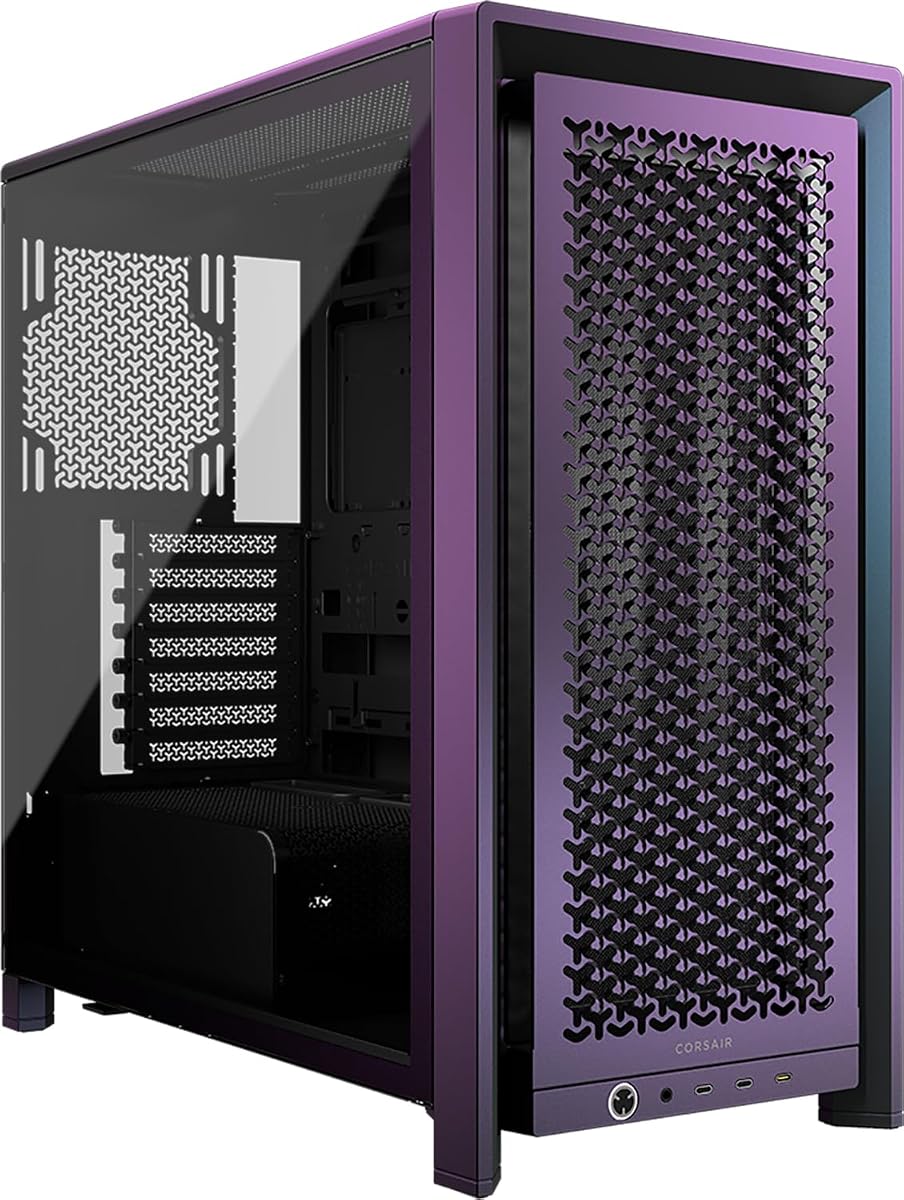
The FRAME 4000D enters the Vault. This inaugural release showcases the stunning Galaxy and Nova unique finishes in a strictly limited run of 1,337 units each. Individually numbered for the ultimate collector.
We may earn a commission when you buy through this link, at no additional cost to you.
FRAME Modular Case System gives new meaning to the word customization. Upgrade the motherboard tray to billet aluminum or swap out your front I/O panel for more USB ports. Options are nearly limitless.
InfiniRail Fan Mounting System offers unmatched flexibility in front and roof fan configuration. Simply slide the rail to mount fans up to 200mm wherever you like ensuring targeted airflow reaches components.
Optimized for high airflow and minimal restriction the steel front panel is perforated in three dimensions with a Y-pattern. Take your cooling to the next level with three mounting locations for 360mm radiators.
The Galaxy finish is unique to this limited run, making it a rare choice for builders wanting a distinct aesthetic not found on standard models.
The FRAME system ensures that your case can evolve with your needs, allowing upgrades that keep the hardware fresh for years.
We may earn a commission when you buy through this link, at no additional cost to you.
Choosing the right case requires understanding airflow design, component clearance, and how your specific hardware will fit.
Look for cases with large perforated or mesh panels on the front and top. This allows cool air to enter easily without resistance. A solid glass front restricts airflow significantly unless it has hidden vents.
Prioritize open mesh designs if you run high-performance CPUs and GPUs that generate substantial heat.
A case with multiple fans included saves you immediate costs. Check if they are PWM or DC fans and if they have RGB lighting. More fans generally mean better intake and exhaust balance.
Ensure you have at least three to four fans pre-installed for optimal thermal performance without extra purchases.
If you plan to use liquid cooling, verify the maximum radiator size supported at the front and top. Look for clearance heights that accommodate both fans and radiator thickness.
Adequate radiator support ensures your liquid cooling loop functions efficiently without obstruction from the chassis walls.
Measure your GPU, CPU cooler, and power supply to ensure they fit. Check for support for E-ATX or large graphics cards up to 400mm. Space for cables also impacts airflow.
Choose a case with enough depth and width to prevent component overlap that blocks air paths.
Effective cable routing keeps air channels clear. Look for grommets, Velcro straps, and tie-down points. Clean interiors prevent airflow turbulence inside the case.
A well-designed cable management system helps maintain consistent cooling across all internal components.
A separate PSU shroud isolates heat from the motherboard. Perforated shrouds allow fresh air to reach the power supply. This prevents heat buildup in the main build area.
Look for open sides or bottoms on the shroud to ensure the PSU does not recirculate hot air.
Newer motherboards route cables to the back for cleaner looks and better airflow. Ensure your case has support for back-connect ATX boards. This allows cables to hide away from hot components.
Back-connect ready cases simplify cable management and maximize usable space inside the chassis.
Dust filters on the front and top intake areas protect internal components. Magnetic filters make removal for cleaning easy. This maintains long-term airflow efficiency.
Prioritize cases with easy-to-clean filters to prevent dust buildup over the years.
Install your motherboard first to check clearances. Connect power supply units carefully to the shrouded area. Ensure cables are routed through designated channels for best airflow.
Set your fan curves in BIOS or software software Match intake and exhaust fans. This balances internal pressure for stable temperatures.
Clean filters every three months. Remove panels to vacuum dust. Maintaining airflow paths extends hardware life.
High airflow cases typically feature mesh front panels and open designs that allow air to enter freely. They often include multiple pre-installed fans to ensure good intake and exhaust. Solid glass fronts usually reduce airflow unless specifically vented for cooling.
More fans help increase air volume but only if the design supports balanced intake and exhaust. You need proper airflow paths to ensure heat is actually expelled from the system. Poorly placed fans might just recirculate hot air internally.
Most high airflow cases support many fan mounting points. You can usually add fans to the top, bottom, or rear. Check the manual to ensure your chosen case has the necessary screw holes and cable connectors.
Not necessarily. High airflow cases excel with air coolers. However, liquid cooling works well in cases with large radiator support. Choose based on your thermal needs and space constraints.
Cables can block airflow if not routed properly. Good cases have channels and straps to hide wires. This keeps air paths clear so hot air can exit without obstruction.
Most support up to 400mm or more. Always check specific dimensions in the product description. If you plan to upgrade graphics cards, ensure enough room for your future hardware.
Yes dust filters trap dust that blocks airflow. Cleaning them every three months ensures consistent cooling. Dust buildup can cause overheating if left unchecked over time.
Glass fronts generally reduce airflow unless they have perforations. If you want good airflow, prioritize mesh panels. You can still enjoy glass on the side for viewing without sacrificing performance.
We reviewed ten excellent options ranging from budget picks to premium models with unique features. Each case offers distinct strengths depending on your build style and cooling needs.
Prioritize mesh panels and pre-installed fans when choosing your next chassis. These features ensure your system stays cool and quiet during use.
Check current availability and listings before purchasing to confirm specs. Prices and stock can change frequently on these models.