
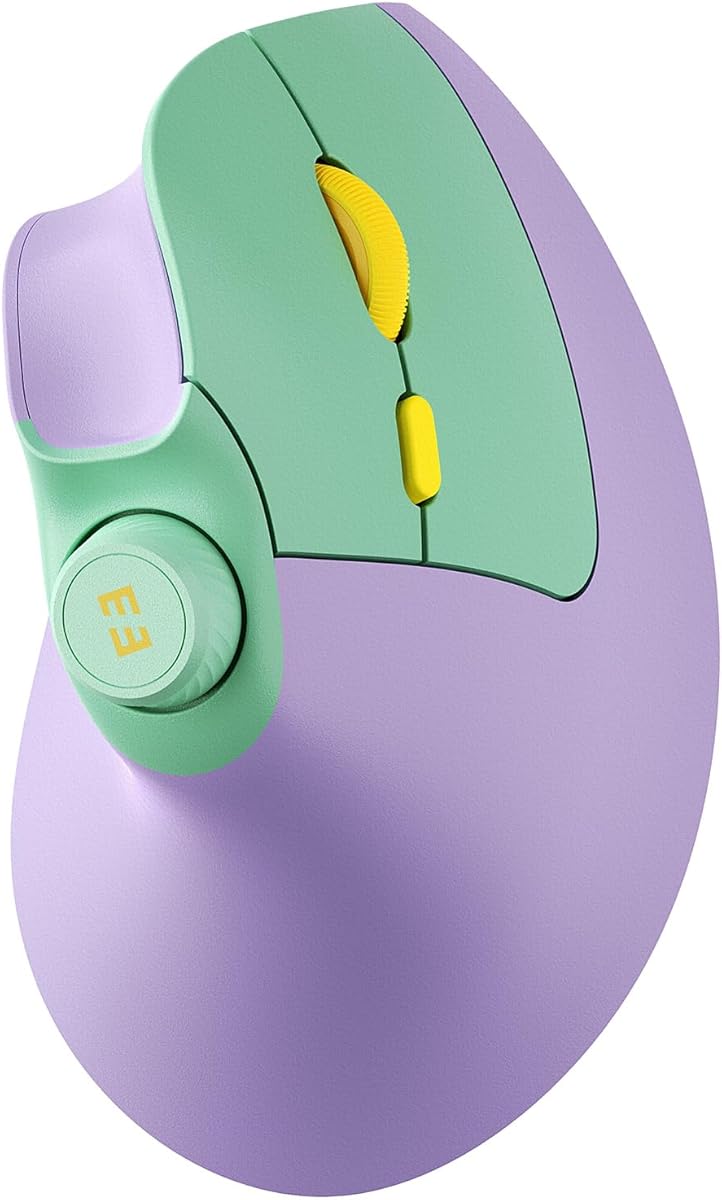
Anker 2.4G Wireless Ergonomic Mouse
4.2Editor score
Neutral handshake position
800 to 1600 DPI
Energy-efficient sleep mode
This guide compares the top ten ergonomic mice for wrist pain to help you find the best vertical design that reduces strain and boosts productivity today.
Prolonged computer use often leads to significant wrist discomfort and repetitive strain injuries. Choosing the right ergonomic mouse can alleviate this pain by promoting a natural handshake position for your hand and forearm.
We evaluated ten leading ergonomic mice based on design, connectivity, battery life, and user feedback. Each product was assessed for its ability to reduce wrist pressure while maintaining precise cursor control for daily tasks.
Our list highlights the best options for various needs, from budget-friendly picks to premium models. Remember that prices and availability change frequently, so check current listings before making your final purchase decision.
4.2Editor score

4.4Editor score

4.4Editor score
Below is a detailed side-by-side comparison of the ten best ergonomic mice designed to combat wrist pain. Each entry highlights key specifications to help you differentiate between connectivity options, sensor performance, and design features.




The Logitech Lift Vertical Ergonomic Wireless Mouse stands out as the top choice for those seeking relief from wrist pain. It combines a thoughtful ergonomic design with a high rating from satisfied users who appreciate its comfort.
We may earn a commission when you buy through this link, at no additional cost to you.
This mouse features a 57-degree vertical angle that lifts your hand into a natural position, reducing forearm strain significantly. The ergonomic certification ensures it meets rigorous standards set by leading ergonomists for daily comfort.
While it may take a short adjustment period, the textured grip and customizable buttons enhance productivity once you adapt. The quiet clicks make it suitable for shared workspaces where noise can be distracting.
Ideal for small to medium hands, this mouse offers reliable wireless connectivity and long battery life. It is a solid investment for anyone looking to improve their workspace ergonomics without compromising on performance.
The vertical design reduces wrist pressure by keeping your hand in a handshake position throughout the workday.
A softly textured grip ensures your hand stays secure and comfortable during extended use sessions.
We may earn a commission when you buy through this link, at no additional cost to you.
The Anker 2.4G Wireless Ergonomic Mouse is an excellent choice for budget-conscious users who still demand comfort. It offers a scientifically designed structure that encourages a healthy neutral wrist and arm position.
We may earn a commission when you buy through this link, at no additional cost to you.
Featuring an optical tracking technology with up to 1600 DPI resolution, this mouse ensures precise cursor control across various surfaces. This sensitivity helps amplify productivity whether you are working or browsing leisure activities.
Although the click sounds are audible, the mouse remains functional and durable for daily use. Its power-saving mode helps extend battery life by disconnecting power after periods of inactivity.
With a hassle-free warranty and convenient design, this mouse provides reliable performance for internet enthusiasts and office workers alike. It is a practical entry point into ergonomic computing accessories.
High sensitivity tracking ensures smooth movement across diverse surfaces for accurate cursor control.
Automatic sleep mode conserves energy by disconnecting power after eight minutes of inactivity.
We may earn a commission when you buy through this link, at no additional cost to you.
The TECKNET Ergonomic Mouse offers seamless switching between three devices using Bluetooth and USB modes. Its vertical design places your palm at a near-vertical angle, reducing pressure on your wrist.
We may earn a commission when you buy through this link, at no additional cost to you.
Equipped with a high-performance chip, it provides six adjustable DPI levels for versatile precision tracking. This makes it suitable for diverse tasks ranging from detailed editing to general browsing.
The silent click buttons allow for quiet usage in libraries or shared offices. Additionally, the mouse automatically enters deep sleep mode to conserve power when not in use.
With a long warranty and broad compatibility, this mouse is a reliable tool for multitasking professionals. It effectively reduces USB port usage while maintaining robust connectivity options.
Connect to two devices via Bluetooth and one via USB to streamline your workflow.
Silent left and right clicks ensure a distraction-free environment for focused work.
We may earn a commission when you buy through this link, at no additional cost to you.
The UGREEN Ergonomic Wireless Mouse is designed for users with larger hands seeking natural comfort. Its vertical handshake position reduces wrist rotation and muscle strain effectively during long sessions.
We may earn a commission when you buy through this link, at no additional cost to you.
Featuring four adjustable DPI levels and PTFE glide feet, this mouse ensures smooth and accurate cursor control. The quiet clicks contribute to a peaceful workspace environment for everyone around you.
With dual wireless options and long battery life, it is a versatile choice for various devices. Smart sleep mode helps extend battery usage significantly between charges.
Ideal for office workstations and laptops, this mouse offers a practical balance of performance and comfort. It simplifies navigation with its efficient layout and reliable connectivity features.
Designed specifically to accommodate larger hands without compromising on ergonomic benefits.
Durable glide pads ensure effortless movement and reduced surface friction for better flow.
We may earn a commission when you buy through this link, at no additional cost to you.
The ProtoArc EM11 NL is a rechargeable ergonomic mouse designed specifically for small to medium hands. It aligns with your natural grip to reduce wrist strain and repetitive strain injuries.
We may earn a commission when you buy through this link, at no additional cost to you.
With a built-in 500mAh Li-Ion battery, you can recharge it easily via Type-C. Connectivity is flexible with dual Bluetooth and USB-A modes for three devices simultaneously.
The vertical design keeps your wrist naturally straight, putting your forearm in a relaxed position. While there is a learning curve, most users find the comfort payoff worth the adjustment period.
This mouse is an eco-friendly alternative to battery-powered mice with silent clicks for focus. It is a smart choice for users who value sustainability and wrist health equally.
Built-in rechargeable battery eliminates waste and saves money over time.
Keeps your wrist naturally straight to promote better posture and less fatigue.
We may earn a commission when you buy through this link, at no additional cost to you.
The Lekvey Ergonomic Mouse encourages healthy neutral wrist and arm positions for smoother movement. Its rechargeable design means you no longer need to buy batteries repeatedly for long-term use.
We may earn a commission when you buy through this link, at no additional cost to you.
With a high-capacity rechargeable battery, it offers over 150 hours of continuous use on a single charge. The page back and forward buttons add convenience for web browsing productivity.
Most customers find it significantly reduces wrist pain after just a few days of adjustment. The 2.4G USB receiver ensures easy plug-and-play setup without drivers.
Ideal for medium or large hands, this mouse delivers a different level of comfort and efficiency. It is a revolutionary option for those tired of traditional wrist-straining devices.
Enjoy over 150 hours of usage on a single charge for convenience and reliability.
Back and forward buttons provide quick access to navigate web pages efficiently.
We may earn a commission when you buy through this link, at no additional cost to you.
The TECKNET Ergonomic Mouse features a natural 52° vertical angle that reduces strain on your forearm and carpal tunnel. Its silent click technology reduces noise by 99% for distraction-free environments.
We may earn a commission when you buy through this link, at no additional cost to you.
It is built with a durable 600mAh rechargeable battery that offers up to 2 months of use after 1.5 hours charging. This eliminates the need for disposable batteries and saves money.
With 6 adjustable DPI levels, it adapts to any task from photo editing to gaming. Side-mounted forward/back buttons help streamline workflows and cut down on repetitive clicking.
This mouse is a robust tool for professionals who value efficiency and quiet operation. Its high durability and smooth tracking ensure performance lasts over the long term.
Whisper-quiet clicks reduce noise by 99% for focused work environments.
Built-in 600mAh battery saves money and waste compared to disposable options.
We may earn a commission when you buy through this link, at no additional cost to you.
The seenda MOU-302 offers ergonomic comfort and a built-in volume control button for multimedia convenience. It promotes a natural handshake grip ideal for workers with wrist strain.
We may earn a commission when you buy through this link, at no additional cost to you.
With 3 multi-device connectivity, you can switch between laptop, tablet, and desktop easily. Its silent and precise mouse design ensures smooth control in shared spaces.
The mouse lasts up to 2 months per charge thanks to a 500mAh battery and USB-C charging. This makes it perfect for travelers and busy professionals needing reliable performance.
Compatible with Windows, macOS, and Android, it is a universal solution for diverse devices. The volume knob boosts efficiency by allowing quick control without switching windows.
Adjust volume directly from the mouse to save time and switch windows faster.
Lasts up to 2 months per charge for convenience and reliability.
We may earn a commission when you buy through this link, at no additional cost to you.
The Logitech MX Vertical Wireless Mouse reduces muscular activity by 10 percent compared to a standard mouse. Its unique 57° vertical angle reduces pressure on your wrist significantly.
We may earn a commission when you buy through this link, at no additional cost to you.
Featuring a 4000 DPI high-precision sensor, it results in 4x less hand movement for reduced fatigue. The cursor speed switch instantly adjusts DPI speed with a touch of a button.
Designed and tested with ergonomist criteria, this mouse improves posture and lowers muscle strain. Its textured rubber surface assures a natural grip for a variety of hand shapes.
Ideal for those seeking a premium ergonomic solution, it delivers comfort without losing performance. The durable form ensures long-term usability for heavy computer users.
Reduces muscular activity by 10 percent compared to standard mice for better health.
Instantly adjust DPI speed with a button press for tailored precision.
We may earn a commission when you buy through this link, at no additional cost to you.
The TECKNET 2.4G Wireless Ergonomic Vertical Mouse lets you hold it like a natural handshake. Its 60° vertical grip keeps your forearm straight and muscles relaxed for better comfort.
We may earn a commission when you buy through this link, at no additional cost to you.
It features 6 programmable buttons and 5 adjustable DPI levels to speed up your workflow. Thumb shortcuts reduce repetitive click fatigue and improve productivity significantly.
Reliable 2.4GHz wireless technology provides a stable connection up to 10 meters without interference. The silent design ensures a quiet workspace that is focused and comfortable.
While it may take three days to adjust, the correction of years of poor posture is worth it. This mouse is a smart investment in your wrist health and daily efficiency.
Six programmable buttons let you customize shortcuts to streamline your workflow.
The 60-degree angle reduces strain by aligning your wrist with your forearm naturally.
We may earn a commission when you buy through this link, at no additional cost to you.
Selecting the right ergonomic mouse involves considering several critical factors that directly impact comfort and usability. This guide breaks down the key elements to evaluate before making your purchase.
The vertical angle of the mouse is crucial for reducing wrist strain. Look for models with angles around 57 degrees as these are proven to keep your hand in a neutral handshake position.
A higher vertical angle generally reduces forearm rotation. Ensure the shape fits your hand size comfortably to maintain long-term ergonomic benefits.
Ergonomic mice come in various sizes to suit small, medium, or large hands. Choosing one that matches your hand length prevents unnecessary strain on your fingers and palm.
Check product descriptions for recommended hand sizes. A proper fit ensures that the grip points align correctly with your hand anatomy.
Most ergonomic mice offer wireless connectivity via Bluetooth or USB receivers. Bluetooth reduces cable clutter while USB receivers provide stable connections without Bluetooth pairing issues.
Decide if you need multi-device switching for productivity. Having both options gives you flexibility across different devices and environments.
Battery life can range from a few months to years depending on the model. Rechargeable batteries are becoming more common for reducing waste and cost.
Consider how often you charge your mouse. Long battery life ensures uninterrupted workflow without frequent interruptions for recharging.
DPI settings control cursor sensitivity and precision. Higher DPI allows for faster movement which is useful for large screens or productivity.
Adjustable DPI levels offer versatility for different tasks. Ensure the sensor tracks smoothly on your desk surface to avoid cursor jitter.
Silent click options are ideal for shared workspaces. Quiet buttons reduce distractions for others and can make your own work experience more focused.
Evaluate the tactile feedback of the buttons. Comfortable clicks enhance usability without causing additional finger fatigue.
Look for extra buttons like back and forward navigation which improve efficiency. Volume controls or customizable shortcuts add value depending on your workflow.
Some models include software for button customization. These features can significantly enhance productivity and reduce repetitive strain.
A robust build quality ensures the mouse lasts for years. Check materials and click durability ratings if available from the manufacturer.
A good warranty provides peace of mind for your investment. Manufacturers offering 36-month warranties usually stand behind their product quality.
When using an ergonomic mouse, adjust your desk height so your forearm rests parallel to the floor. This posture ensures that the vertical angle reduces strain effectively.
Clean the sensor lens regularly with a soft cloth to maintain tracking accuracy. Dust buildup can cause cursor issues that lead to unnecessary adjustments.
Allow yourself a few days to adapt to the new shape. Taking breaks and switching back and forth initially can help your muscles adjust comfortably.
Yes, ergonomic mice promote a natural handshake position that reduces forearm rotation and strain. This alignment decreases pressure on the wrist and can alleviate discomfort over time.
Most users adapt within one to two weeks. During this period, it is normal to feel some resistance as your muscles adjust to the new posture and grip style.
Many ergonomic mice work for casual gaming but may lack high refresh rates needed for competitive play. However, some models with adjustable DPI are versatile enough for both work and leisure.
Bluetooth saves USB ports and is convenient for laptops. USB receivers offer a stable connection and are easier to pair if you face Bluetooth issues on your system.
Most ergonomic mice are compatible with macOS. However, check that side buttons and customization features work correctly with Mac OS before purchasing.
A DPI range of 1000 to 4000 is ideal for most users. Higher DPI is useful for large monitors while lower DPI provides precision for detailed tasks.
Advanced optical sensors can track on glass but performance varies. Using a mouse pad is recommended for consistent and smooth tracking results.
Choosing the right ergonomic mouse is essential for long-term wrist health and productivity. The Logitech Lift offers the best balance of comfort and certification for most users.
Budget shoppers should consider the Anker model while professionals might prefer the premium Logitech MX Vertical for durability and features. Always prioritize ergonomic fit over extra buttons.
Remember to check current prices before buying as they fluctuate frequently. Investing in a quality ergonomic mouse now can save you from costly medical issues later.