
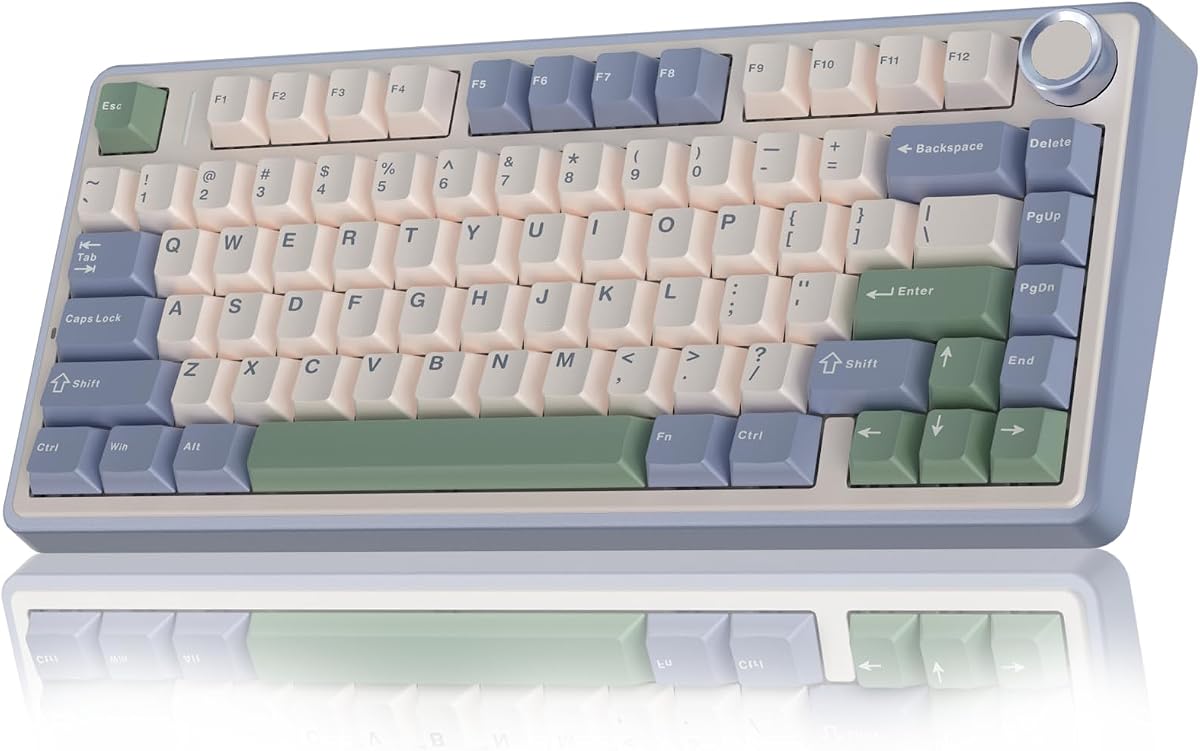
Womier DK75 75% Wireless Gaming Keyboard
4.5Editor score
Silent membrane switches
PBT keycaps
RGB effects
Long battery life
Explore our expert guide comparing the top 10 Green Backlit Gaming Keyboard models for performance, features, and value to help you choose the perfect gaming
Finding the right green backlit gaming keyboard can transform your setup with vibrant aesthetics and reliable performance. These keyboards offer distinct visual flair while ensuring responsive key action for intense gaming sessions and daily productivity tasks alike.
We evaluated ten top-rated models based on connectivity, build quality, customization options, and overall user satisfaction. Our analysis focuses on how each device balances style with functionality to meet diverse needs across different gaming and work environments.
Each pick highlights specific strengths like wireless flexibility, mechanical switches, or compact layouts. Remember that availability and pricing can shift frequently so always check current details before making your final decision on a new peripheral.
4.5Editor score
4.6Editor score
4.8Editor score
This table provides a side-by-side look at key specifications for each of the ten selected models to help you quickly identify the right fit for your specific gaming and typing needs.


The AULA F75 stands out as a top contender with its robust feature set and high user satisfaction. It offers a creamy mechanical typing experience combined with extensive customization options ideal for gamers seeking performance.
We may earn a commission when you buy through this link, at no additional cost to you.
Its tri-mode connectivity allows seamless switching between up to five devices while the hot-swap capability supports future upgrades. The gasket structure and pre-lubed switches deliver a smooth and consistent feel across every keypress.
While the driver software is limited to Windows systems this keyboard still offers ample onboard control through the knob and shortcut keys. The RGB lighting adds a vibrant aesthetic touch that matches the green theme perfectly.
Gamers and power users will appreciate the programmable macros and responsive keys that enhance gameplay efficiency. This model balances premium feel with accessible pricing making it a strong choice for most setups.
Connect to multiple devices instantly using the dedicated side button or shortcut keys for a clutter free workspace.
Enjoy a thocky and creamy sound profile thanks to the five layer sound-dampening structure included in the build.
We may earn a commission when you buy through this link, at no additional cost to you.
The Womier DK75 brings exceptional value to the table with durable PBT keycaps and silent membrane switches. It is an excellent option for those who want a clean look without breaking the bank.
We may earn a commission when you buy through this link, at no additional cost to you.
Its 4000mAh battery ensures you can game or work for days on a single charge. The RGB effects are easy to adjust without software giving you immediate visual control over your setup.
Although it lacks mechanical switches the typing feel is smooth and the design mimics the aesthetic of higher end keyboards. This makes it a great pick for students or casual gamers.
For anyone looking to start their green themed setup affordably this keyboard delivers solid performance. It prioritizes battery life and build materials to ensure long term satisfaction.
PBT material resists wear and oil ensuring your keys stay looking new even after hours of daily use.
Silent membrane switches make it ideal for shared spaces where quiet operation is a priority during late nights.
We may earn a commission when you buy through this link, at no additional cost to you.
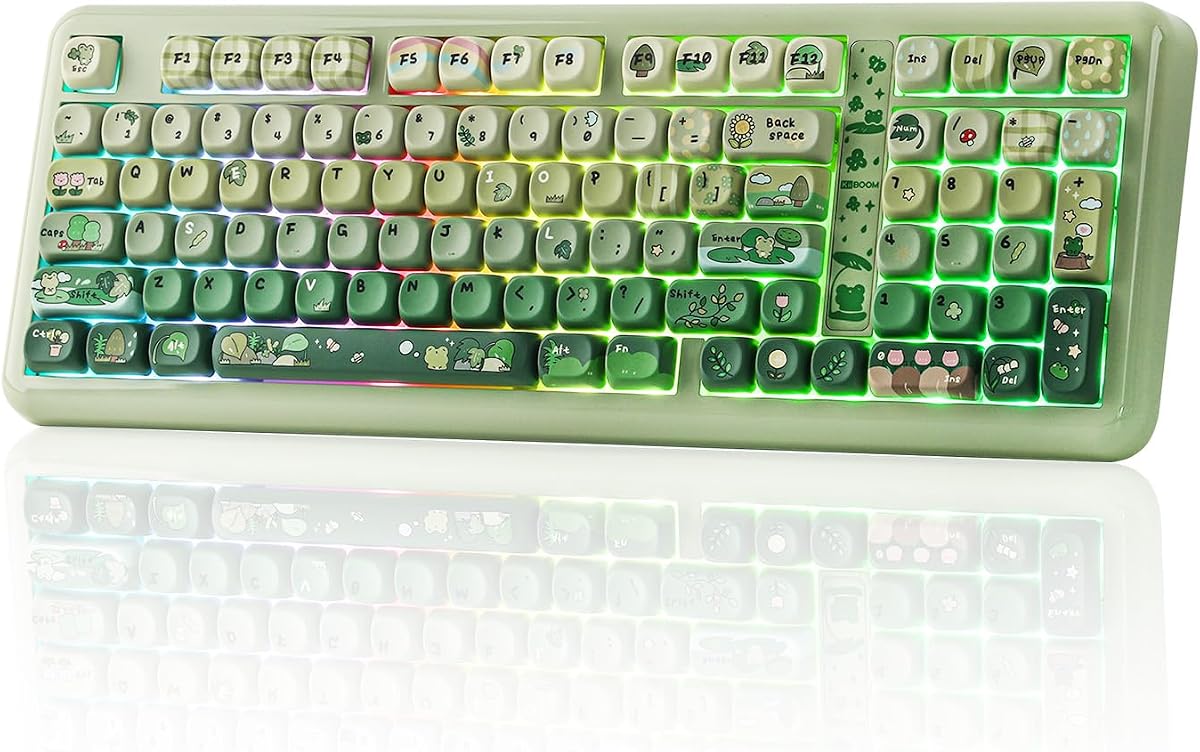
The KiiBoom Phantom98 Lite offers a premium experience with VIA support and a robust 8000mAh battery for extended use. It is tailored for users who demand full control over their input device.
We may earn a commission when you buy through this link, at no additional cost to you.
The gasket mount structure provides a distinct typing feel that reduces noise and improves comfort. Hot-swap compatibility means you can experiment with different switches to find your perfect sound profile.
While the cost is higher than basic options the build quality and feature depth justify the investment for enthusiasts. You get a reliable and highly customizable tool for both work and play.
Enthusiasts and professionals will love the ability to map macros and layers via VIA. This keyboard represents a top tier choice for those ready to invest in a long lasting device.
VIA software allows you to remap every key and macro without needing proprietary driver installations.
The massive battery capacity ensures weeks of usage on a single charge depending on your brightness settings.
We may earn a commission when you buy through this link, at no additional cost to you.
The Womier SK80 features a vibrant color multimedia screen that adds a unique interactive element to your desk. Its design focuses on visual customization alongside mechanical performance.
We may earn a commission when you buy through this link, at no additional cost to you.
With gasket mounting and hot-swap sockets you get a refined typing experience and the freedom to change switches easily. The Frog Green theme provides a fresh and modern look for any setup.
The screen allows you to show custom gifs or connection status which is a fun addition for content creators. It is a solid mechanical keyboard with plenty of personality.
Users looking for a distinctive visual style will appreciate the screen and compact layout. It balances utility and aesthetics well for those who want something different.
The color screen displays status updates and custom images to keep your desk looking lively and personalized.
Gasket mount design helps reduce typing noise for a more immersive gaming experience without distractions.
We may earn a commission when you buy through this link, at no additional cost to you.
The Keymatic Gaming Keyboard offers a practical layout with a number pad and status screen for efficient workflows. It combines a mechanical feel with membrane durability for a balanced experience.
We may earn a commission when you buy through this link, at no additional cost to you.
Its tri-mode connectivity ensures you can link to multiple devices while the large battery keeps it running longer. The RGB lighting is vibrant and adds a nice touch to the green aesthetic.
The built-in iron plate gives it a solid weight that prevents sliding during intense sessions. It is a reliable choice for those who need a full number pad without bulk.
Casual gamers and office workers will find this keyboard offers the right mix of function and style. It delivers a quiet typing environment suitable for shared workspaces.
The 98-key layout includes a full number pad while maintaining a smaller footprint for efficient typing.
Constructed with a built-in iron plate to ensure the keyboard stays firmly in place during use.
We may earn a commission when you buy through this link, at no additional cost to you.
The Owpkeenthy Full Size keyboard delivers a traditional layout with mechanical reliability for those who need a number pad. It uses linear red switches for fast and consistent inputs.
We may earn a commission when you buy through this link, at no additional cost to you.
Its RGB lighting offers 18 modes to suit your mood while anti-ghosting ensures every command is registered accurately. The ergonomic kickstands help maintain a comfortable hand position.
Since it is wired you get stable performance without worrying about battery life or connection issues. The green keycaps add a fresh pop of color to a standard design.
This model is ideal for office and gaming users who prioritize function over wireless convenience. It provides a solid foundation for long typing sessions.
Red switches offer minimal resistance and fast return times for rapid inputs in games.
A wired connection ensures zero latency for competitive gaming without battery anxiety.
We may earn a commission when you buy through this link, at no additional cost to you.
The Aula Nova75 features a TFT smart display that allows for deep customization of gifs and system settings. It combines high-end mechanical features with modern multimedia capabilities.
We may earn a commission when you buy through this link, at no additional cost to you.
Its gasket mount construction and south-facing RGB ensure a premium typing feel and bright lights. The 8000mAh battery supports long gaming sessions without frequent charging.
Dual-color PBT keycaps provide durability and a stylish look that matches the green theme. This keyboard is designed for users who want both performance and visual flair.
If you are looking for a device that doubles as a productivity assistant the Nova75 fits well. It offers robust features in a compact 75% form factor.
Use the TFT display to view real-time system info or custom images directly on the keyboard.
White and green dual-color injection-molded PBT keycaps ensure long-lasting texture and a crisp look.
We may earn a commission when you buy through this link, at no additional cost to you.
The Aula F75 is a standout for its creamy sound profile and solid build quality. It is engineered to reduce noise and provide a smooth typing experience for gamers.
We may earn a commission when you buy through this link, at no additional cost to you.
With a 4000mAh battery and smart power management you get reliable use throughout the day. The hot-swap base supports 3-pin and 5-pin switches for future customization.
Its RGB lighting options are extensive and allow you to sync with your workflow visually. The compact layout saves space while keeping essential keys for gaming.
This model is a strong contender for enthusiasts wanting quality without overspending. It brings high-end features to a more accessible market segment.
Five sound-absorbing layers counteract cavity noise for a cleaner sound signature.
The 75% layout pairs space efficiency with a colossal 4000mAh rechargeable battery.
We may earn a commission when you buy through this link, at no additional cost to you.
The Redragon K742 offers advanced QMK/VIA support for users seeking maximum control over key mapping. It features a gasket structure for a satisfying and quiet typing feel.
We may earn a commission when you buy through this link, at no additional cost to you.
Its battery lasts for up to 53 hours without backlighting and includes spare switches in the box. The 98% layout saves desk space while retaining full functionality.
You can customize layers and macros extensively through the open source software. It is ideal for power users who want to tailor their input device to the letter.
This keyboard balances high-end customization with reliable everyday performance. It is a strong choice for those willing to invest time into tuning.
VIA support gives you endless possibilities in remapping keys and automating repetitive macros.
Five-layer sound-absorbing paddings create a silent and satisfying typing feel.
We may earn a commission when you buy through this link, at no additional cost to you.
The AULA S99 brings a vintage aesthetic with modern wireless features and programmable shortcuts. It supports Bluetooth 5.0 and 2.4GHz modes for flexible connectivity.
We may earn a commission when you buy through this link, at no additional cost to you.
Its dual-mode rotary knob allows quick switching between gaming and office modes with ease. The 96% layout keeps the numeric keypad while saving valuable desk space.
Although it uses membrane switches the keyboard offers smooth typing and a quiet experience suitable for shared offices. The foldable stand helps improve wrist comfort during long sessions.
Users who prefer a retro look with modern convenience will find this keyboard appealing. It is a practical and stylish option for mixed work and gaming use.
The rotary knob design lets you quickly switch between gaming and office modes instantly.
The 96% layout combines vintage aesthetics with modern craftsmanship and frees up more desktop space.
We may earn a commission when you buy through this link, at no additional cost to you.
Selecting the right keyboard involves considering several key factors that affect performance comfort and longevity. This guide breaks down the essential features to help you make an informed choice.
Mechanical switches offer tactile feedback and durability while membrane keyboards provide a quieter experience at a lower cost. For gaming mechanical switches are generally preferred for their faster actuation points and consistent feel.
Consider if you prefer linear or clicky switches based on your environment and gaming style.
Choose between wired or wireless options depending on your need for portability versus zero latency. Tri-mode keyboards allow you to connect via Bluetooth 2.4GHz and USB-C for maximum flexibility.
Ensure the wireless connection supports fast data transmission to avoid lag during competitive gaming.
Wireless keyboards require sufficient battery capacity to last through your sessions without frequent recharging. Models with 4000mAh or higher batteries can operate for days on a single charge.
Look for fast charging features and auto-sleep modes to conserve power effectively.
Compact layouts like 75% or 96% save desk space while retaining essential keys for gaming and productivity. Full-size keyboards offer a numeric keypad which is useful for data entry and calculations.
Select a layout that fits your desk size and usage requirements without sacrificing needed functionality.
Features like hot-swap sockets allow you to replace switches without soldering giving you more control over sound and feel. RGB lighting customization adds to the personalization of your setup.
Software support for macros and key remapping can significantly boost your efficiency in games and apps.
A keyboard with a solid frame and PBT keycaps will withstand wear and tear over time. Gasket mounts improve comfort by reducing flex and noise during typing.
Higher quality materials ensure your investment lasts longer and maintains a consistent feel daily.
An ergonomic design with adjustable tilt and wrist support can reduce strain during extended use. Comfortable typing angles prevent fatigue and improve your overall productivity.
Look for models with foldable stands or built-in wrist rests for better support during long sessions.
Prices vary widely from budget-friendly membrane models to premium mechanical options with advanced features. Determine how much you are willing to spend on based on the features you need most.
Balance cost with performance to find a keyboard that fits your financial constraints without compromising essential features.
To get the most out of your new keyboard start by connecting it to your device via the preferred method such as Bluetooth or USB-C. Once paired use the function keys to adjust backlighting and settings to your preference.
Clean the keyboard regularly using compressed air to remove dust from under the keys and a soft dry cloth for the surface. Avoid using liquids that could damage the electronic components inside.
Update firmware and drivers periodically through the manufacturer's website to ensure you have the latest features and bug fixes. Store your keyboard in a dry place when not in use to preserve its condition.
Hot-swappable switches allow you to change individual switches without soldering which makes it easy to customize the sound and feel of your keyboard. This feature is useful for trying different switches or replacing broken ones quickly.
Most keyboards listed support Mac but some software features may be Windows only. Always check the product specs for macOS compatibility before purchasing to ensure all functions work as expected.
Membrane keyboards are durable and typically last for millions of keystrokes. They are designed to withstand daily use but may not offer the same tactile precision as mechanical keyboards over time.
Yes modern wireless gaming keyboards offer low latency connections comparable to wired options. They are suitable for competitive play provided the connection is stable and the battery is charged.
Many models include programmable macro support via software or onboard memory. You can record complex sequences to execute with a single keypress to improve your efficiency in games.
Look for keyboards with gasket mounts and pre-lubed switches which help dampen sound. Silent switches and lower brightness settings can also help reduce noise in shared spaces.
Wireless gaming keyboards usually offer anywhere from 10 to 50 hours depending on RGB settings. Higher battery capacity models can last for several days on a single charge.
Yes most models allow you to customize RGB colors and effects either through software or onboard controls. This flexibility lets you match the keyboard to your setup or personal style.
The AULA F75 leads our list for its balance of mechanical performance and versatility making it ideal for most gamers. The Womier DK75 offers great value for budget conscious buyers while the KiiBoom Phantom98 Lite serves enthusiasts seeking customization.
Prioritize features like connectivity and battery life based on how you use your desk. A model that fits your workflow will provide the best long-term experience and satisfaction.
Always verify current availability and warranty details before making your purchase to ensure you get the best deal. These keyboards combine style with functionality to enhance your gaming environment.