
MINISFORUM MS-01
4.5Editor score
PCIe 4.0 x16 Slot
Dual 10Gbps SFP+ Ports
Enterprise Grade Storage Support
This guide compares the top Intel Core i9 Mini PC models for performance, connectivity, and value to help you choose the best compact desktop for your needs.
The market for compact computing has evolved rapidly with powerful processors now fitting into tiny chassis. An Intel Core i9 Mini PC offers desktop-class performance in a space-saving design ideal for modern offices and homes.
We evaluated ten leading models based on processor speed, memory capacity, storage options, and connectivity features. Our analysis focuses on real-world utility for creators, professionals, and enthusiasts seeking efficiency.
Each pick highlights unique strengths from triple displays to AI capabilities. Remember that pricing fluctuates often so check current deals before finalizing your purchase decision for the best value today.
4.5Editor score

4.5Editor score

4.5Editor score
This table provides a side-by-side look at the key specifications and features of the top ten Intel Core i9 Mini PC models available in the market.


The MINISFORUM M1-1390 stands out as a top contender in the compact desktop space with its powerful Intel Core i9 processor offering exceptional multi-core performance for demanding tasks.
We may earn a commission when you buy through this link, at no additional cost to you.
Its configuration includes 32GB of DDR4 RAM and a fast 1TB SSD ensuring smooth multitasking and quick load times for creative applications and large file transfers alike.
Users appreciate the triple display capability which significantly boosts productivity for traders and designers who need multiple screens without a cluttered desk setup.
This machine is ideal for professionals seeking a balance of power and space efficiency making it a reliable choice for home offices and small workspaces.
The 13900HX processor features 8 performance cores and 16 efficiency cores to intelligently manage workloads and maintain high clock speeds when needed.
Dual M.2 slots allow for massive storage expansion up to 8TB total which is perfect for media editors and gamers with large libraries.
We may earn a commission when you buy through this link, at no additional cost to you.
The Beelink GTi13 distinguishes itself with premium features like Thunderbolt 4 and DDR5 memory making it a high-end choice for users requiring fast data transfer rates.
We may earn a commission when you buy through this link, at no additional cost to you.
Its unique AI voice interaction system allows for hands-free control and multi-person conference capabilities which enhances usability in meeting rooms and smart home setups.
Security is enhanced by the built-in fingerprint sensor enabling quick secure logins without needing external peripherals for access control.
This model is best suited for tech enthusiasts and enterprise users who value cutting-edge interfaces and advanced security features in a compact form factor.
Supporting 40Gbps data transfer and 100W power delivery this port enables versatile docking solutions and high-speed storage expansions.
The MSC2.0 cooling system ensures the device runs efficiently even under heavy loads by balancing airflow with minimal noise output.
We may earn a commission when you buy through this link, at no additional cost to you.
The KAMRUI Hyper H2 delivers impressive performance at a budget-friendly price point using the latest 14th Gen Intel Core i9-14900HX processor.
We may earn a commission when you buy through this link, at no additional cost to you.
Its professional-grade cooling system with dual copper heat pipes ensures stable operation even during intensive tasks like 3D rendering or long gaming sessions.
The compact size and included VESA mount make it easy to hide behind monitors keeping workspaces clean and organized for maximum efficiency.
Buyers looking for raw performance without breaking the bank will find this model to be a strong contender offering flagship features at an accessible cost.
The all-copper structure increases thermal conductivity significantly allowing the CPU to maintain high clock speeds for longer periods.
With HDMI 2.0 DP 1.4 and USB-C ports it supports triple 4K display setups ideal for multitasking workflows.
We may earn a commission when you buy through this link, at no additional cost to you.
The MINISFORUM NAB9S is uniquely tailored for network-intensive applications with its dual 2.5G Ethernet ports which are essential for routing and storage aggregation.
We may earn a commission when you buy through this link, at no additional cost to you.
It supports up to four independent displays allowing for extensive multitasking and monitoring capabilities that are rare in mini PC form factors.
The tool-free removable top cover simplifies upgrades for memory and storage making it a user-friendly option for those who like to modify their hardware.
This model is a smart choice for network engineers and power users who need robust connectivity and flexibility without the bulk of a tower.
Dual Ethernet ports enable link aggregation and failover setups providing high availability for home labs and small business servers.
Dual HDMI and dual USB-C video outputs allow for a quad-screen setup that maximizes workspace utility significantly.
We may earn a commission when you buy through this link, at no additional cost to you.
The MINISFORUM MS-01 is a powerhouse workstation that breaks the mold of mini PCs with its full size PCIe 4.0 x16 slot for discrete graphics.
We may earn a commission when you buy through this link, at no additional cost to you.
It offers enterprise-grade networking with dual 10G SFP+ ports ideal for NAS servers and high-throughput environments requiring massive data speeds.
Support for three M.2 NVMe drives allows for RAID configurations providing both high capacity and data redundancy for critical professional projects.
This unit is perfect for IT professionals and creators who need the expandability of a tower PC in a smaller footprint without compromising power.
The standard PCIe slot allows installation of high-performance external GPUs making it viable for professional 3D rendering and gaming.
10Gbps SFP+ ports support link aggregation which significantly boosts throughput for file servers and data transfers.
We may earn a commission when you buy through this link, at no additional cost to you.
The GEEKOM IT13 MAX leverages Intel's Ultra 9 185H processor with an integrated NPU to deliver powerful AI capabilities locally without cloud dependency.
We may earn a commission when you buy through this link, at no additional cost to you.
Its silent operation makes it suitable for hospitals and schools where noise levels must remain low despite sustained high performance usage.
A three-year warranty offers peace of mind for business users who need reliable hardware that can withstand daily operational demands.
This PC is best for developers and enterprises interested in privacy-focused AI applications that require robust local processing power.
Run LLMs and vision models locally ensuring sensitive data stays on-device without risking privacy breaches.
Rigorous testing and a comprehensive warranty make it a dependable choice for shared environments like labs.
We may earn a commission when you buy through this link, at no additional cost to you.
The Barebone version of the MS-01 workstation provides a flexible foundation for users who wish to choose their own RAM and storage configurations.
We may earn a commission when you buy through this link, at no additional cost to you.
Its PCIe x16 slot allows for discrete graphics card integration giving it the versatility of a full desktop tower within a compact unit.
The inclusion of dual 10G SFP+ ports ensures that network speeds remain fast enough for professional server and storage applications.
This option is ideal for IT admins who prefer to manage component quality and selection directly for specialized enterprise builds.
Build your system with specific RAM and drives to meet exact performance and budget requirements without being locked in.
Support for external GPUs means you can boost graphics performance for rendering or gaming without buying a new PC.
We may earn a commission when you buy through this link, at no additional cost to you.
The GEEKOM XT13 Pro stands out for its generous configuration of 32GB RAM and a massive 2TB SSD providing ample space for heavy workflows.
We may earn a commission when you buy through this link, at no additional cost to you.
Its three-year hardware coverage ensures reliable long-term performance which is a significant advantage over many competitors offering only one-year terms.
Local fast repair support minimizes downtime making it a reliable choice for business environments where system availability is critical.
This model is excellent for office users and creators who want a high-spec unit with strong warranty protection right out of the box.
Three years of hardware protection plus lifetime professional guidance provides significant value and peace of mind.
A 2TB SSD reduces the immediate need for external storage solutions simplifying setup and file management.
We may earn a commission when you buy through this link, at no additional cost to you.
The GEEKOM GT13 MAX combines powerful Intel Ultra 9 processing with an AI NPU to handle local document summarization and OCR tasks securely.
We may earn a commission when you buy through this link, at no additional cost to you.
It supports up to four 8K displays making it a unique choice for visualization professionals requiring ultra-high resolution output across multiple screens.
The IceBlast cooling system ensures quiet operation while maintaining performance which is beneficial for shared office spaces.
This PC is best suited for professionals who value privacy and require top-tier display capabilities alongside advanced AI productivity tools.
Keep sensitive documents on-device while using AI for transcription and summaries without sending data to the cloud.
Wi-Fi 7 support ensures your network connection stays fast and stable for the years to come.
We may earn a commission when you buy through this link, at no additional cost to you.
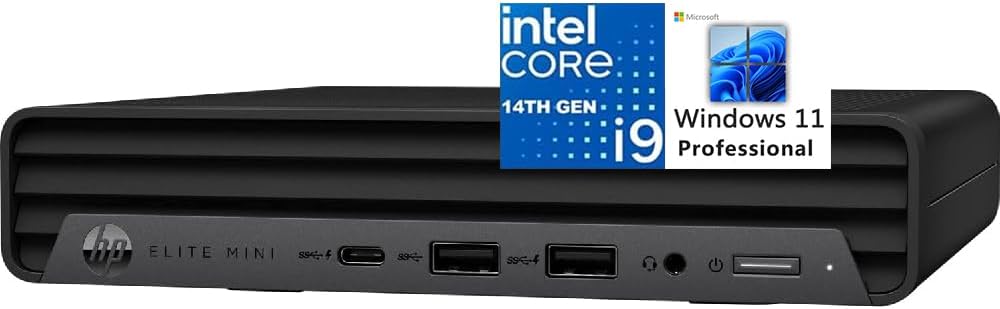
The HP Elite Mini 800 G9 brings enterprise-grade reliability and the latest 14th Gen Intel Core i9 processor to the business desktop market.
We may earn a commission when you buy through this link, at no additional cost to you.
Its ultra-quiet design makes it perfect for open office environments where noise reduction is a priority for employee focus and productivity.
Windows 11 Pro with full keyboard and mouse included offers a complete out-of-the-box solution that simplifies procurement for business buyers.
This model is the ideal choice for corporate IT departments needing robust security features and reliable performance in a professional form factor.
Windows 11 Pro provides enhanced security protocols and management tools essential for protecting corporate data.
The cooling design ensures the unit runs quietly even under load which helps maintain a peaceful office atmosphere.
We may earn a commission when you buy through this link, at no additional cost to you.
Selecting the right mini PC involves balancing performance needs with physical constraints and budget. This guide covers the essential factors to consider.
Intel Core i9 processors come in various generations such as 13th 14th and Ultra series. Newer generations often provide better efficiency and AI capabilities which can impact daily workflow speed significantly.
Always check the specific model number like 13900HX versus 13900H to understand thermal limits and sustained performance differences.
DDR5 memory offers faster data transfer speeds compared to DDR4 which benefits applications like video editing and 3D rendering heavily.
Ensure the unit has enough RAM for your tasks such as 32GB for professional work and verify if it is expandable for future needs.
PCIe 4.0 SSDs are standard now providing quick boot times and fast file access. Look for models with multiple M.2 slots if you need to store large media libraries.
Dual storage setups allow you to separate system files from data improving overall system stability and speed.
Consider the number and type of video outputs required for your monitors. USB4 and Thunderbolt ports are valuable for high-speed docking and charging.
Ethernet speed matters for large file transfers so 2.5G or 10G ports are beneficial for power users and network admins.
Mini PCs can run hot under load so look for features like dual fans copper heat pipes or metal chassis design for better heat dissipation.
Effective cooling prevents throttling ensuring the CPU stays at peak performance during long rendering or gaming sessions.
Multi-monitor setups are common for productivity so check the max resolution and number of screens supported by the graphics output.
4K support is standard but triple or quad 4K capabilities offer significant productivity boosts for traders and designers.
Some models offer PCIe slots or removable covers for easy upgrades which extends the lifespan of the device.
If you plan to add a GPU or more storage later verify that the chassis supports these changes physically.
A longer warranty period indicates confidence in build quality and provides security for your investment over time.
Business users should look for brands with local repair options to minimize downtime in case of hardware failures.
Position your mini PC in a well-ventilated area to allow airflow through the vents. Avoid placing it on soft surfaces like carpets which can block air intake.
Use a high-quality power supply and surge protector to protect sensitive electronics from power fluctuations. Ensure all cables are securely connected to prevent accidental dislodging.
Perform regular software updates to keep the system running smoothly. Periodically check for dust buildup on vents and clean them with compressed air to maintain cooling efficiency.
Yes they are excellent for video editing due to their high core counts and fast processing speeds. Models with dedicated VRAM or PCIe slots handle 4K timelines well. Always ensure you have ample RAM for smooth playback.
Most models in this list support dual or even triple monitor setups via HDMI and DisplayPort connections. Check the specific output ports on the unit to confirm compatibility with your display types.
Many models feature accessible slots for RAM and SSD upgrades but some may be soldered. Review the product details for expansion options before purchasing to ensure future flexibility.
With proper care these devices often last five to seven years. Thermal paste replacement and regular cleaning can extend performance stability significantly over time.
They can handle light gaming and esports titles well thanks to powerful processors. However for AAA gaming you may need models with dedicated GPU expansion capabilities like the MS-01.
Most units come with Windows 11 Home or Pro pre-installed but some barebone versions require you to install the OS yourself. Always check the package contents for OS inclusion.
The MINISFORUM M1-1390 and MS-01 offer the best overall balance of power and expandability for most professional users.
Prioritize your specific needs such as port selection and thermal design when selecting a model to ensure it fits your workflow perfectly.
Remember to verify current pricing and availability as these deals change frequently to get the best value for your investment.