
TECKNET Laptop Cooling Pad
4.5Editor score
Triple efficient cooling fans
Dual USB port design
Wide laptop compatibility range
Explore our expert guide comparing the top 10 laptop overheating solutions for October 2026. We review cooling pads, stands, and accessories to keep your
Laptop overheating can severely impact performance and hardware lifespan. Whether you game, edit video, or work remotely, keeping your machine cool is essential for reliability and comfort during extended use sessions daily.
We evaluated ten top-rated cooling products based on airflow design, ergonomics, noise levels, and portability. Each option offers unique benefits tailored to different laptop sizes and user needs for optimal thermal management.
Every pick includes key specs, pros, cons, and real-world insights. Note that prices and availability change frequently, so verify current details before purchasing to ensure you get the best value for your setup.
4.5Editor score

4.4Editor score

4.6Editor score
This table offers a side-by-side look at all ten cooling solutions, highlighting key specs like fan count, adjustability, and size compatibility to help you quickly find the right fit.




The havit HV-F2056 is our top recommendation for users seeking reliable cooling without noise. With three ultra-quiet fans and a metal mesh surface, it maintains optimal airflow for 15.6 to 17-inch laptops while keeping noise levels minimal.
We may earn a commission when you buy through this link, at no additional cost to you.
Its ergonomic design doubles as a stand with two adjustable height settings, improving posture during long work sessions. The extra USB port allows you to connect peripherals without using up your laptop’s limited ports, enhancing convenience significantly.
While it lacks RGB lighting and uses USB-A cabling, the trade-off is a quieter and more durable experience. The USB-to-USB connection requires an adapter for Type-C devices, but the cooling performance justifies this minor limitation.
Ideal for office workers and gamers alike, this pad delivers consistent thermal management. If you value silence and stability over flashy features, the havit HV-F2056 is the best choice for your cooling needs.
The three fans operate at low decibels, ensuring focus isn’t disrupted by background noise during work or gaming sessions.
Two adjustable height settings elevate your laptop, reducing neck strain and improving typing comfort over extended periods.
We may earn a commission when you buy through this link, at no additional cost to you.
TECKNET’s cooling pad stands out for its budget-friendly price and powerful triple-fan system. With fans spinning at 1200 RPM, it effectively pulls cool air from the bottom to prevent overheating during intense use.
We may earn a commission when you buy through this link, at no additional cost to you.
Its dual USB ports allow you to power the cooler while connecting external devices like keyboards or mice. The blue LED indicators confirm active status, and the included lifetime support ensures long-term customer satisfaction.
The design is straightforward without flashy lights, but it focuses on functionality. While it uses a USB-A to USB-A cable, the performance per dollar makes it a standout choice for students and casual users.
This pad is perfect for anyone needing reliable cooling without breaking the bank. If you prioritize efficiency and support over aesthetics, TECKNET offers one of the best values in the category.
Triple fans operating at 1200 RPM ensure rapid heat dissipation even during gaming or heavy multitasking.
Dual USB ports free up your laptop’s ports for peripherals while keeping the cooler powered and ready.
We may earn a commission when you buy through this link, at no additional cost to you.
The Thibault Aluminum Stand takes a passive approach to cooling, relying on airflow and elevation. Crafted from sturdy aluminum alloy, it elevates your laptop for better ventilation and adds a professional look to any workspace.
We may earn a commission when you buy through this link, at no additional cost to you.
Its ventilated design ensures air circulates beneath the device, naturally lowering internal temperatures. The stand supports laptops from 13 to 17 inches, making it a versatile choice for various brands and models.
While it lacks fans, the passive method eliminates noise and power dependency entirely. This makes it ideal for quiet environments or users who prefer a minimalist setup without cables or electricity.
Choose this stand if you value aesthetics, durability, and silent operation. It’s a premium investment for those seeking long-term ergonomic benefits and reliable thermal management without active cooling.
Crafted from robust aluminum, this stand ensures long-lasting performance and a sleek appearance.
Ventilated structure enhances passive airflow to keep your device cool without any electricity.
We may earn a commission when you buy through this link, at no additional cost to you.
Kootek offers a robust cooling solution with five built-in fans of varying sizes. This multi-fan setup provides extensive coverage across the laptop surface, ensuring even heat dissipation for 12 to 17-inch devices.
We may earn a commission when you buy through this link, at no additional cost to you.
Its ergonomic stand features six adjustable height settings, offering customizable viewing angles for different tasks. The dual USB hub adds connectivity options, allowing you to attach peripherals while the fans run.
While the switch controls can be slightly complex, the performance speaks for itself. The blue LEDs and stopper design enhance usability, making it a strong contender for users seeking advanced features.
This pad is ideal for power users who need maximum airflow and adjustability. If you want precise control over fan usage and height, Kootek delivers an excellent feature set.
Five fans of different sizes ensure complete airflow across your laptop for superior cooling.
Six height settings allow precise customization of your laptop angle for better posture and comfort.
We may earn a commission when you buy through this link, at no additional cost to you.
The KeiBn pad is specifically designed for laptops ranging from 10 to 15.6 inches. Its dual-fan system delivers efficient cooling for mid-sized devices, while the five height stands ensure ergonomic comfort.
We may earn a commission when you buy through this link, at no additional cost to you.
A unique feature is the hideable phone stand, which keeps your device within reach during multitasking. The two USB ports maintain connectivity without using your laptop’s internal ports, adding practical utility.
While it’s not suited for larger machines, the convenience for smaller setups is unmatched. The baffle prevents slipping, and the LED indicator helps track active status easily.
This is a top choice for students and remote workers using 15.6-inch machines. If you need a compact, multi-functional cooler with phone support, KeiBn offers great versatility.
A hidden side holder keeps your smartphone visible and accessible while you work on your laptop.
Built-in baffles prevent your laptop from sliding, ensuring safety during intense typing or gaming sessions.
We may earn a commission when you buy through this link, at no additional cost to you.
Hagibis takes portability to the next level with its magnetic, portable cooler balls. These tiny feet lift your laptop to enhance natural airflow without needing any cables or power sources.
We may earn a commission when you buy through this link, at no additional cost to you.
The silica gel pads protect both your desk and laptop from scratches while providing a skid-proof surface. Weighing only 1.76oz, they easily fit in pockets, making them perfect for travelers.
While they don’t offer active cooling, they provide efficient passive heat dissipation. This makes them suitable for light use and devices where battery life and weight are priorities.
If you travel often or work in various locations, these are an invaluable accessory. They’re a simple yet effective solution for keeping your MacBook or other laptops cool on the go.
Tiny and lightweight design ensures it doesn’t add bulk to your bag or daily carry.
Strong magnetic suction keeps the cooling feet securely in place under your laptop during use.
We may earn a commission when you buy through this link, at no additional cost to you.
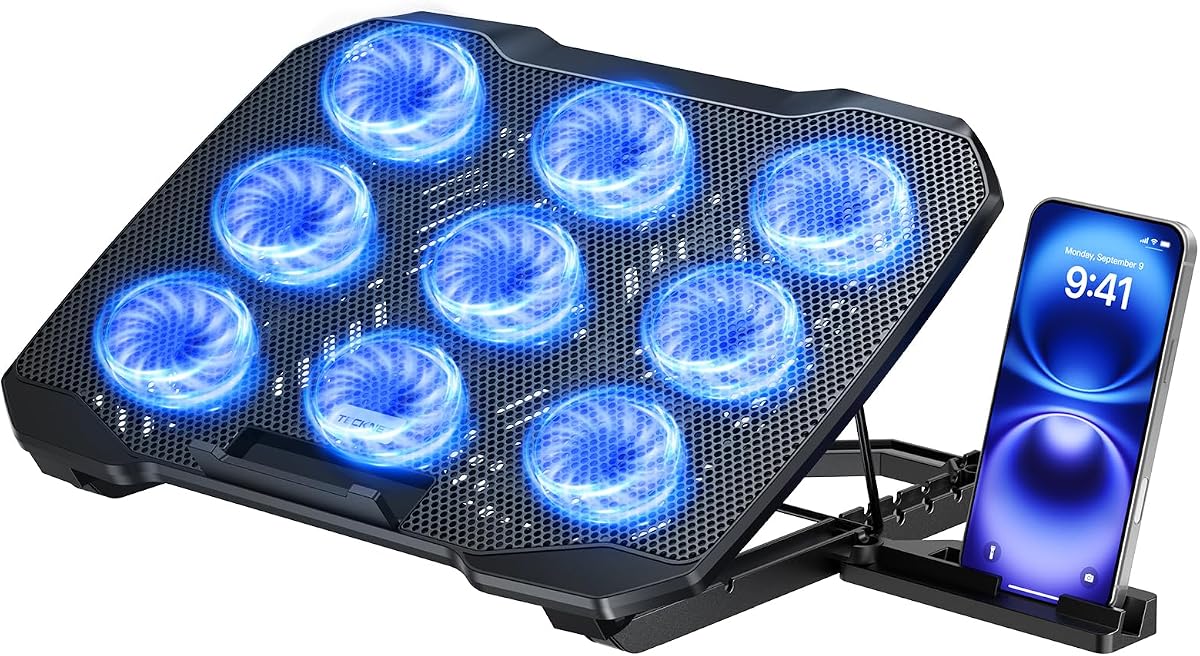
For maximum airflow, this TECKNET model delivers nine high-performance fans with speeds up to 2600 RPM. The 360° surround airflow quickly dissipates heat to avoid overheating and lag during gaming.
We may earn a commission when you buy through this link, at no additional cost to you.
Its five-level height adjustment allows you to raise the stand up to six inches and tilt up to 34 degrees. The LED brightness syncs with fan speed, providing visual feedback on operating status.
The dual USB ports free up your laptop’s connections for other devices. A built-in phone holder keeps your mobile within sight, enhancing productivity during long sessions.
This is an ideal pick for gamers and power users who need aggressive cooling. If you prioritize raw performance over noise, this pad offers unmatched thermal management power.
Up to 2600 RPM speed ensures intense cooling for demanding applications and extended sessions.
Nine fans provide all-around airflow to prevent hotspots across your entire laptop surface.
We may earn a commission when you buy through this link, at no additional cost to you.
AIMIUZI offers a well-balanced solution with five quiet fans and a honeycomb metal mesh. The design focuses on efficiency, keeping laptops cool without excessive noise or power consumption.
We may earn a commission when you buy through this link, at no additional cost to you.
Five angle adjustments and a flip-up anti-slip pad provide ergonomic flexibility and stability. The USB-powered system ensures easy setup, while the speed wheel allows you to adjust fan intensity as needed.
While it lacks extra features like a phone holder, its core performance is solid. The 12-month warranty and friendly service add confidence for buyers looking for dependable cooling.
This pad is great for general users who need consistent cooling. If you value simplicity and quiet operation, AIMIUZI delivers a reliable experience for daily tasks.
Honeycomb structure enhances airflow efficiency while maintaining a sleek and sturdy build.
Five angle settings let you find the perfect ergonomic position for work or gaming.
We may earn a commission when you buy through this link, at no additional cost to you.
TECKNET’s targeted design draws air directly to the center of your laptop, focusing cooling where the CPU gets hottest. Two large 110mm fans provide adjustable speeds for either quiet work or intense gaming.
We may earn a commission when you buy through this link, at no additional cost to you.
Its flat base makes it suitable for use on your lap, isolating heat between the computer and your legs. The USB-C and A dual ports offer compatibility with MacBooks and most standard laptops.
While it is portable, it is not as thin as some competitors. However, the ability to use it on your lap without discomfort makes it a versatile choice for flexible work environments.
This pad is perfect for students and workers who need lap-friendly cooling. If you want targeted airflow and portability, TECKNET provides a reliable solution.
A flat base design isolates heat, allowing comfortable use on your lap for extended periods.
Internal channel design directs cool air straight to the CPU hotspot for efficient cooling.
We may earn a commission when you buy through this link, at no additional cost to you.
Targus offers a comfortable and ergonomic work surface with a soft neoprene base. This material cushions your lap, making extended use more comfortable while dual fans disperse heat effectively.
We may earn a commission when you buy through this link, at no additional cost to you.
The open mesh top ensures constant airflow, and four rubber stops keep your laptop stable. Its ergonomic tilt makes typing easy on your hands and wrists during long tasks.
While the soft base may wear over time, it provides superior comfort compared to rigid metal options. This makes it ideal for users who often work from couches or beds.
Choose this mat if comfort and lap usage are your priority. It balances cooling with a soft surface that protects both your legs and your laptop during daily use.
Soft neoprene cushioning provides superior comfort for lap use without hard edges.
Open mesh top ensures constant airflow to keep your laptop cool during intensive use.
We may earn a commission when you buy through this link, at no additional cost to you.
Choosing the right cooling solution depends on your laptop size, usage patterns, and comfort needs. This guide outlines key factors to consider.
More fans or higher RPM generally mean better airflow, but they can also increase noise levels. Look for adjustable speed settings to balance performance with a quiet environment.
Choose higher RPM for gaming and lower speeds for office work to maintain focus.
Ensure the cooling pad matches your laptop size, from 12 to 17 inches. Larger pads may not fit smaller desks, while smaller ones won’t cover the entire device.
Check specifications carefully to confirm the range matches your device dimensions.
Adjustable height settings improve posture and reduce strain on your neck and wrists. A stand that tilts or elevates your screen helps maintain a healthy working position.
Prioritize models with multiple height options for long-term comfort during extended use.
Metal mesh surfaces offer better airflow and durability compared to plastic. Aluminum stands provide premium aesthetics but may lack active cooling features.
Select robust materials that resist wear while ensuring stability on your desk.
Some pads include extra USB ports to connect peripherals like mice or drives. This feature keeps your laptop’s ports free for other essential devices.
Verify USB-C vs. USB-A compatibility to ensure it works with your specific setup.
Quiet operation is critical for shared spaces or focus-oriented tasks. Look for products with decibel ratings below 40 dB for a distraction-free experience.
If noise is a concern, prioritize pads with whisper-quiet fan technology.
Active cooling pads require power, often via USB from your laptop. Passive stands don’t need electricity but may offer less aggressive heat dissipation.
Decide between active or passive based on whether you prioritize silence or raw cooling power.
If you travel often, consider lightweight and slim designs. Some models even include foldable stands or detachable fans to reduce bulk.
Pick compact options with protective features to ensure your device stays safe during transit.
Place the cooling pad on a flat surface to ensure stability and proper airflow. For stands, adjust the height to match your eye level and typing comfort before starting work.
Keep the fan vents and mesh surface free of dust by regularly wiping them with a soft cloth. Dust buildup can restrict airflow and reduce cooling efficiency significantly over time.
If your laptop supports USB power, connect the cooling device directly to a powered port. Avoid using unpowered hubs, as they may not supply enough energy to run the fans effectively.
Yes, they significantly reduce internal temperatures by improving airflow. Active fans pull cool air into vents while passive stands elevate the laptop for natural dissipation.
Pads with multiple high-RPM fans are ideal for gaming. They handle the extra heat load generated by demanding applications better than passive stands.
Not if chosen correctly. Ensure the size fits and the surface material is smooth. Most modern pads are designed specifically to protect your device while cooling it.
No, most cooling solutions are plug-and-play via USB. They do not require drivers or software, making them easy to set up and use immediately.
Use a soft brush or cloth to remove dust from the fans and mesh. Avoid liquids directly on fans; instead, use a dry cloth or compressed air for thorough cleaning.
Passive stands are excellent for quiet environments or users who prefer silent operation. They enhance natural cooling by raising the device, though they may not handle extreme heat as well as fans.
The havit HV-F2056, TECKNET, and Thibault stands lead the pack for overall performance, budget, and premium design respectively. Each offers unique benefits tailored to different user needs.
Prioritize ergonomics and fan performance based on your typical usage. If you game, focus on airflow; if you work from a couch, prioritize lap comfort and portability.
Remember that prices and availability change frequently, so verify current details before purchasing to ensure you get the best value for your setup.