
ASRock J4125M Intel Quad Core Processor
3.4Editor score
Quad core J4125 processor
Supports DDR4 memory
Compact micro ATX design
This guide compares ten low power motherboard options for NAS, home servers, and energy efficient builds to help you choose the best platform for your needs.
Finding the right low power motherboard is crucial for building energy efficient systems like NAS servers or compact home offices. These boards minimize electricity usage while maintaining reliable performance for 24-7 operations.
We compared ten top rated models based on power consumption, connectivity, and compatibility. Each entry includes detailed specifications and real world use cases to help you find the ideal match for your project.
Every pick highlights key strengths and potential trade offs. Prices and availability can change quickly so verify current details before purchasing. Our goal is to provide clear insights for informed decisions.
3.4Editor score

4.5Editor score
This table provides a side by side view of all ten low power motherboard options. Compare key specs like processor type, memory support, and connectivity to find the right fit for your build.





The Celeron N5105 Industrial Motherboard stands out as the top pick for low power builds. With a rating of 4.5 stars it delivers strong performance for NAS and server use.
We may earn a commission when you buy through this link, at no additional cost to you.
Its quad core CPU handles multitasking well while keeping power draw low. The four 2.5G ports provide fast networking for file transfers and virtualization.
While it requires both 24pin and 4pin power connectors the stability is worth the extra setup. Boot times can be long on first start as the board reads memory info.
This board is ideal for users needing reliable 24 7 operation with fast network speeds. It balances performance and efficiency better than most options in this category.
The four i226 2.5GbE ports allow link aggregation for higher throughput. This is perfect for media servers or professional network appliances.
Built with high density moisture proof fiber the board resists environmental stress. It is designed to run continuously without overheating.
We may earn a commission when you buy through this link, at no additional cost to you.
This ASRock board is designed for basic tasks where low power is key. It uses an older DDR3 memory type which is still available and cheap.
We may earn a commission when you buy through this link, at no additional cost to you.
The J1800 CPU handles web browsing and document editing without issue. It includes VGA DVI and HDMI for flexible monitor connections.
While it lacks modern speed its simplicity makes it easy to set up. It works well for thin clients or point of sale systems.
Choose this if you need a simple board with minimal power needs. It is a cost effective solution for non demanding applications.
Three video outputs let you connect multiple monitors easily. This is useful for dual screen setups in tight spaces.
It only needs a 24pin connector so no extra power cables are required. This reduces clutter inside the case.
We may earn a commission when you buy through this link, at no additional cost to you.
This board brings modern AM4 platform support at an affordable price. It handles Ryzen 5000 CPUs which offer strong efficiency for general use.
We may earn a commission when you buy through this link, at no additional cost to you.
Dual M.2 slots provide fast storage options while PCIe 4.0 ensures future proofing for graphics cards. The digital VRM helps maintain stable power.
Though it lacks wireless connectivity the wired LAN is reliable for most setups. It is a solid choice for budget conscious builders.
Pick this for compact desktops needing high performance without high power draw. It balances cost and features well.
PCIe 4.0 x16 slot supports newer GPUs and fast M.2 drives. This keeps your system relevant longer.
Small board size fits many cases while still supporting four RAM slots. It is easy to build in a small case.
We may earn a commission when you buy through this link, at no additional cost to you.
This MSI board excels in memory performance with speeds up to 4400 MT/s. It is great for workloads that benefit from fast RAM.
We may earn a commission when you buy through this link, at no additional cost to you.
Core Boost and Frozr AI cooling help maintain stability under load. The passive chipset heatsink keeps noise low during normal use.
It supports Ryzen 5000 processors for a good mix of performance and efficiency. Two M.2 slots offer flexible storage options.
Choose this if you need fast RAM and reliable thermal management. It is a strong contender for mid tier builds.
Supports speeds up to 4400+ MT/s with proper RAM. This improves application responsiveness and gaming.
Frozr AI adjusts fans based on GPU and CPU temps. This keeps noise down while protecting components.
We may earn a commission when you buy through this link, at no additional cost to you.
This board is one of the cheapest options with a quad core processor. It is perfect for simple home servers or media players.
We may earn a commission when you buy through this link, at no additional cost to you.
The J4125 runs cool and efficient making it suitable for 24 7 use. It supports DDR4 which is common and affordable.
While it lacks some high end features it gets the job done for basic tasks. The low price makes it accessible for tight budgets.
Pick this for entry level low power builds. It is a reliable choice for casual users.
The J4125 offers four cores at a very low price. This is rare for budget boards.
Small size fits mini PCs and ITX cases easily. It is simple to wire up.
We may earn a commission when you buy through this link, at no additional cost to you.
This board offers three video outputs for maximum monitor compatibility. It supports high speed memory up to 4733 MHz.
We may earn a commission when you buy through this link, at no additional cost to you.
Full Spike Protection guards against electrical surges making it durable. The six USB ports provide plenty of connectivity.
Two RAM slots may limit capacity but they support high speeds. This board is well built for daily use.
Choose this for office systems or home theaters. It balances performance and protection well.
HDMI DVI and VGA outputs support almost any monitor. This avoids needing adapters.
Full Spike Protection on USB and LAN prevents damage from surges. This extends system life.
We may earn a commission when you buy through this link, at no additional cost to you.
This Mini ITX board is designed for small builds with integrated WiFi. It supports Ryzen 3rd Gen processors for decent performance.
We may earn a commission when you buy through this link, at no additional cost to you.
The six phase VRM ensures stable power even in a small form. Three video outputs allow flexible display setups.
While it uses PCIe 3.0 it is sufficient for most users. The Intel WiFi is reliable and easy to set up.
Pick this for compact desktops or HTPCs. It offers great features in a tiny board.
Intel Dual Band AC WiFi and Bluetooth are built in. This saves space and cable clutter.
Direct 6 phases with 55A DrMOS keep temps low. This is key for small cases.
We may earn a commission when you buy through this link, at no additional cost to you.
This board stands out for its high rated wireless performance. Wi-Fi 6E provides fast low latency connections ideal for gaming.
We may earn a commission when you buy through this link, at no additional cost to you.
It supports up to 128GB RAM and has excellent audio hardware. The eight USB ports cover most needs without hubs.
While pricier it offers top tier features for wireless users. The Realtek codec delivers clear sound.
Choose this for wireless desktops needing reliable connectivity. It is a premium option with solid value.
Supports 6GHz band for low latency and speed. This is perfect for online gaming.
Realtek ALC1220 with Nahimic provides 7.1 audio. This is better than standard boards.
We may earn a commission when you buy through this link, at no additional cost to you.
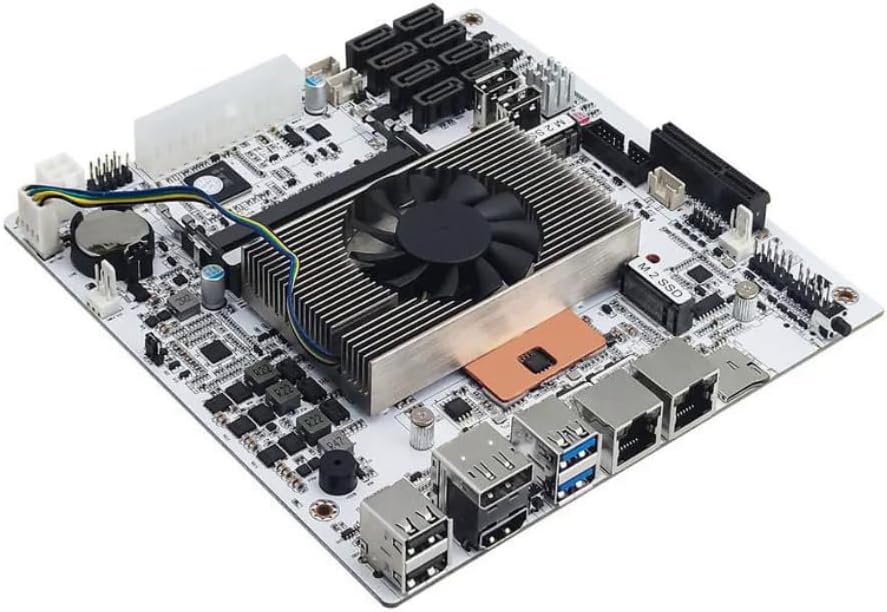
This board offers eight threads which is rare for low power CPUs. It is built for virtualization and firewall tasks.
We may earn a commission when you buy through this link, at no additional cost to you.
Eight SATA ports allow large storage arrays while dual LAN ports enable advanced networking. The processor is efficient with only 15W TDP.
Sleep mode may be problematic on this version. Still the performance and connectivity are strong for servers.
Choose this for complex home labs or NAS builds. It provides great flexibility in a small form.
VT-x and VT-d support smooth virtual machine operation. This is key for Proxmox users.
Eight SATA ports plus M.2 slots offer huge capacity. Ideal for large media libraries.
We may earn a commission when you buy through this link, at no additional cost to you.
This board is tailored for eight bay NAS builds with strong CPU power. The i5 8265U handles multiple VMs and storage tasks.
We may earn a commission when you buy through this link, at no additional cost to you.
Eight SATA ports plus two NVMe slots allow flexible caching and storage. Dual LAN enables link aggregation for higher speeds.
It does not support sleep mode so it runs continuously. This fits the NAS design perfectly.
Pick this for serious storage servers. It offers the best connectivity for large drives.
Eight SATA ports plus two NVMe slots. This is ideal for TrueNAS builds.
Designed for 24-7 use with passthrough NIC support. It runs without sleep modes.
We may earn a commission when you buy through this link, at no additional cost to you.
Selecting the right low power motherboard requires balancing performance, connectivity, and power efficiency. This guide breaks down the key factors to consider.
Low power CPUs like Celeron or Core i5 U-series offer efficiency for servers. Check TDP to ensure power consumption fits your needs.
Choose a processor that matches your workload to avoid overpaying for unused performance.
DDR4 is standard and affordable for most builds. Ensure the board supports enough capacity for your apps.
Two slots limit future upgrades but four provide flexibility for larger systems.
Multiple Ethernet ports allow link aggregation for faster file transfers. Look for 2.5GbE if available for modern speed.
Dual LAN is vital for firewall or routing tasks.
SATA ports count matters for NAS builds with many drives. M.2 slots offer fast cache options.
Ensure the board supports enough ports for your planned drive count.
Mini ITX is ideal for compact systems but ATX offers more slots. Match the board to your case size.
Smaller boards save space but reduce expandability.
Some boards need both 24pin and 4pin power connectors. Ensure your PSU has the required cables.
Dual power inputs improve stability under load.
Multiple video outputs like HDMI DP and VGA support multi-monitor setups. This is useful for headless systems needing remote access.
Choose based on your display needs.
Features like Q-Flash or clear CMOS help recover from boot issues. Check for virtualization support if running VMs.
Modern BIOS tools make setup easier.
Install the motherboard in a well ventilated case to prevent overheating. Ensure all power cables are secure and the board is level.
Use the correct PSU for the required pins and ensure good airflow around the CPU cooler. Check connections for proper seating.
Update BIOS regularly for stability and keep the system dust free. Avoid physical shocks during transport to preserve components.
The most important feature is efficient CPU support and power delivery. Look for low TDP processors and stable VRM design. This ensures energy savings without sacrificing reliability.
Yes but high performance gaming needs stronger CPUs. Low power boards are better for media or office use. Choose based on your workload.
For a four bay NAS you need at least four ports. Six or more is better for expansion. Ensure the board supports enough for your drives.
No DDR4 is sufficient and cost effective. Most low power CPUs work with DDR4. It provides enough speed for most tasks.
Some do with built-in modules but many require an adapter. Check specifications for wireless support. Integrated Wi-Fi saves space in small cases.
Use a standard ATX PSU with required 24pin and 4pin connectors. Ensure wattage matches your CPU and drives. A efficient PSU reduces noise.
Yes if the CPU supports VT-x and VT-d. Many low power CPUs handle basic VMs. Check compatibility before building a hypervisor.
We highlighted top picks for various needs from budget NAS to powerful builds. Each offers unique benefits for energy efficient computing.
Prioritize CPU efficiency connectivity and form factor. Ensure the board supports your planned storage and RAM needs.
Check current availability and verify specs before buying. These boards provide reliable performance for long term use.