
CENMATE Aluminum 4 Bay
4.3Editor score
Affordable 4-bay aluminum
Supports 2.5 and 3.5 drives
USB 3.0 high speed
Direct Attached Storage offers a reliable way to expand your digital library without complex network setups. These enclosures connect directly to your computer via USB, providing instant access to massive amounts of data for backups and media storage.
We evaluated ten leading models based on transfer speeds, drive compatibility, and build quality. Our analysis covers both basic passthrough units and advanced enclosures with hardware RAID capabilities to suit various professional and home office needs.
Each pick highlights specific strengths like cooling performance or hot-swap convenience. Prices fluctuate frequently so verify current deals before purchasing. Use this guide to find the perfect DAS solution for your unique workflow requirements today.
4.3Editor score

4.2Editor score

3.5Editor score
As an Amazon Associate we earn from qualifying purchases.
This side-by-side table compares all ten models highlighting their unique features, maximum capacities, and interface speeds to help you quickly identify the right fit.


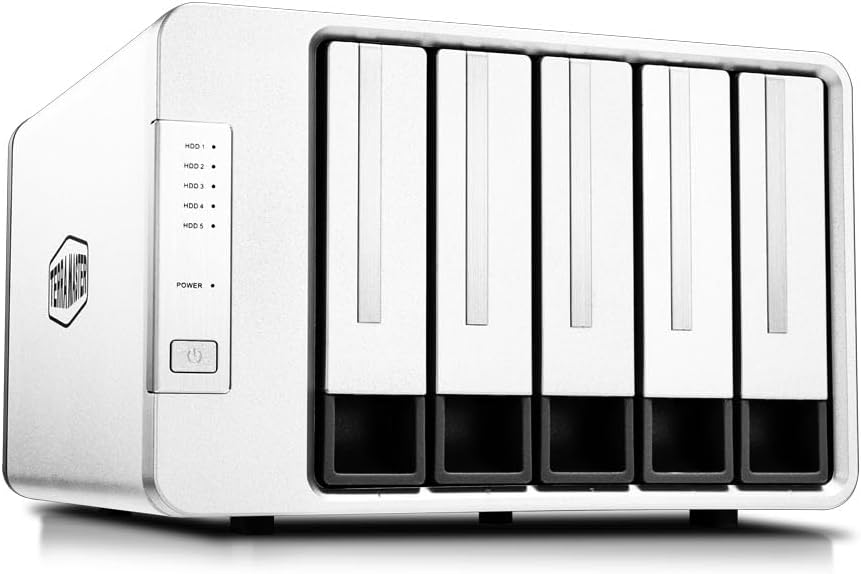


The TERRAMASTER D4-320 stands out as a top choice for users needing fast direct attached storage without complex network configurations. It achieves a rating of 4.2 stars based on user feedback regarding reliability and speed.
We may earn a commission when you buy through this link, at no additional cost to you.
Its standout feature is the USB 3.2 Gen2 interface which allows data transfer rates up to 10Gbps. This ensures that large files like 4K video projects move quickly between your computer and the enclosure.
While it lacks hardware RAID functionality which means it operates as a JBOD device users benefit from the ease of use and flexibility. The tool-free trays make swapping drives simple without needing screwdrivers.
This device is ideal for content creators and home office users who need fast access to large storage volumes. We recommend it for anyone prioritizing speed and quiet operation in a 4-bay enclosure.
The USB 3.2 Gen2 protocol ensures your data moves at maximum available speeds for this form factor reducing wait times during backups.
The Push-lock design allows you to secure drives instantly without tools making maintenance and upgrades incredibly convenient for daily users.
We may earn a commission when you buy through this link, at no additional cost to you.
The QNAP TR-004 offers a unique blend of direct attached storage capabilities with hardware RAID support usually reserved for more expensive units. It is highly rated at 4.2 stars for its robust functionality and reliability.
We may earn a commission when you buy through this link, at no additional cost to you.
Unlike standard DAS units this model supports RAID 0 1 and 5 configurations which adds a layer of data redundancy and performance. This makes it suitable for businesses needing secure external storage without a full NAS setup.
It integrates seamlessly with QNAP NAS systems allowing you to expand your existing storage pool effortlessly. The device acts as an external volume providing more space for backups and media files.
This unit is best for QNAP owners or those needing hardware RAID security on a budget. It provides a cost-effective way to manage data redundancy while maintaining fast access via USB Type-C.
Built-in RAID controllers ensure data safety and performance without relying on your computer to process the array logic.
You can connect it directly to a QNAP NAS to instantly increase storage capacity for networked access.
We may earn a commission when you buy through this link, at no additional cost to you.
The TERRAMASTER D8 Hybrid is a pioneering enclosure that combines traditional hard drives with high-speed NVMe SSDs in one unit. It has received mixed ratings of 3.5 stars due to its complexity but offers unique value.
We may earn a commission when you buy through this link, at no additional cost to you.
You get four bays for SATA drives and four for M.2 NVMe SSDs allowing you to mix speed and capacity. This design lets you keep active data on fast SSDs and archives on cheaper HDDs.
The USB 3.2 Gen2 interface ensures both types of drives perform near their maximum potential. This makes it ideal for high-end video editing workflows where fast access to assets is critical.
This premium solution is best for professionals who want to optimize their storage budget. It balances the cost of mechanical drives with the speed of solid-state storage in a single efficient chassis.
The design allows you to segregate data based on access frequency using SSDs for hot data and HDDs for cold storage.
Automatic reboot after power loss ensures your workflow resumes quickly without manual intervention.
We may earn a commission when you buy through this link, at no additional cost to you.
The CENMATE Aluminum 4 Bay is an excellent entry-level option for those needing reliable external storage without breaking the bank. It holds a strong 4.3 rating due to its value for money and sturdy construction.
We may earn a commission when you buy through this link, at no additional cost to you.
Its aluminum body helps dissipate heat effectively while the built-in fan keeps drives cool during heavy use. This ensures longevity for your drives which is crucial for external storage devices.
It supports both 2.5 and 3.5-inch drives giving you flexibility in how you build your storage array. The USB 3.0 connection provides decent speeds for general file transfers and backups.
We recommend this enclosure for students and home users who need basic multi-drive storage. It is perfect for backing up photos and documents where maximum speed is less critical than capacity and cost.
The aluminum alloy construction ensures the enclosure remains durable and helps manage heat better than plastic alternatives.
Whether you have old laptop drives or new desktop HDDs this unit accommodates both sizes effortlessly.
We may earn a commission when you buy through this link, at no additional cost to you.
The SABRENT 5-Bay DS-SC5B offers robust connectivity for users needing a large number of drives in a single dock. It is rated 4.1 stars for its reliability and consistent performance across multiple drives.
We may earn a commission when you buy through this link, at no additional cost to you.
Each bay has its own dedicated ASMedia controller ensuring that a failure in one drive does not affect the others. This independence is crucial for professionals who rely on multiple drives for daily tasks.
The enclosure supports daisy-chaining allowing you to connect multiple docks to one port expanding your storage further. This scalability makes it a powerful tool for growing video editing or media server setups.
Ideal for power users and small studios this unit provides a reliable foundation for massive storage arrays. Its high speed and independent connections make it a top choice for demanding workflows.
Dedicated controllers per bay ensure stability and prevent a single drive fault from taking down the whole array.
Connect multiple docks via USB-C to expand your workspace without needing extra ports on your host computer.
We may earn a commission when you buy through this link, at no additional cost to you.
The TERRAMASTER D8 Hybrid 2 is a highly rated upgrade offering precise control over every drive in the array. It boasts a perfect 5.0 star rating from users who appreciate its stability and advanced features.
We may earn a commission when you buy through this link, at no additional cost to you.
It introduces TPM power technology which allows you to switch between power saving and active modes seamlessly. This feature optimizes energy use while ensuring drives wake up quickly when you need them.
The enclosure supports USB 4.0 providing future proofing for even faster transfer speeds. This ensures you stay ahead of the curve as your workflow demands more bandwidth over time.
We recommend this for advanced users who need maximum performance and control. The independent drive management ensures you can organize your data exactly how you need it for efficiency.
This proprietary feature balances energy efficiency and performance allowing you to save power without sacrificing speed.
Support for USB 4.0 ensures compatibility with next gen devices maintaining high transfer speeds for years.
We may earn a commission when you buy through this link, at no additional cost to you.
The TERRAMASTER D5-310 simplifies hardware RAID setup with a dedicated knob on the back of the device. It received a 3.6 rating reflecting its specialized nature for users needing specific RAID configurations.
We may earn a commission when you buy through this link, at no additional cost to you.
You can switch between RAID 0 1 5 10 and single modes instantly without software configuration. This convenience saves time and ensures your data is protected with the right redundancy level.
The inclusion of a hot spare feature means your system can recover automatically if a drive fails. This is vital for businesses where downtime is not an option during critical operations.
This unit is best for small businesses or creative professionals needing reliable redundancy. Its ease of use regarding RAID setup makes it accessible compared to complex server-grade solutions.
The physical knob allows you to change redundancy modes quickly without booting into complex software menus.
A dedicated spare drive can automatically replace a failed drive ensuring your array stays active without manual intervention.
We may earn a commission when you buy through this link, at no additional cost to you.
The WAVLINK 4-Bay HDMI stands out because it includes an HDMI port for direct video playback. It is rated 4.0 stars for this unique feature which adds significant utility beyond just data storage.
We may earn a commission when you buy through this link, at no additional cost to you.
You can connect this unit directly to a TV to watch movies stored on the drives without a computer. This is incredibly useful for media centers or living room entertainment systems.
The aluminum shell ensures efficient heat dissipation while the USB 3.2 Gen2 interface provides fast data access. This combination makes it a versatile tool for both work and play.
We recommend this for users who need a media server that can play content directly on a display. It bridges the gap between storage and entertainment in a sleek single device.
The HDMI port allows you to connect directly to a TV providing a quick way to access media without a PC.
Whether you are editing files or watching movies this unit adapts to your needs with versatile connectivity options.
We may earn a commission when you buy through this link, at no additional cost to you.
The ORICO 5 Bay offers a simple and effective solution for expanding your storage with minimal setup. It maintains a 4.0 rating for its straightforward design and robust protection features.
We may earn a commission when you buy through this link, at no additional cost to you.
The cover uses magnetic chips to hold in place eliminating the need for screws entirely. This makes accessing your drives fast and easy whenever you need to replace a disk.
It includes multiple safety protections against overvoltage and overheating which ensures your data remains safe. The 60mm fan helps manage heat effectively during sustained data transfers.
This unit is great for general home storage needs where ease of use is paramount. Its magnetic design reduces the tools needed for maintenance making it friendly for non-technical users.
Magnetic chips secure the cover tightly without tools making maintenance quick and hassle-free for everyday tasks.
Built-in circuit protection guards against power surges and heat ensuring your drive hardware remains safe.
We may earn a commission when you buy through this link, at no additional cost to you.
The QNAP TR-002 is designed for users who need redundancy without taking up much desk space. It holds a 4.0 rating for its compact form factor and reliability in small environments.
We may earn a commission when you buy through this link, at no additional cost to you.
It supports hardware RAID 0 and 1 allowing you to mirror data for safety or stripe it for speed. This dual support ensures you get security even in a small 2-bay unit.
The lockable drive bays provide physical security which is useful for shared offices or public workspaces. This physical security layer is a nice addition to data protection in professional settings.
This enclosure is perfect for small teams or solo creators needing secure local storage. Its compact size makes it easy to integrate into any office setup without cluttering your workspace.
The smaller design allows you to keep your desk tidy while still having reliable external storage for important files.
Lockable bays prevent unauthorized access to your drives adding a layer of physical security to your data.
We may earn a commission when you buy through this link, at no additional cost to you.
Choosing the right Direct Attached Storage involves balancing speed capacity and interface options to meet your workflow needs efficiently.
USB 3.2 Gen2 interfaces offer 10Gbps speeds which are essential for large file transfers and video editing. Older USB 3.0 ports limit speeds to 5Gbps which may slow down your workflow with 4K media.
Look for USB-C ports as they are becoming the standard for modern computers. Ensure your host computer supports the speeds you need to avoid bottlenecks.
Most enclosures support 2.5-inch and 3.5-inch drives allowing you to choose between compact laptop drives and high capacity desktop drives.
Check the maximum capacity per bay to ensure you can fit the drive sizes you plan to use in the future.
Hardware RAID adds a layer of data security by mirroring or spreading data across drives. Passthrough or JBOD modes are simpler and often faster for general file storage without redundancy.
Decide if you need data redundancy or just raw space. Hardware RAID is better for critical business data while passthrough is fine for personal archives.
Aluminum casings and built-in fans are crucial for heat dissipation during heavy transfers. Quiet fans are better for home office environments where noise levels matter.
Look for models with intelligent temperature control that adjust fan speed based on heat to save energy and reduce noise.
Tool-free drive trays simplify maintenance and upgrades significantly. Hot-swap features allow you to change drives without shutting down the system.
Consider models with extra features like HDMI ports for direct video access or software for automatic backups to enhance productivity.
Solid aluminum construction ensures durability and better heat management than plastic units. Check the warranty period to ensure long-term support for your investment.
Reliable brands offer better technical support which is helpful if you encounter issues with drivers or compatibility.
Units with power recovery features can restart automatically after a power outage which is vital for unattended operations.
Consider energy-efficient models that have sleep modes to save electricity when the drive is not actively in use.
Choose units with support for newer technologies like USB 4.0 or Thunderbolt if possible to accommodate future computer upgrades.
Investing in a slightly more advanced model now can save money in the long run by avoiding the need for an upgrade soon.
Connect the enclosure to your computer using a high-quality USB-C or USB 3.0 cable for optimal speed. Ensure the power adapter is connected to a stable outlet to prevent data loss during operations.
Use disk management tools on your operating system to format the drives if they are new. Choose the file system that matches your usage like exFAT for compatibility or NTFS for Windows.
Maintain your enclosure by keeping it in a well-ventilated area away from direct sunlight. Clean the dust filters regularly to ensure fans can move air efficiently and prevent overheating.
Direct Attached Storage connects directly to one computer via USB providing fast personal access without network complexity. A Network Attached Storage connects to your home network allowing multiple devices to access data simultaneously over Wi-Fi or Ethernet.
Yes most Direct Attached Storage enclosures are sold as diskless units. You must purchase compatible SATA HDDs or SSDs separately to install them into the drive bays.
Most modern Direct Attached Storage units work with Mac macOS Windows and Linux. However always check the specific model compatibility as some require formatting to exFAT for full cross-platform support.
In a basic JBOD setup if one drive fails the data on that specific drive is lost but others remain intact. If you use RAID 1 or 5 you can recover data from the remaining drives.
Yes enclosures with 10Gbps speeds like the TERRAMASTER or SABRENT models are excellent for video editing. They allow for smooth playback of high bitrate footage without stuttering.
Regularly back up your critical data to another location like the cloud or a second physical drive. Even reliable enclosures can fail so a 3-2-1 backup strategy is recommended for safety.
We found that the TERRAMASTER D4-320 offers the best balance of speed and quiet operation for most users. The QNAP TR-004 is ideal for those needing hardware RAID security without network setup.
Prioritize USB 3.2 Gen2 interfaces for future speed needs and consider your cooling requirements based on your environment. Tool-free designs will save you time and effort during future maintenance or upgrades.
Always check current prices before purchasing as deals change frequently online. Selecting the right DAS solution today ensures you have reliable and fast storage for your expanding data needs.